10 Best Coding & Development Tools in 2026: Free and Paid Options Compared
- by Muhammad Raza
- 0 Comments
- 17 minutes read
- 26 Views
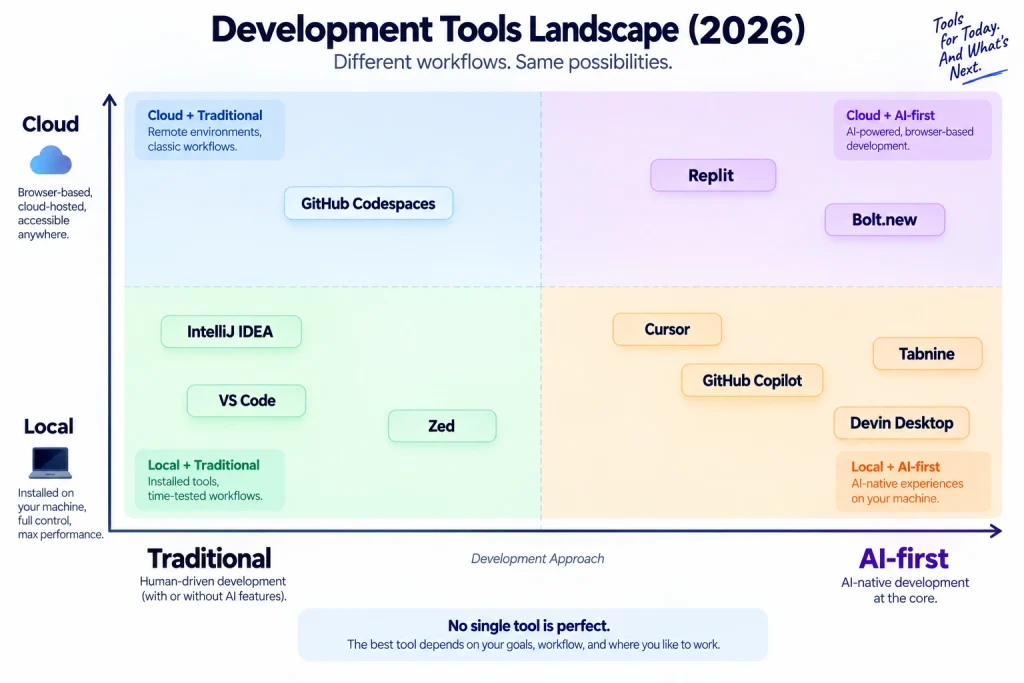
Software development in 2026 is no longer centered around one type of editor.
A developer may work in a traditional IDE, use an AI-first editor for multi-file changes, open a cloud environment for a reproducible setup, or use an agent to move a task through several stages.
That makes a simple “best coding tool” ranking misleading. The tool that is excellent for a Java backend team may be unnecessary for a frontend freelancer, while an AI-first editor can be productive for one developer and risky for another who does not review generated changes carefully.
For this comparison, I am judging the tools by the work they make easier, the amount of control they give the developer, the review burden they create, and the point at which their cost or complexity stops making sense.
That is also why the list mixes editors, IDEs, AI assistants, cloud environments and application builders. They solve different problems, and calling one universally “best” would hide the trade-offs that actually matter.
The practical question is not “Which tool has the most impressive demo?” It is “Which tool fits the way this project will be planned, built, reviewed, tested and maintained?”
The list includes free and paid options, with current pricing checked against vendor information where available.
How We Compare These Tools
I use four editorial tests throughout this guide: development fit, control, review risk, and value at the user’s actual level of work.
A tool earns a strong recommendation when its strengths solve a real development problem without creating a larger problem somewhere else. For example, faster AI generation is not automatically an advantage if the resulting code takes longer to understand, test or maintain.
I also separate capability from suitability. A professional IDE can be more capable than a lightweight editor and still be the wrong choice for a simple project. Likewise, a rapid AI builder can be excellent for validating an idea without being the right foundation for a production system.
Pricing matters, but it is not the ranking by itself. Setup time, learning curve, usage limits, portability, ecosystem fit and the amount of human review required can materially change the real cost.
Quick Comparison: 10 Coding Tools for 2026
| Tool | Main Type | Free Option | Starting Paid Price | Best For |
|---|---|---|---|---|
| Visual Studio Code | Code editor | Yes | Free | General development |
| Cursor | AI code editor | Yes | $20/month | AI-assisted development |
| GitHub Copilot | AI coding assistant | Yes | $10/month | Developers wanting AI inside existing tools |
| Replit | Cloud development platform | Yes | $20/month annually | Browser-based building and AI development |
| Bolt.new | AI app builder | Yes | $25/month | Rapid web apps and prototypes |
| IntelliJ IDEA | Professional IDE | Yes | $719/year Ultimate | Java/Kotlin development |
| Zed | High-performance editor | Yes | $10/month Pro | Fast modern editing + AI |
| Tabnine | AI coding platform | No comparable unrestricted free tier | $39/user/month annually | Enterprise-focused AI coding |
| GitHub Codespaces | Cloud development environment | Yes | Usage-based | Reproducible cloud development |
| Devin Desktop / formerly Windsurf | AI development environment | Yes | $20/month | Agent-driven coding workflows |
Prices can change by region, billing cycle, usage, tax, or product restructuring. Always confirm the current vendor price before purchasing.
1. Visual Studio Code
Visual Studio Code — Official Website
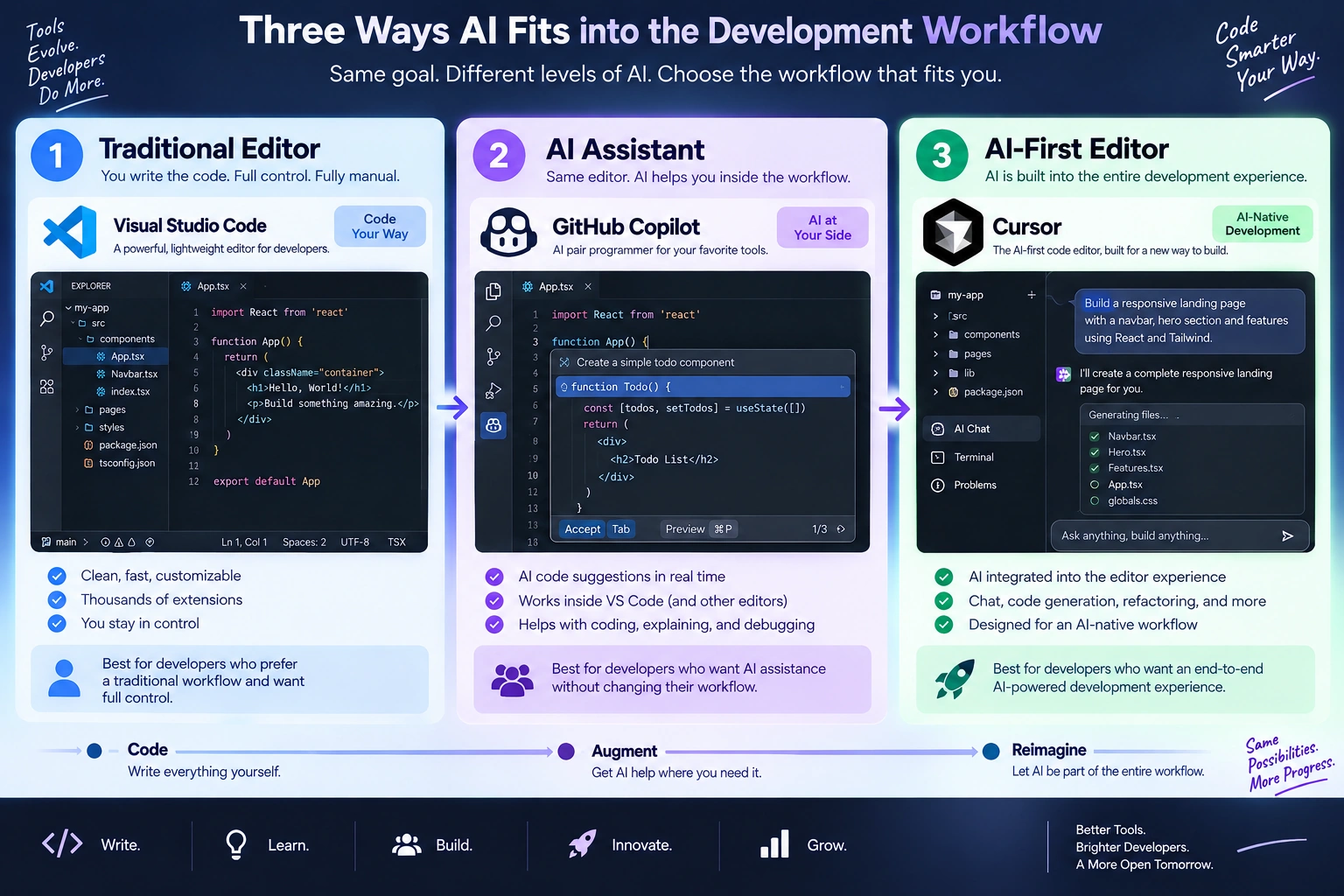
Visual Studio Code remains one of the easiest recommendations for developers who want a flexible editor without committing to a large commercial IDE.
Microsoft describes VS Code as a free editor for Windows, macOS, and Linux, with extensions, source control, debugging, browser access, and newer AI-agent capabilities built into the development experience.
Pricing
Free: $0
There is no mandatory paid subscription for the core editor.
Best for
- Web development
- Python
- JavaScript and TypeScript
- PHP
- C/C++
- Smaller projects
- Freelance development
- Developers who like customizing their environment
Why it stands out
The biggest advantage is flexibility.
Instead of forcing every developer into the same workflow, VS Code lets you construct your environment around extensions, language tooling, Git, debugging, terminals, containers, and AI services.
That makes it particularly useful when your work changes frequently.
One week you might be building a WordPress plugin. The next you could be working on a Python script or React application.
Where it is weaker
The flexibility can become a disadvantage.
A new developer can install dozens of extensions without understanding which ones are actually necessary. Too many extensions can create a messy environment and make troubleshooting harder.
My practical verdict
Best free all-purpose editor for most developers.
If you do not know where to start, VS Code is one of the safest starting points.
Video / Learning Link
2. Cursor
Cursor represents a different direction.
Instead of treating AI as another extension attached to a conventional editor, Cursor puts AI-assisted development at the center of the editing experience.
Its current individual pricing lists a free Hobby plan and a Pro plan at $20/month, with higher Pro+ and Ultra options for heavier users.
Pricing
- Hobby: Free
- Pro: $20/month
- Pro+: $60/month
- Ultra: $200/month
Best for
- AI-assisted coding
- Multi-file changes
- Prototyping
- Refactoring
- Developers comfortable reviewing AI-generated code
- Fast product iteration
Why it stands out
Cursor is useful when the developer’s job is not simply typing code but continuously explaining, modifying, inspecting, and restructuring a codebase.
That makes the difference between autocomplete and agent-style development much more visible.
For example, instead of asking an AI:
“Write a login component.”
you can work at a broader project level:
“Find where authentication is handled, add validation to this flow, update the affected components, and show me which files changed.”
That is a fundamentally different workflow.
Where it is weaker
AI-assisted development can create false confidence.
A generated change can look convincing while introducing a subtle architectural problem.
Cursor is therefore strongest when the developer can review:
- logic
- dependencies
- security implications
- database changes
- error handling
- tests
My practical verdict
One of the strongest choices for developers who want an AI-first coding environment.
Video / Learning Link
3. GitHub Copilot
GitHub Copilot — Official Website
GitHub Copilot is different from Cursor because it can fit into an editor and development workflow you already use.
The current individual plans include:
- Free: $0
- Pro: $10/month
- Pro+: $39/month
- Max: $100/month
The free tier currently includes 2,000 code completions per month and limited chat/agent usage.
Best for
- Developers already using VS Code
- GitHub-based projects
- Code completion
- AI chat
- Code review
- Agent-assisted development
- Freelancers who want a relatively inexpensive AI layer
Why it stands out
The strongest reason to choose Copilot is ecosystem integration.
It works across environments including VS Code, Visual Studio, JetBrains IDEs, Xcode, Neovim, Eclipse, and GitHub itself.
That means you do not necessarily need to abandon your existing development environment.
Pricing
| Plan | Price |
|---|---|
| Free | $0 |
| Pro | $10/month |
| Pro+ | $39/month |
| Max | $100/month |
One important 2026 change is the growing role of AI credits for some agent, chat, and premium-model usage. GitHub explains that one AI credit is valued at $0.01, while included allowances vary by plan.
Where it is weaker
If you want an AI-first environment that radically changes how you interact with a codebase, Cursor or another agentic editor may feel more focused.
Copilot’s strength is often integration rather than reinvention.
My practical verdict
Excellent value for developers who already live inside GitHub and a conventional IDE.
Video / Learning Link
4. Replit
Replit has moved beyond being simply an online coding environment.
Its current platform combines browser-based development, AI-assisted building, hosting, databases, collaboration, and deployment.
The current pricing page lists:
- Starter: Free
- Core: $20/month, or $18/month when billed annually
- Pro: $100/month, or $90/month annually
- Enterprise: Custom pricing
Best for
- Beginners
- Rapid prototypes
- Browser-based development
- AI-assisted application building
- Teaching
- Small experiments
- Founders testing product ideas
Why it stands out
The most interesting part is the reduction in setup work.
You can work from a browser rather than spending the first hour installing a development stack.
Replit’s current learning material also emphasizes an iterative workflow:
Describe → Critique → Iterate
Rather than assuming an AI-generated application is correct immediately, users are encouraged to review the result and refine it.
That distinction matters.
AI-generated software still needs judgment.
Pricing
| Plan | Current price |
|---|---|
| Starter | Free |
| Core | $20/month |
| Core annual equivalent | $18/month |
| Pro | $100/month |
| Pro annual equivalent | $90/month |
Where it is weaker
A browser-first environment can become less attractive when you need highly customized local tooling, complex infrastructure, or specialized enterprise workflows.
My practical verdict
One of the easiest tools for turning an idea into a working prototype without building the entire development environment first.
Video / Learning Link
Replit Learn — Official Video Learning Platform
Replit’s current learning platform includes video lessons and hands-on exercises for AI-assisted development.
5. Bolt.new
Bolt.new is aimed at an even more direct idea-to-application workflow.
You describe what you want to build, and the platform generates a working application inside the browser. The resulting code remains accessible rather than being locked away as a visual-only prototype.
Pricing
Current pricing includes:
- Free: $0
- Pro: $25/month
- Teams: $30/month per member
- Enterprise: Custom
The free plan includes public and private projects, a daily token allowance, hosting, and databases.
Best for
- MVPs
- Landing pages
- Internal tools
- Small web applications
- Business prototypes
- Non-developers working with developers
- Fast experiments
Why it stands out
Bolt reduces the distance between:
idea → code → preview → revision → deployment
That makes it attractive for people who understand the product they want but do not want to spend days setting up the first prototype.
Where it is weaker
Fast generation is not the same thing as production engineering.
If an application grows into something involving complex authentication, sophisticated infrastructure, heavy traffic, or unusual backend requirements, a professional development workflow may eventually become necessary.
My practical verdict
Excellent for quickly proving whether an application idea is worth developing further.
Video / Learning Link
Bolt.new learning and product guides
6. IntelliJ IDEA
IntelliJ IDEA — Official Website
IntelliJ IDEA belongs to a different category from many of the AI-first tools above.
It is a deep professional IDE, particularly strong for Java and Kotlin development.
JetBrains currently lists IntelliJ IDEA Ultimate at $719 per user/year for individual use, with AI Free included. JetBrains also offers special pricing categories and other subscription options.
Best for
- Java
- Kotlin
- Large applications
- Enterprise development
- Debugging
- Refactoring
- Professional backend development
Why it stands out
The value is not simply writing code.
A mature IDE can understand relationships between classes, dependencies, project structures, tests, build systems, and refactoring operations.
That becomes increasingly valuable as projects become larger.
Pricing
IntelliJ IDEA Ultimate: $719/year for individual use based on the current JetBrains store listing.
Students and educators may qualify for special educational access.
Where it is weaker
For someone learning basic HTML and CSS, IntelliJ IDEA can be unnecessary complexity.
If your project is a small landing page, a lightweight editor may make more sense.
My practical verdict
A serious choice for professional Java/Kotlin development rather than casual scripting.
Video / Learning Link
IntelliJ IDEA tutorials and video learning
JetBrains’ current documentation includes a video tutorial and first-project guidance.
7. Zed
Zed takes a different approach: speed first, with modern collaboration and AI capabilities built into the editor.
The editor itself can be used for free. Zed’s current Pro plan is $10/month, including $5 of monthly hosted-model credit; additional hosted-model usage is billed according to usage.
Best for
- Developers who dislike heavy IDEs
- Fast code editing
- Modern AI workflows
- Collaboration
- macOS/Linux development
- Developers who prefer a lightweight environment
Pricing
- Free editor: $0
- Pro: $10/month
- Student: Free for one year for verified university students
- Business: available for teams
Why it stands out
Zed is interesting because you do not have to buy into its AI subscription to use the editor.
You can also bring your own API keys or use external agents, depending on your workflow.
That creates a useful middle ground between a traditional editor and a fully managed AI coding subscription.
Where it is weaker
Its appeal is strongest for developers who value speed and a relatively streamlined interface.
If you rely heavily on the enormous plugin ecosystem surrounding older editors, another option may be more comfortable.
My practical verdict
A strong lightweight alternative for developers who want speed without abandoning modern AI features.
Video / Learning Link
8. Tabnine
Tabnine focuses on AI-assisted development with a strong emphasis on organizations that care about privacy, deployment control, and codebase context.
Its current pricing page lists $39 per user/month when billed annually for its Code Assistant platform.
Best for
- Development teams
- Enterprise environments
- AI code completion
- Codebase-aware assistance
- Organizations with stronger privacy requirements
Why it stands out
Tabnine is less about being the cheapest AI coding assistant and more about being a controlled AI development platform.
That distinction matters for companies where questions around code privacy, deployment, governance, and internal development practices are important.
Pricing
Tabnine Code Assistant: $39/user/month on annual subscription.
Enterprise arrangements may have different requirements and pricing.
Where it is weaker
For an individual developer who simply wants inexpensive AI autocomplete, $39/month can be difficult to justify compared with lower-cost alternatives.
My practical verdict
More interesting for teams and organizations than casual hobby coding.
Video / Learning Link
Tabnine Video and Webinar Library
Tabnine maintains a dedicated video and webinar library covering AI coding, agentic development, secure coding, and related workflows.
9. GitHub Codespaces
GitHub Codespaces — Official Website
GitHub Codespaces solves a different problem from an editor.
It gives you a cloud-hosted development environment that can be configured from repository files.
That makes it particularly useful when you want a reproducible development setup rather than asking every contributor to manually install the same tools.
GitHub says personal accounts receive included monthly Codespaces usage, while additional usage is billed according to compute and storage.
Pricing
Personal GitHub accounts currently include:
- 120 core hours/month
- 15 GB storage/month
For paid usage, current compute examples include:
- 2-core machine: $0.18/hour
- 4-core: $0.36/hour
- 8-core: $0.72/hour
- 16-core: $1.44/hour
- 32-core: $2.88/hour
- Storage: $0.07/GB-month
Best for
- Remote development
- GitHub projects
- Team environments
- Open-source contributors
- Reproducible development setups
- Developers switching between computers
Why it stands out
Imagine opening a repository and getting an environment designed for that project instead of spending an afternoon installing dependencies.
That is the real value of Codespaces.
Where it is weaker
Usage-based billing requires attention.
A developer who creates larger machines or leaves environments running can consume the included allowance faster.
My practical verdict
One of the most practical choices when development environment consistency matters as much as the editor.
Video / Learning Link
GitHub Codespaces Documentation and Tutorials
10. Devin Desktop — Formerly Windsurf
Devin Desktop — Official Website
One of the more notable developments in the 2026 coding-tool market is the evolution of Windsurf into Devin Desktop.
The current Windsurf site explains that Devin Desktop is the new name for the product, while the IDE foundation, extensions, workflows, and settings carry over. The current listed Pro price is $20/month.
Pricing
Current listed plans include:
- Free: $0
- Pro: $20/month
- Max: $200/month
- Teams: listed separately
- Enterprise: custom
Best for
- Agent-driven coding
- Multi-step development tasks
- Developers interested in autonomous workflows
- AI-assisted project management inside the coding environment
Why it stands out
The interesting shift is from:
“AI helps me write this function.”
toward:
“AI can help me move this development task through multiple steps.”
That is where modern coding tools are heading.
Instead of treating AI purely as autocomplete, agent-oriented systems can inspect project context, make multiple edits, reason about changes, and help move work forward.
Where it is weaker
Agentic development increases the importance of review.
The more control you give an AI system over multiple files or operations, the more important it becomes to inspect:
- changed files
- dependencies
- tests
- security-sensitive code
- database operations
- deployment changes
My practical verdict
Worth watching closely if you want to move from AI autocomplete toward agent-based development.
Video / Learning Link
Devin Desktop / Windsurf official product resources
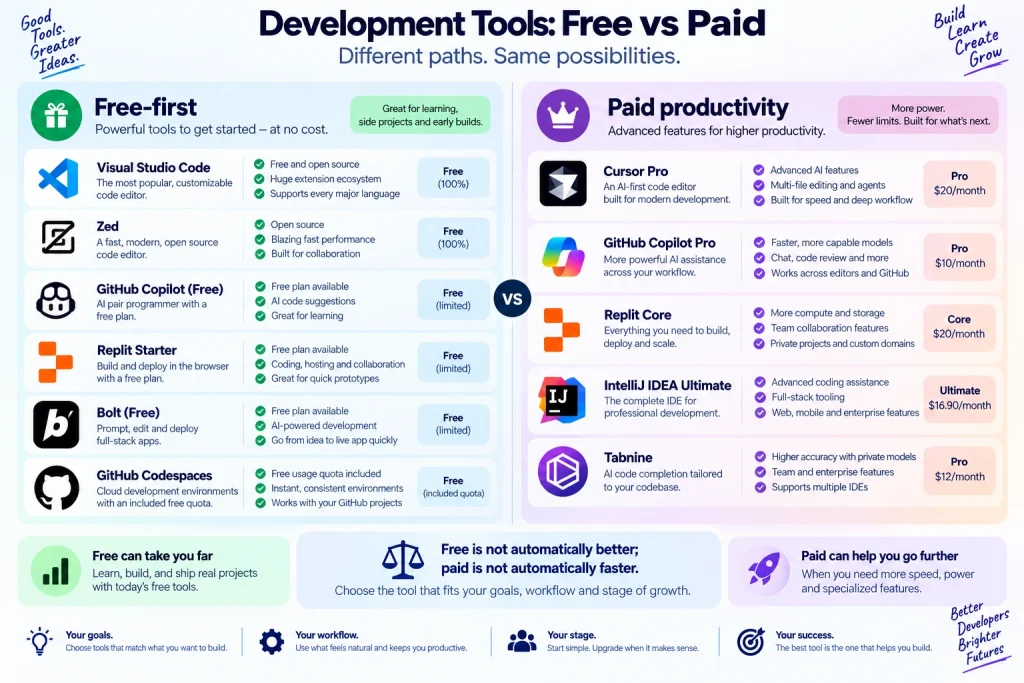
Price Comparison: Which Coding Tool Costs the Least?
Price alone does not tell you which development tool offers the best value.
Still, the current starting point is useful.
| Tool | Free | Paid Starting Point | Pricing Model |
|---|---|---|---|
| VS Code | Yes | $0 | Free editor |
| Cursor | Yes | $20/month | Subscription |
| GitHub Copilot | Yes | $10/month | Subscription + AI usage allowances |
| Replit | Yes | $18/month annual equivalent | Subscription + usage |
| Bolt.new | Yes | $25/month | Subscription + tokens |
| IntelliJ IDEA Ultimate | Limited/special access | $719/year | Annual subscription |
| Zed | Yes | $10/month | Subscription + model usage |
| Tabnine | — | $39/user/month annual | Subscription |
| GitHub Codespaces | Yes | Usage-based | Compute + storage |
| Devin Desktop | Yes | $20/month | Subscription |
The cheapest option is not always the cheapest workflow
For example, VS Code may cost $0 but require additional services, extensions, hosting, AI subscriptions, or development infrastructure.
A $20 tool that saves hours every week can be cheaper in practice than a free editor that requires substantial manual setup.
The right comparison is therefore:
Monthly price + learning curve + setup time + development speed + project requirements.
Which Coding Tool Should You Choose?
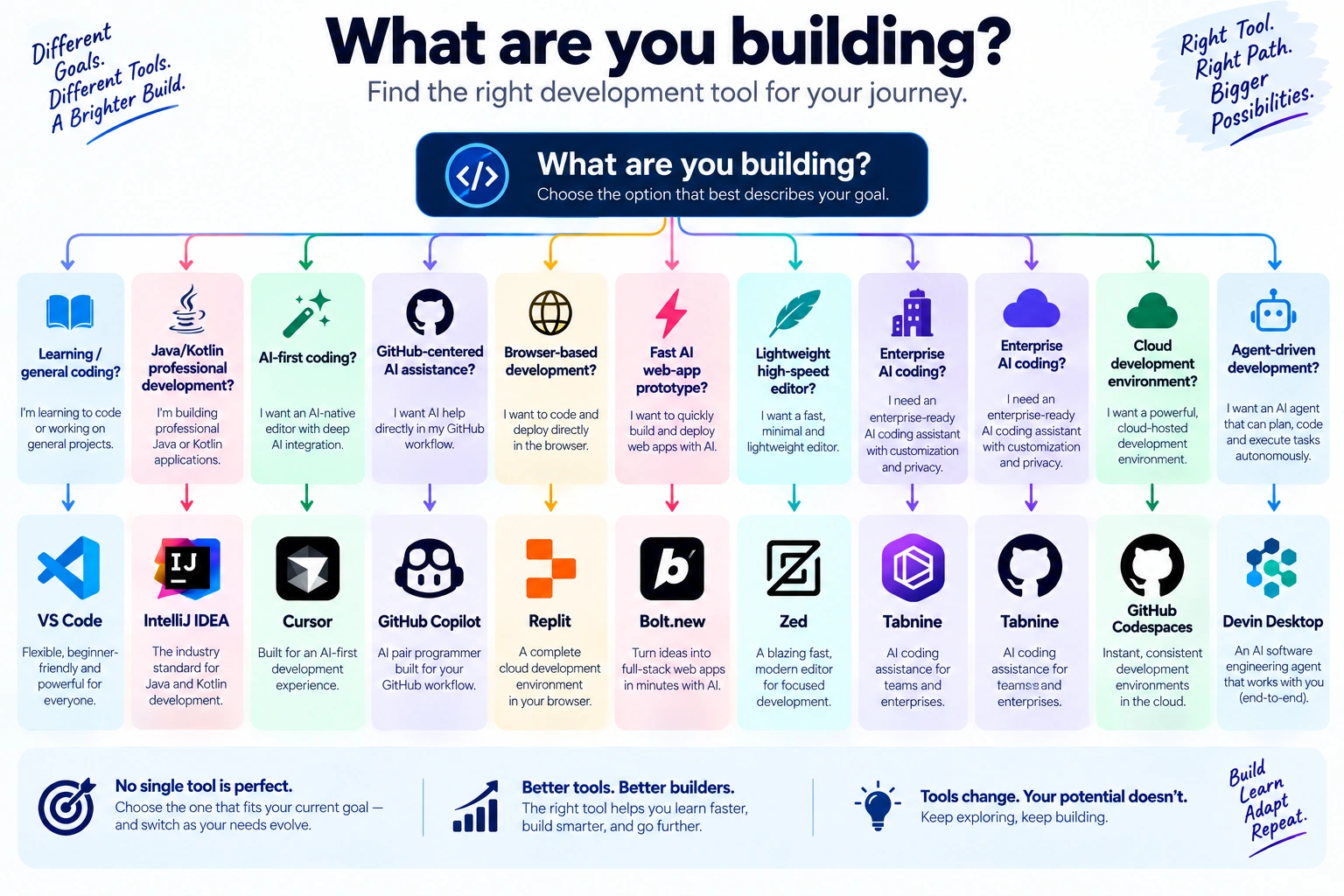
Instead of choosing based on popularity, match the tool to the job.
Choose VS Code if…
You want a flexible free editor that can handle almost anything.
Choose Cursor if…
You want AI to participate deeply in coding and multi-file development.
Choose GitHub Copilot if…
You already work inside GitHub and want AI assistance without replacing your existing editor.
Choose Replit if…
You want to build from a browser and reduce setup friction.
Choose Bolt.new if…
You want to turn a product idea into a functioning web application quickly.
Choose IntelliJ IDEA if…
You work seriously with Java or Kotlin and need deep IDE functionality.
Choose Zed if…
You care about speed, simplicity, and a modern editor experience.
Choose Tabnine if…
You are evaluating AI coding assistance for a team with stronger governance and privacy requirements.
Choose GitHub Codespaces if…
Your biggest problem is development-environment consistency.
Choose Devin Desktop if…
You want to explore agent-based development rather than relying primarily on autocomplete.
What Is Changing in Coding Tools in 2026?
The most important change is not that AI can generate code.
That has already become normal.
The bigger change is where AI participates in the development process.
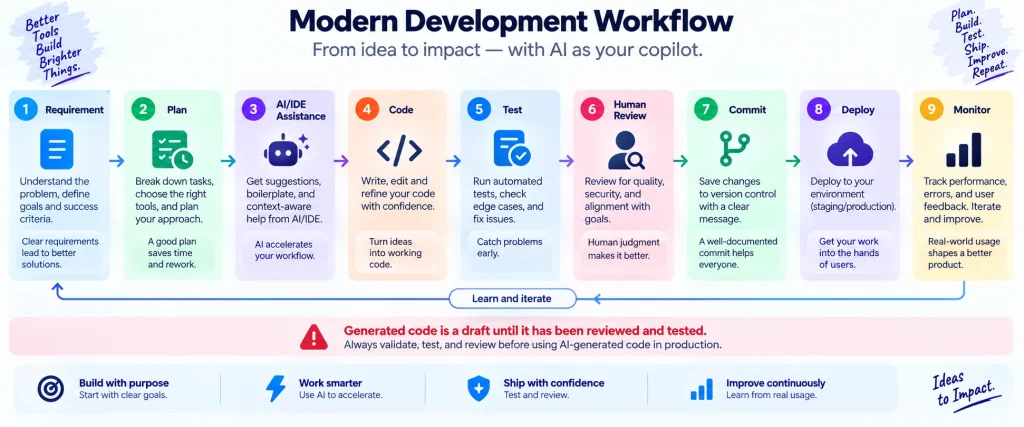
Older workflows looked like:
Idea → Developer → Code → Test → Deploy
Modern AI-assisted workflows can look more like:
Idea → Specification → Agent → Code → Review → Test → Iterate → Deploy
That creates a new responsibility for developers.
The ability to generate code quickly does not eliminate the need to understand the software.
In fact, it makes certain skills more valuable:
- writing clear requirements
- reviewing generated code
- understanding architecture
- testing
- debugging
- security awareness
- Git
- documentation
- knowing when AI should not make the decision
Replit’s current learning material makes a similar distinction: AI-assisted building is an iterative process involving planning, review, testing, and feedback rather than simply pressing a button and accepting the result.
A Practical 2026 Coding Stack
You do not necessarily need all 10 tools.
A sensible stack could be surprisingly small.
Beginner
VS Code + GitHub + GitHub Copilot Free
Start with the fundamentals before adding expensive AI services.
Freelance Web Developer
VS Code or Cursor + GitHub + Codespaces when useful
This gives you flexibility without forcing every project into the same environment.
AI-First Developer
Cursor + GitHub + testing tools
Useful when AI-assisted multi-file development is central to your workflow.
Founder Building an MVP
Bolt.new or Replit + GitHub
Use rapid development to validate the idea, then bring in deeper engineering practices as the project becomes more important.
Java/Kotlin Developer
IntelliJ IDEA + GitHub Copilot
The IDE handles deep project understanding while Copilot adds AI assistance.
Small Development Team
VS Code/JetBrains + GitHub Copilot + Codespaces
This combination can provide familiar editors, AI support, and repeatable environments.
Don’t Make This Mistake With AI Coding Tools
The biggest mistake is judging a coding AI by how impressive its first output looks.
A better evaluation is:
- Give it a small task.
- Ask it to explain what it changed.
- Review the files.
- Run the tests.
- Introduce an edge case.
- Ask it to fix the problem.
- Check whether the second change breaks something else.
- Review the final diff.
This turns a flashy demonstration into a meaningful evaluation.
The question is not:
“Can this tool write code?”
Almost every modern coding tool can.
The better question is:
“Can I trust its output inside the workflow I actually use?”
That is a much harder and more useful test.
FAQ: Coding & Development Tools in 2026
What is the best free coding tool in 2026?
For general development, Visual Studio Code is one of the strongest free choices because it supports many languages, extensions, debugging, source control, and modern AI-assisted workflows.
Is Cursor better than VS Code?
Not universally.
Cursor is more focused on AI-first development, while VS Code offers a broader customizable environment. The better choice depends on how central AI is to your workflow.
Is GitHub Copilot free?
Yes. GitHub currently offers a Free tier with limited completions and chat/agent usage. Paid individual plans start at $10/month for Pro.
Is Replit good for beginners?
Yes. Its browser-based environment and current learning material make it accessible to people who want to begin building without setting up a traditional local development environment.
Is Bolt.new a replacement for professional developers?
Not automatically.
It can accelerate prototypes and simpler applications, but complex production software still requires engineering judgment, testing, security review, architecture, and maintenance.
Is IntelliJ IDEA worth paying for?
For professional Java and Kotlin development, its deep IDE features can justify the cost. For simple web pages or beginner scripting, it may be unnecessary.
Is Zed completely free?
The editor itself can be used for free. Zed’s hosted AI features are available through paid options, while users can also use their own API keys and external agents.
What is GitHub Codespaces used for?
Codespaces provides cloud-hosted development environments that can be configured around a repository, making it useful for remote and reproducible development workflows.
What happened to Windsurf?
The current product has been renamed Devin Desktop. The vendor says the IDE foundation, extensions, workflows, and settings continue across the transition.
Should beginners use AI coding tools?
Yes, but not as a substitute for learning.
Use AI to explain errors, generate small examples, suggest approaches, and help you experiment. Then inspect and understand what it produces.
Final Verdict
There is no single winner among these 10 coding and development tools.
The market is separating into several useful categories.
VS Code remains the flexible free foundation.
Cursor pushes AI deeper into the editor.
GitHub Copilot brings AI into an established GitHub-centered workflow.
Replit reduces the setup barrier for browser-based development.
Bolt.new is particularly interesting for rapid application creation.
IntelliJ IDEA remains a serious professional IDE for Java and Kotlin.
Zed offers a fast, lightweight alternative with modern AI capabilities.
Tabnine is more compelling when organizational control and AI governance matter.
GitHub Codespaces addresses the development environment rather than just the editor.
Devin Desktop represents the move toward more agent-driven software development.
The important lesson for 2026 is simple:
Do not choose a coding tool because it generates the most impressive demo. Choose the tool that fits the way you plan, write, review, test, and maintain software.