10 Best Digital Marketing Tools in 2026: Free and Paid Options Compared
- by Muhammad Raza
- 0 Comments
- 19 minutes read
- 43 Views
Digital marketing in 2026 is no longer about finding one platform that promises to “do everything.”
In practice, the right stack depends on the decisions a business needs to make. A small store may need search visibility, visitor measurement and email; a B2B company may care more about lead handoff and CRM; a freelancer may need a simpler combination that can actually be maintained each week.
That is the standard I use in this comparison: does the tool solve a real marketing problem well enough to justify its cost, complexity and learning time? A feature list alone is not enough.
The selections below are therefore not a popularity contest. Each tool is judged by the job it performs, the situation where I would choose it, the situation where I would not, and the trade-off that should influence the decision.
Pricing and feature details can change, so vendor pages should be checked before purchasing.
How We Compare These Tools
For every tool, I look at four practical questions: What problem does it solve? What makes it a sensible choice over an alternative? When is it unnecessary? And what would make me change the recommendation?
This matters because “best” is always conditional. A sophisticated platform can be the wrong recommendation if its data will not change a decision or nobody has time to use it.
The comparison below is designed to make those trade-offs visible rather than simply repeat vendor feature lists.
Quick Comparison: 10 Digital Marketing Tools for 2026
| Tool | Main Function | Free Option | Paid Starting Point* | Best For |
|---|---|---|---|---|
| Semrush | SEO & search visibility | Limited/free tools | About $117.33/mo annual | SEO, competitors, AI search visibility |
| Ahrefs | SEO & backlink research | Yes | $29/mo Starter | Keywords, backlinks, SEO research |
| HubSpot Marketing Hub | CRM + marketing automation | Yes | Promotional Starter pricing varies | Lead generation and automation |
| Mailchimp | Email marketing | Yes | Varies by contacts/plan | Newsletters and campaigns |
| Buffer | Social media management | Yes | $5/channel/mo annual | Scheduling and social publishing |
| Brevo | Email + multi-channel marketing | Yes | $9/mo | Email, SMS and automation |
| Google Analytics 4 | Web analytics | Yes | Standard is free | Traffic and conversion analysis |
| Google Search Console | Search performance | Yes | Free | SEO monitoring |
| Meta Business Suite | Facebook/Instagram management | Yes | Free; advertising separate | Social publishing and insights |
| Hotjar | Behavior analytics | Yes | From $39/mo on current monthly pricing | Heatmaps, recordings and feedback |
*Prices and limits can change by country, billing cycle, contact volume, usage, taxes, and promotional offers. Check the official vendor page before purchasing.
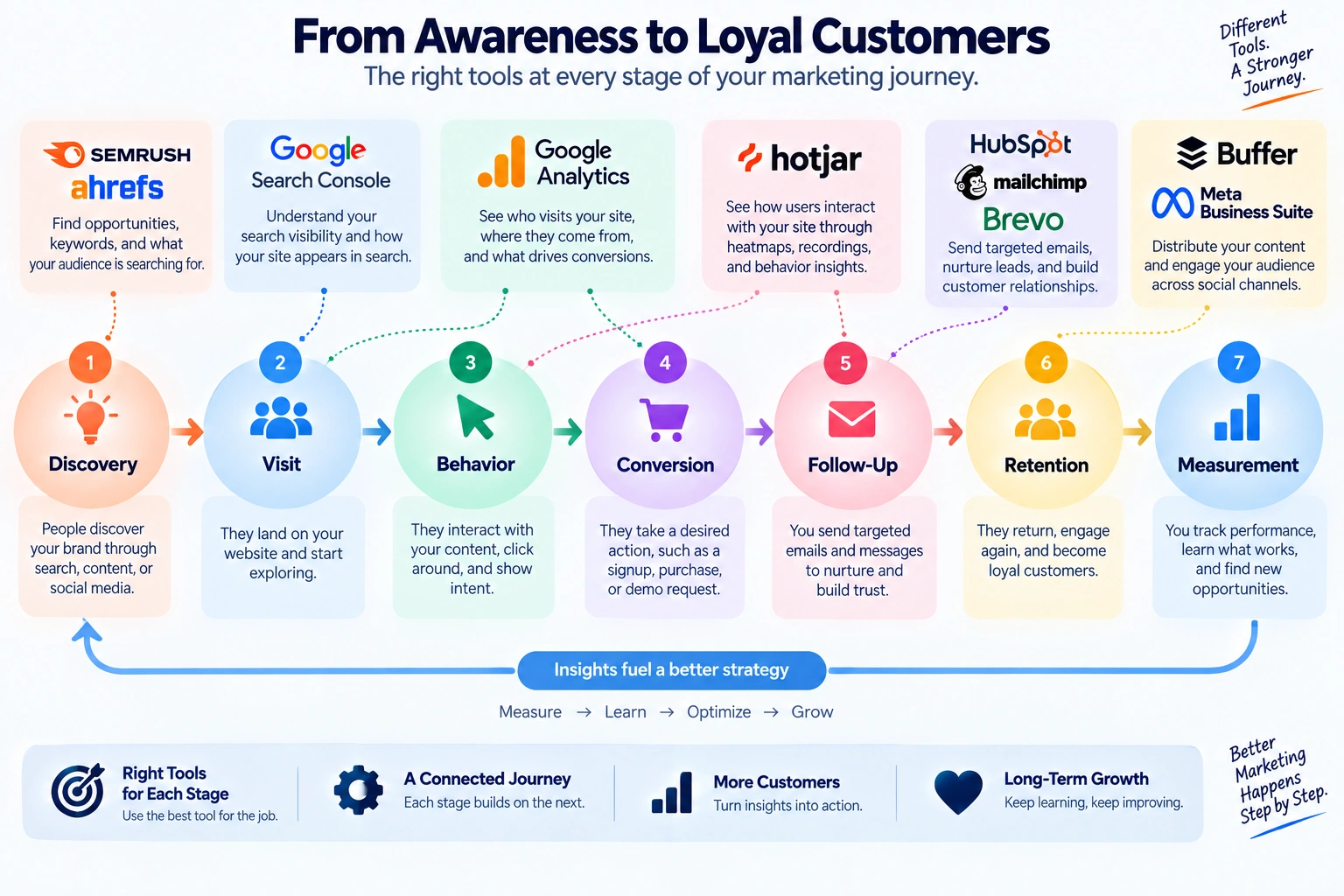
The important point is that these tools operate at different layers. Some discover opportunities, some measure what happened, some explain visitor behavior, and some manage follow-up. I would not treat ten tools as ten things a business needs to buy.
1. Semrush
Best for: SEO, competitor research, keyword research, site audits, and AI-search visibility
Semrush is the tool I would put on the shortlist when search is a serious acquisition channel and the team needs several types of SEO data in one place.
It can investigate organic keywords, competitors, rankings, backlinks, technical SEO, content opportunities, paid search, brand visibility and AI-search visibility.
Pricing
Semrush’s current pricing should be checked against its official plan page because billing terms and limits change.
Why I would choose it
The case for Semrush is breadth. If I need keyword research, competitor analysis, technical auditing and visibility tracking in the same working environment, consolidating those tasks can be more useful than stitching together several smaller tools.
When I would not choose it
I would not recommend paying for Semrush simply because a site publishes content. If a small site has little search demand and nobody is going to review the data, the subscription can become an expensive dashboard rather than a useful decision tool.
Editorial verdict: A strong choice when search visibility is central to the business and the team will actually use the breadth of data.
Video / Learning Link
This current 2026 tutorial covers keyword research, site audits, competitor research, SEO content workflows, and AI-search optimization.
Verdict: One of the strongest choices when search visibility is a major part of your marketing strategy.
2. Ahrefs
Best for: SEO research, backlinks, keyword analysis, competitors, and search visibility
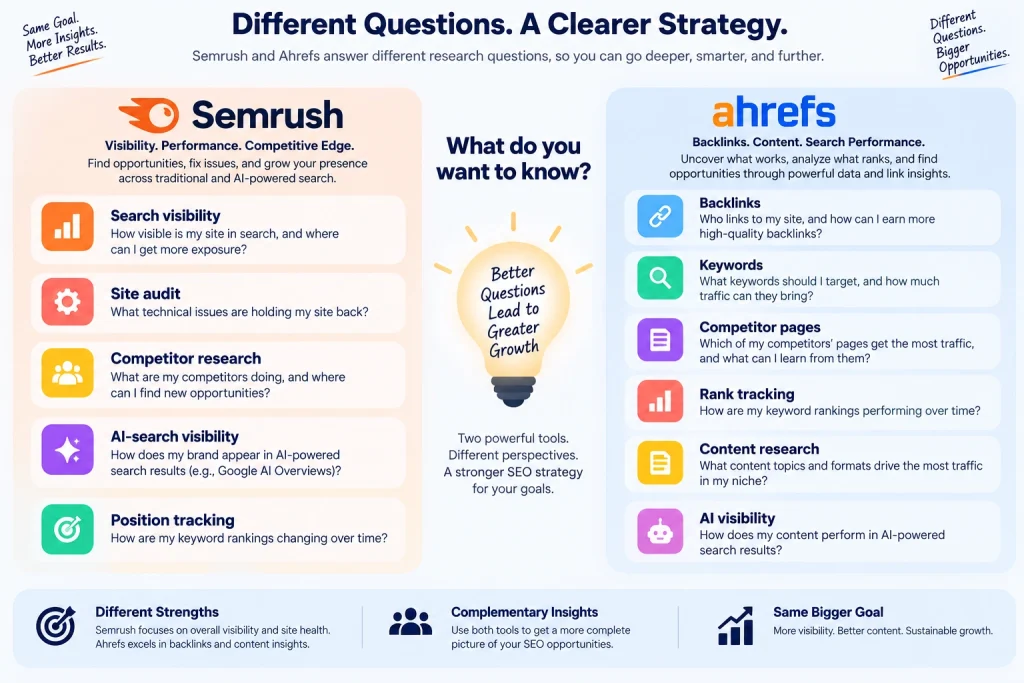
Ahrefs approaches digital marketing from a strong SEO and research perspective.
It is particularly useful for answering questions such as:
- Who links to my competitors?
- Which pages attract organic traffic?
- Which keywords does another website rank for?
- Which content opportunities are missing?
- How is my search visibility changing?
Pricing
Ahrefs currently offers:
- Ahrefs Free: Free
- Starter: $29/month
- Lite: $129/month
- Standard: $249/month
- Advanced: $449/month
- Enterprise: $1,499/month
Ahrefs says annual billing can save up to 17% on applicable plans. Its current plans also include newer AI-visibility functionality such as tracked AI prompts and Brand Radar.
Why it stands out
Ahrefs remains particularly useful when backlinks and competitive search research are central to your strategy.
Its lower-cost Starter plan is also interesting for marketers who want more than the free account without immediately committing to a large SEO subscription. Ahrefs describes Starter as a plan for beginner SEOs and digital marketers.
Where it is strongest
- Backlink research
- Competitor analysis
- Keyword research
- Content research
- Rank tracking
- SEO audits
Where it is weaker
The advanced plans become expensive quickly.
A small business should not automatically choose Ahrefs simply because it is popular among SEO professionals.
Best user
- SEO freelancers
- Content marketers
- Agencies
- Affiliate publishers
- Businesses investing seriously in organic search
Video / Learning Link
Use Ahrefs’ current learning resources for keyword research, Site Explorer, Rank Tracker, Site Audit, and broader SEO workflows.
Verdict: A strong choice when SEO research, backlinks, and competitor visibility matter more than all-in-one marketing automation.
3. HubSpot Marketing Hub
HubSpot Marketing Hub — Official Website
Best for: Lead generation, CRM-connected marketing, automation, email, and customer journeys
HubSpot is different from Semrush and Ahrefs because its main purpose is not simply finding traffic.
It is about what happens after someone becomes a prospect.
Marketing Hub can connect activities such as:
- forms
- lead capture
- landing pages
- automation
- CRM records
- customer journeys
- reporting
- AI-assisted marketing
Pricing
HubSpot currently offers:
- Free: $0/month
- Starter: promotional pricing currently starts around $7/month per seat in the Customer Platform, while regular pricing varies by billing option and package
- Professional: $800/month on the current pricing page for Marketing Hub
- Enterprise: $3,600/month
Professional and Enterprise plans can also involve required onboarding fees and additional contact/seat costs.
Why it stands out
HubSpot becomes especially valuable when marketing and sales need to work from the same customer information.
For example:
Landing page → form submission → CRM record → email sequence → sales follow-up
is much easier to manage when the stages are connected.
Where it is strongest
- Lead generation
- CRM-connected marketing
- Email automation
- Landing pages
- Marketing reporting
- Customer journeys
Where it is weaker
The professional tiers can become expensive.
A small business with only a newsletter and a few forms may not need HubSpot’s full ecosystem.
Best user
- Growing businesses
- B2B companies
- Sales-led businesses
- Marketing teams
- Companies needing marketing + CRM integration
Video / Learning Link
This 2026 tutorial covers campaigns, automation, landing pages, forms, analytics, and Marketing Hub basics.
Verdict: A powerful option when marketing needs to connect directly to leads, CRM data, and sales activity.
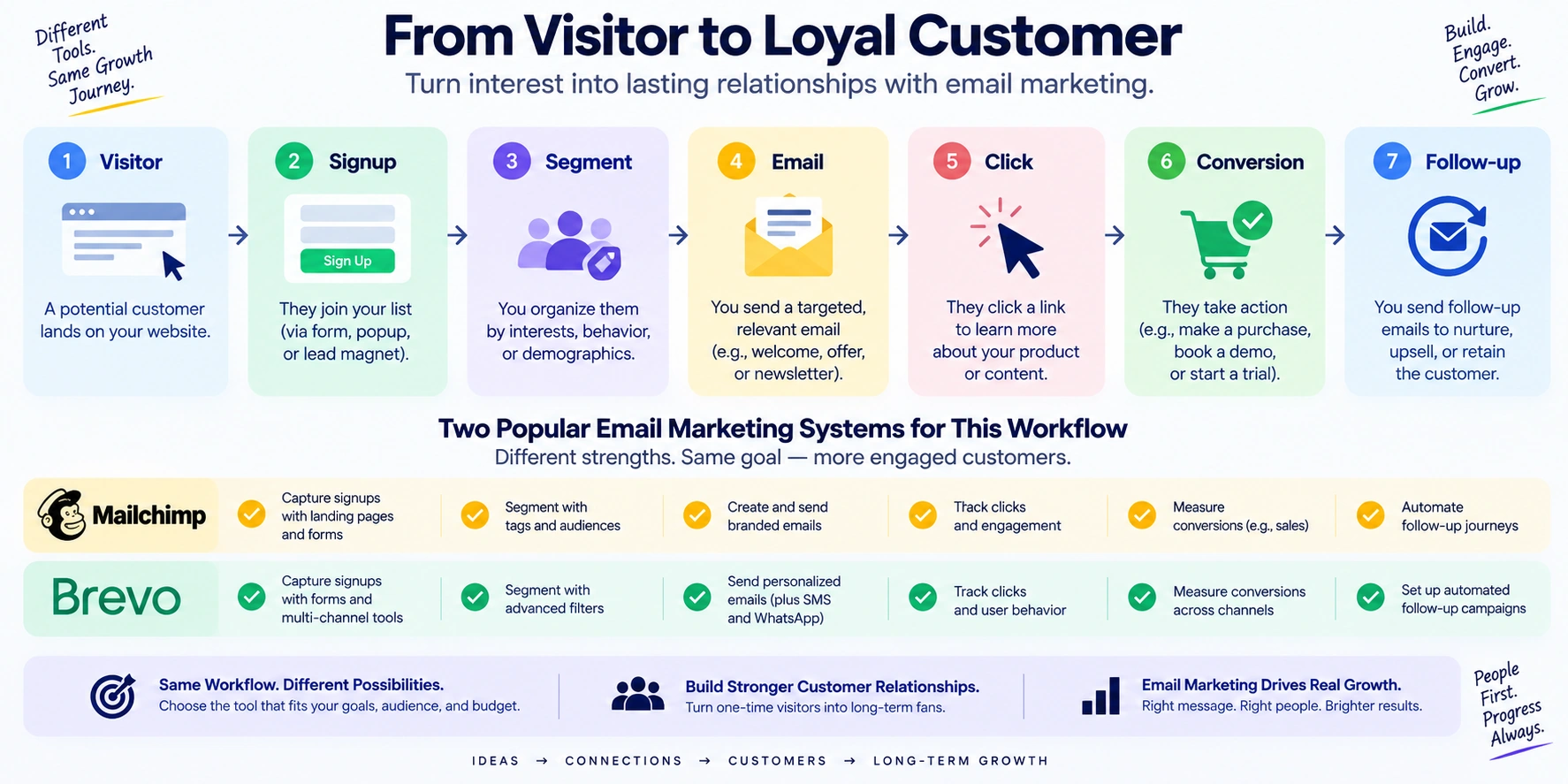
4. Mailchimp
Best for: Email newsletters, promotional campaigns, audience management, and automated email
Email remains one of the most useful owned marketing channels because a business does not need to rely entirely on social-media algorithms to reach subscribers.
Mailchimp remains a familiar option for managing:
- newsletters
- customer lists
- email campaigns
- automated messages
- audience segments
- forms
- campaign reporting
Pricing
Mailchimp pricing depends heavily on:
- number of contacts
- plan
- monthly email volume
- features
The current site shows promotional pricing around $17/month for 500 contacts for a Standard plan offer, with the regular starting price shown afterward around $20/month. Free/trial availability depends on the current plan and eligibility.
Because Mailchimp pricing scales with audience size, always calculate the price using your actual contact count before choosing it.
Why it stands out
Mailchimp’s biggest advantage is familiarity.
A small business can start with a newsletter and gradually add:
- audience segmentation
- automated sequences
- campaign reporting
- signup forms
- integrations
Where it is strongest
- Newsletters
- Ecommerce email
- Small-business campaigns
- Audience management
- Email automation
Where it is weaker
Pricing becomes more complicated as contact lists grow.
If you have a large audience but send relatively little email, compare contact-based pricing carefully against alternatives.
Best user
- Small businesses
- Ecommerce stores
- Creators
- Newsletter publishers
- Marketing teams
Video / Learning Link
Verdict: A familiar email-marketing choice for businesses that want campaigns and audience management without building a complicated marketing system from scratch.
5. Buffer
Best for: Social media scheduling, content planning, lightweight analytics, and small marketing teams
Buffer takes a much narrower approach than HubSpot.
That can be an advantage.
If your main social-media problem is:
“I have content, but I keep forgetting to publish it.”
you may not need a massive marketing platform.
You may need a reliable publishing calendar.
Pricing
Buffer currently offers:
- Free: $0
- Up to 3 connected channels
- Up to 10 scheduled posts per channel
- Essentials: $5/month per channel when billed yearly
The paid plan adds unlimited scheduled posts per channel, advanced analytics, community inbox functionality, AI assistance, and other features. Buffer says its pricing was last updated in November 2025 and uses volume discounts as the number of channels increases.
Why it stands out
Buffer is simple enough to become part of a weekly publishing routine.
For example:
Monday → prepare content
Tuesday → schedule
Wednesday → review performance
Friday → recycle or improve successful topics
The software supports that kind of workflow without requiring a full CRM implementation.
Where it is strongest
- Social scheduling
- Content calendars
- Small teams
- Creator workflows
Where it is weaker
It is not designed to replace:
- advanced SEO platforms
- full CRM systems
- enterprise marketing automation
- advanced paid advertising platforms
Best user
- Freelancers
- Creators
- Small businesses
- Social media managers
- Agencies managing smaller accounts
Video / Learning Link
Use the current Buffer learning library for social publishing, content planning, analytics, and platform-specific workflows.
Verdict: One of the more practical options when social publishing consistency is the actual problem.
6. Brevo
Best for: Email, SMS, transactional messaging, automation, and small businesses wanting a broader communication platform
Brevo is worth considering alongside Mailchimp because its pricing model and communication focus are different.
The platform supports:
- email campaigns
- SMS
- transactional email
- automation
- contact management
- segmentation
- forms
- reporting
Pricing
Brevo currently lists:
- Free: $0/month
- Starter: from $9/month
- Standard: from $18/month
- Professional: from $499/month
- Enterprise: custom
The free plan includes up to 100,000 stored contacts but limits sending to 300 emails per day. Starter begins at $9/month and removes the daily sending limit through monthly email tiers.
Why it stands out
Brevo can make sense when email is only one part of your customer communication.
For example:
Marketing email + transactional email + SMS
can live in one broader system.
Where it is strongest
- Email campaigns
- Transactional email
- SMS
- Automation
- Small businesses
- Customer communications
Where it is weaker
The pricing becomes more complicated as email volume and advanced features increase.
The free plan’s 300-email daily limit can also become restrictive for larger campaigns.
Best user
- Small businesses
- Ecommerce companies
- SaaS companies
- Agencies
- Businesses sending transactional email
Video / Learning Link
Use the current Brevo Academy resources for email campaigns, automation, segmentation, and customer communication.
Verdict: A strong alternative to traditional email platforms when SMS and transactional messaging matter too.
7. Google Analytics 4
Google Analytics — Official Website
Best for: Understanding website traffic, user behavior, events, conversions, and marketing performance
Google Analytics 4 answers a different question from Search Console.
Search Console tells you how your site performs in Google Search.
Analytics tells you what happens when users interact with your website or app.
You can use it to investigate:
- acquisition
- engagement
- events
- conversions
- ecommerce activity
- audiences
- landing pages
- user journeys
Pricing
Google Analytics Standard: Free.
Google also offers Analytics 360, the enterprise version with higher limits and additional capabilities. Google states that 360 contracts are handled through Google representatives or authorized partners.
Why it stands out
It provides a measurement layer that can connect marketing activity to actual website behavior.
For example:
Social post → website visit → product page → checkout
is much more useful to understand than simply knowing that the social post received 2,000 views.
Where it is strongest
- Website analytics
- Conversion measurement
- Ecommerce
- Marketing attribution
- Audience analysis
- Event tracking
Where it is weaker
Analytics can become overwhelming.
Installing it does not automatically create useful measurement.
A business should decide what matters before creating dozens of events.
Best user
- Website owners
- Ecommerce businesses
- Marketing teams
- Agencies
- Content publishers
Video / Learning Link
This 2026 tutorial covers setup, reports, acquisition, engagement, ecommerce, conversions, audiences, and Analytics Advisor.
Verdict: The essential measurement layer for businesses that want to understand what visitors actually do after arriving.
8. Google Search Console
Google Search Console — Official Website
Best for: Monitoring organic search performance and technical search visibility
Search Console is one of the easiest recommendations in this entire article because it is free and directly connected to Google Search.
It can show:
- search queries
- impressions
- clicks
- average position
- indexed pages
- URL inspection information
- Core Web Vitals
- search-related issues
- sitemap submission
- structured-data-related information
Google describes Search Console as a tool for measuring search traffic and performance, fixing issues, and understanding how Google sees your pages.
Pricing
Free: $0
There is no standard paid tier required for normal Search Console use.
Why it stands out
A small business does not need an expensive SEO subscription to answer basic questions such as:
“Which queries are already bringing people to my website?”
or:
“Did this page actually gain impressions after I updated it?”
Search Console can answer those questions directly.
Where it is strongest
- SEO monitoring
- Search performance
- Indexing
- Technical visibility
- Query research
- Core Web Vitals
Where it is weaker
It does not replace a complete competitor-research platform.
You cannot expect it to provide the same competitive intelligence as Semrush or Ahrefs.
Best user
Everyone with a website who cares about Google Search.
Video / Learning Link
Google Search Console Training
Google’s official Search Console resources include tutorials covering verification, performance reports, URL Inspection, and search optimization.
Verdict: One of the highest-value free tools in digital marketing.
9. Meta Business Suite
Meta Business Suite — Official Website
Best for: Managing Facebook and Instagram content, messages, insights, and basic business workflows
Meta Business Suite is particularly useful for businesses that depend on Facebook and Instagram.
The platform allows businesses to:
- create posts
- schedule content
- manage messages
- respond to comments
- view insights
- manage notifications
- handle Facebook and Instagram activity from one place
Meta’s current Business Suite app is free and supports publishing and scheduling across Facebook and Instagram, unified messaging, and insights.
Pricing
Meta Business Suite: Free.
Paid advertising is separate and depends on the advertising budget and campaign setup.
Why it stands out
It removes a simple but common problem:
switching between multiple social apps to perform basic business tasks.
For a small business primarily active on Facebook and Instagram, that convenience can be enough to justify using it regularly.
Where it is strongest
- Social publishing
- Social inbox
- Social insights
- Basic content management
Where it is weaker
It is not a replacement for a multi-network social management platform if you manage many unrelated channels.
Best user
- Local businesses
- Ecommerce stores
- Creators
- Instagram-focused businesses
- Facebook-focused businesses
Video / Learning Link
This 2026 walkthrough covers the core Business Suite interface, posts, insights, inbox, and basic workflows.
Verdict: A practical free tool for businesses whose social strategy is centered on Facebook and Instagram.
10. Hotjar
Best for: Heatmaps, session recordings, surveys, feedback, and understanding why visitors behave differently from what analytics suggests
Google Analytics may tell you:
“Visitors are leaving this page.”
Hotjar can help you investigate:
“What were they doing before they left?”
That distinction makes behavior analytics useful.
Hotjar’s current product structure includes:
- heatmaps
- session recordings
- surveys
- feedback
- interviews
- user testing
Pricing
Current Hotjar pricing includes:
- Basic: $0
- Plus: about $39/month
- Business: about $99/month
- Higher plans are available.
The Basic Observe plan currently supports up to 35 daily sessions and unlimited heatmaps.
Why it stands out
Traditional analytics gives you numbers.
Behavior tools can provide visual context.
For example, a page may have a strong traffic volume but weak conversion.
A heatmap or recording may reveal:
- users missing the CTA
- mobile visitors struggling with a layout
- a form being abandoned
- important information being overlooked
- repeated clicks on something that is not clickable
Where it is strongest
- Landing-page optimization
- UX research
- Conversion improvement
- Ecommerce
- SaaS websites
- User feedback
Where it is weaker
Session recordings and heatmaps can generate a lot of information.
You need a specific question before reviewing them.
Best user
- Ecommerce businesses
- SaaS companies
- Conversion-focused marketers
- UX teams
- Agencies
Video / Learning Link
Use Hotjar’s learning resources for heatmaps, recordings, surveys, feedback, and conversion research.
Verdict: An excellent second layer after analytics when you need to understand user behavior rather than simply count it.
Price Comparison: Which Digital Marketing Tools Are Free?
One of the most useful discoveries from this list is that you do not need to start with a huge marketing budget.
| Tool | Free Option | Paid Starting Point |
|---|---|---|
| Semrush | Limited/free tools | About $117.33/month annual |
| Ahrefs | Yes | $29/month Starter |
| HubSpot | Yes | Promotional Starter pricing varies |
| Mailchimp | Yes/eligibility varies | Current pricing depends on contacts |
| Buffer | Yes | $5/channel/month annual |
| Brevo | Yes | $9/month |
| Google Analytics | Yes | Standard free |
| Google Search Console | Yes | Free |
| Meta Business Suite | Yes | Free; ads separate |
| Hotjar | Yes | About $39/month |
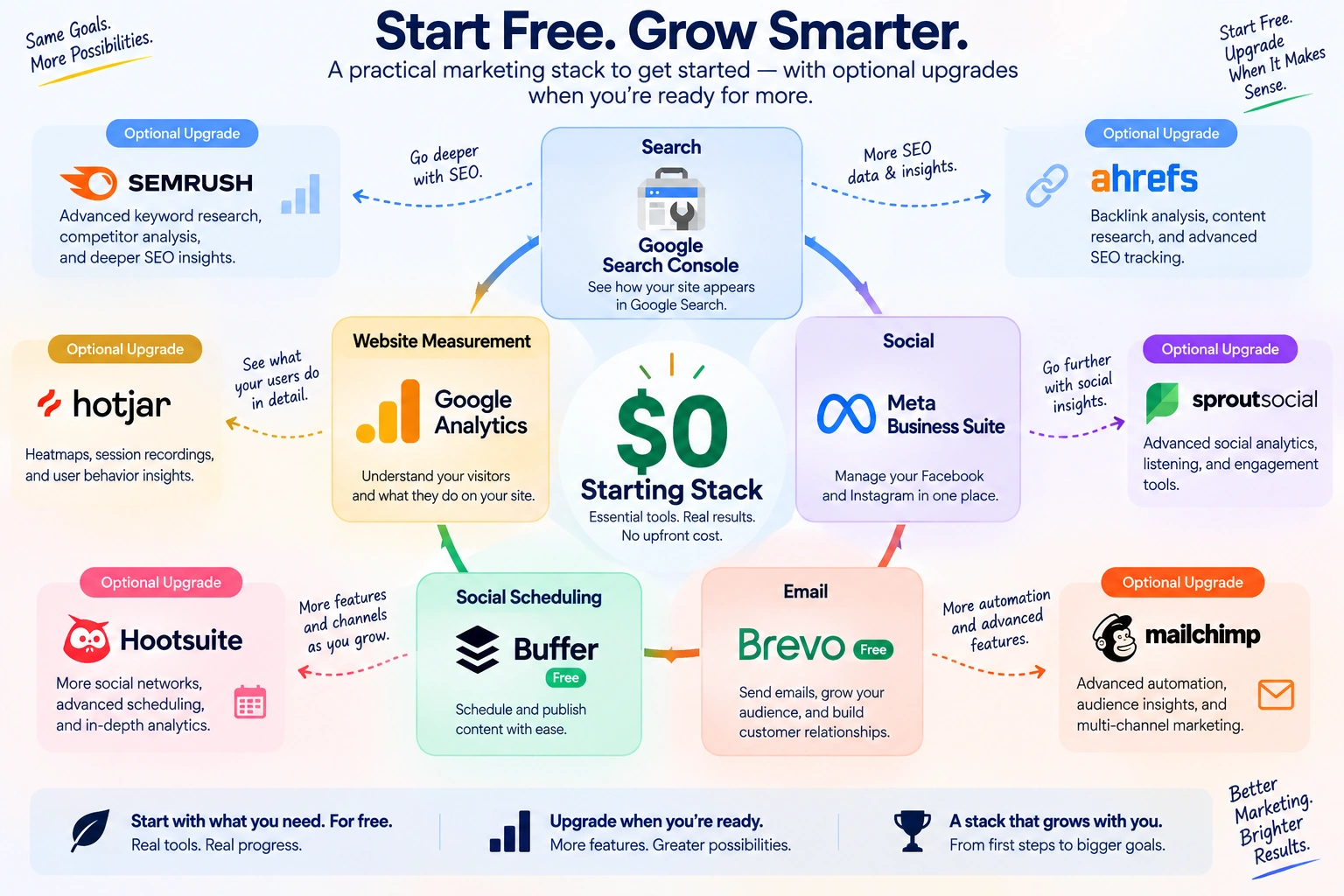
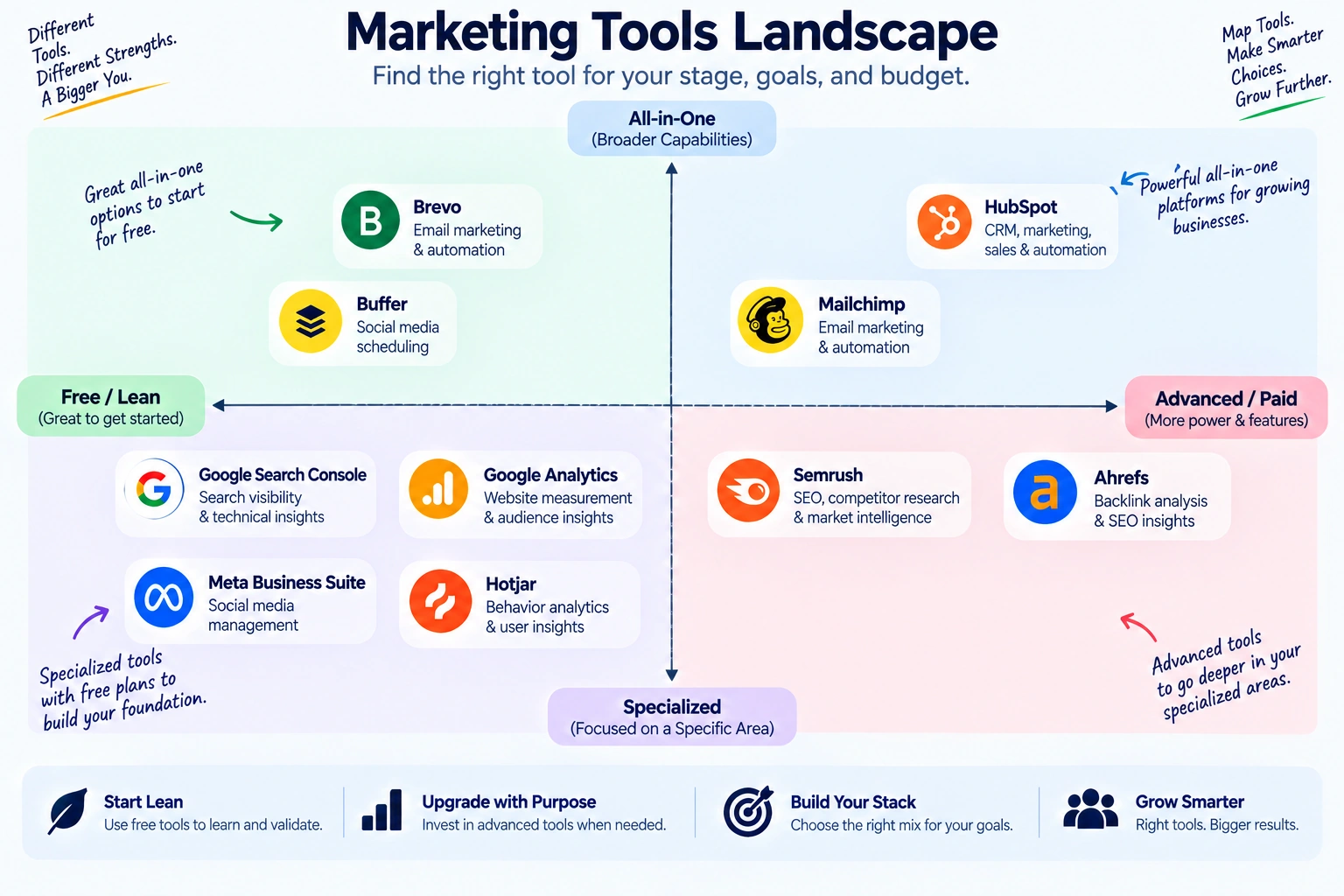
The free tools are particularly useful when building a lean marketing stack.
A small website could start with:
Google Search Console + Google Analytics + Meta Business Suite + Buffer Free + Brevo Free
and delay larger subscriptions until there is a clear reason to upgrade.
Which Digital Marketing Tool Should You Choose?
Choose Semrush if…
SEO and competitive search research are major parts of your strategy.
Choose Ahrefs if…
Backlinks, keywords, competitor pages, and organic search research are your main concerns.
Choose HubSpot if…
You need marketing activity connected directly to CRM records and sales processes.
Choose Mailchimp if…
Email newsletters and campaigns are your primary owned marketing channel.
Choose Buffer if…
Your main problem is organizing and consistently publishing social content.
Choose Brevo if…
You want email plus SMS, transactional messaging, and automation in one system.
Choose Google Analytics if…
You need to understand what visitors do after arriving at your website.
Choose Google Search Console if…
You want a free and direct view of your Google Search performance.
Choose Meta Business Suite if…
Facebook and Instagram are central to your marketing.
Choose Hotjar if…
You already have traffic data but need to understand why visitors behave the way they do.
What Is Changing in Digital Marketing in 2026?
The biggest change is not that every marketing platform now has AI.
Almost every platform claims some form of AI assistance.
The more important change is that marketing visibility is spreading across different discovery environments.
A brand can now be discovered through:
- traditional search engines
- AI search
- social feeds
- short-form video
- newsletters
- communities
- paid advertising
- direct referrals
That means a marketer can no longer judge visibility through one dashboard.
Semrush and Ahrefs are already adding tools for tracking visibility in AI-generated search experiences. Semrush’s current plans include AI-search performance and visibility reporting, while Ahrefs offers tracked AI prompts and Brand Radar.
This creates an important distinction:
Traffic measurement tells you what happened.
Visibility measurement tells you where your brand can be discovered.
Behavior analysis helps explain what visitors did.
Marketing automation determines what happens next.
A mature 2026 marketing stack needs to connect those four questions.
A Practical 2026 Digital Marketing Stack
You do not need all 10 tools.
A better approach is to build around the questions your business needs to answer.
Small Business Starting Stack
Google Search Console + Google Analytics + Meta Business Suite + Brevo
This covers:
- search visibility
- website measurement
- social management
without requiring a large monthly software budget.
SEO-Focused Business
Ahrefs or Semrush + Search Console + Analytics
Choose one major SEO platform first.
Do not pay for both unless the additional data genuinely changes your decisions.
Content Marketing Business
Semrush + Analytics + Search Console + Buffer
This combination connects search research with publishing and measurement.
Ecommerce Business
Analytics + Search Console + Hotjar + Mailchimp or Brevo
The focus becomes:
traffic → product interaction → checkout behavior → customer communication
B2B Lead Generation
HubSpot + Search Console + Analytics
Use the CRM-connected marketing system to follow leads after they arrive.
Social-First Business
Meta Business Suite + Buffer + Analytics
Use Meta Business Suite for native Facebook/Instagram operations and Buffer when broader scheduling is useful.
Don’t Make This Mistake: Buying Tools Before Defining Metrics
A common marketing problem looks like this:
Tool first → dashboard second → strategy never
The better order is:
Step 1: Define the business outcome
Examples:
- more qualified leads
- more product sales
- more newsletter subscribers
- more organic traffic
- lower customer acquisition cost
Step 2: Choose the measurement
For example:
Goal: More leads
Measurement: Qualified form submissions
Step 3: Identify the marketing activity
Maybe:
- SEO
- social
- paid ads
Step 4: Choose the smallest useful tool
You may not need an enterprise marketing platform.
Step 5: Review the data regularly
A dashboard that nobody reviews is decoration.
Step 6: Change one meaningful thing
For example:
- improve a landing page
- change an email subject
- update an underperforming article
- adjust audience targeting
- improve a CTA
Step 7: Measure again
This turns software into a feedback loop.
A Simple Digital Marketing Tool Selection Test
Before subscribing to another platform, ask these seven questions:
1. What decision will this tool help me make?
If the answer is unclear, stop.
2. What data does it provide that I cannot already get?
Avoid paying for duplicate information.
3. Who will actually use it?
A sophisticated platform is useless if nobody checks it.
4. How often will we use it?
Daily, weekly, monthly, or almost never?
5. Does the free plan cover our actual workflow?
If yes, delay upgrading.
6. What happens when the audience grows?
Check contact, campaign, seat, usage, or credit limits.
7. Can we export our data?
This matters before building a major process around a platform.
This seven-question test is more useful than choosing software because a competitor happens to use it.
Digital Marketing Tool Stack by Budget
$0 Starting Budget
Start with:
- Google Search Console
- Google Analytics
- Meta Business Suite
- Buffer Free
- Brevo Free
Then use the data to identify your first real bottleneck.
Small Monthly Budget
Add one paid specialist:
SEO problem → Ahrefs Starter
Social scheduling problem → Buffer Essentials
Email growth problem → Brevo Starter
Behavior problem → Hotjar
Growing Marketing Team
Consider:
- Semrush or Ahrefs
- HubSpot
- dedicated email platform
- social management
- behavior analytics
At this point, integration becomes more important than collecting additional tools.
FAQ: Digital Marketing Tools in 2026
What is the best digital marketing tool in 2026?
There is no universal winner. Semrush and Ahrefs are strong for SEO, HubSpot for CRM-connected marketing, Buffer for social publishing, Brevo and Mailchimp for email, and Google Analytics for measurement.
What are the best free digital marketing tools?
Google Analytics, Google Search Console, Meta Business Suite, Buffer’s free plan, and Brevo’s free plan are useful starting points.
Is Google Analytics free?
Yes. Standard Google Analytics is free. Google Analytics 360 is the premium enterprise version with higher limits and additional capabilities.
Is Google Search Console free?
Yes. Google provides Search Console as a free service for monitoring and improving search performance.
Is Semrush worth paying for?
It can be worthwhile when SEO is an important acquisition channel and you actually use competitor, keyword, auditing, ranking, and visibility data to make decisions.
Is Ahrefs better than Semrush?
Neither is universally better. Ahrefs is particularly strong for backlink and SEO research, while Semrush offers a broader marketing and visibility toolkit. Compare the specific workflows you need.
Is Buffer free?
Yes. Buffer currently offers a free plan supporting up to three channels and ten scheduled posts per channel.
Is Brevo free?
Yes. Brevo’s free plan is available indefinitely and currently includes 300 email sends per day.
What is Hotjar used for?
Hotjar helps marketers understand visitor behavior through tools such as heatmaps, session recordings, surveys, and feedback.
Do small businesses need HubSpot?
Not necessarily. HubSpot becomes more valuable when marketing, lead management, automation, and CRM processes need to work together.
Should I buy multiple SEO tools?
Usually not at the beginning. Choose one primary SEO platform, learn how to use it properly, and add another only when its additional data changes your decisions.
Should digital marketers use AI tools in 2026?
Yes, but AI should support research, analysis, content production, personalization, and workflow automation rather than replace verification and strategic judgment.
Final Verdict
The best digital marketing stack is rarely the one with the most software.
It is the one that creates a reliable chain between:
Discovery → Visit → Behavior → Conversion → Follow-Up → Measurement
For SEO, Semrush and Ahrefs remain strong research platforms, with both now moving further into AI-search visibility.
For CRM-connected marketing, HubSpot offers a much broader system.
For email, Mailchimp remains familiar, while Brevo is attractive when email needs to connect with SMS and transactional communication.
For social scheduling, Buffer keeps the workflow comparatively simple.
For website measurement, Google Analytics remains an essential foundation.
For organic search monitoring, Google Search Console is difficult to ignore because it is free and directly connected to Google Search.
For Facebook and Instagram, Meta Business Suite provides a useful free operating layer.
For behavior research, Hotjar adds something that normal traffic reports cannot: visual evidence of how visitors interact with pages.
If you are starting from zero, do not buy all ten.
Start with the free tools.
Find the marketing problem that is actually limiting growth.
Then buy the tool that solves that specific problem.
That approach produces a smaller stack, clearer data, and usually a much healthier marketing budget.