Ecommerce Product Retirement Process: A Practical Guide for Small Stores
- by Muhammad Raza
- 0 Comments
- 29 minutes read
- 99 Views
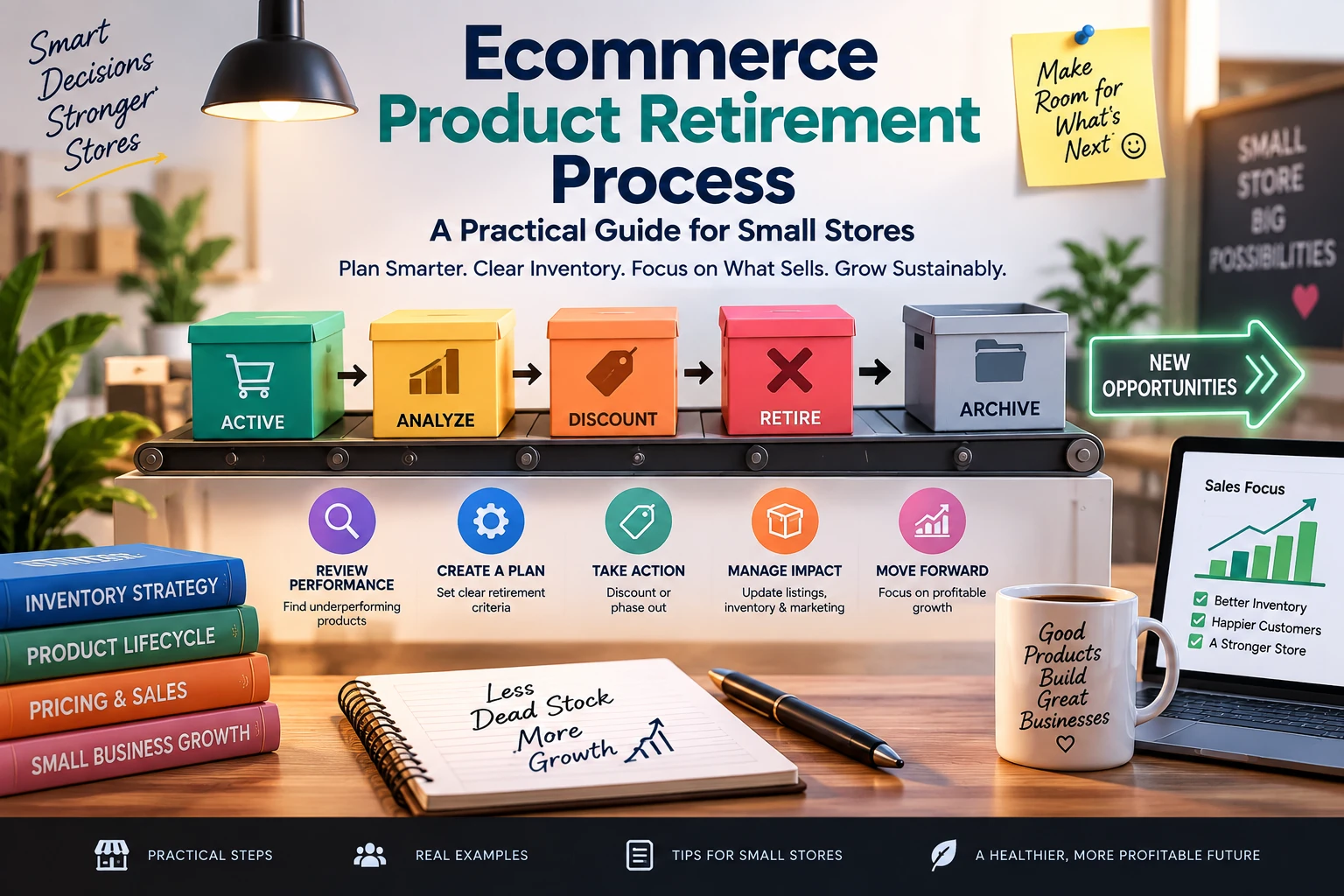
An ecommerce product retirement process helps small stores safely discontinue products while protecting customer paths, remaining inventory, search traffic, and important operational connections.
Someone removes it from the online store.
The work appears finished.
Then a customer clicks an old search result.
A marketplace listing still shows the item.
An email campaign points to the retired product.
A customer wants a replacement.
A return request arrives.
An old subscription still references the product.
The warehouse still has several units.
A support employee cannot tell whether the item is discontinued, temporarily unavailable, or simply out of stock.
The original product page may have disappeared, but the business relationship around that product has not necessarily disappeared with it.
That is the operational problem behind product retirement.
Removing an ecommerce product is not always the same as ending its lifecycle.
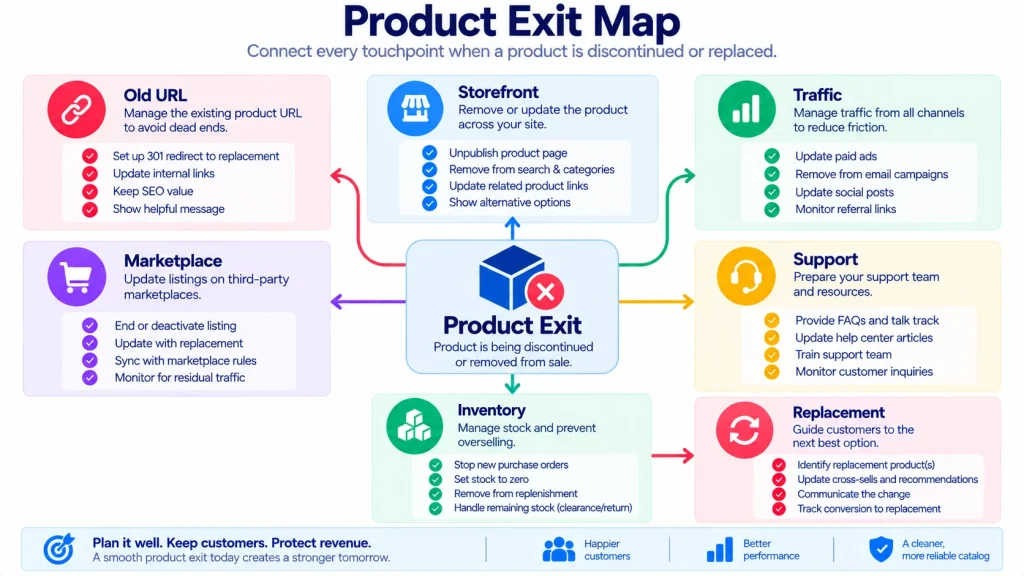
For a small store, a better approach is to create a Product Exit Map before retiring a product, SKU, or variant.
The map answers a simple question:
What still depends on this product after we stop selling it?
That question matters because modern ecommerce catalogs are connected to much more than a storefront.
A product can exist across:
- the website,
- search results,
- advertising,
- email campaigns,
- marketplaces,
- inventory systems,
- customer-service records,
- analytics,
- product feeds,
- subscriptions,
- returns,
- warranties,
- internal documents,
- and replacement products.
Current ecommerce platforms are also giving merchants more granular controls over product and variant visibility. For example, Shopify introduced variant-level publishing in 2026, allowing merchants to hide individual variants from selected channels while keeping their underlying records.
That makes product retirement less like pressing a delete button and more like closing a small operational network.
This article presents a practical framework for doing that without turning product management into a giant project.
What Is a Product Exit Map?
A Product Exit Map is a short record showing what happens to every important connection when a product, SKU, or variant is discontinued.
Instead of recording only:
“Product discontinued.”
record:
Product → Inventory → Customer Page → Search → Campaigns → Marketplace → Orders → Support → Replacement
Then decide what happens to each connection.
For example:
| Connection | Exit Decision |
|---|---|
| Storefront | Hide purchase option |
| Product page | Keep informational page |
| Search | Remove from active discovery |
| Inventory | Sell remaining stock |
| Marketplace | Retire listing |
| Paid ads | Stop campaigns |
| Remove from future campaigns | |
| Returns | Keep support reference |
| Replacement | Link to successor |
| Analytics | Preserve historical record |
This is the difference between removing a product and retiring a product properly.
Why Product Retirement Is More Complicated Than It Looks
Consider a fictional store called Oakline Home.
The store sells a desk lamp called the Arc Mini.
The manufacturer stops producing the black version.
The store owner removes the black variant from the product page.
But five things remain:
- Twenty units are still in the warehouse.
- A marketplace listing still advertises the black version.
- A comparison article links to the product.
- Two customers have open orders.
- The support team still needs the SKU for warranty questions.
The product has disappeared from one screen.
It has not disappeared from the business.
This is why the first question should not be:
“How do we delete this product?”
Ask instead:
“What must continue to work after this product stops being sellable?”
Build the Product Exit Map Before Making the Change
Do not start by editing the product.
Start by mapping it.
A simple Product Exit Map contains seven areas:
- Sellability
- Inventory
- Customer Access
- Traffic
- Operational Connections
- After-Sale Obligations
- Replacement Path
These categories are intentionally broader than catalog fields.
A product may have perfect title, pricing, images, and SKU information while still having a messy exit.
The Seven-Layer Product Exit Map
Layer 1 — Sellability
First determine what exactly is ending.
Is the business retiring:
- the entire product?
- one variant?
- one size?
- one color?
- one package?
- one region?
- one sales channel?
- one supplier version?
These are different situations.
For example:
“Black, 500 ml variant discontinued”
is not the same as:
“Entire product discontinued.”
Do not apply a full-product retirement process to a single variant unless the business actually intends to remove the whole product.
Layer 2 — Inventory
Next determine what physically exists.
Ask:
- How many units remain?
- Where are they?
- Are any reserved?
- Are any damaged?
- Are any already allocated to open orders?
- Are marketplace quantities different?
- Are warehouse and storefront quantities synchronized?
- Are replacement units already available?
A product should not be marked “finished” simply because the supplier stopped manufacturing it.
There may still be customer-owned obligations connected to the remaining inventory.
Layer 3 — Customer Access
Now inspect what customers can still see.
Check:
- product page,
- collection pages,
- internal search,
- filters,
- recommendations,
- related products,
- saved links,
- customer account history,
- order history.
The correct customer experience may not always be:
“404 — page not found.”
Sometimes keeping an informational page is useful.
For example:
This product has been discontinued. See the current replacement here.
That can be more helpful than sending an existing customer into a dead end.
The correct choice depends on the product, traffic, customer expectations, and business strategy.
Layer 4 — Traffic
A retired product may still receive visitors.
Possible sources include:
- Google search,
- old blog posts,
- social posts,
- email campaigns,
- paid advertising,
- marketplace links,
- affiliate links,
- bookmarks,
- QR codes,
- printed materials.
A product page can therefore remain operationally important after sales stop.
Current ecommerce guidance and tooling increasingly recognizes this issue: discontinued product URLs may continue to carry traffic, links, and customer demand, making the retirement decision more than a simple catalog cleanup.
The question becomes:
Where should an existing visitor go now?
Possible answers:
- successor product,
- related product,
- category page,
- informational page,
- support page,
- or nowhere, if the page genuinely has no useful continuation.
Do not redirect blindly.
A replacement should make sense.
Layer 5 — Operational Connections
A product may be connected to systems that customers never see.
Check:
- inventory software,
- accounting,
- fulfillment,
- shipping rules,
- product feeds,
- marketplace listings,
- POS,
- warehouse systems,
- subscription systems,
- bundles,
- product recommendations,
- reporting,
- customer-service software.
A product retirement can fail quietly when one of these systems continues treating the product as active.
For example:
Storefront: discontinued
Marketplace: active
Inventory system: active
Paid advertising: active
The customer does not see one product.
They see four conflicting versions of the same product.
Layer 6 — After-Sale Obligations
This layer is easy to overlook.
Ask whether existing customers may still need:
- returns,
- exchanges,
- warranty service,
- replacement parts,
- manuals,
- accessories,
- troubleshooting,
- invoices,
- order-history information,
- subscription management.
A discontinued product can still have a long customer-service life.
That means retirement should not erase the information required to support previous purchases.
Some merchants specifically want to preserve discontinued variant history for reporting and operational records rather than simply deleting it. Shopify community discussions have highlighted this exact tension between storefront cleanliness and historical data preservation.
Layer 7 — Replacement Path
Finally, decide what happens when customers still want the product.
There are four common outcomes.
Outcome A — Direct Successor
A newer version replaces the old one.
Example:
Desk Lamp A → Desk Lamp B
Outcome B — Functional Alternative
There is no direct successor, but another product solves the same problem.
Example:
Travel Mug 350 → Travel Mug 500
Outcome C — Category Redirect
There is no equivalent product, but the customer can continue browsing relevant products.
Example:
Discontinued Winter Jacket → Outdoor Jackets
Outcome D — No Replacement
The product is genuinely gone.
In that case, the business may need to provide an informative ending rather than inventing a replacement.
Create a Product Exit Card
Before retiring a product, create a short Product Exit Card.
| Field | What to Record |
|---|---|
| Product | Product name |
| SKU | Internal identifier |
| Exit type | Product / Variant / Channel |
| Exit reason | Discontinued / Replaced / Seasonal / Other |
| Final sellable date | Last intended selling date |
| Remaining stock | Current quantity |
| Open orders | Number requiring attention |
| Customer page | Keep / Redirect / Remove |
| Search status | Keep / Hide / Remove |
| Marketplace | Active / Retire / Replace |
| Advertising | Stop / Update |
| Email campaigns | Update / Archive |
| Support | Keep reference |
| Replacement | Product or category |
| Owner | Person responsible |
| Exit date | Planned date |
| Verification date | Date checked |
This does not need to become a complicated database.
A spreadsheet is enough for a small store.
Use the Exit Type Test
Before changing anything, classify the exit.
Type 1 — Temporary Exit
The product is unavailable for a limited period.
Example:
Supplier delay.
Do not treat this as a permanent retirement.
Type 2 — Variant Exit
One size, color, flavor, or package is ending.
The parent product remains active.
Type 3 — Channel Exit
The product stops selling through one channel but remains available elsewhere.
Type 4 — Product Exit
The entire product is discontinued.
Type 5 — Family Exit
A group of related products is being removed.
This may require a larger customer-path review.
The classification matters because each exit type produces different consequences.
Do Not Confuse “Out of Stock” With “Discontinued”
This distinction should be explicit.
Out of stock means:
The business currently cannot fulfill the item.
Discontinued means:
The business does not intend to continue selling it.
Those states can require different customer experiences.
If a product is temporarily unavailable, hiding it permanently may unnecessarily destroy useful traffic and customer context.
If a product is permanently discontinued, leaving a purchase option active may create avoidable orders and customer disappointment.
Use a clear status model.
For example:
Active
→ Temporarily Unavailable
→ Final Sale
→ Discontinued
→ Archived
The exact labels can differ by platform.
The important thing is that the business knows what each status means.
Build the “Last Sale” Boundary
A product exit needs a clear point at which normal selling ends.
Call this the Last Sale Boundary.
Before that point:
- inventory can be sold,
- promotions may remain active,
- orders are accepted normally.
After that point:
- new sales should stop,
- remaining obligations continue,
- replacement logic becomes important.
For some products, the boundary may be:
“When remaining stock reaches zero.”
For others:
“After September 30.”
For regulated, seasonal, subscription-based, or contract-sensitive products, the rule may be more specific.
The point is to avoid ambiguity.
Decide What Happens to Remaining Inventory
Do not automatically destroy, discount, or hide remaining stock.
Choose one:
Sell Normally
Useful when customers still want the product.
Final Sale
Useful when the business wants to communicate that replenishment will not occur.
Markdown
Useful when the objective is faster inventory recovery.
Bundle
Combine remaining units with another product.
Transfer
Move inventory to another channel or location.
Return
Possible where supplier agreements permit it.
Dispose
Appropriate only when the product cannot or should not be sold.
The correct decision depends on the product and economics.
The important operational point is:
Inventory exit and catalog exit do not always happen at the same time.
Build the Customer Path After Retirement
Draw the journey.
For example:
Old Product Link
↓
Product Page
↓
Discontinued Message
↓
Replacement Product
↓
Current Product Page
↓
Purchase
This is better than:
Old Product Link
↓
404
But only when the replacement is genuinely relevant.
For another product:
Old Product Link
↓
Discontinued Information
↓
Category
That may be better if there is no close replacement.
Use the Replacement Relevance Test
Before linking to a replacement, ask:
Same customer problem?
Does the new item solve the same underlying need?
Same customer expectation?
Is the replacement broadly comparable?
Similar price range?
A large price difference may require explanation.
Similar availability?
Do not send customers to a replacement that is also unavailable.
Similar use case?
A visually similar product is not necessarily a functional replacement.
This avoids the common mistake of treating “another product” as automatically being “the replacement.”
Check More Than the Product Page
A product can be retired correctly on the main store and still appear elsewhere.
Create a Product Footprint Check.
Search for the product across:
- website search,
- collections,
- category pages,
- comparison content,
- blog posts,
- paid ads,
- email templates,
- marketplace listings,
- social-commerce catalogs,
- shopping feeds,
- product recommendation widgets.
The objective is not necessarily to erase every historical mention.
Some references should remain.
The objective is to make sure every remaining reference has the correct meaning.
Use the “Meaning Check”
Every remaining product reference should answer:
What does this reference now mean to the customer?
For example:
Old blog article
“This lamp is available in three colors.”
If one color has been discontinued, update the statement.
Comparison guide
“Choose between Model A and Model B.”
If Model A no longer exists, the comparison may now be misleading.
Customer email
“Buy your favorite black version.”
That campaign should not continue after retirement.
This is a meaning problem, not merely a link problem.
Product Exit and Marketplace Listings
Marketplaces can have different lifecycle rules from your own store.
Do not assume:
“I removed it from my website, so it is gone everywhere.”
A marketplace may require:
- listing retirement,
- inventory adjustment,
- end-date update,
- offer removal,
- variant change,
- feed update,
- or separate catalog action.
For example, Walmart’s current marketplace documentation provides explicit item-retirement workflows and notes that catalog retirement can take time to propagate.
The practical lesson is broader:
Record the marketplace action separately instead of assuming the storefront change propagates automatically.
Product Exit and Historical Data
Do not casually delete historical records just to make the active catalog cleaner.
Historical information may be useful for:
- sales reporting,
- customer support,
- warranty work,
- returns,
- accounting,
- product analysis,
- purchasing decisions,
- future product comparisons.
A retired product can therefore have:
No current selling status
while still having:
A permanent historical record.
That is often the better distinction.
Use the “Archive, Don’t Erase” Principle
When appropriate:
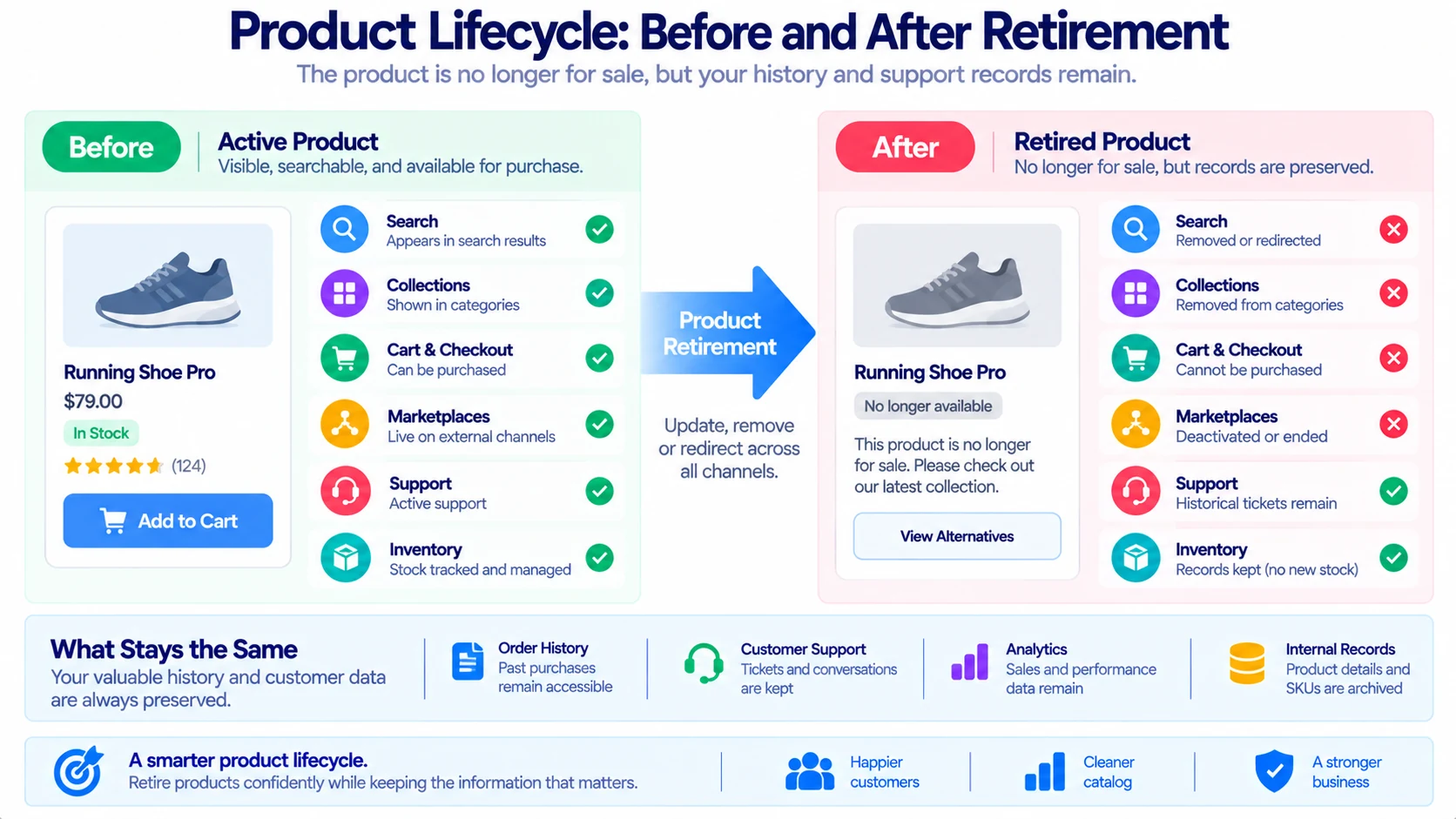
Remove a product from active selling without destroying the history needed to understand previous sales or support previous customers.
This does not mean every product should remain publicly visible forever.
It means the internal record and customer-facing presence are separate decisions.
For example:
Internal record: retained
Storefront purchasing: disabled
Search visibility: reduced
Support access: retained
Marketplace: retired
Historical analytics: retained
This is much more precise than “delete product.”
Watch for Open Orders
Before retirement, check:
- pending orders,
- partially fulfilled orders,
- backorders,
- preorders,
- returns,
- exchanges,
- customer complaints,
- replacement requests.
Imagine a product has been discontinued today.
Tomorrow, a customer asks:
“Where can I download the manual for the product I bought last month?”
If the product record was deleted, the support team may have to reconstruct information that could easily have been retained.
Product retirement should therefore include an After-Sale Check.
Build the After-Sale Check
Before completing retirement, answer:
- Are all open orders accounted for?
- Can customers still access order history?
- Can support identify the product?
- Are manuals or instructions preserved?
- Are warranty requirements understood?
- Are replacement parts available?
- Is the return process still clear?
- Does the replacement product require different support instructions?
This is especially important for products with long customer lifespans.
Handle Product Variants Carefully
Variant retirement deserves its own decision.
Suppose a clothing store sells:
Classic Hoodie
- Black / Small
- Black / Medium
- Black / Large
- Green / Small
- Green / Medium
- Green / Large
Only Green / Small is discontinued.
Do not treat the entire product as discontinued.
Instead:
Parent product: active
Green / Small: retired
Other variants: active
This sounds obvious, but the operational consequences can spread across inventory, filters, feeds, recommendations, and marketplace listings.
Modern ecommerce platforms increasingly support more granular variant visibility. Shopify’s 2026 variant publishing update specifically describes use cases such as retiring discontinued options while keeping the variant record and history.
Create a Variant Exit Matrix
| Variant | Status | Inventory | Replacement | Customer Action |
|---|---|---|---|---|
| Black / S | Active | 18 | — | Sell |
| Black / M | Active | 12 | — | Sell |
| Black / L | Active | 7 | — | Sell |
| Green / S | Discontinued | 0 | Green / M | Hide + suggest |
| Green / M | Active | 5 | — | Sell |
| Green / L | Active | 4 | — | Sell |
This makes partial retirement easier to review.

Do Not Reuse Retired SKUs Casually
A retired identifier can have historical meaning.
If SKU LAMP-ARC-BLK once represented a black Arc Mini lamp, reusing it for a completely different product can create confusion in:
- reports,
- accounting,
- warehouse systems,
- customer history,
- integrations,
- support records.
A practical rule is:
Once a SKU represents a real product history, treat that identifier as historical rather than recyclable.
The exact policy should fit the business’s systems.
But the principle is useful because historical identifiers can become part of the business record.
Build a Product Dependency List
Before final retirement, ask:
What else knows this product exists?
Create a dependency list.
Commercial
- pricing
- promotions
- discounts
- bundles
- subscriptions
Marketing
- ads
- emails
- social posts
- blog articles
Technical
- feeds
- APIs
- integrations
- product recommendations
Operational
- warehouse
- fulfillment
- purchasing
- accounting
Customer
- orders
- returns
- warranties
- support
This list is not meant to become an enterprise dependency map.
For a small business, ten or fifteen relevant checks may be enough.
Use the “No Orphan” Rule
A retired product should not leave behind unexplained dependencies.
Call this the No Orphan Rule:
Every important product reference must either be updated, intentionally retained, redirected, retired, or documented.
For example:
Old product in ad account
→ Stop campaign.
Old product in marketplace
→ Retire listing.
Old product in support system
→ Retain historical reference.
Old product in comparison article
→ Update article.
Old product in customer order
→ Retain.
This creates a deliberate exit instead of a disappearing act.
Build the Product Exit Board
A simple spreadsheet can show the status.
| Connection | Owner | Action | Status | Verified |
|---|---|---|---|---|
| Storefront | Ecommerce | Disable purchase | Done | Yes |
| Search | Ecommerce | Remove active discovery | Done | Yes |
| Google feed | Marketing | Update feed | Done | Yes |
| Marketplace | Marketplace owner | Retire listing | Pending | No |
| Paid ads | Marketing | Stop campaign | Done | Yes |
| Marketing | Remove product | Pending | No | |
| Support | Customer service | Retain record | Done | Yes |
| Inventory | Operations | Confirm final stock | Done | Yes |
| Replacement | Merchandising | Add successor | Done | Yes |
This is where the Product Exit Map becomes operational.
Assign One Exit Owner
Do not assign:
“Everyone should check this.”
Assign:
One person owns the exit.
That person does not have to perform every action.
Their responsibility is to make sure every action has:
- an owner,
- a decision,
- a status,
- and verification.
This avoids the classic situation where everyone assumes someone else updated the marketplace or email campaign.
Use the Two-Check Exit Rule
For higher-impact products, use two separate checks.
Check One — Operational
Confirm:
- inventory,
- orders,
- fulfillment,
- marketplace,
- product status.
Check Two — Customer
Confirm:
- links,
- replacement,
- product messaging,
- campaigns,
- support path.
Do not treat the first successful check as proof that the whole exit worked.
Create a “Do Not Retire Yet” List
Some products should pause before retirement.
Examples:
- active paid campaigns,
- open high-value orders,
- unresolved returns,
- active subscriptions,
- significant remaining inventory,
- warranty obligations,
- pending marketplace orders,
- unclear replacement product,
- unknown integration dependencies.
If any of these exist, mark the item:
Exit Blocked
rather than forcing the retirement through.
That is often safer than discovering the problem afterward.
Product Retirement Is Not Always a Delete Decision
There are several valid end states.
Keep Visible, Stop Selling
Useful when customers need historical information.
Keep Page, Disable Purchase
Useful for discontinued products with ongoing support demand.
Redirect to Successor
Useful when a clear replacement exists.
Redirect to Category
Useful when no direct successor exists.
Remove From Public View, Retain Internally
Useful when there is little ongoing customer value but historical records matter.
Fully Retire
Appropriate when the product has no remaining customer or operational dependency.
The important point is that retirement is a decision tree, not a single button.

Create the Product Exit Decision Tree
Use this sequence:
Question 1
Are there open customer obligations?
Yes → handle them first.
No → continue.
Question 2
Is there remaining inventory?
Yes → decide how it will be sold or cleared.
No → continue.
Question 3
Is there a relevant successor?
Yes → create a replacement path.
No → continue.
Question 4
Does the old product still receive meaningful traffic?
Yes → decide how visitors should be handled.
No → continue.
Question 5
Does the product still have support, warranty, or historical value?
Yes → preserve an appropriate record.
No → consider full retirement.
This creates a much more deliberate process than:
“The supplier discontinued it, so delete it.”
Example: Oakline Home Retires a Lamp Variant
Return to the fictional Oakline Home store.
The black Arc Mini lamp is discontinued.
The store has:
- 14 units remaining,
- three open orders,
- one marketplace listing,
- a product comparison article,
- several old social posts,
- and a silver Arc Mini as a suitable alternative.
The Product Exit Map becomes:
Inventory
Sell remaining 14 units.
Open Orders
Fulfill three existing orders.
Product Page
Keep the parent product.
Black Variant
Disable after inventory is exhausted.
Marketplace
Retire black variant listing.
Comparison Article
Update wording.
Social Posts
No need to delete historical posts, but stop promotional reuse.
Replacement
Suggest silver only where it genuinely matches the customer’s needs.
Support
Keep black variant record for previous buyers.
The business has not simply removed a variant.
It has closed its operational connections.
Example: A Product With No Replacement
Now imagine a seasonal decoration that will never return.
There is:
- no successor,
- no remaining stock,
- no active advertising,
- no warranty,
- low search traffic.
The exit could be simple:
Storefront: remove from active catalog
Historical record: retain internally
Old page: remove or provide a useful category path depending on traffic
Ads: stop
Marketplace: retire
Support: retain historical information
There is no need to manufacture a replacement just to make the process look complete.
Example: A Product With Strong Search Traffic
Consider a discontinued coffee machine that still receives significant organic traffic.
Deleting the page may create a poor customer experience.
Instead:
Old page
↓
“This model is discontinued”
↓
Current replacement
↓
Comparison
↓
Purchase
The old page becomes a bridge rather than a dead end.
That is a customer-experience decision, not merely an SEO trick.
Use a Product Exit Verification Test
After the changes are made, test the customer path.
Try:
Old direct URL
What happens?
Internal search
Does the old item appear correctly?
Collection page
Is the product still presented as purchasable?
Product recommendation
Does the retired item appear?
Marketplace
Does the listing remain active?
Cart
Can the retired product still be added?
Checkout
Can a stale link create an order?
Support
Can the team still identify the product?
A retirement is not complete until the important paths behave as intended.
Test the Cart Separately
This deserves special attention.
A product may look unavailable on the storefront while still being reachable through:
- an old URL,
- a saved browser session,
- a recommendation,
- a marketplace link,
- an API,
- a stale feed,
- or a direct cart request.
The practical question is:
Can a customer still accidentally purchase something the business believes it has retired?
A controlled test can answer that.
Do not assume the visual storefront tells the entire story.
Check Product Feeds
If the store sends product data to:
- shopping platforms,
- marketplaces,
- comparison services,
- social-commerce channels,
- advertising systems,
check whether the retired product is still being distributed.
A product can be invisible on the main store and still appear in an external feed.
This is another reason to treat retirement as a network change.
Build a Product Exit Evidence Folder
For important product retirements, retain a small record:
- final product state,
- retirement decision,
- inventory snapshot,
- replacement decision,
- marketplace confirmation,
- campaign stop confirmation,
- final verification,
- owner,
- retirement date.
This does not need to be elaborate.
The purpose is to answer later:
“Why did this product disappear, and what happened to its related systems?”
That is especially useful when a team member changes.
Use “Before” and “After” Snapshots
For a high-value product, capture:
Before
- product status,
- variants,
- inventory,
- channels,
- campaigns,
- replacement candidate.
After
- final status,
- remaining inventory,
- customer path,
- marketplace status,
- campaign status,
- support availability.
This creates simple evidence that the retirement was intentional.
If actual screenshots are used, capture the real storefront/admin screens rather than generic stock images.
These should be genuine screenshots from the store being documented. If no real store screenshots are available, use an original diagram instead and label it as illustrative.
A Practical Weekly Product Exit Review
Stores with frequent product changes can review pending exits once a week.
Ask:
What is scheduled to retire?
List products and variants.
What still has inventory?
Confirm quantities.
What has open customer obligations?
Check orders, returns, warranties, and subscriptions.
What has a successor?
Confirm replacement logic.
What has external traffic?
Review important old URLs, campaigns, and feeds.
What is blocked?
Record unresolved dependencies.
What is ready?
Move completed exits out of the active queue.
This is enough for many small stores.
Use a Product Exit Queue
A simple queue might look like:
| Product | Exit Type | Inventory | Successor | Main Risk | Owner | Status |
|---|---|---|---|---|---|---|
| Arc Mini Black | Variant | 14 | Arc Mini Silver | Marketplace | Sara | In Progress |
| Winter Mug | Product | 0 | None | Old traffic | Ali | Review |
| Travel Case | Product | 6 | New Case | Open orders | Hamza | Blocked |
| Linen Cover | Variant | 0 | None | None | Sara | Ready |
This turns retirement into manageable operational work.
Lessons Learned From Product Exits
A useful Product Exit Map can reveal problems beyond the individual product.
Suppose every retirement requires someone to manually update three marketplaces.
That is a process problem.
Suppose old products repeatedly remain in email campaigns.
That is a marketing governance problem.
Suppose support cannot find discontinued product information.
That is a documentation problem.
Suppose customers repeatedly ask what replaced retired products.
That is a product-transition communication problem.
The exit process therefore becomes a source of operational learning.
Turn Repeated Exit Problems Into Rules
If the same issue appears repeatedly, create a rule.
Problem
Old products remain in paid campaigns.
Rule
Every product retirement automatically creates a campaign review task.
Problem
Marketplace listings remain active.
Rule
Marketplace status is a required field on the Product Exit Card.
Problem
Support loses historical product information.
Rule
Product retirement never deletes the support reference.
Problem
Customers cannot find replacements.
Rule
Every high-traffic discontinued product requires a replacement decision.
The goal is not more paperwork.
The goal is fewer repeated mistakes.
Create a Product Exit Risk Ladder
Not every retirement needs the same level of review.
Level 1 — Low Dependency
No inventory, no meaningful traffic, no open orders, no replacement requirement.
A simple retirement may be enough.
Level 2 — Customer Dependency
Existing customers may still need support or product information.
Keep historical access.
Level 3 — Commercial Dependency
Active traffic, advertising, marketplace presence, or meaningful inventory exists.
Use a full Product Exit Map.
Level 4 — Operational Dependency
Subscriptions, warranties, open orders, integrations, or multiple sales channels are involved.
Use two-person verification before completing retirement.
This helps small businesses spend effort where it matters.
The Two-Person Review Rule
For Level 4 exits, have another person review:
- open orders,
- inventory,
- customer path,
- marketplace status,
- replacement,
- support obligations.
The second person does not need to redo every task.
They should challenge the assumption:
“Are we sure nothing important still depends on this product?”
That question can catch omissions.
Product Retirement and Customer Communication
Not every retirement requires an announcement.
Communication may be appropriate when:
- customers have active subscriptions,
- replacement products are available,
- warranties remain,
- customers have placed preorders,
- the product has a loyal customer base,
- the retirement changes an important service.
For a low-interest discontinued accessory, a public announcement may add unnecessary noise.
The right communication depends on customer impact.
Avoid the “Everything Needs a Redirect” Rule
Redirecting every discontinued product to the homepage or nearest category is not automatically helpful.
A destination should answer the customer’s likely intent.
If the customer searched for:
“replacement filter for Model X”
sending them to:
“Home”
does not solve the problem.
A useful exit path should preserve as much customer intent as reasonably possible.
Avoid the “Delete Everything” Rule
Deleting a product may feel clean.
But it can also remove information that is still useful for:
- customers,
- support,
- finance,
- analytics,
- returns,
- warranties,
- historical reporting.
A clean active catalog does not require a clean historical database.
Separate the two.
Avoid the “Keep Everything Forever” Rule
The opposite mistake is keeping every discontinued product fully active.
That can create:
- clutter,
- inaccurate availability,
- confused customers,
- outdated recommendations,
- obsolete search results,
- accidental purchases.
The goal is not maximum retention.
The goal is intentional retention.
Build a Product Exit Review Loop
Use this sequence:
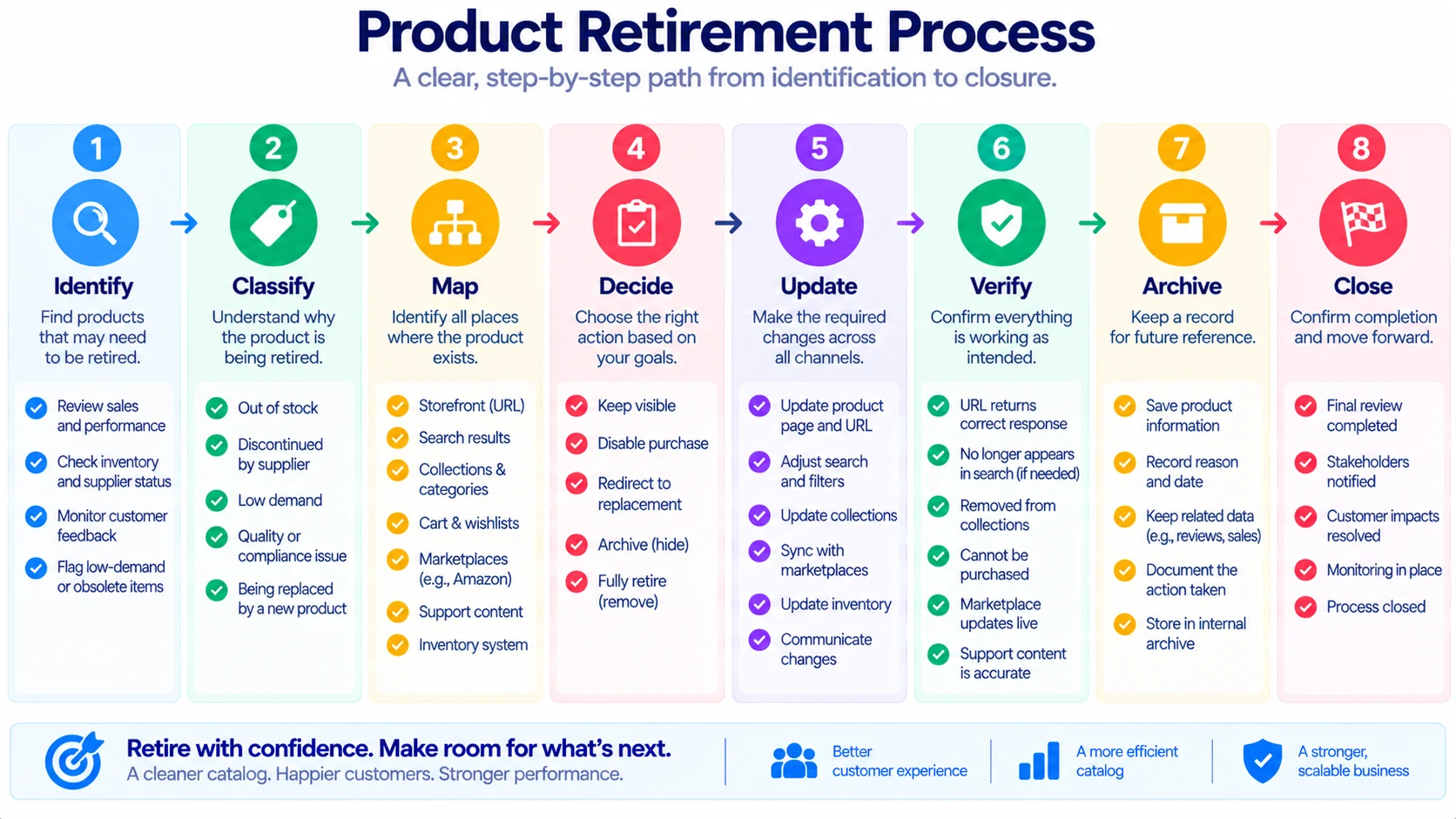
Identify
↓
Classify Exit
↓
Map Dependencies
↓
Choose Customer Outcome
↓
Handle Inventory
↓
Update Channels
↓
Preserve After-Sale Access
↓
Verify Customer Path
↓
Archive Evidence
↓
Close Exit
This is the central workflow of the article.
It gives a small ecommerce team a repeatable way to retire products without improvising every time.
A One-Page Product Exit Map Template
Product Exit Record
Product:
SKU:
Exit Type:
Product / Variant / Channel / Temporary
Reason for Exit:
Final Sellable Date:
Remaining Inventory:
Open Orders:
Returns / Warranty Obligations:
Customer Page Decision:
Keep / Disable Purchase / Redirect / Remove
Search Decision:
Keep / Hide / Remove
Replacement:
Marketplace Action:
Advertising Action:
Email Action:
Product Feed Action:
Support Action:
Historical Record:
Retain / Other
Owner:
Exit Risk Level:
1 / 2 / 3 / 4
Verification Date:
Old URL Tested:
Yes / No
Search Tested:
Yes / No
Cart Tested:
Yes / No
Marketplace Tested:
Yes / No / Not Applicable
Customer Path Verified:
Yes / No
Evidence Stored:
Yes / No
Final Status:
Open / Blocked / Ready / Complete
Example Product Exit Board
A small store can maintain a board like this:
| Product | Exit Reason | Customer Path | Inventory | External Channels | Support | Status |
|---|---|---|---|---|---|---|
| Arc Mini Black | Variant discontinued | Silver successor | 14 | Marketplace | Keep | In progress |
| Winter Mug | Seasonal end | Category | 0 | None | Keep briefly | Ready |
| Travel Case V1 | Replaced | V2 successor | 6 | Marketplace + ads | Keep | Blocked |
| Old Gift Box | Packaging change | New gift box | 0 | None | None | Complete |
This is enough visibility for a small team without requiring specialized product-lifecycle software.
What Freelancers and Small Agencies Can Learn
This process is not limited to physical ecommerce stores.
A freelancer managing a client ecommerce website may also encounter:
- discontinued product pages,
- outdated promotional landing pages,
- old product feeds,
- archived variants,
- marketplace listings,
- outdated product photography,
- stale campaign links.
The useful lesson is:
Do not treat product retirement as a single content-editing task.
If the freelancer is responsible for implementation, ask the client for the Product Exit Map before removing the product.
That protects both the store and the implementation workflow.
What Small Ecommerce Teams Should Do First
If the store has never formalized product retirement, do not start by documenting every product ever sold.
Start with the next three products scheduled for retirement.
For each one:
- Create the Product Exit Card.
- Identify inventory.
- Check open orders.
- Identify external channels.
- Decide the customer destination.
- Check marketing references.
- Preserve support information.
- Test the old customer path.
- Record the final state.
After doing this three times, the business will probably discover where its real friction exists.
That is more useful than building a giant process before testing it.
A Five-Minute Product Exit Check
Before marking an item complete, ask:
1. Can customers still accidentally buy it?
If yes, investigate.
2. What happens to an old product link?
Test it.
3. Is there a sensible replacement?
If yes, connect it.
4. Does another channel still sell it?
Check marketplaces and feeds.
5. Are existing customers still supported?
Confirm returns, warranties, and product information.
6. Is historical information preserved?
Make sure future support and reporting are possible.
7. Who verified the exit?
Record the owner and verification date.
If all seven answers are clear, the retirement is much less likely to create a hidden problem.
A Practical Product Exit Scenario
Imagine Mossline Home, a small furniture store.
The company is discontinuing a compact oak side table.
The owner initially plans to:
“Remove it from the website tonight.”
The Product Exit Map reveals:
- four units remain,
- two are reserved,
- one customer has an open return,
- the product appears in a Google Shopping feed,
- an old blog article recommends it,
- a Pinterest post still sends visitors,
- one marketplace listing remains active,
- the support team has installation instructions,
- and a newer side table is a reasonable successor.
The retirement plan changes.
Step 1
Complete the two reserved orders.
Step 2
Handle the return separately.
Step 3
Stop new advertising.
Step 4
Retire the marketplace listing.
Step 5
Update the product feed.
Step 6
Keep a useful product information page.
Step 7
Explain the replacement.
Step 8
Update the old blog article.
Step 9
Preserve installation instructions.
Step 10
Test the old URL.
The original task was:
“Delete product.”
The actual task was:
“Close the product’s operational lifecycle.”
That is the central distinction.
Build a Product Exit Evidence Trail
For products with meaningful commercial importance, save:
- Product Exit Card
- final inventory count
- screenshot of final product status
- marketplace confirmation
- campaign stop confirmation
- replacement decision
- customer-path test
- final owner approval
This creates evidence without requiring a formal compliance system.
It also helps if someone later asks:
“Why is this product no longer available?”
The business can answer from records rather than memory.
Use Real Screenshots Carefully
If this article is published with screenshots, the strongest visuals will be screenshots from an actual store workflow.
Useful screenshots include:
- product status before retirement,
- variant publishing/visibility settings,
- storefront discontinued message,
- replacement product link,
- marketplace retirement confirmation,
- final customer-path test.
Do not use generic screenshots from another store and present them as your own.
If the screenshot is from a platform such as Shopify, identify it honestly.
If you create a conceptual diagram, label it:
Illustrative workflow
That distinction strengthens trust.
What the Current Platform Landscape Suggests
Platform capabilities are becoming more granular.
Shopify’s May 2026 variant-level publishing release, for example, lets merchants control which variants are visible across sales channels while retaining the variant record.
Walmart’s current marketplace documentation also treats item retirement as a defined catalog operation rather than simply deleting a product from a seller’s internal records.
These platform changes reinforce an important operational idea:
Visibility, sellability, historical existence, and retirement are not necessarily the same thing.
A small store does not need to copy enterprise product-lifecycle systems.
But it can adopt the same useful distinction.
Product Exit Lessons Worth Keeping
After several product retirements, review the process.
Ask:
Which dependency was easiest to forget?
Maybe marketplaces.
Which action required the most manual work?
Maybe product feeds.
Which customer question appeared repeatedly?
Maybe replacement products.
Which system behaved differently than expected?
Maybe the cart or marketplace.
Which information did support need after retirement?
Maybe manuals or specifications.
Which step should become mandatory?
Turn the answer into a rule.
This turns product retirement into an operational learning process.
Create a Product Exit Rulebook
The store eventually needs only a few clear rules.
For example:
Rule 1: Never retire a product without checking open orders.
Rule 2: Never remove a high-traffic product without deciding where visitors should go.
Rule 3: Never delete historical product information needed for support.
Rule 4: Marketplace retirement must be separately verified.
Rule 5: A variant retirement must not accidentally retire the parent product.
Rule 6: Every high-risk product exit needs a second review.
These rules are more valuable than a 40-page product manual if they are actually followed.
Final Takeaway
A discontinued ecommerce product does not disappear the moment someone removes it from the storefront.
Its links, orders, inventory, variants, marketplace listings, advertisements, customer records, support obligations, historical data, and replacement expectations may continue to exist.
That is why a small ecommerce business should treat product retirement as a controlled exit rather than a deletion task.
The practical framework is:
Identify → Classify → Map Dependencies → Decide Customer Outcome → Handle Inventory → Update Channels → Preserve After-Sale Access → Verify → Archive
The most useful question is: “What still depends on this product after we stop selling it?”
If the answer is known, the business can make a deliberate decision for each dependency. If the answer is unknown, the product is probably not ready to retire.
A clean catalog is useful. A clean product exit is better.
Do not just remove the product. Close its lifecycle.
Related Ecommerce Guides
For the next steps in ecommerce operations, see our guides on promotion promise management, order hold processes, and product change freezes.
Frequently Asked Questions
What is an ecommerce product retirement process?
An ecommerce product retirement process is a structured way to stop selling a product or variant while managing its remaining inventory, customer links, orders, marketing, marketplaces, support obligations, and historical records.
What is a Product Exit Map?
A Product Exit Map records the important systems and customer paths connected to a product and defines what should happen to each one when the product is discontinued.
Should a discontinued product page be deleted?
Not always. Depending on traffic, customer support needs, historical value, and replacement availability, it may be better to keep an informational page, disable purchasing, redirect customers, or remove the page completely.
Should discontinued products remain in historical records?
In many businesses, yes. Historical product information can remain useful for reporting, customer support, returns, warranties, and accounting even after a product is no longer sold.
What is the difference between discontinued and out of stock?
Out of stock generally means the product is temporarily unavailable for purchase. Discontinued means the business does not intend to continue selling or replenishing it.
Should old product URLs be redirected?
Sometimes. The destination should match customer intent. A relevant successor or category can be useful, while an unrelated homepage redirect may provide little value.
What should happen to discontinued variants?
Retire the specific variant when appropriate while keeping the parent product and other active variants available. Check inventory, filters, feeds, marketplaces, and customer paths before making the change.
Should ecommerce stores delete old SKUs?
Not automatically. Historical SKUs may be important for reporting, support, accounting, and order records. A business should define its own SKU-retirement policy.
What should happen to marketplace listings when a product is discontinued?
Marketplace status should be checked separately. Removing a product from your own store does not necessarily retire its listing on another sales channel.
How should a small business test a product retirement?
Test the old URL, internal search, product recommendations, cart behavior, marketplace listing, replacement path, and support access where relevant.
How many products should a small store review first?
Start with the next few scheduled retirements rather than documenting the entire historical catalog. Testing the process on three real products can reveal where the store has operational gaps.
Is product retirement mainly an SEO task?
No. SEO can be one consideration, but retirement also involves inventory, customer service, marketplaces, orders, feeds, advertising, historical records, and product replacements.
What is the biggest product retirement mistake?
Treating retirement as a single delete action. The bigger risk is leaving behind conflicting or broken customer and operational connections.