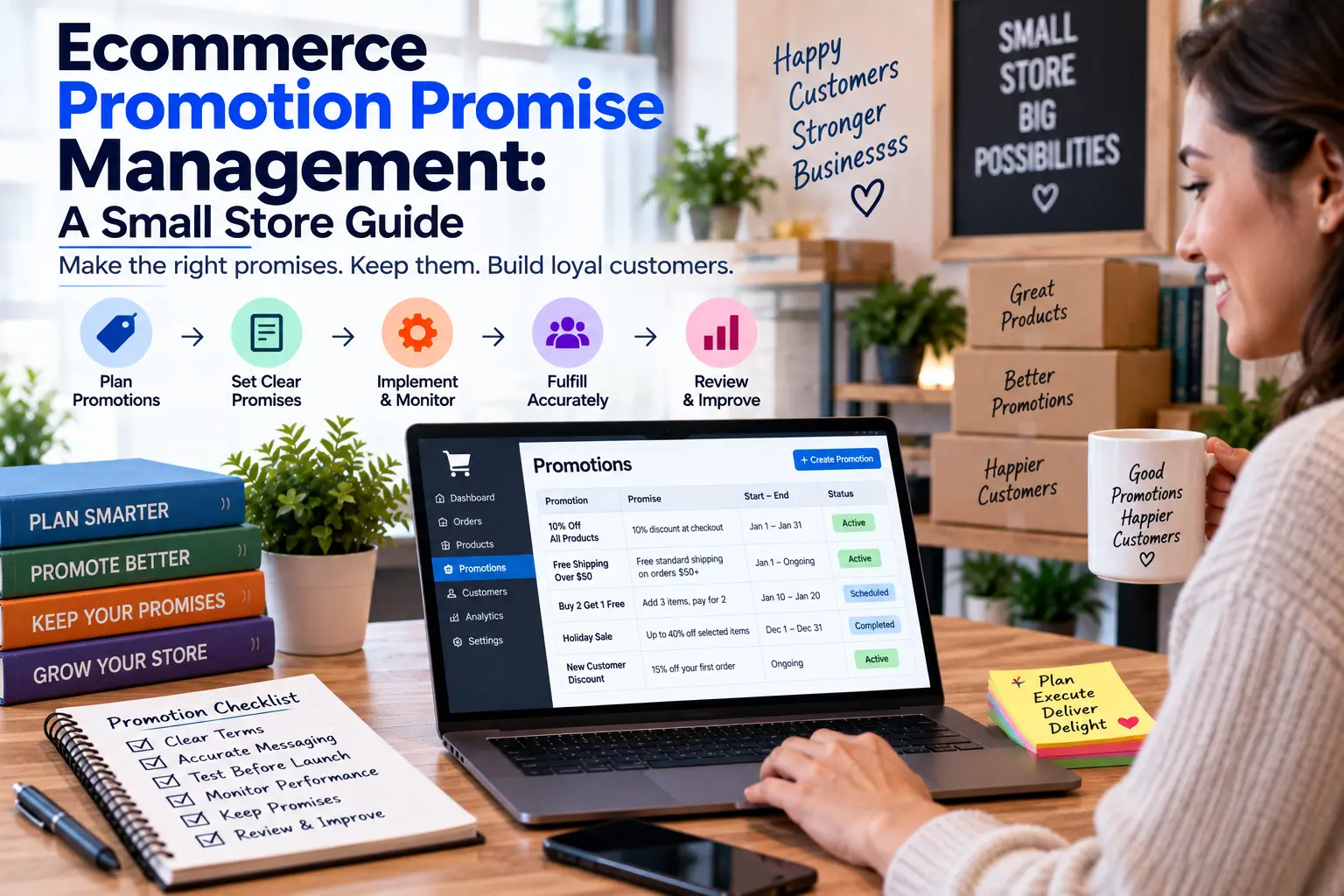
Ecommerce Promotion Promise Management: A Small Store Guide
- by Muhammad Raza
- 0 Comments
- 21 minutes read
- 87 Views
An ecommerce promotion promise management system helps small stores keep discounts, gifts, shipping terms, eligibility rules, and customer-facing campaign promises consistent across every channel.
A campaign may promise:
- 20% off selected products,
- free shipping above a certain amount,
- a gift with purchase,
- delivery before a specific date,
- a bundle price,
- bonus loyalty points,
- limited availability,
- a free sample,
- early access,
- or special support for qualifying orders.
Each promise may appear in several places.
The homepage says one thing.
The product page says another.
An email adds a condition.
A social post leaves that condition out.
The cart interprets the offer differently.
A marketplace listing still shows yesterday’s wording.
Customer support remembers an older version.
The problem is not simply that ecommerce promotions have many moving parts.
The deeper problem is that the business often manages campaign assets instead of managing the actual promises those assets make.
That distinction matters.
A banner is an asset.
“Free shipping over $75” is a promise.
A social image is an asset.
“Order by Friday for delivery before the event” is a promise.
A product badge is an asset.
“Free gift included” is a promise.
When the business tracks only banners, emails, and product pages, it can miss inconsistencies between the messages customers actually receive.
A better approach is to create a Promotion Promise Register.
It gives every important campaign promise:
Exact Meaning → Locations → Owner → Conditions → Verification → Retirement Decision
The goal is simple:
A customer should not receive a different deal depending on where they encounter the promotion.
What Is a Promotion Promise Register?
A Promotion Promise Register is a compact record of every customer-facing commitment created by a promotion.
It does not replace the campaign calendar.
It does not replace the discount setup.
It does not replace product data.
Instead, it answers:
What exactly are we promising the customer, where are we promising it, and how do we know every location still agrees?
Consider a fictional promotion:
Buy any two summer products and receive free standard shipping plus a complimentary travel pouch through Sunday.
That one sentence contains several promises:
Promise 1
Two qualifying products unlock the offer.
Promise 2
The shipping benefit is free.
Promise 3
Only standard shipping is included.
Promise 4
A travel pouch is included.
Promise 5
The promotion ends Sunday.
Promise 6
Some products may qualify while others may not.
Now imagine the campaign appears across:
- homepage hero,
- collection page,
- product pages,
- promotional email,
- social posts,
- paid advertising,
- cart,
- checkout,
- FAQ,
- customer-support scripts.
A campaign manager might say:
“Everything is live.”
But that does not answer whether all ten locations communicate the same promise.
The Promotion Promise Register does.
Start With the Promise, Not the Channel
A common ecommerce workflow begins like this:
Website banner
Instagram post
Google ad
Product page
SMS
That organizes the campaign by publishing location.
The Promotion Promise Register reverses the structure.
Start with:
What is the customer being told?
Then map everywhere that statement appears.
For example:
Promise
Free shipping on orders above $75.
Appears In
- homepage banner,
- shipping bar,
- campaign email,
- collection page,
- cart message,
- FAQ.
Now the business can verify one promise across six places.
That is easier than reviewing six unrelated assets and hoping they mean the same thing.
Build the Promise Stack
Most campaigns contain more than one promise.
Use a Promise Stack.
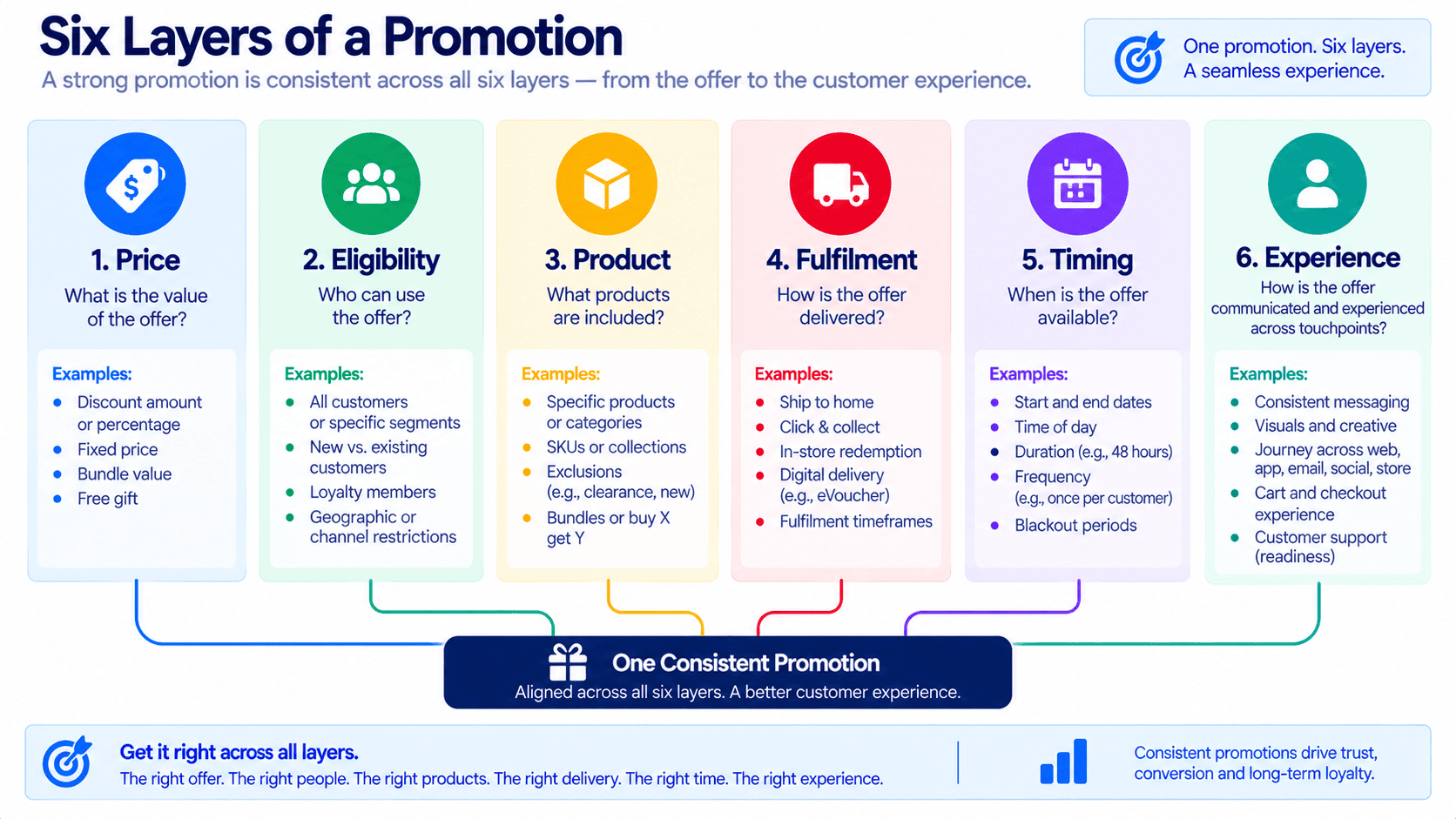
Divide campaign commitments into six layers.
Layer 1 — Price Promise
What will the customer pay?
Examples:
- 15% off,
- $10 off,
- bundle price,
- buy one get one,
- fixed promotional price.
Layer 2 — Eligibility Promise
Who or what qualifies?
Examples:
- selected products,
- orders above a threshold,
- first-time customers,
- loyalty members,
- specific regions,
- one use per customer.
Layer 3 — Product Promise
What exactly is included?
Examples:
- gift,
- bonus item,
- sample,
- bundle contents,
- special packaging.
Layer 4 — Fulfilment Promise
What happens after purchase?
Examples:
- free shipping,
- express dispatch,
- local pickup,
- delivery window,
- preorder timing.
Layer 5 — Timing Promise
When does the offer begin or end?
Examples:
- ends Sunday,
- while stocks last,
- first 100 orders,
- midnight cutoff,
- preorder closes Friday.
Layer 6 — Experience Promise
What extra treatment does the customer receive?
Examples:
- gift wrapping,
- priority processing,
- bonus points,
- exclusive access,
- extended return window.
A campaign does not need all six layers.
But separating them reveals complexity that a headline can hide.
Create a Promise Card
Every important campaign promise receives a Promise Card.
Use fields such as:
| Field | What to Record |
|---|---|
| Promise | Exact customer-facing commitment |
| Promise type | Price, eligibility, product, fulfilment, timing, experience |
| Applies to | Products, collections, customers, regions, channels |
| Starts | Activation date and time |
| Ends | Planned end date and time |
| Conditions | Restrictions or requirements |
| Source owner | Person who defines the promise |
| Execution owner | Person who implements it |
| Customer locations | Everywhere the promise appears |
| Verification method | How the business proves it works |
| Exception | Known differences by channel or region |
| Retirement action | What changes when the campaign ends |
| Last verified | Most recent check |
The distinction between source owner and execution owner is useful.
One person may decide:
“Free shipping above $75.”
Another person may configure that rule in the store.
Another person may publish the email.
The promise still needs one authoritative meaning.
Create a Single Promise Sentence
Promotional wording becomes harder to control when every person describes the offer differently.
Create one internal Promise Sentence before publishing.
For example:
“Customers receive free standard domestic shipping when the qualifying merchandise subtotal reaches $75 before tax, through 11:59 PM Sunday.”
That sentence may not appear exactly as written on the homepage.
A banner could simply say:
Free Shipping Over $75
But internally, the business now knows what that shorter statement means.
Every channel should remain compatible with the Promise Sentence.
Use this rule:
Shorter wording may remove detail. It must not change meaning.
Use the Meaning Match Test
Two pieces of promotional copy do not need identical words.
They do need compatible meaning.
Imagine:
Homepage
Free Shipping Over $75
Spend $75 and get free delivery.
Checkout
Standard shipping discounted to $0 for eligible domestic orders above $75.
These may be consistent.
Now consider:
Social Post
Free Shipping This Weekend
That may not be consistent.
It suggests no spending threshold.
The problem is not wording variation.
It is a Meaning Mismatch.
Use the Meaning Match Test:
- Does the same customer qualify?
- Is the same purchase required?
- Is the same benefit provided?
- Does the same time window apply?
- Are important restrictions preserved?
- Would a reasonable shopper expect the same result?
If one answer is no, the promise needs review.
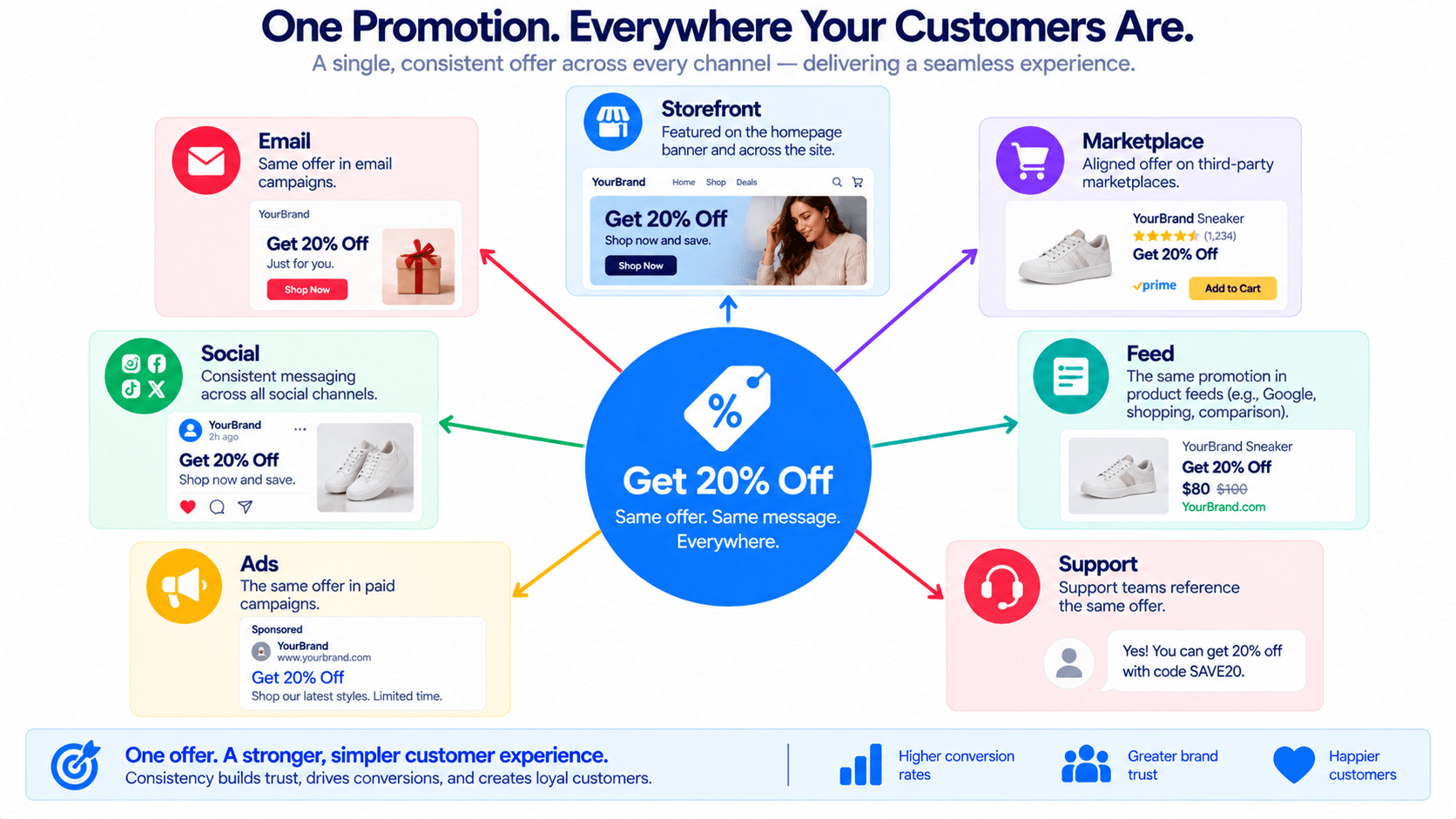
Build a Promise Location Map
After defining each promise, map where customers can encounter it.
Possible locations include:
Storefront
- homepage,
- announcement bar,
- navigation,
- collection page,
- product page,
- recommendation widget,
- search results,
- popup.
Transaction Path
- cart,
- mini-cart,
- checkout,
- shipping selector,
- discount field,
- order confirmation.
Marketing
- email,
- SMS,
- paid advertising,
- social posts,
- affiliate material,
- influencer briefs,
- push notifications.
External Commerce
- marketplaces,
- shopping feeds,
- social-commerce shops,
- comparison engines.
Customer Support
- live chat,
- support macros,
- phone scripts,
- FAQ,
- help center.
A promise should not be considered “live” merely because the homepage is correct.
It is live wherever the customer can reasonably rely on it.
Use the Promise Footprint
The number of places a promise appears creates its Promise Footprint.
A promise appearing in two locations has a small footprint.
A promise appearing across:
- website,
- five emails,
- four social channels,
- product feed,
- paid ads,
- marketplace,
- support center,
has a large footprint.
The larger the footprint, the more difficult the promise is to change safely.
Give promises a simple footprint rating.
Footprint 1 — Local
One or two controlled locations.
Footprint 2 — Storewide
Several locations inside the ecommerce store.
Footprint 3 — Multichannel
Store plus external marketing.
Footprint 4 — Distributed
Store, marketing, feeds, partners, marketplaces, and support systems.
A high-footprint promise deserves stronger verification.
Separate Promise Creation From Promise Distribution
This is one of the most important operating rules.
The person creating a campaign message should not silently redefine the offer.
Suppose the approved promise is:
Free gift on orders containing at least one item from the Autumn Collection.
A social-media manager may simplify it to:
Free gift with every order.
That is no longer simplification.
It is a different promotion.
Use:
Promise Defined → Message Adapted → Meaning Checked → Published
This keeps creative flexibility without allowing campaign terms to change accidentally.
Create an Offer Source of Truth
Each promotion should have one location containing the approved promise set.
Call this the Offer Source of Truth.
It might be:
- one spreadsheet,
- one campaign document,
- one project record,
- one database entry.
It should include:
Campaign name
Approved Promise Sentence
Qualifying products
Excluded products
Discount or benefit
Threshold
Start
End
Region
Stock condition
Shipping condition
Code
Stacking rule
Gift condition
Customer restrictions
Retirement action
Do not force employees to reconstruct the promotion from a mixture of emails, Slack messages, product pages, and memory.
The “Which Version Wins?” Rule
Conflicting information eventually appears.
When it does, employees need an answer to:
Which version wins?
The answer should not be:
“Whichever was updated most recently.”
Recency does not guarantee authority.
Instead define a hierarchy.
For example:
Approved Offer Record
↓
Store Configuration
↓
Customer-Facing Assets
↓
Internal Notes
If an email conflicts with the approved Offer Record, the email is wrong.
If a support script conflicts with the approved Offer Record, the script is wrong.
This prevents employees from treating a visible mistake as the new policy.
Build the Promise Activation Check
Before campaign launch, verify each promise from a customer’s point of view.
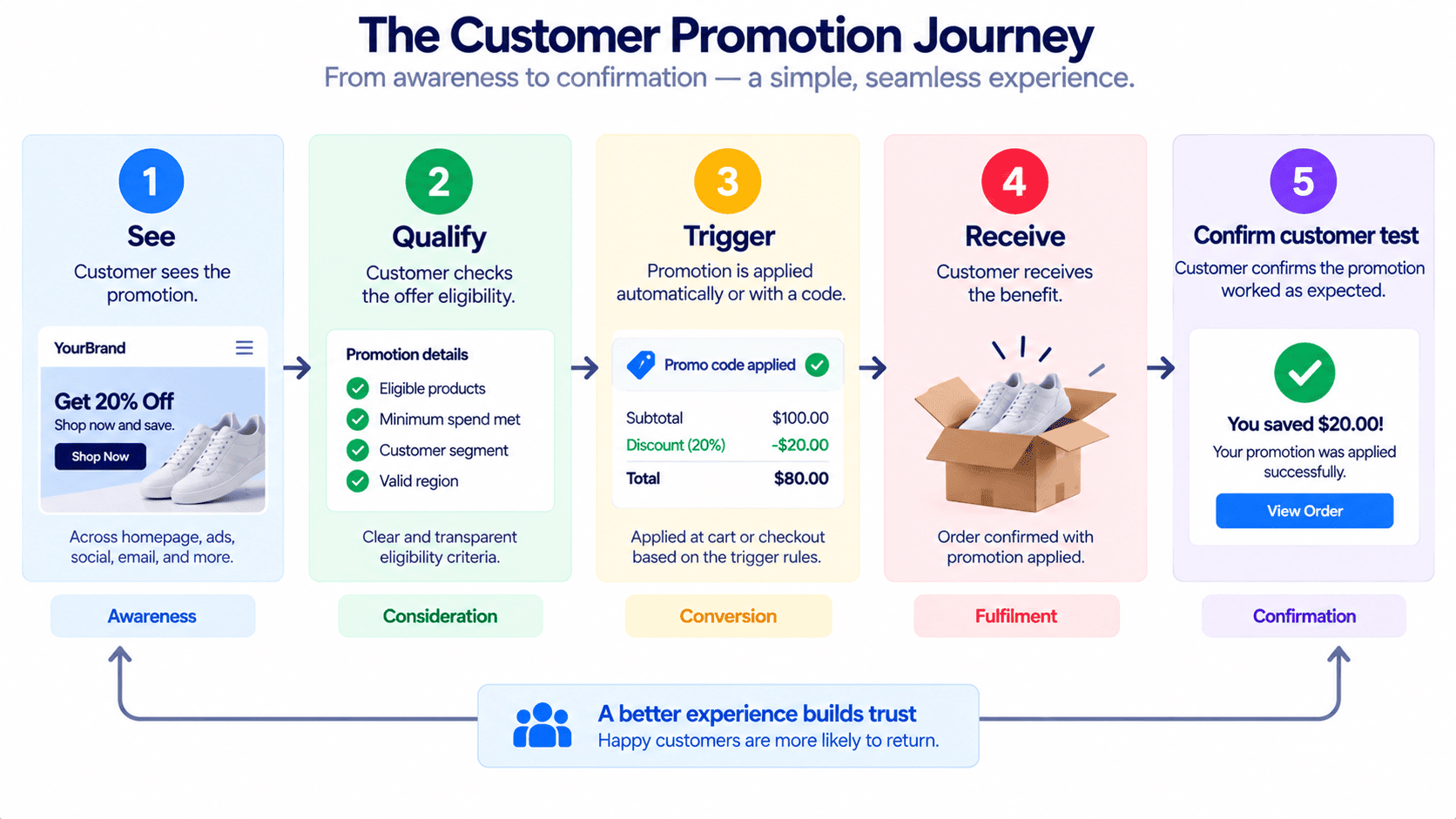
For every important promise:
Step 1 — Locate It
Where does the customer see the promise?
Step 2 — Qualify
Can an eligible customer actually receive it?
Step 3 — Fail It
What happens when the customer does not qualify?
Step 4 — Confirm It
Does the cart or checkout behave correctly?
Step 5 — Verify the Result
Does the order confirmation reflect the expected result?
This creates a useful sequence:
See → Qualify → Trigger → Receive → Confirm
Current ecommerce sale-readiness guidance similarly recommends testing the customer journey rather than checking only promotional creative, because discount, shipping, checkout, order, and confirmation behavior can diverge.
Test the Non-Qualifying Customer
Campaign teams naturally test the customer who should receive the offer.
Also test the person who should not receive it.
For example:
Promotion:
Free shipping above $75.
Test:
Cart A
$80 qualifying subtotal.
Expected:
Free shipping.
Cart B
$70 subtotal.
Expected:
Normal shipping.
Cart C
$80 total including a nonqualifying gift card.
Expected:
Whatever the approved conditions specify.
Cart D
Eligible subtotal, but customer is outside the supported region.
Expected:
Normal international shipping.
The non-qualifying path often reveals unclear wording.
If the customer sees a promise but cannot understand why it did not apply, the campaign may create support work even when the system is technically correct.
Create a Promise Exception Table
Not every channel can always support the same promotion.
That does not automatically make the campaign wrong.
But differences must be explicit.
Use:
| Channel | Promise Difference | Reason | Customer Message | Owner |
|---|---|---|---|---|
| Website | Full offer | Primary store | Standard wording | Ecommerce |
| Marketplace | Gift unavailable | Platform limitation | Gift excluded | Marketplace lead |
| International | Free shipping unavailable | Shipping cost | Domestic only | Operations |
| Wholesale | Promotion excluded | Contract pricing | Not eligible | Sales |
This creates a legitimate Promise Exception rather than accidental inconsistency.
The important rule is:
Different may be acceptable. Hidden difference is dangerous.
Distinguish an Exception From an Error
An Exception is intentional and documented.
An Error is unintended.
Example:
Exception
Marketplace orders do not receive the free gift because marketplace fulfilment cannot support it.
The customer-facing listing clearly says so.
Error
Marketplace creative still says:
Free Gift With Every Order
but marketplace orders never receive the gift.
The operational difference is the same.
The communication difference changes the customer experience completely.
Create a Promise Owner
Every campaign needs one person who can answer:
What is the actual offer?
That person is the Promise Owner.
They do not need to:
- design the graphics,
- write every email,
- configure every discount,
- or manage every channel.
They do need to own the approved meaning.
When someone asks:
“Does this product qualify?”
or:
“Does free shipping include express delivery?”
or:
“Does the gift apply to marketplace orders?”
there should be one reliable answer.
Do Not Let Promo Codes Define the Offer
A coupon code is an implementation mechanism.
It is not the promotion itself.
Suppose the code is:
SUMMER20
That does not tell the team:
- which products qualify,
- whether sale items are excluded,
- whether it stacks,
- what happens to bundles,
- which regions qualify,
- when it expires,
- whether the discount has a maximum,
- or what happens if a customer has multiple eligible items.
The Promotion Promise Register should describe the customer commitment independently of the mechanism used to enforce it.
Track Promise Dependencies
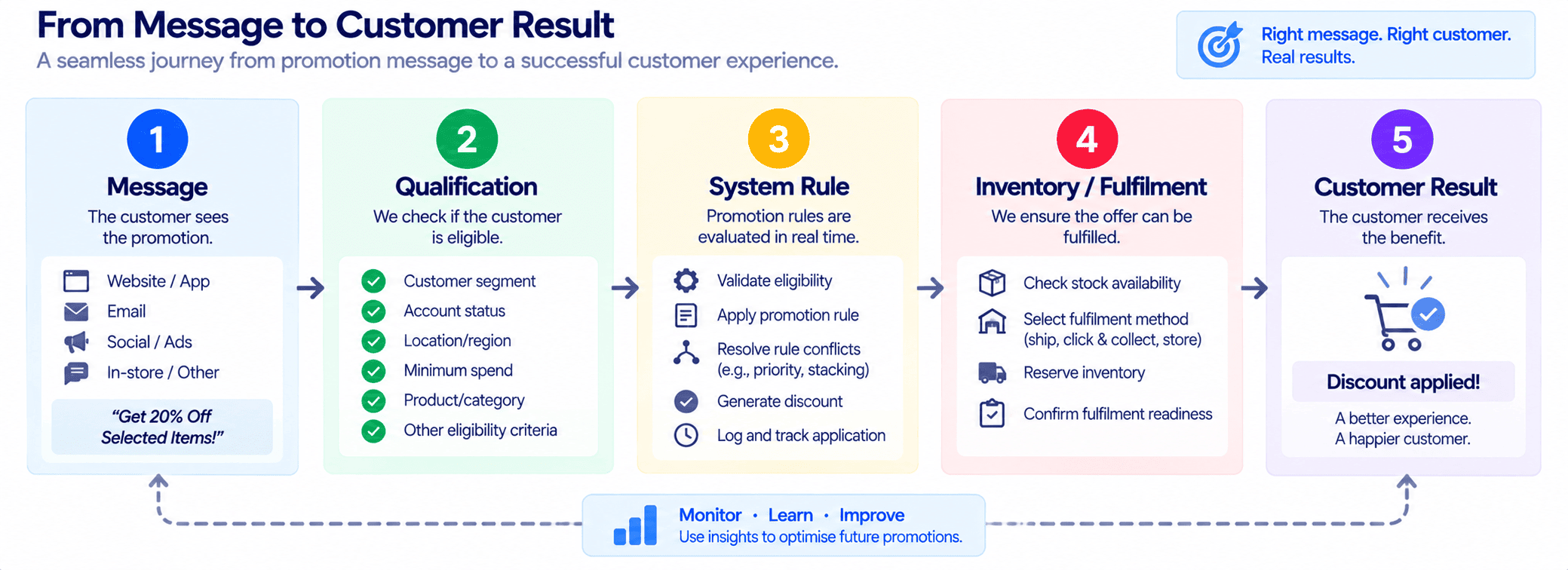
Many ecommerce promises depend on multiple systems.
Example:
Free Gift With Purchase
may depend on:
Promotion eligibility
↓
Gift inventory
↓
Cart rule
↓
Warehouse pick instruction
↓
Packing confirmation
↓
Customer support policy
The website can display the promise perfectly while fulfilment fails to deliver it.
This is why the promise needs a Dependency Chain.
For every high-impact promise, ask:
“What must remain true for us to keep this promise?”
Possible dependencies include:
- inventory,
- pricing,
- discount engine,
- shipping method,
- warehouse instruction,
- payment method,
- customer location,
- product eligibility,
- marketplace capability,
- email automation,
- fulfilment cutoffs.
Use the “Can We Still Keep It?” Check
Promotional circumstances can change after launch.
A free gift begins running out.
Shipping becomes delayed.
A product is removed from sale.
A discount configuration fails.
A supplier misses a delivery.
The business should not ask only:
“Is the campaign still running?”
Ask:
“Can we still keep every promise currently being advertised?”
This is the Can We Still Keep It? Check.
Review:
Availability
Can we supply the promised product or gift?
Price
Can the checkout produce the advertised price?
Shipping
Can the advertised fulfilment promise still be met?
Timing
Are the campaign dates still accurate?
Channel
Are external listings still synchronized?
Support
Does the team know what to tell customers when something changes?
Create a Promise Risk Ladder
Not every promise deserves the same level of attention.
Use four levels.
Level 1 — Informational
Low consequence if wording is imperfect.
Example:
“New season collection.”
Level 2 — Expectation
Creates a meaningful customer expectation.
Example:
“Limited quantities available.”
Level 3 — Transactional
Affects what the customer pays or receives.
Example:
“15% off.”
“Free gift.”
“Free shipping.”
Level 4 — Commitment
Failure may create significant customer disappointment, cost, disputes, or operational problems.
Example:
“Guaranteed delivery before December 24.”
A Level 4 promise deserves more verification than a decorative campaign message.
Use a Customer Consequence Score
Also ask what happens if the promise fails.
Score from 1 to 4.
1 — Mild Confusion
Customer sees inconsistent wording but receives the expected transaction.
2 — Support Contact
Customer needs clarification or assistance.
3 — Financial Difference
Customer pays more, receives less, or misses a benefit.
4 — Trust Failure
The customer reasonably believes the business failed a meaningful commitment.
Combine:
Promise Risk + Customer Consequence
This helps determine what should be checked first.
Build a Live Promise Watch
During a major promotion, do not monitor only:
- traffic,
- revenue,
- conversion,
- orders.
Also monitor the promises most likely to break.
A Live Promise Watch might contain:
| Promise | Current State | Dependency | Risk | Owner | Last Check |
|---|---|---|---|---|---|
| Free gift | Healthy | Gift stock | 3 | Fulfilment | 14:00 |
| Free shipping | Healthy | Shipping rule | 3 | Ecommerce | 14:15 |
| Delivery cutoff | Watch | Carrier capacity | 4 | Operations | 13:30 |
| 20% discount | Healthy | Discount rule | 3 | Ecommerce | 14:10 |
This does not need real-time monitoring for every campaign.
Use it when the promotion is significant enough that a failed promise could create substantial support or customer problems.
Watch the Promise With the Weakest Dependency
A promotion can contain five promises.
Four may be easy to maintain.
One may depend on something unstable.
For example:
- 20% discount — stable
- email offer — stable
- campaign deadline — stable
- free shipping — stable
- free gift — inventory running low
The promotion’s practical risk is now driven by the gift.
Use the Weakest Promise Rule:
The campaign is only as reliable as the important promise most likely to fail.
This focuses attention where it matters.
Create a Promise Change Protocol
Sometimes a promotion must change while live.
Do not silently edit one channel.
Use:
Change Requested
↓
Promise Owner Reviews
↓
Affected Locations Identified
↓
Dependencies Rechecked
↓
New Promise Approved
↓
All Locations Updated
↓
Customer Path Tested
↓
Old Promise Retired
The biggest mistake is updating only the visible storefront.
A promise may still survive in:
- scheduled email,
- paid ad,
- social post,
- affiliate page,
- support macro,
- marketplace listing.
Use a Promise Change Stamp
Every meaningful live change should receive:
Changed: date/time
Changed by: owner
Old promise: previous meaning
New promise: updated meaning
Reason: why it changed
Affected locations: where updates are required
Verified: who checked completion
This gives the campaign a small but useful history.
It also prevents employees from debating which version was correct at a particular time.
Separate Correction From Compensation
If a promotional promise fails, two different questions arise.
Question 1
How do we correct the campaign?
Question 2
What should we do for customers already affected?
Those are not the same decision.
Example:
A free-gift rule stopped working for two hours.
Correcting the campaign means restoring or changing the offer.
Handling affected customers might mean:
- sending the gift,
- refunding an amount,
- offering another benefit,
- or following the business’s customer-service policy.
The Promise Register should record the operational correction.
Customer remediation should follow the business’s approved service policy.
Build a Promise Retirement Plan Before Launch
Most teams think carefully about activating a promotion.
Far fewer think about retiring it.
Before launch, record what happens to each promise afterward.
For example:
| Promise | End Action |
|---|---|
| 20% discount | Restore regular price |
| Free shipping | Disable promotional shipping rule |
| Free gift | Remove gift message and rule |
| Sale banner | Replace with standard homepage |
| Promo code | Disable |
| Paid ad | Pause |
| Support macro | Archive |
| Shipping cutoff message | Remove |
| Marketplace message | Revert |
| Campaign FAQ | Unpublish or update |
This is the Promise Retirement Plan.
Promotion cleanup guidance commonly emphasizes restoring prices and checking external feeds or merchandising after a sale; the Promise Register expands that idea from pricing alone to every customer commitment created by the campaign.
Use the Last Promise Standing Test
After the campaign closes, ask:
“Where could a customer still discover this offer?”
Search:
- homepage,
- collection pages,
- product pages,
- search,
- cart,
- FAQ,
- old campaign URLs,
- social bios,
- pinned posts,
- scheduled emails,
- ads,
- marketplace listings,
- feeds,
- support responses.
The last remaining promotion message is the Last Promise Standing.
Do not consider a campaign fully closed until unintended old promises are removed or intentionally retained.
Distinguish Expired From Evergreen
Some campaign promises should disappear.
Others may deserve to remain.
Example:
Expired
“Free shipping this weekend.”
Remove it.
Potentially Evergreen
“Orders over $75 receive free standard shipping.”
If the business decides to keep this policy, convert it from campaign promise to standard store policy.
Do not leave it in a promotional state indefinitely.
Use:
Retire → Extend → Convert to Standard
That creates a deliberate outcome.
Add a Promise Aftercare Window
A campaign can technically end while customer consequences continue.
Orders may still be:
- awaiting fulfilment,
- carrying promotional gifts,
- using special packaging,
- subject to special returns,
- waiting for delayed stock,
- affected by shipping commitments.
Create a short Promise Aftercare Window.
During this period, monitor promises attached to orders already placed.
For example:
Promotion ends Sunday.
Aftercare continues until Friday.
The storefront promotion is closed.
But fulfilment still checks:
- gifts,
- promised shipping,
- campaign bundles,
- special instructions.
This avoids treating the campaign as finished before its customer obligations are finished.
Create a Campaign Promise Archive
After closure, preserve the final approved record.
The archive should include:
- final promise set,
- actual dates,
- qualifying products,
- major changes,
- exceptions,
- customer-facing terms,
- retirement status,
- unresolved issues.
Why keep it?
Because months later, a customer may ask:
“What were the terms of your August promotion?”
The answer should not depend on someone remembering an old social post.
Example: The Missing Gift Problem
Imagine a fictional ecommerce brand called Oak & Vale.
It launches:
Spend $100 and receive a free travel pouch while supplies last.
The campaign appears on:
- homepage,
- collection page,
- email,
- social media,
- product pages,
- cart.
The store initially has 600 pouches.
During the promotion, gift inventory falls rapidly.
Without a Promise Register, the team might discover the problem only when customers complain.
With the system, the Promise Card contains:
Promise: Free travel pouch
Eligibility: $100 merchandise subtotal
Condition: While supplies last
Dependency: Gift inventory
Risk: 3
Owner: Fulfilment
Watch point: 100 pouches remaining
Change action: Review whether campaign wording should change
At 100 remaining units, the owner checks campaign demand.
The team does not automatically cancel the offer.
It makes a deliberate decision while there is still time.
The value is not the spreadsheet.
The value is the decision point attached to the promise.
Example: The Shipping Message Mismatch
Imagine Northshore Goods advertises:
Free Shipping Over $60
The website correctly limits that offer to domestic standard shipping.
But a social post simply says:
Free Worldwide Shipping This Weekend
The checkout is technically working as configured.
The marketing message is wrong.
The Promise Register exposes this quickly because the approved Promise Sentence says:
“Free standard domestic shipping on qualifying orders above $60.”
The social message fails the Meaning Match Test.
This is an important distinction:
A technically correct checkout cannot repair a misleading promotional message.
Example: The Campaign That Ended Everywhere Except One Place
Imagine Mossline Home completes a three-day sale.
The team:
- restores prices,
- removes the homepage banner,
- disables the code,
- stops the email campaign.
A week later, customers continue asking for the discount.
Why?
A pinned social post still advertises it.
The promotion ended operationally.
The promise remained publicly visible.
A Last Promise Standing Test would have caught it.
What Small Ecommerce Teams Should Track
A very small store does not need a complex campaign system.
Start with six columns:
| Promise | Where It Appears | Condition | Owner | Verified | End Action |
|---|
For example:
| Promise | Locations | Condition | Owner | Verified | End Action |
|---|---|---|---|---|---|
| 15% off | Website, email, social | Selected products | Store owner | Yes | Disable |
| Free shipping | Header, cart, email | $75 domestic | Operations | Yes | Restore normal rule |
| Free gift | PDP, cart | While stock lasts | Fulfilment | Yes | Remove |
| Ends Sunday | All campaign assets | 23:59 local time | Marketing | Yes | Remove |
That may be enough.
What Larger Small Businesses Can Add
Teams with more channels can add:
- footprint score,
- risk level,
- customer consequence,
- dependency,
- source owner,
- execution owner,
- exception,
- change history,
- aftercare status,
- retirement verification.
The system should grow with campaign complexity.
Do not add fields simply because they sound professional.
Add them because someone uses them to make a decision.
A Five-Minute Daily Promise Check
During an important campaign, review:
1. What are we promising today?
Confirm the current approved promise set.
2. Can we still deliver each important promise?
Check dependencies.
3. Did any channel change?
Review new assets or updates.
4. Did customer support report confusion?
Look for wording problems.
5. Is any promise approaching a failure point?
Check stock, shipping, timing, or technical dependencies.
6. Does anything need to change today?
If yes, use the Promise Change Protocol.
This is far more focused than reviewing the entire store.
Common Mistakes to Avoid
1. Managing creative instead of promises
A banner checklist does not guarantee campaign meaning is consistent.
2. Letting each channel describe the offer independently
Creative variation is useful. Offer variation is not.
3. Forgetting non-qualifying customers
A good promotion explains not only who receives the benefit but also prevents misleading expectations for those who do not.
4. Treating the discount code as the promotion
A code cannot explain the full customer commitment.
5. Ignoring fulfilment dependencies
A website promise may rely on inventory, warehouse instructions, or shipping capacity.
6. Updating only the website
External ads, emails, social posts, marketplaces, and support material may preserve the old promise.
7. Having no promise owner
If nobody owns the meaning, different teams can create different interpretations.
8. Waiting for complaints to reveal inconsistency
Use deliberate verification before confusion becomes visible through support.
9. Ending the campaign before its obligations end
Orders already placed may still carry promotional commitments.
10. Archiving no final record
Future disputes are harder to resolve when nobody can reconstruct the original offer.
One-Page Promotion Promise Register Template
Campaign
Campaign Name:
Campaign Owner:
Start:
End:
Promise
Approved Promise Sentence:
Promise Type:
Price / Eligibility / Product / Fulfilment / Timing / Experience
Applies To:
Excluded From:
Conditions:
Promise Owner:
Execution Owner:
Promise Footprint:
1 / 2 / 3 / 4
Risk Level:
1 / 2 / 3 / 4
Customer Consequence:
1 / 2 / 3 / 4
Locations
Homepage:
Collection Pages:
Product Pages:
Cart:
Checkout:
Email:
Social:
Ads:
Marketplace:
Support:
Other:
Dependency
What must remain true for this promise to work?
Failure warning point:
Current state:
Healthy / Watch / At Risk / Failed
Verification
Eligible path tested:
Non-eligible path tested:
Customer result verified:
Last verified:
Retirement
End Action:
Remove / Revert / Disable / Extend / Convert to Standard
Aftercare needed:
Yes / No
Retirement verified:
Archive location:
When to Update the Promise Register
Update it whenever:
- campaign terms change,
- a product becomes unavailable,
- gift inventory falls,
- a shipping promise changes,
- a new channel is added,
- a promotion is extended,
- a discount is modified,
- an eligibility rule changes,
- a marketplace cannot support the full offer,
- customer support identifies confusion,
- a live asset is corrected,
- or the campaign enters its retirement phase.
The register should represent the promise the customer can rely on right now.
A Better Way to Manage Ecommerce Promotions
A campaign team can ask:
“Are all our assets published?”
A stronger team asks:
“Are all our promises still true?”
That shift changes promotion management.
It puts customer meaning ahead of asset completion.
A useful promotion system therefore tracks:
Promise
↓
Meaning
↓
Locations
↓
Conditions
↓
Dependencies
↓
Verification
↓
Change
↓
Retirement
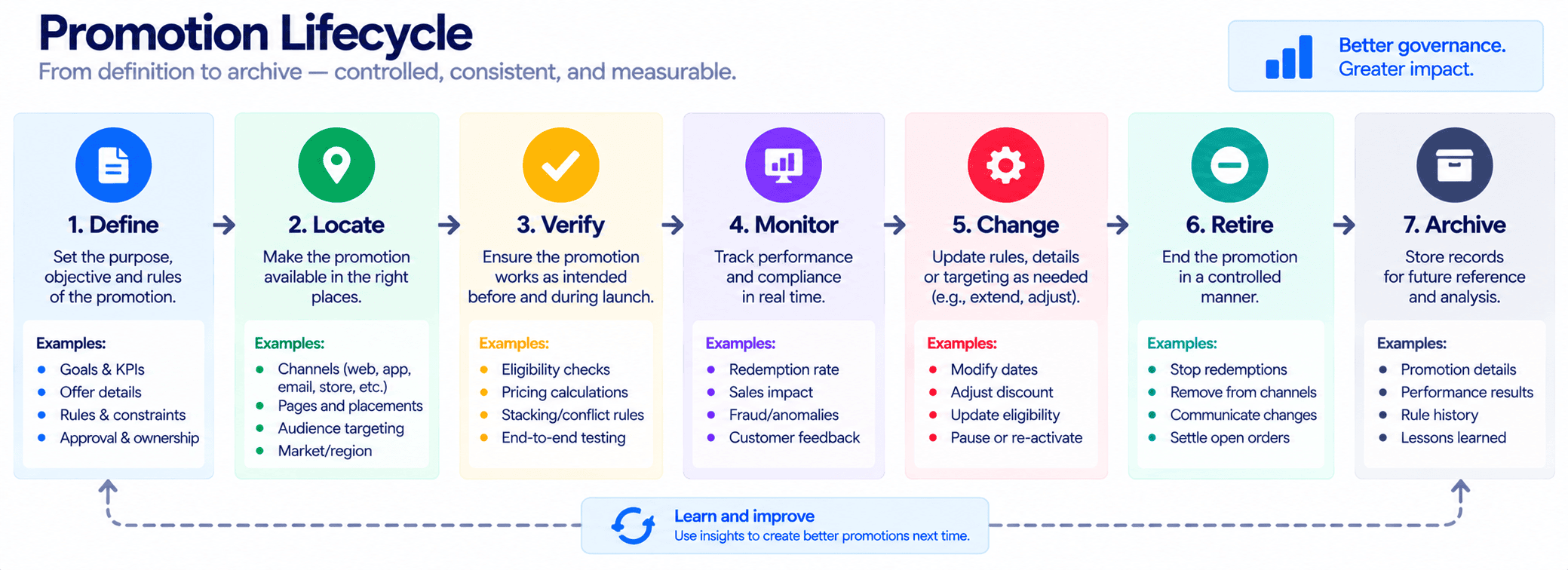
This does not require enterprise campaign software.
A small ecommerce business can run the system in a spreadsheet.
The important thing is that every significant campaign commitment has one approved meaning and one deliberate ending.
Related Ecommerce Guides
If you are building a broader ecommerce operating process, continue with our guides on product change freezes, order hold rules, and product retirement processes.
Frequently Asked Questions
What is ecommerce promotion promise management?
Ecommerce promotion promise management is the process of defining customer-facing campaign commitments, tracking where they appear, verifying that systems deliver them correctly, and retiring them when the promotion ends.
What is a Promotion Promise Register?
A Promotion Promise Register is a record of promotional commitments such as discounts, gifts, shipping benefits, timing, eligibility, and special services, together with their locations, owners, conditions, dependencies, and end actions.
Why not use a normal campaign checklist?
A normal checklist often tracks assets and tasks. A Promise Register tracks the meaning customers receive across those assets.
Which ecommerce promises should be recorded?
Prioritize promises affecting price, eligibility, products received, shipping, delivery timing, gifts, special services, or other commitments that can influence a customer’s purchase decision.
Should promotional wording be identical everywhere?
No. Wording can be adapted to fit different channels, but the underlying meaning should remain consistent.
What is a Promise Footprint?
A Promise Footprint describes how widely a campaign promise is distributed. A promise appearing across the store, ads, email, marketplaces, and support systems has a larger footprint and requires more careful change management.
What should happen if one channel cannot support the full promotion?
Document the difference as an explicit Promise Exception and communicate it clearly to customers on that channel.
How should a small ecommerce business test a promotion?
Test both qualifying and non-qualifying customer paths. Verify what customers see, whether they qualify, what the cart or checkout does, and what the final order confirms.
What is a Promise Aftercare Window?
It is a short period after the public campaign ends during which the business continues monitoring commitments attached to orders already placed, such as gifts, delivery promises, or special fulfilment instructions.
What is the biggest mistake with ecommerce promotion promises?
Allowing different teams or channels to create their own interpretation of the offer without one approved source of truth.
Final Takeaway
Promotions are often managed as collections of banners, emails, discounts, ads, product updates, and social posts.
Customers do not experience those as separate campaign assets. They experience promises.
That is why a small ecommerce business should manage the promise itself.
The practical framework is:
Define → Locate → Verify → Monitor → Change → Retire
And for every important commitment:
Promise → Conditions → Locations → Dependencies → Owner → Customer Result
A campaign is controlled when the business knows what it promised, where it promised it, whether it can still deliver it, and when that promise should disappear.