How to Automate Your Business With AI in 2026: A Complete Beginner’s Guide
- by Muhammad Raza
- 0 Comments
- 14 minutes read
- 47 Views
AI automation becomes useful when it removes a real bottleneck, not when a business simply finds a task that can be automated. The better starting point is to look at where work repeatedly gets delayed, copied between systems, or handed from one person to another.
For example, a small agency may not need to automate every email. It may get more value from automatically classifying new enquiries, flagging incomplete information, and routing the right requests to the right person.
This guide focuses on those practical decisions: what to automate first, where human review should remain, how to test an automation safely, and how to tell when a workflow is creating more complexity than it removes.
The Basic Structure of an AI Automation Workflow
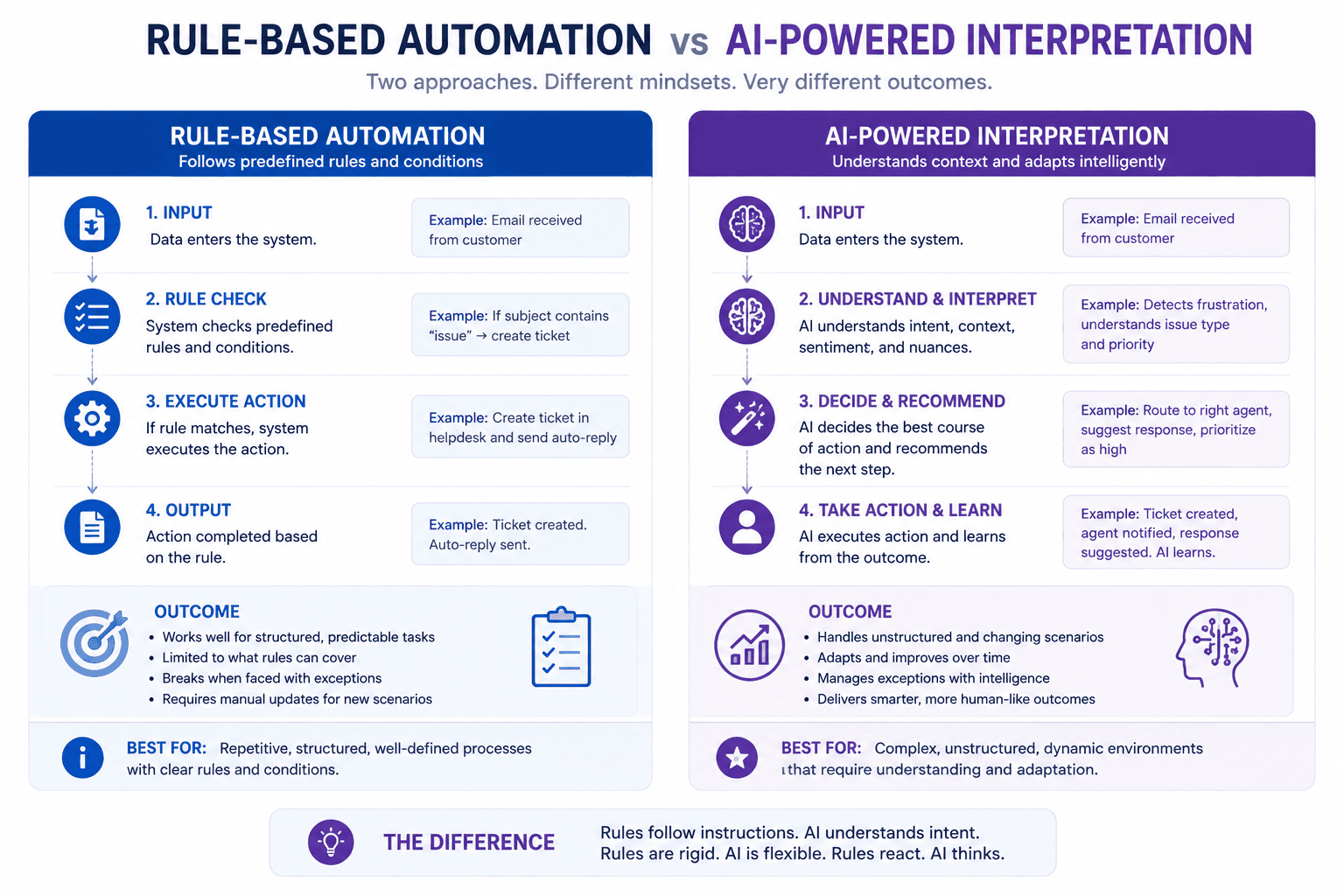
Most AI workflows contain several basic components.
1. Trigger
Something starts the workflow.
Examples:
- New email
- Form submission
- New order
- New CRM contact
- Scheduled event
- Uploaded document
- Customer message
2. Data Collection
The workflow gathers information.
For example:
- Customer name
- Email address
- Message
- Order number
- Website
- Company
- Product
3. AI Processing
An AI model analyzes or transforms the information.
For example:
- Summarize
- Classify
- Extract
- Translate
- Generate
- Score
- Categorize
4. Decision
The workflow determines what should happen next.
For example:
If lead score is high → notify sales team.
5. Action
The workflow performs an action.
Examples:
- Send email
- Create CRM record
- Update spreadsheet
- Send Slack notification
- Generate document
- Create task
6. Human Review
For important decisions, the workflow can ask a person to review the output before taking action.
This human-in-the-loop approach is especially useful for sensitive or high-risk processes.
Example of a Simple AI Automation
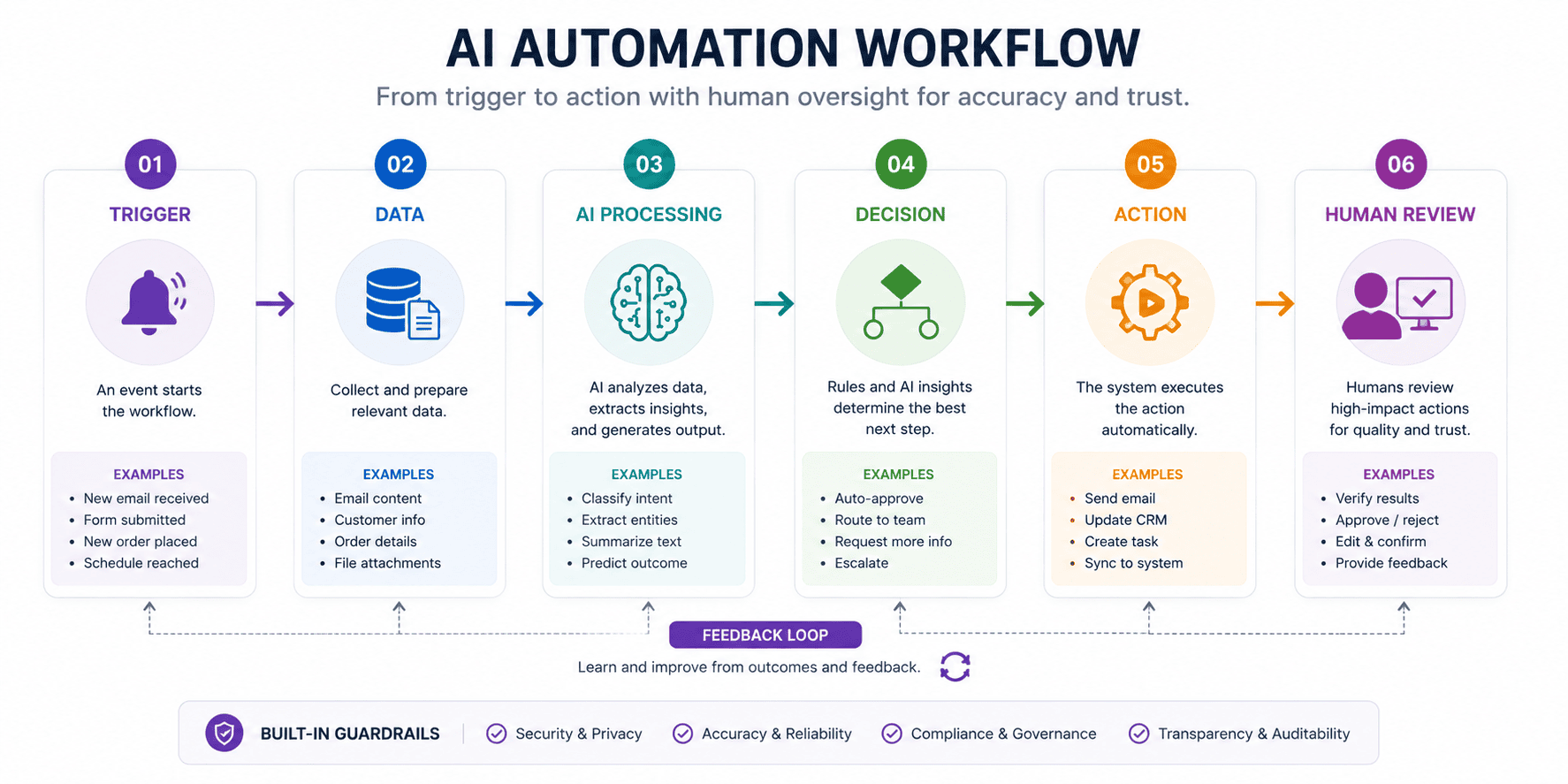
Imagine a digital marketing agency receives 100 inquiry emails every week.
A team member currently reads each message and categorizes it.
The manual process might look like:
Email arrives → employee reads email → identifies service → copies information → assigns category → notifies salesperson.
An AI-powered workflow could become:
Email arrives → AI reads message → extracts customer information → identifies requested service → assigns lead category → creates CRM record → notifies salesperson.
The employee does not disappear.
Instead, the employee receives a cleaner, structured lead and can focus on the conversation.
Which Business Processes Should You Automate?
Not every process should be automated.
The best candidates usually have several characteristics.
A process is a strong candidate when it is:
- Repetitive
- Time-consuming
- Predictable
- Digital
- Rule-based
- Text-heavy
- Data-heavy
- Frequently performed
- Easy to verify
For example, automatically summarizing customer emails is usually easier to automate than automatically deciding whether to fire an employee.
The more important the decision, the more carefully automation should be designed.
10 Business Processes You Can Automate With AI
1. Customer Support
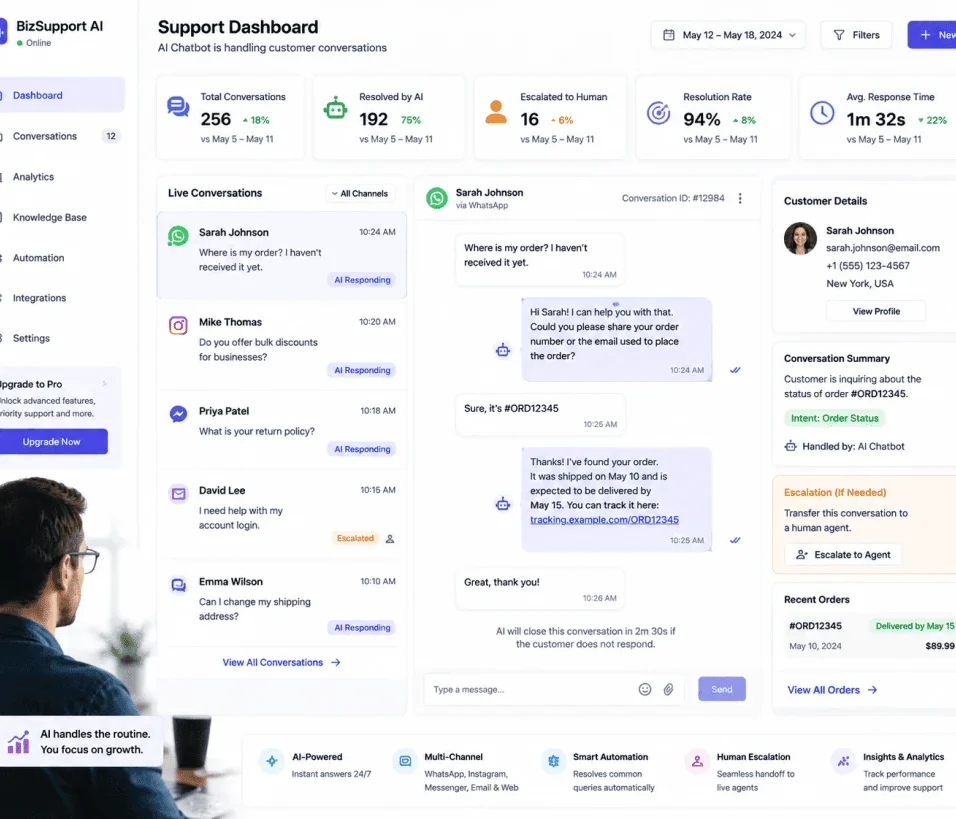
Customer support is one of the most obvious applications.
Businesses receive many repetitive questions:
- What are your opening hours?
- Where is my order?
- How do I reset my password?
- What is your refund policy?
- Which plan should I choose?
- How do I get started?
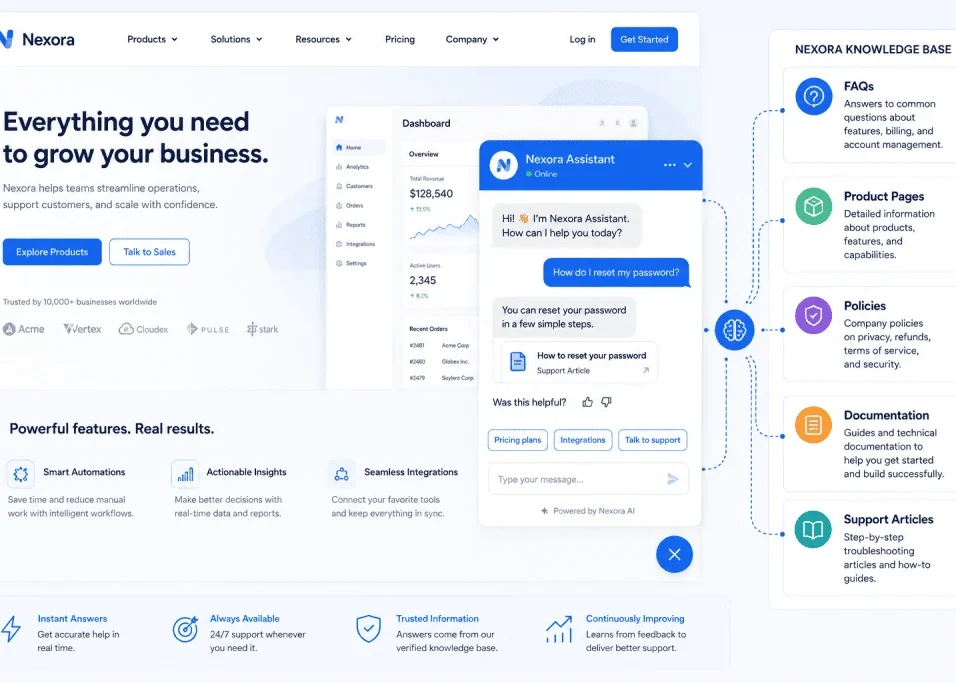
An AI assistant can help answer common questions using approved company information.
More complicated requests can be escalated to a human.
This creates a hybrid support system.
AI handles repetitive questions.
Humans handle complex cases.
2. Lead Qualification
Sales teams often receive leads from websites, advertisements, social media, and email.
Instead of manually reviewing every inquiry, AI can analyze incoming information.
For example:
Lead submits form → AI reads responses → identifies industry → estimates intent → summarizes requirements → assigns category → alerts salesperson.
The sales representative receives a concise summary instead of reading the entire message.
This can save significant administrative time.
3. Email Management
Email overload is another strong automation opportunity.
AI can classify messages into categories such as:
- Sales
- Support
- Finance
- Partnership
- Newsletter
- Urgent
- General inquiry
The workflow can then route messages accordingly.
For example:
Email → AI classification → sales inbox
or:
Email → AI classification → customer support queue
The important point is that the AI is not simply generating replies.
It is helping organize information.
4. Content Production
Content teams can automate parts of their workflow.
For example:
Keyword research → content brief → outline → draft → fact-checking → human editing → publishing.
AI can help with:
- Topic research
- Outlines
- Headlines
- Content briefs
- Meta descriptions
- Summaries
- Social media drafts
- Content repurposing
However, human editing remains important.
Publishing large amounts of unreviewed AI-generated content can create quality problems.
For a website that wants long-term search visibility, content should provide genuine value rather than simply existing to target keywords.
5. Meeting Summaries
Meetings can generate a large amount of information.
AI can transform a transcript into:
- Summary
- Decisions
- Action items
- Deadlines
- Assigned responsibilities
- Follow-up questions
A workflow could automatically send the summary to the relevant team after the meeting.
This is a simple but highly practical AI automation.
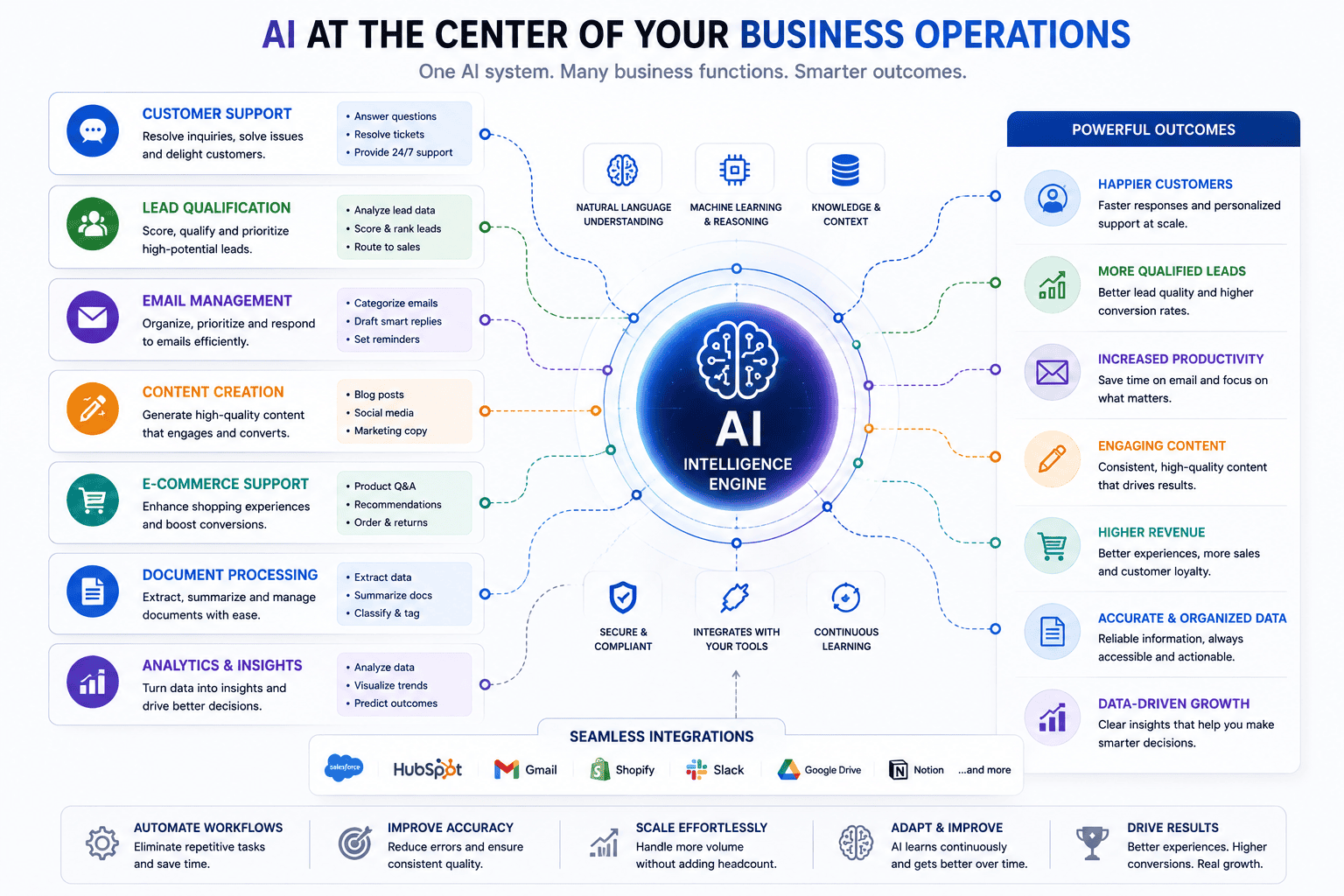
6. Document Processing
Businesses often receive documents containing important information.
Examples include:
- Invoices
- Applications
- Forms
- Contracts
- Reports
- Receipts
- Customer documents
AI can help extract structured information.
For example:
Upload invoice → AI extracts vendor, date, amount, invoice number → save information to accounting spreadsheet.
Human verification may still be appropriate depending on the importance of the information.
7. Social Media Workflows
Social media teams can automate parts of content production.
For example:
Blog published → AI summarizes article → creates social post variations → sends drafts for approval.
The workflow can generate versions for:
- X
- Newsletter
The final publishing decision can remain with a human.
8. Customer Feedback Analysis
Businesses receive customer feedback from:
- Reviews
- Surveys
- Support conversations
- Emails
- Social media
- Product feedback
AI can analyze this information and identify patterns.
For example:
Customer reviews → AI categorization → sentiment analysis → common complaints → weekly report.
A business owner might discover that many customers mention the same problem.
That information can influence product development.
9. Ecommerce Operations
Online stores can automate many administrative processes.
Examples include:
- Product description drafts
- Customer support
- Review classification
- Order notifications
- Inventory alerts
- Product categorization
- Customer segmentation
For example:
New product added → AI generates initial product description → human reviews → publish.
Again, the objective is not necessarily full automation.
It is faster execution with quality control.
10. Internal Knowledge Management
Companies often have information spread across:
- Documents
- Emails
- Wikis
- PDFs
- Google Drive
- Notion
- CRM systems
Employees may spend considerable time searching for answers.
An AI knowledge assistant can help employees locate information and summarize relevant documents.
This can become particularly useful as a company grows.
Popular Tools for AI Automation
The right tool depends on your technical ability and business requirements.
Some commonly used platforms include:
- Zapier
- Make
- n8n
- OpenAI
- Google Workspace
- Microsoft Power Automate
- Airtable
- Notion
- Slack
- HubSpot
- Salesforce
Each platform has different strengths.
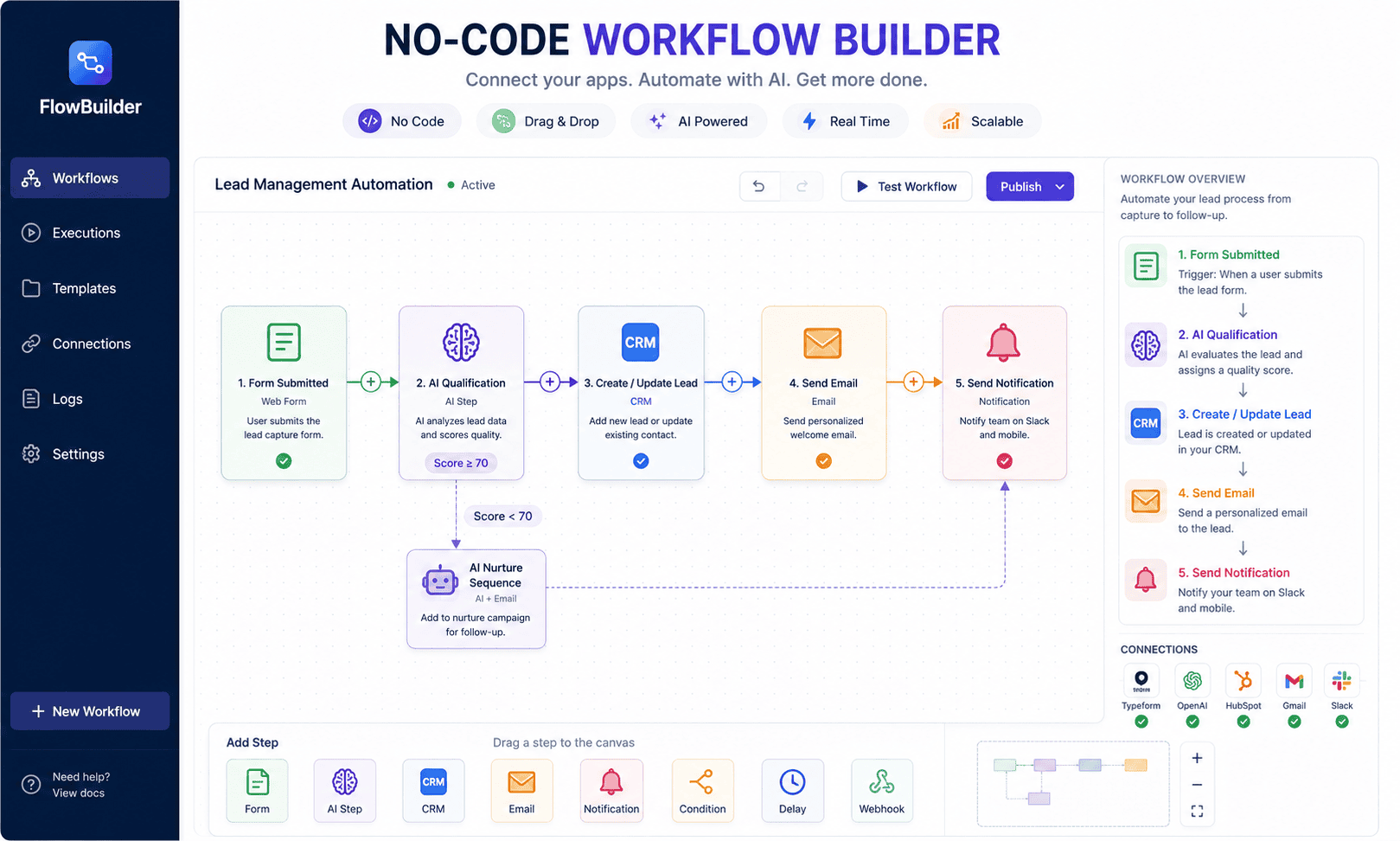
Zapier for AI Automation
Zapier is designed around connecting applications and automating workflows.
A simple workflow might look like:
Form submission → AI processing → Gmail → Google Sheets → Slack
This can be useful for businesses that want to build workflows without developing a complete custom application.
Zapier also provides AI-focused automation capabilities and integrations.
It is particularly attractive for beginners because many workflows can be created with relatively little technical development.
Make for Visual Automation
Make provides a visual approach to workflow automation.
Instead of simply thinking:
Trigger → Action
you can build more complex workflows containing:
- Routers
- Filters
- Conditions
- Multiple applications
- Data transformations
- AI steps
For example:
New lead → AI analysis → router → high-value lead → CRM + Slack
while:
Low-priority lead → CRM only
This makes visual workflow design useful for businesses with more complex processes.
n8n for Flexible AI Workflows
n8n is popular among technical users because it provides flexible workflow automation and can be self-hosted.
It can connect APIs, databases, AI models, business applications, and custom logic.
For developers and advanced automation specialists, this flexibility can be valuable.
A workflow could connect:
Website → API → AI model → database → CRM → notification system.
This makes n8n especially interesting for freelancers who want to offer AI automation as a professional service.
How to Choose an AI Automation Tool
Don’t choose a platform simply because it is popular.
Ask:
What applications do I need to connect?
If your business depends on specific software, check whether the automation platform supports it.
How complex is the workflow?
A simple three-step automation may not require a complex platform.
Do I need custom code?
If yes, a platform with stronger developer capabilities may be appropriate.
Do I need self-hosting?
Some businesses prefer more control over infrastructure and data.
What is the expected volume?
High-volume workflows may require careful consideration of pricing and infrastructure.
Who will maintain it?
A technically complex automation is not useful if nobody understands how to maintain it.
How to Build Your First AI Automation
If you are completely new to automation, don’t begin with a complicated AI agent.
Start with a simple workflow.
Step 1: Choose One Repetitive Task
Write down everything you do during a typical week.
Look for something repetitive.
For example:
Every time a customer submits a contact form, I manually read the message and copy it into a spreadsheet.
That is a good starting point.
Step 2: Document the Existing Process
Write every step.
Example:
- Customer submits form.
- Email notification arrives.
- Open email.
- Read message.
- Copy customer name.
- Copy email.
- Copy message.
- Decide lead category.
- Add data to spreadsheet.
- Notify sales team.
Now you understand the workflow.
Step 3: Identify Where AI Adds Value
Not every step requires AI.
The workflow might become:
- Customer submits form.
- Automation captures information.
- AI categorizes the message.
- AI summarizes the request.
- Data goes into CRM.
- Sales team receives notification.
This is simpler and more reliable.
Don’t Use AI Where Normal Automation Is Enough
This is a common mistake.
Suppose your workflow is:
New order → send confirmation email.
You don’t need AI.
A standard automation is sufficient.
AI becomes useful when the workflow needs interpretation.
For example:
Read customer message → identify intent → determine category.
The best systems often combine both.
Traditional automation handles predictable actions.
AI handles interpretation.
Step 4: Define the AI’s Job
Never tell an AI system simply:
“Handle this.”
Give it a specific responsibility.
For example:
Classify the customer message as one of the following categories: Sales, Support, Billing, Partnership, or Other. Return only the category and a one-sentence summary.
Clear instructions make automation more predictable.
Step 5: Create Structured Outputs
Whenever possible, ask AI to return structured information.
For example:
Category:
Lead Priority:
Customer Name:
Summary:
Recommended Action:
Structured output makes it easier for automation software to process the result.
Instead of receiving a long paragraph, your workflow receives clearly defined fields.
Step 6: Add Human Approval
For important workflows, don’t let AI make irreversible decisions automatically.
For example:
AI generates customer refund recommendation → human reviews → refund processed.
This is safer than:
AI decides refund → money automatically sent.
The appropriate amount of human oversight depends on the risk involved.
Step 7: Test With Realistic Examples
Never test an AI workflow with only one example.
Create different cases.
For example:
- Normal inquiry
- Angry customer
- Spam
- Very short message
- Long message
- Multiple questions
- Missing information
- Unusual request
Then observe how the workflow behaves.
Step 8: Add Error Handling
Every automation can fail.
Possible failures include:
- API unavailable
- Invalid data
- AI response format changes
- Missing email address
- Application connection failure
- Rate limits
- Authentication problems
Your workflow should have a fallback.
For example:
If AI classification fails → send message to human review queue.
That is much better than silently losing the request.
AI Agents vs AI Automation
These terms are often used interchangeably, but they are not exactly the same.
A traditional AI automation may follow a predefined sequence.
For example:
Email → AI → CRM → Slack
An AI agent may have more flexibility to determine which actions to take based on its objective and available tools.
For example:
Find information about this customer, check their order, review previous support messages, summarize the situation, and recommend the next action.
The agent may need to decide which tools to use.
Agents can be powerful, but complexity increases risk.
For many businesses, a simple workflow is better than an unnecessarily complicated autonomous agent.
When Should You Use an AI Agent?
Consider an AI agent when:
- The task requires multiple decisions
- The workflow is not always linear
- Multiple tools need to be selected dynamically
- The process requires contextual reasoning
- The system needs to work through a multi-step objective
Avoid agents when:
- A simple rule works
- The process is highly predictable
- Errors would be expensive
- There is no need for autonomous decision-making
A simple automation that works reliably is usually better than an impressive-looking system that frequently fails.
AI Automation for Small Businesses
Small businesses can benefit significantly from practical automation.
Imagine a local service company.
Its workflow might be:
Website inquiry → AI identifies service → extracts location → qualifies request → creates CRM record → sends notification → prepares follow-up email.
The business owner still handles the customer relationship.
But repetitive administrative work is reduced.
Another example:
Customer review → AI categorizes feedback → identifies negative sentiment → creates follow-up task.
These are relatively simple workflows, but together they can save substantial time.
AI Automation for Freelancers
Freelancers can use AI automation internally and as a service.
Internal examples:
- Proposal drafting
- Lead organization
- Meeting summaries
- Invoice reminders
- Client onboarding
- Content planning
Service examples:
- AI chatbots
- Lead automation
- Customer support workflows
- Document processing
- AI-powered CRM workflows
- Email automation
- AI content systems
This creates a potential freelance specialization:
AI Automation Specialist
Instead of simply selling hours, freelancers can sell systems.
AI Automation for Agencies
Agencies can use automation to improve both internal operations and client delivery.
For example, a marketing agency could automate:
Client onboarding → questionnaire → AI summary → project brief → task creation → team notification.
A content agency could automate:
New topic → research → content brief → writer assignment → editing checklist → client approval.
The key advantage is consistency.
When processes are documented and automated, teams are less dependent on manual administrative work.
AI Automation for SaaS Companies
SaaS companies have many potential automation opportunities.
Examples include:
- Customer onboarding
- Support ticket classification
- Churn analysis
- Feature request categorization
- Sales qualification
- User feedback analysis
- Product documentation
- Internal reporting
For example:
Support ticket → AI identifies category → searches knowledge base → drafts response → human approval → customer receives response.
This can improve response speed while keeping human oversight.
AI Automation for Ecommerce
Ecommerce businesses generate large volumes of structured and unstructured information.
Automation opportunities include:
- Product descriptions
- Customer questions
- Reviews
- Order support
- Product categorization
- Customer segmentation
- Inventory alerts
For example:
New review → AI analyzes sentiment → identifies issue → updates feedback dashboard.
Over time, this can help businesses identify recurring product problems.
How Much Does AI Automation Cost?
There is no single price.
The cost depends on:
- Number of workflows
- Number of tasks
- AI model usage
- Automation platform
- Number of users
- Integrations
- Hosting
- Development
- Maintenance
- Data requirements
A simple automation may require only a small software subscription.
A complex enterprise workflow can require substantial development and ongoing infrastructure.
Before building anything, estimate:
Monthly automation cost
versus
Monthly time or revenue value created.
How to Calculate Automation ROI
A simple formula is:
Automation ROI = Value Created − Automation Cost
For example:
Suppose a business spends 20 hours each month on a repetitive process.
If the employee’s effective cost is $25 per hour:
20 × $25 = $500 monthly labor value.
If the automation costs $100 per month and reliably saves most of that time:
Potential monthly value = $500
Automation cost = $100
Potential net value = $400
This is simplified, but it provides a starting point for evaluating automation.
Don’t automate simply because AI can do something.
Automate because the result creates meaningful value.
Common AI Automation Mistakes
Mistake 1: Automating a Broken Process
If the process is already inefficient, automation can simply make the inefficiency happen faster.
Fix the process first.
Mistake 2: Automating Everything
Not every task needs automation.
Some tasks are better handled by humans.
Mistake 3: Using AI Without Quality Control
AI can produce incorrect, incomplete, or misleading results.
Always evaluate the consequences of mistakes.
Mistake 4: Building Overly Complex Workflows
More steps mean more potential failure points.
Start simple.
Mistake 5: Ignoring Data Privacy
Businesses should carefully consider what information is being sent to third-party services.
Sensitive information requires appropriate safeguards and organizational policies.
Mistake 6: No Error Handling
Assume something will eventually fail.
Build a recovery path.
Mistake 7: No Human Oversight
Important decisions should not automatically be delegated to AI without considering risk.
Mistake 8: Forgetting Maintenance
Automation is not always “set it and forget it.”
APIs change.
Applications update.
Credentials expire.
Business processes evolve.
Your automation needs maintenance.
How to Protect Business Data During AI Automation
Data protection should be part of the design.
Before connecting an AI model to business information, ask:
- What data is being transmitted?
- Why does the AI need it?
- Where is the data processed?
- Who can access it?
- How long is it retained?
- Is sensitive information involved?
- Can the workflow minimize the data sent?
Use the principle of data minimization:
Send only what is necessary.
For example, if an AI system only needs the text of a customer inquiry, you may not need to send unrelated customer records.
The Future of AI Automation
AI automation is moving toward increasingly capable systems that can understand context, interact with multiple tools, and execute more complicated workflows.
But the future is unlikely to be about blindly replacing every human process.
Businesses will still need:
- Strategy
- Creativity
- Judgment
- Accountability
- Relationship building
- Leadership
- Quality control
The most valuable systems will likely combine human expertise with machine efficiency.
Think of AI as a workforce multiplier.
A good employee using strong automation may be able to accomplish significantly more than an employee spending most of the day performing repetitive administrative tasks.
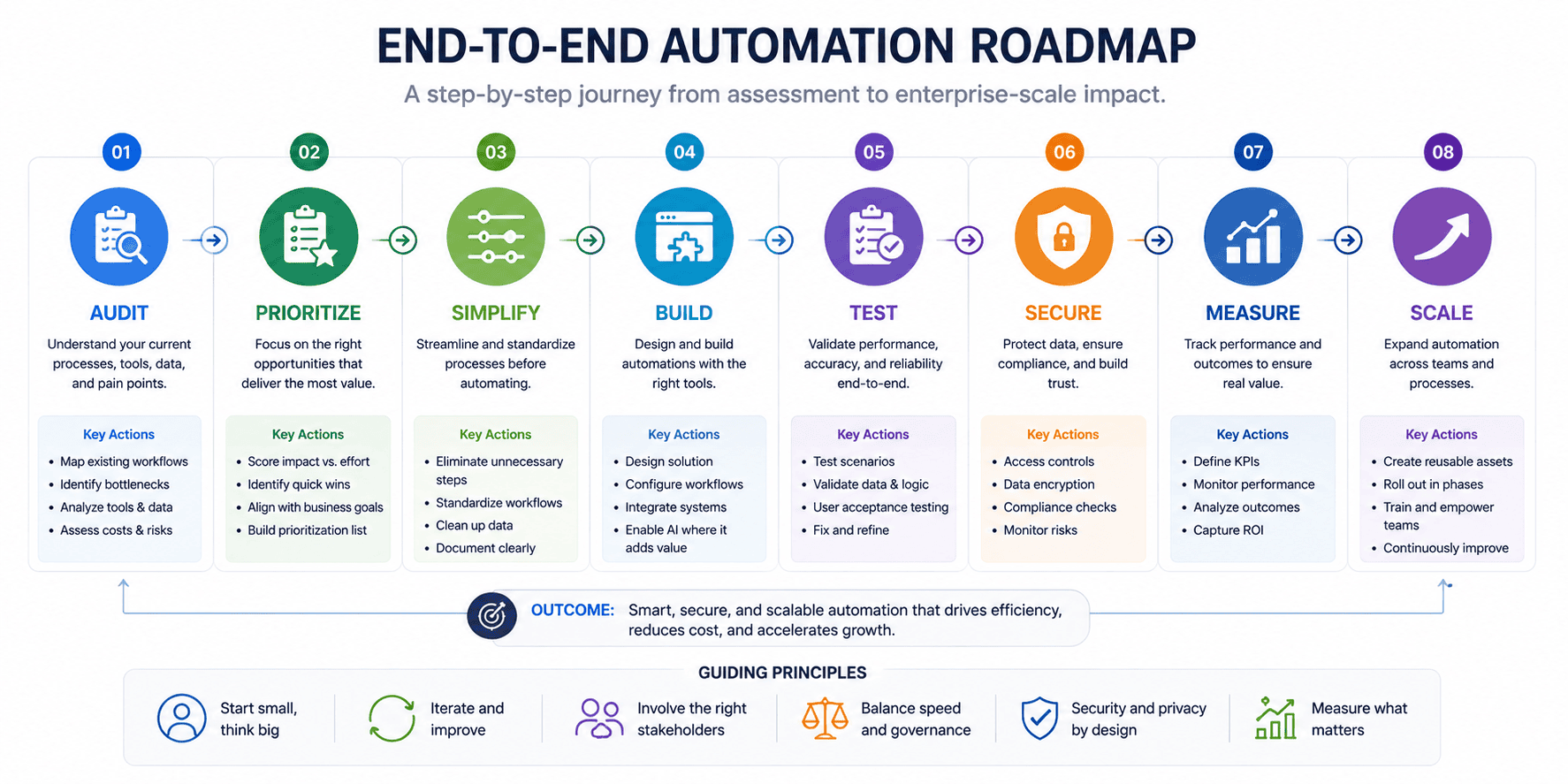
A Practical AI Automation Roadmap for 2026
If you’re starting from zero, follow this sequence.
Phase 1: Audit
Write down repetitive tasks.
Phase 2: Prioritize
Choose tasks based on:
- Frequency
- Time consumed
- Business value
- Risk
- Difficulty
Phase 3: Simplify
Improve the manual process before automating it.
Phase 4: Select Tools
Choose appropriate automation and AI platforms.
Phase 5: Build
Create a small workflow.
Phase 6: Test
Use realistic examples.
Phase 7: Add Safeguards
Include human review and error handling.
Phase 8: Measure
Track time saved and quality.
Phase 9: Improve
Optimize the workflow.
Phase 10: Scale
Only after the system works reliably should you expand it.
30-Day AI Automation Plan
Week 1: Discover
List all repetitive tasks in your business.
Select three.
Rank them based on:
- Time savings
- Difficulty
- Risk
- Business value
Choose one.
Week 2: Build
Map the current process.
Identify:
- Trigger
- Inputs
- AI step
- Decision
- Output
- Human review
Build the simplest possible version.
Week 3: Test
Test:
- Normal cases
- Edge cases
- Errors
- Missing information
- Unexpected input
Record failures.
Fix them.
Week 4: Measure
Compare:
Before automation
with:
After automation
Measure:
- Time
- Cost
- Accuracy
- Response speed
- Employee satisfaction
- Customer experience
If the results are positive, consider automating another process.
The Best AI Automation Strategy
The strongest strategy isn’t:
“Use AI everywhere.”
It is:
“Use AI where it creates measurable value.”
Start with repetitive processes.
Use normal automation for predictable tasks.
Use AI when interpretation is required.
Keep humans involved where judgment matters.
Build error handling.
Protect data.
Measure results.
Then scale.
That approach is more sustainable than chasing every new AI trend.
Where AI Automation Should Stop
Automation is not automatically an improvement. If a workflow handles sensitive decisions, unusual customer situations, financial exceptions, or actions that are difficult to reverse, a person should remain responsible for the final decision.
A useful rule is to automate the preparation before automating the commitment. Let AI collect information, classify a request, draft a response, or flag an exception; require human approval before money moves, an account changes, or an important customer receives a consequential decision.
Before putting a workflow into production, run it against ordinary cases and awkward edge cases. If the team cannot explain what happens when the AI is wrong, the workflow is not ready.