How to Optimize Your LinkedIn Profile in 2026: Complete Guide to Jobs, Freelancing, Personal Branding and AI Search
- by Muhammad Raza
- 0 Comments
- 20 minutes read
- 46 Views
LinkedIn profile optimization in 2026 is no longer just about adding your job title, uploading a professional photograph, and listing a few skills.
LinkedIn has become a much more important professional discovery platform. Recruiters use it to find candidates, clients use it to evaluate freelancers, businesses use it to identify partners, and professionals use it to build authority around their expertise.
At the same time, AI is changing how professional information is discovered.
LinkedIn itself says its content is increasingly relevant to AI-powered discovery environments, and its 2026 marketing guidance recommends creating clear, useful, structured content that can be understood by both people and AI systems.
That creates a new opportunity.
Your LinkedIn profile should not simply say:
“I am a web developer.”
It should make it immediately clear:
- What you do
- Who you help
- What problems you solve
- What skills you have
- What results you create
- What services you offer
- What kind of opportunities you want
In other words, your profile should function like a professional landing page.
This guide explains how to optimize a LinkedIn profile in 2026 for jobs, freelancing, clients, networking, personal branding and professional visibility, while also explaining how AI is changing LinkedIn discovery.
Important: LinkedIn changes its features, algorithms, recommendations and interface regularly. The practical strategies below focus on durable profile and content principles rather than promising a specific algorithmic ranking.
Why LinkedIn Profile Optimization Matters in 2026
A LinkedIn profile can serve several purposes simultaneously.
It can be:
- Your professional résumé
- Your online portfolio
- Your personal brand
- Your networking hub
- Your client acquisition page
- Your recruiter-facing profile
- Your authority page
- Your professional introduction
The mistake many people make is trying to optimize their profile for everyone.
A better approach is to define the primary goal first.
For example:
Job seeker
Your profile should communicate:
“I am qualified for this type of role.”
Freelancer
Your profile should communicate:
“I solve this specific problem for this type of client.”
Business owner
Your profile should communicate:
“I understand this market and can help businesses achieve this outcome.”
Creator
Your profile should communicate:
“I consistently publish useful information about this subject.”
The same LinkedIn profile can support multiple objectives, but one primary positioning should be obvious.
How LinkedIn Search and Recommendations Work
LinkedIn isn’t simply a social feed.
It also functions as a professional search and recommendation system.
For example, LinkedIn’s current job-recommendation system uses information such as your profile, headline, About section, experience, education, location and preferences to recommend jobs. LinkedIn specifically recommends keeping your profile information up to date to improve job recommendations.
This means the words you use on your profile matter.
If you say:
“Digital expert”
that tells LinkedIn—and humans—very little.
If you say:
“WordPress Developer helping small businesses build fast, SEO-friendly websites”
your positioning is much clearer.
The second version contains meaningful concepts:
- WordPress
- Developer
- Small businesses
- Websites
- SEO
These are much more useful for professional discovery.
1. Choose Your LinkedIn Positioning Before Editing Your Profile
Before changing your profile, answer one question:
What do I want people to remember me for?
This question sounds simple, but it can completely change your LinkedIn strategy.
Suppose someone writes:
Web Designer | Developer | SEO | Marketing | AI | Freelancer | Entrepreneur | Consultant
The profile appears broad.
But broad isn’t always valuable.
Compare that with:
WordPress Developer for Small Businesses | Fast, SEO-Friendly Websites | AI-Powered Automation
Now the person has a clearer professional identity.
The second profile may appeal to fewer people, but it can be much more relevant to the right audience.
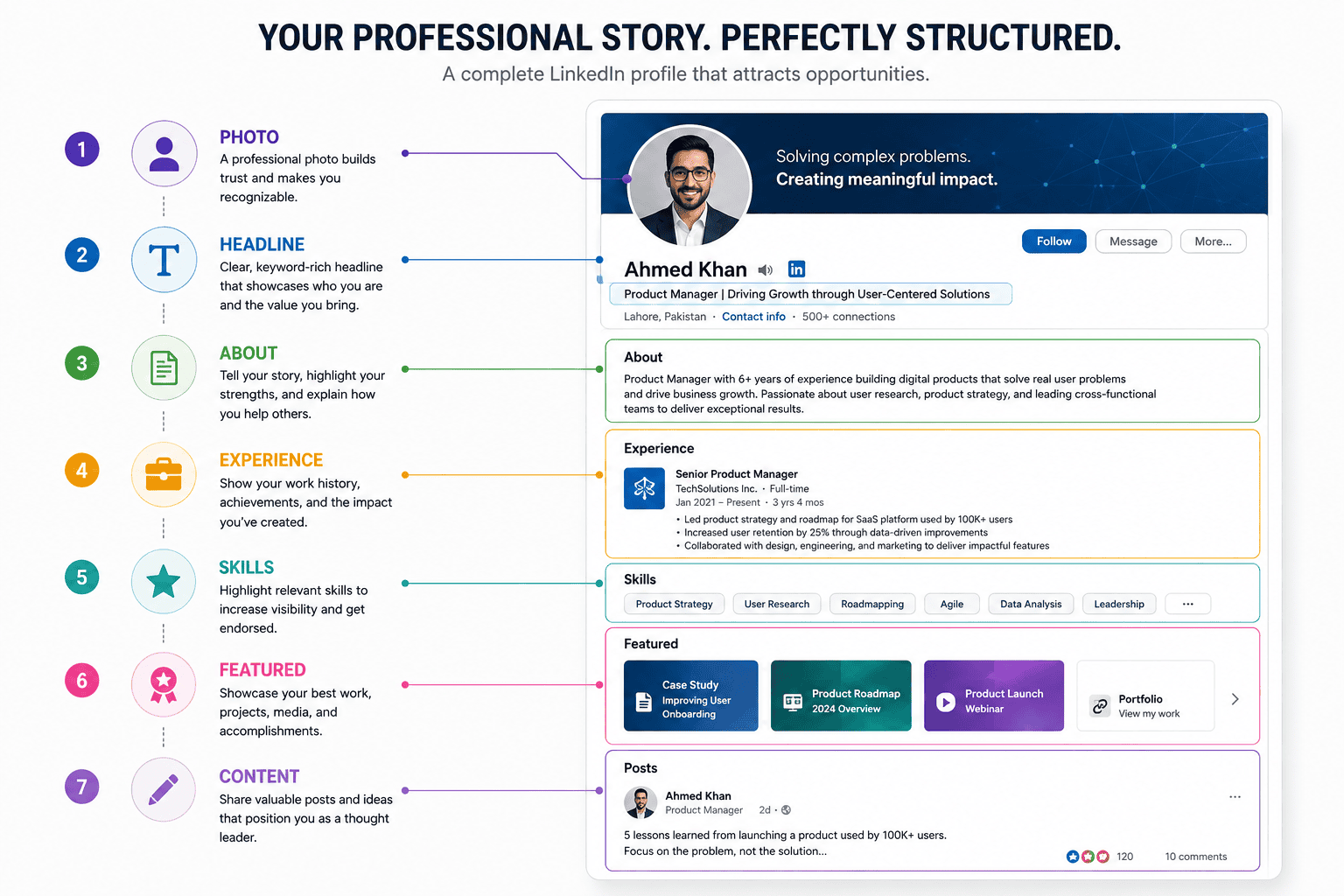
The Positioning Formula
A useful framework is: What you do + Who you help + Outcome
WordPress Developer + Small Businesses + High-Converting Websites
Or:
AI Automation Consultant + Online Businesses + Less Repetitive Work
Or:
Freelance SEO Writer + SaaS Companies + Search-Focused Content
This doesn’t have to be your exact headline.
It is a framework for deciding what your profile should communicate.
2. Optimize Your LinkedIn Profile Photo
Your profile photo is one of the first visual signals people receive.
You don’t need an expensive studio photograph.
But your image should generally be:
- Clear
- Recent
- High quality
- Professionally appropriate
- Well lit
- Easy to recognize
Avoid:
- Group photographs
- Extremely old photographs
- Blurry images
- Distracting backgrounds
- Heavy filters
- Images where your face occupies only a tiny portion
Your photograph doesn’t need to look corporate if you’re a freelancer or creator.
The objective is recognition and professionalism.
3. Your LinkedIn Banner Is Valuable Real Estate
Many people upload a generic background image and never think about it again.
That is a missed opportunity.
Your banner can communicate your positioning.
For example:
AI Automation for Small Businesses
Then below:
Save time. Reduce repetitive work. Build smarter workflows.
Or:
WordPress Developer
Fast websites • SEO • Performance • Automation
Your banner should be simple.
Don’t fill it with ten services, twelve logos, and twenty lines of text.
The visitor should understand your professional focus within a few seconds.
4. Write a Strong LinkedIn Headline
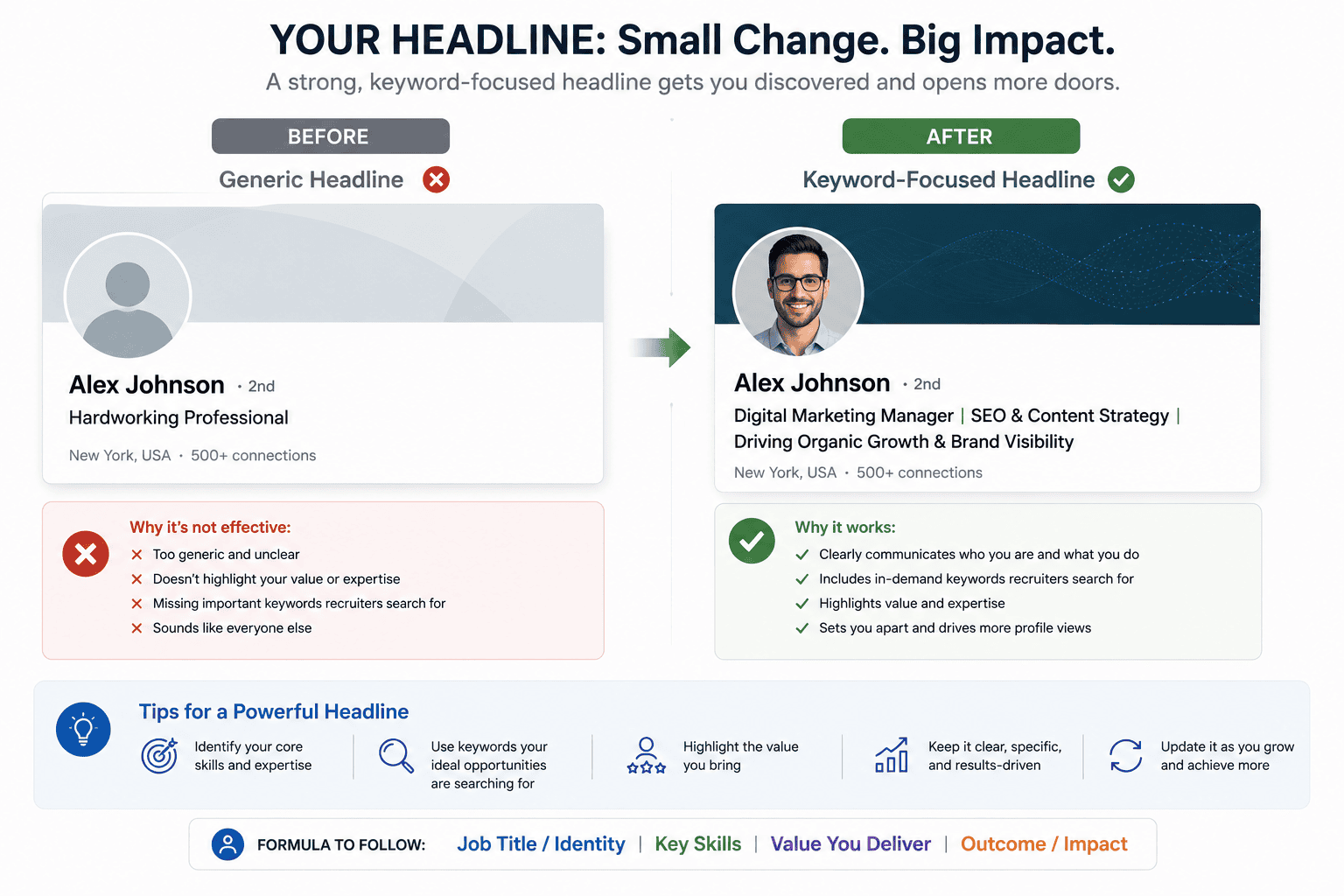
Your headline is one of the most important elements of your LinkedIn profile.
A weak headline might be:
Freelancer
Another weak example:
Entrepreneur | Founder | CEO
Those titles may be technically accurate, but they don’t explain what you actually do.
A stronger headline communicates expertise and relevance.
Formula 1: Job Seeker
Digital Marketing Specialist | SEO | Content Strategy | B2B Growth
Formula 2: Freelancer
WordPress Developer | Helping Small Businesses Build Fast, SEO-Friendly Websites
.
Formula 3: AI Specialist
AI Automation Consultant | Helping Businesses Automate Repetitive Workflows
Formula 4: Consultant
Business Consultant | Helping SaaS Companies Improve Customer Acquisition
The important thing is to use words that your target audience actually uses.
If clients search for “WordPress developer,” don’t hide that phrase behind vague branding
5. Treat Your About Section Like a Sales Page
Your About section should answer four questions:
- Who are you?
- What do you do?
- Who do you help?
- How can someone contact or work with you?
Don’t begin with a generic sentence like:
“I am a highly motivated professional with a passion for excellence.”
Almost everyone says something similar.
Instead, begin with the problem you solve.
For example:
I help small businesses build WordPress websites that are fast, search-friendly and designed to turn visitors into customers.
Then explain:
- Your expertise
- Your experience
- Your approach
- Your services
- Your results
- Your ideal clients
Finish with a clear call to action.
For example:
Need help with a WordPress website or automation workflow? Send me a message here on LinkedIn.
6. Use Keywords Naturally
LinkedIn SEO doesn’t mean stuffing the same keyword into every sentence.
Instead, use relevant terminology naturally across your profile.
For a WordPress developer, relevant terms might include:
- WordPress
- Elementor
- WooCommerce
- SEO
- Website performance
- Responsive design
- Website development
- Website optimization
For an AI automation freelancer:
- AI automation
- Workflow automation
- AI agents
- No-code automation
- Zapier
- Make
- n8n
- Business process automation
For an SEO specialist:
- SEO
- Technical SEO
- Keyword research
- Content strategy
- On-page SEO
- Search visibility
- Google Search
The objective is not to insert every possible keyword.
It is to make your expertise easy to understand.
7. Improve Your Experience Section
Many LinkedIn profiles treat the Experience section like a résumé database.
That’s not enough.
Instead of writing:
Responsible for website development.
explain what you actually accomplished.
For example:
Built and maintained WordPress websites for small businesses, focusing on responsive design, website performance, SEO fundamentals and conversion-focused page structure.
Even better, when you can truthfully provide measurable outcomes:
Reduced average page-load time by approximately 35% through image optimization, caching and front-end improvements.
Specificity makes experience more credible.
Use the STAR Structure
You can structure important achievements using:
Situation → Task → Action → Result
For example:
A small business website had slow load times and poor mobile usability. I redesigned the WordPress site, optimized media, improved page structure and introduced performance-focused practices, resulting in a faster and more usable website.
You don’t need to turn every bullet into a long paragraph.
Just make your contribution understandable.
8. Add Relevant Skills
Skills help communicate your professional capabilities.
But don’t add every skill LinkedIn allows.
Choose skills that support your target position.
For example, a WordPress developer might prioritize:
- WordPress
- Web Development
- SEO
- Website Development
- JavaScript
- HTML
- CSS
- WooCommerce
- Responsive Web Design
- Website Performance
An AI automation specialist might prioritize:
- AI Automation
- Artificial Intelligence
- Workflow Automation
- AI Agents
- Process Automation
- Zapier
- Make
- n8n
- Business Process Automation
- Generative AI
Your strongest skills should align with the professional identity established by your headline and About section.
9. Use the Open to Work Feature Strategically
If you’re looking for employment, LinkedIn provides an Open to Work feature.
LinkedIn currently allows users to specify details such as:
- Job titles
- Locations
- Location types
- Start date
- Employment types
- Visibility
You can choose whether your Open to Work information is visible to recruiters or to the broader LinkedIn community.
This is useful because job preferences can also influence job recommendations.
LinkedIn says job recommendations can be based on preferences such as titles, locations, remote/hybrid/on-site preferences and employment type.
Don’t Select Everything
If you select 25 unrelated job titles, you may communicate that you don’t have a clear direction.
Choose roles that genuinely fit your skills.
For example:
WordPress Developer
Web Developer
Front-End Developer
is more coherent than:
Web Developer
Accountant
Sales Manager
Graphic Designer
Project Manager
Data Scientist
Specificity helps.
10. Build a Featured Section That Demonstrates Your Work
The Featured section is an opportunity to move from:
“I say I’m good at this.”
to:
“Here is evidence that I do this.”
You can potentially showcase:
- Portfolio projects
- Articles
- Case studies
- Videos
- Presentations
- Website links
- Important posts
- Lead magnets
- Research
If you’re a freelancer, this section can be particularly powerful.
Example
Featured
- WordPress portfolio
- Website redesign case study
- AI automation project
- Client testimonial
- Helpful article about website optimization
Don’t make your Featured section a random collection.
Think of it as a mini portfolio.
11. Publish Content That Supports Your Professional Position
One of the biggest mistakes professionals make is having a highly optimized profile but never publishing anything.
If you claim to specialize in AI automation but every post is about random motivational quotes, your content doesn’t reinforce your positioning.
Your posts should demonstrate expertise.
For example, an AI automation consultant might publish:
5 business processes you can automate with AI
Then:
Here’s how I would automate a customer-support workflow.
Then:
Three mistakes businesses make when implementing AI agents.
Then:
AI automation vs traditional automation: what’s the difference?
Now your profile and content tell the same story.
12. Don’t Try to Go Viral With Every Post
LinkedIn isn’t only about viral reach.
A post with 20,000 impressions may produce zero business opportunities.
A post with 1,000 impressions may generate three highly relevant conversations.
LinkedIn’s own 2026 marketing guidance increasingly emphasizes useful insights, credible expertise, and business outcomes rather than vanity metrics alone.
So measure:
- Relevant profile views
- Qualified connections
- Comments from industry professionals
- Direct messages
- Leads
- Job opportunities
- Client conversations
- Newsletter subscribers
Reach is useful.
Relevance is better.
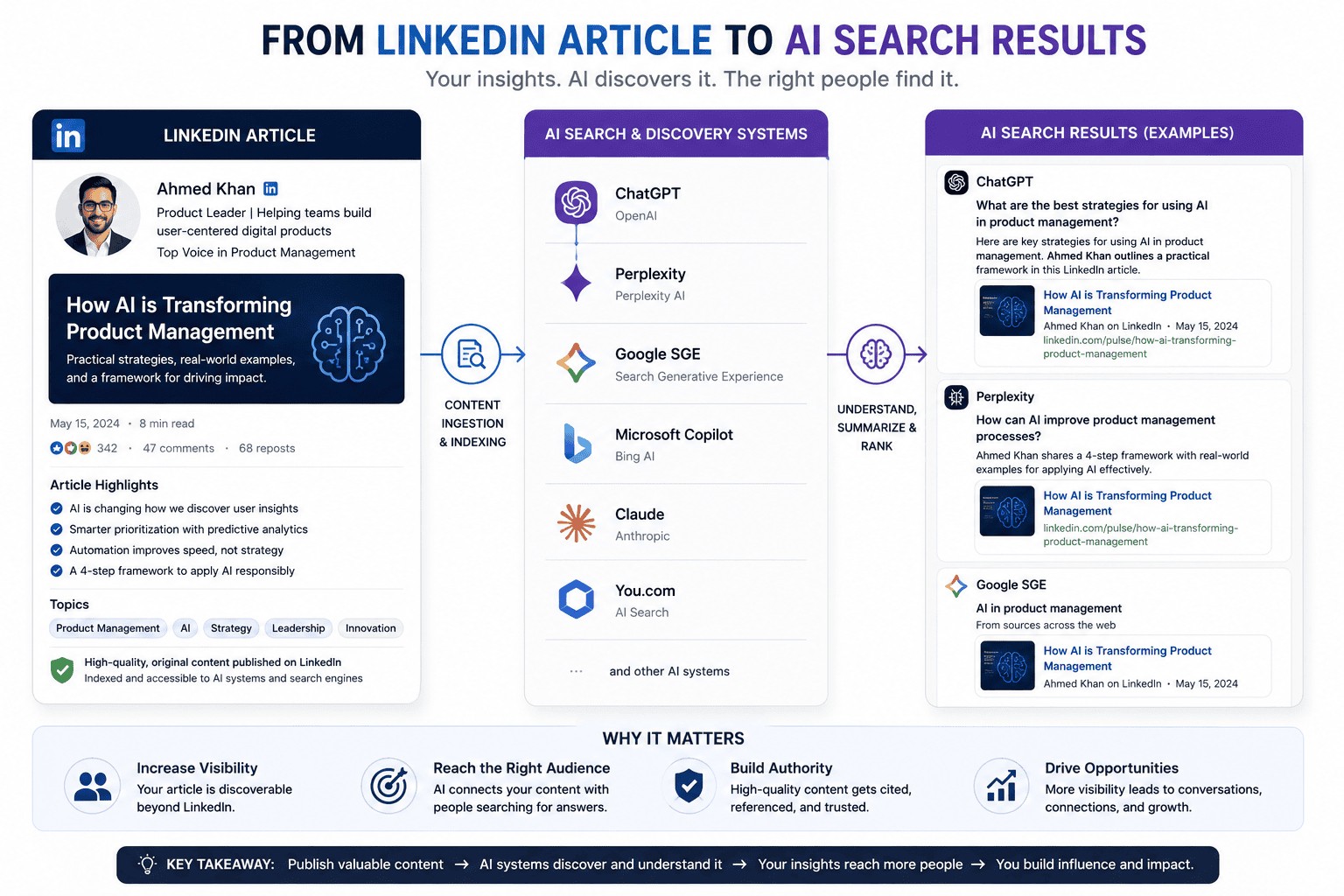
13. LinkedIn Content Is Becoming More Important for AI Search
This is one of the biggest changes professionals should understand.
AI search systems increasingly retrieve information from websites and professional platforms.
LinkedIn published research in June 2026 on AI search visibility for LinkedIn posts, recommending clear keyword-rich openings, direct answers, useful educational content, and consistent publishing.
LinkedIn also reported analyzing tens of thousands of LinkedIn URLs cited by AI search systems, including ChatGPT Search, Google AI Mode and Perplexity.
This means your LinkedIn content may have value beyond the LinkedIn feed itself.
A useful post can potentially become part of the broader information ecosystem used by AI search systems.
What Should You Do?
Write clearly.
Instead of starting with:
“So I’ve been thinking about something interesting lately…”
start with:
AI automation can save small businesses hours every week—but only when the process is already well defined.
The second opening immediately establishes the subject.
14. Use Clear Questions and Answers
AI systems need understandable information.
Humans do too.
Therefore, structure content around questions.
For example:
What is AI automation?
Then answer directly.
Which business processes should be automated?
Then provide examples.
What should businesses avoid automating?
Then explain risks.
This structure can improve readability while also making the content easier for search systems to interpret.
LinkedIn’s 2026 guidance similarly recommends clear questions and direct answers for AI visibility.
15. Write LinkedIn Posts Around One Idea
One common content mistake is trying to explain everything in one post.
A better structure is:
One post = one core idea.
For example:
Why your AI automation project keeps failing
Then discuss three reasons.
Another day:
Five customer-service tasks you can automate
Another:
When not to use an AI agent
This creates a content series.
It also makes your expertise easier to understand.
16. Create LinkedIn Content Pillars
A content pillar is a recurring topic you can discuss consistently.
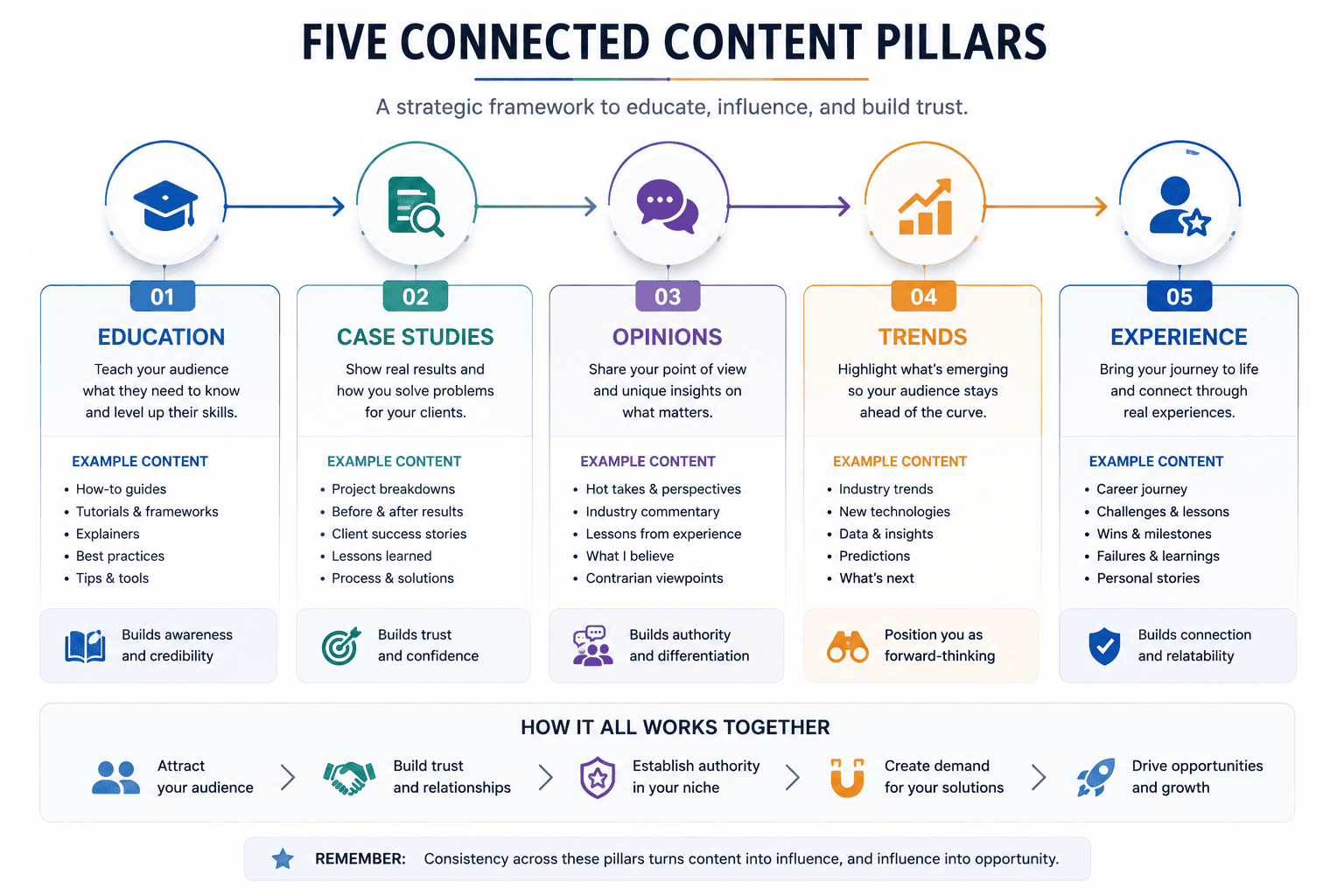
For a freelancer, three to five pillars are enough.
For example:
Pillar 1: Expertise
Teach people something.
Pillar 2: Case Studies
Show how you solved problems.
Pillar 3: Opinions
Explain what you believe and why.
Pillar 4: Industry Trends
Discuss meaningful developments.
Pillar 5: Personal Experience
Share lessons from your work.
This prevents the common problem of asking:
“What should I post today?”
Instead, you choose one pillar and create something useful.
17. A Simple LinkedIn Posting Schedule
You don’t need to post ten times every day.
Consistency is more important than volume.
A practical schedule might look like:
| Day | Content |
|---|---|
| Monday | Educational post |
| Tuesday | Personal experience |
| Wednesday | Industry insight |
| Thursday | Case study |
| Friday | Opinion or practical tip |
LinkedIn’s current AI-search guidance recommends consistent publishing, including two to three posts per week as a practical baseline.
If five posts per week isn’t sustainable, publish three.
If three isn’t sustainable, publish two high-quality posts.
Consistency beats burnout.
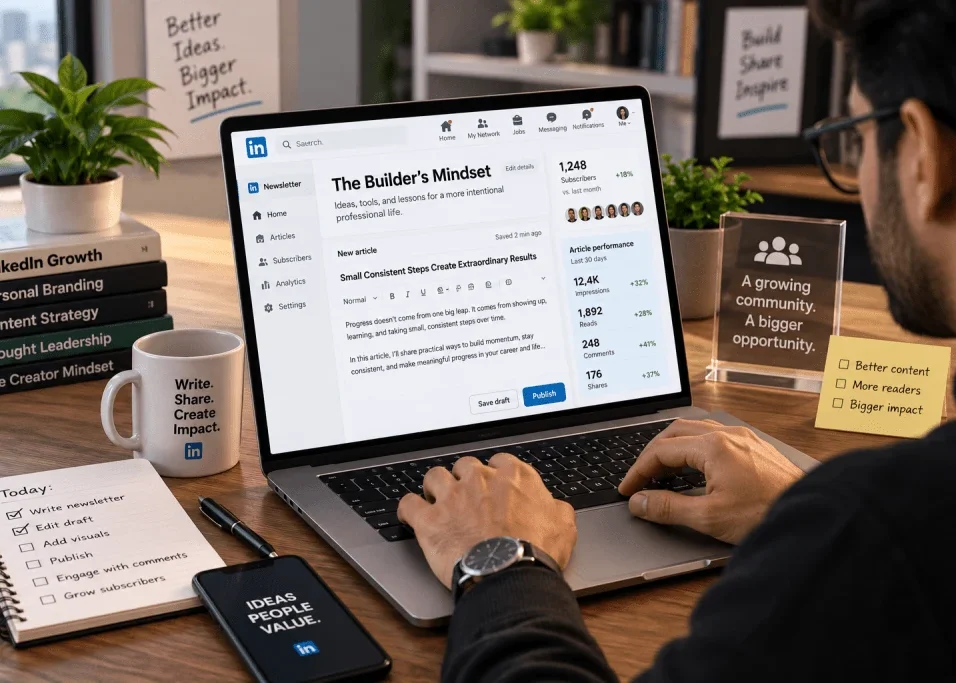
18. Use LinkedIn Articles for Deeper Expertise
Short posts are useful, but they aren’t the only content format.
LinkedIn Articles allow long-form publishing.
LinkedIn’s own March 2026 guidance describes Articles as a way for brands and creators to publish deeper insights and build authority, especially as AI-powered discovery becomes more important.
An article can cover a topic in more depth than a short post.
For example:
Complete Guide to AI Automation for Freelancers
Then use short LinkedIn posts to distribute individual insights from that article.
This creates a content ecosystem:
Long article
↓
Five short posts
↓
Discussion
↓
Profile visits
↓
Connections
↓
Potential clients
This is much more sustainable than trying to invent completely unrelated content every day.
19. Build Authority Instead of Chasing Followers
Follower count can be useful, but it shouldn’t become the main objective.
Imagine two profiles.
Profile A
50,000 followers.
Posts receive thousands of likes.
But almost nobody knows what service the person provides.
Profile B
4,000 followers.
Regularly publishes detailed information about WordPress development.
Receives messages from business owners.
Gets client inquiries every month.
For a freelancer, Profile B could be significantly more valuable.
The goal is not:
“Get as many followers as possible.”
The goal is:
Become known by the right people for the right expertise.
20. Networking on LinkedIn Without Spamming
Networking doesn’t mean sending:
“Hi, I’m looking for opportunities. Please check my profile.”
to 500 people.
That approach usually produces poor results.
Instead, build relationships around shared professional interests.
Step 1
Follow relevant people.
Step 2
Read their content.
Step 3
Leave useful comments.
Step 4
Share your own insights.
Step 5
Connect when there is a logical reason.
Step 6
Start genuine conversations.
The objective is to become recognizable.
If someone sees your comments several times and notices that you’re consistently knowledgeable about a subject, you’re no longer a random connection request.
You’re becoming part of their professional network.
21. How Freelancers Can Use LinkedIn to Find Clients
LinkedIn can be particularly valuable for freelancers because it allows you to demonstrate expertise publicly.
Suppose you’re a web designer.
Don’t only post:
“I offer website design services.”
Instead, publish:
Three reasons small-business websites lose visitors before they reach the contact page.
Then explain:
- Slow performance
- Confusing navigation
- Weak calls to action
At the end:
“If you’re rebuilding a business website, these are the first three things I’d review.”
That post demonstrates knowledge without aggressively selling.
Another post could show a before-and-after redesign.
Another could explain how you improved a site’s performance.
Over time, the content becomes proof of expertise.
22. Use Case Studies to Sell Without Hard Selling
Case studies are among the strongest types of professional content because they demonstrate a process.
Use this structure:
Problem
What was wrong?
Goal
What did the client want?
Process
What did you do?
Result
What changed?
Lesson
What did you learn?
For example:
A local business website had high traffic but few inquiries.
Then:
We simplified the homepage, improved the service structure and made the contact path more obvious.
Then:
The result was a clearer user journey and improved lead-generation performance.
Don’t fabricate numbers.
If you don’t have a verified percentage, don’t invent one.
A truthful qualitative result is better than a fake statistic.
23. Use AI to Help With LinkedIn—but Don’t Let AI Become Your Voice
AI can be useful for LinkedIn content.
You can use it to:
- Brainstorm topics
- Create outlines
- Rewrite unclear sentences
- Summarize research
- Generate headline variations
- Analyze content structure
- Repurpose long articles
But there is a major problem with completely AI-generated LinkedIn content.
It often sounds generic.
For example:
“In today’s rapidly evolving digital landscape, leveraging innovative AI solutions is crucial for businesses seeking sustainable growth.”
That sentence could have been written by thousands of accounts.
It doesn’t sound like a person.
Instead, provide AI with your actual experience.
For example:
“I spent three hours this week fixing an automation that should have taken 20 minutes. The problem wasn’t the AI. The workflow itself was badly designed.”
Now there is a story.
AI can help polish it.
But the insight comes from you.
24. Your LinkedIn Profile Should Match Your Website
If you have a personal website or business website, make sure the two identities are consistent.
For example:
AI Automation Consultant
Website
AI Automation Services for Small Businesses
Content
AI automation tutorials
These three pieces reinforce each other.
But if your LinkedIn says:
SEO Consultant
and your website says:
Full-Service Web Development Agency
while your posts focus entirely on cryptocurrency, visitors may not know what you actually do.
Consistency builds trust.
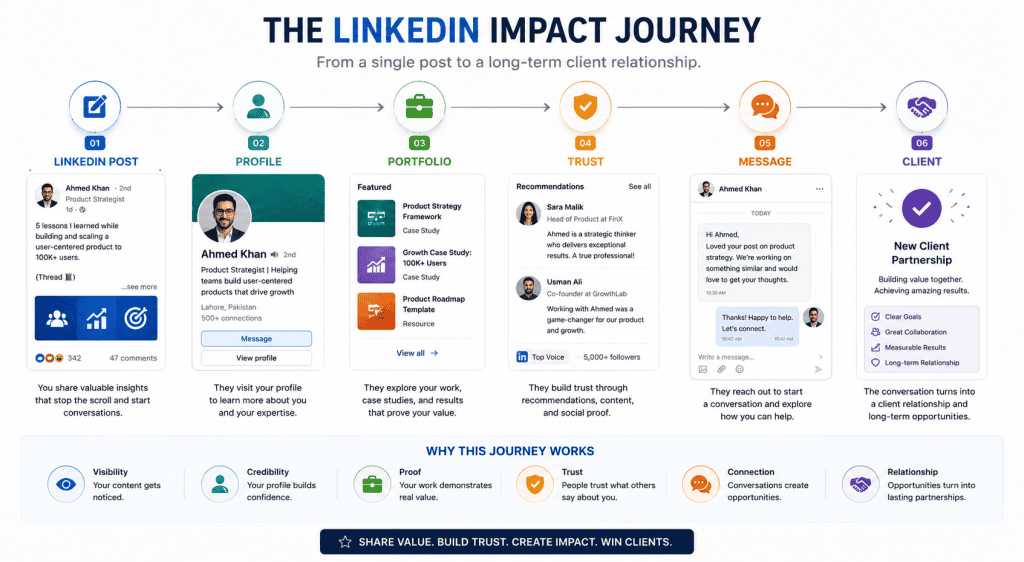
25. Create a Professional Content Funnel
You can think of LinkedIn as the top of a funnel.
Stage 1: Discovery
Someone sees your post.
Stage 2: Interest
They read more.
Stage 3: Profile Visit
They want to know who you are.
Stage 4: Proof
They see your Featured section and experience.
Stage 5: Trust
They read your articles and case studies.
Stage 6: Action
They:
- Connect
- Message
- Visit your website
- Book a call
- Apply for a job
This means your profile and content should work together.
Don’t optimize posts while ignoring your profile.
And don’t optimize your profile while never publishing anything.
26. Optimize Your LinkedIn Profile for Recruiters
If your primary goal is employment, think like a recruiter.
A recruiter often wants quick answers:
- What role does this person want?
- What skills do they have?
- What experience do they have?
- Where are they located?
- Are they available?
- What evidence supports their claims?
Make those answers easy to find.
Your profile should have:
- Clear headline
- Specific About section
- Relevant experience
- Relevant skills
- Portfolio or Featured examples
- Accurate location
- Appropriate job preferences
- Open to Work settings when relevant
LinkedIn’s job recommendation system specifically uses profile information such as headline, About, experience and education when determining profile-based job recommendations.
27. Optimize Your LinkedIn Profile for Clients
Clients think differently from recruiters.
A recruiter asks:
“Can this person do the job?”
A client asks:
“Can this person solve my problem?”
Therefore, freelancers should emphasize outcomes.
Instead of:
“I use WordPress.”
Say:
“I build WordPress websites that help small businesses create a faster, clearer online customer journey.”
Instead of:
“I know AI.”
Say:
“I help businesses automate repetitive workflows using AI and no-code tools.”
The second versions communicate value.
28. Build Social Proof
Social proof can reduce uncertainty.
Possible forms include:
- Recommendations
- Testimonials
- Client feedback
- Case studies
- Portfolio projects
- Certifications
- Publications
- Speaking appearances
- Relevant achievements
Don’t ask everyone you know for a recommendation.
Ask people who genuinely experienced your work.
A short, specific recommendation is more useful than:
“Great person. Highly recommended!”
A better recommendation might explain:
“They rebuilt our WordPress website and were particularly strong at explaining technical issues in simple terms.”
Specificity creates credibility.
29. Common LinkedIn Mistakes to Avoid
Mistake 1: Generic Headline
Entrepreneur | Motivational Speaker | Leader
This doesn’t communicate enough.
Mistake 2: Empty About Section
You’re wasting valuable professional real estate.
Mistake 3: Listing Duties Instead of Results
Responsibilities don’t always demonstrate impact.
Mistake 4: Random Content
Your posts should reinforce your professional identity.
Mistake 5: Excessive Self-Promotion
Nobody wants every post to be an advertisement.
Mistake 6: Copying Viral Posts
People can often recognize recycled content.
Mistake 7: Keyword Stuffing
Use relevant terminology naturally.
Mistake 8: Fake Results
Never invent revenue, traffic, client numbers or performance improvements.
Mistake 9: Buying Followers
Large follower numbers without meaningful engagement don’t necessarily create professional opportunities.
Mistake 10: Ignoring Your Profile After Publishing
Content may attract visitors.
Your profile needs to convert that attention into trust.
30. A Complete LinkedIn Optimization Checklist
Use this checklist before considering your profile finished.
Profile
- Professional photograph
- Clear banner
- Specific headline
- Strong About section
- Relevant experience
- Relevant skills
- Updated education
- Relevant certifications
- Portfolio examples
- Recommendations
- Accurate location
- Current job preferences
Personal Branding
- Clear niche
- Defined target audience
- Consistent positioning
- Clear professional promise
- Website matches profile
- Content supports expertise
Content
- Educational posts
- Case studies
- Personal insights
- Industry analysis
- Useful examples
- Clear opening lines
- Direct answers
- Consistent publishing
- Genuine voice
Job Search
- Open to Work configured if appropriate
- Relevant job titles selected
- Location preferences updated
- Remote/hybrid/on-site preferences accurate
- Employment type selected
- Job alerts configured
LinkedIn currently allows users to manage these Open to Work preferences and visibility settings directly from their profile and job preferences.
A 30-Day LinkedIn Growth Plan
If your profile is currently weak, don’t try to rebuild everything in one day.
Use a 30-day system.
Week 1 — Profile
Day 1
Define your target audience.
Day 2
Rewrite your headline.
Day 3
Rewrite your About section.
Day 4
Improve your Experience section.
Day 5
Update skills.
Day 6
Improve your banner.
Day 7
Add portfolio items.
Week 2 — Content
Create five educational posts.
Topics could include:
- Three mistakes people make in your field
- One useful tutorial
- One personal lesson
- One industry trend
- One case study
Week 3 — Networking
Every day:
- Read relevant posts.
- Leave thoughtful comments.
- Connect with relevant professionals.
- Avoid spam.
Focus on quality.
Week 4 — Authority
Publish:
- One deeper article
- Two educational posts
- One case study
- One opinion post
Then review:
- Profile views
- Connection growth
- Messages
- Leads
- Job opportunities
- Engagement from relevant professionals
How to Measure LinkedIn Success
Don’t only track likes.
Use a simple dashboard.
| Metric | Why It Matters |
|---|---|
| Profile views | Indicates professional interest |
| Relevant connection requests | Measures network quality |
| Messages | Shows direct interest |
| Website visits | Measures traffic |
| Leads | Measures business value |
| Job interviews | Measures career value |
| Client calls | Measures commercial value |
| Content saves | Indicates usefulness |
| Comments | Indicates discussion |
| Qualified opportunities | Most important outcome |
The best metric depends on your goal.
If you’re job hunting:
Interviews matter more than impressions.
If you’re freelancing:
Qualified leads matter more than followers.
If you’re building a personal brand:
Relevant audience growth matters more than random viral reach.
LinkedIn and the Future of Professional Discovery
LinkedIn is becoming part of a broader professional information ecosystem.
People don’t discover professionals only through LinkedIn anymore.
They may discover them through:
- AI search
- Chatbots
- Newsletters
- YouTube
- Podcasts
- Websites
- Communities
- Social media
This means your professional identity should be consistent across platforms.
If someone searches:
“Best WordPress developer for small businesses”
you want your online presence to clearly communicate why you are relevant.
That doesn’t mean you can guarantee appearing in AI-generated results.
It means you should create information that is:
- Clear
- Useful
- Specific
- Credible
- Consistent
- Easy to understand
LinkedIn’s own 2026 research suggests that professional content can increasingly appear in AI-powered discovery environments, making content quality and topical authority more important.
Final Thoughts
LinkedIn profile optimization in 2026 is less about trying to trick an algorithm and more about making your professional identity understandable.
A strong profile answers a simple question:
Why should the right person care about you?
Your headline explains what you do.
Your About section explains your value.
Your Experience section provides evidence.
Your Featured section demonstrates your work.
Your skills reinforce your expertise.
Your content proves that you understand your subject.
Your network creates professional relationships.
And your website or portfolio provides another layer of trust.
AI is changing how information is discovered, but that makes authentic expertise more valuable—not less.
As more people use AI to generate generic content, genuinely useful experience can become a competitive advantage.
Don’t try to sound like an AI.
Don’t try to sound like everyone else on LinkedIn.
Explain what you know.
Show what you’ve done.
Teach useful things.
Share lessons from real work.
Build relationships.
And make it extremely easy for the right people to understand what you can help them accomplish.
That is the foundation of a strong LinkedIn presence in 2026.
Frequently Asked Questions
How do I optimize my LinkedIn profile in 2026?
Start with a specific headline, clear About section, relevant skills, measurable experience, portfolio examples and consistent content. Your profile should clearly communicate what you do, who you help and what opportunities you want.
What should I put in my LinkedIn headline?
Use your professional role, important expertise and target audience or outcome. For example: WordPress Developer | Helping Small Businesses Build Fast, SEO-Friendly Websites.
How many LinkedIn posts should I publish per week?
There is no universal number. LinkedIn’s current AI-search guidance suggests publishing consistently, with two to three posts per week as a practical baseline.
Does LinkedIn SEO really matter?
Yes, in the sense that clear professional terminology helps LinkedIn and people understand your expertise. LinkedIn currently uses profile information such as headline, About, experience and education when making job recommendations.
Should freelancers use LinkedIn?
Yes. Freelancers can use LinkedIn to demonstrate expertise, publish case studies, build relationships, find potential clients and direct interested people toward their portfolio.
Should I turn on Open to Work?
If you’re actively looking for employment, it can be useful. LinkedIn lets you control who can see your Open to Work status and allows you to specify roles, locations, employment types and other preferences.
Can AI write my LinkedIn posts?
AI can help with research, brainstorming, outlining and editing. However, completely generic AI-generated posts can weaken your personal voice. Your own experience and insights should remain central.
Does LinkedIn content appear in AI search?
LinkedIn has published research showing that LinkedIn URLs can appear as citations in AI-powered search environments and has provided guidance for improving AI visibility.
How do I get LinkedIn clients without spamming people?
Publish useful content, demonstrate expertise, participate in relevant conversations, build genuine relationships and use case studies to show what you can do. Avoid sending mass promotional messages to people who have no context about you.