LinkedIn Newsletter Best Practices: A Practical Guide
- by Muhammad Raza
- 0 Comments
- 14 minutes read
- 37 Views
Effective LinkedIn newsletter best practices start with giving readers a clear reason to subscribe and a reliable reason to keep reading.
A strong LinkedIn newsletter focuses on a specific audience and topic, delivers useful editions consistently, and turns reader questions and performance data into better future content.
This guide explains how to choose a focused topic, structure editions, build a content calendar, grow subscribers, promote each edition, use analytics, and create a sustainable newsletter system without chasing vanity metrics.
Define Your Ideal Reader
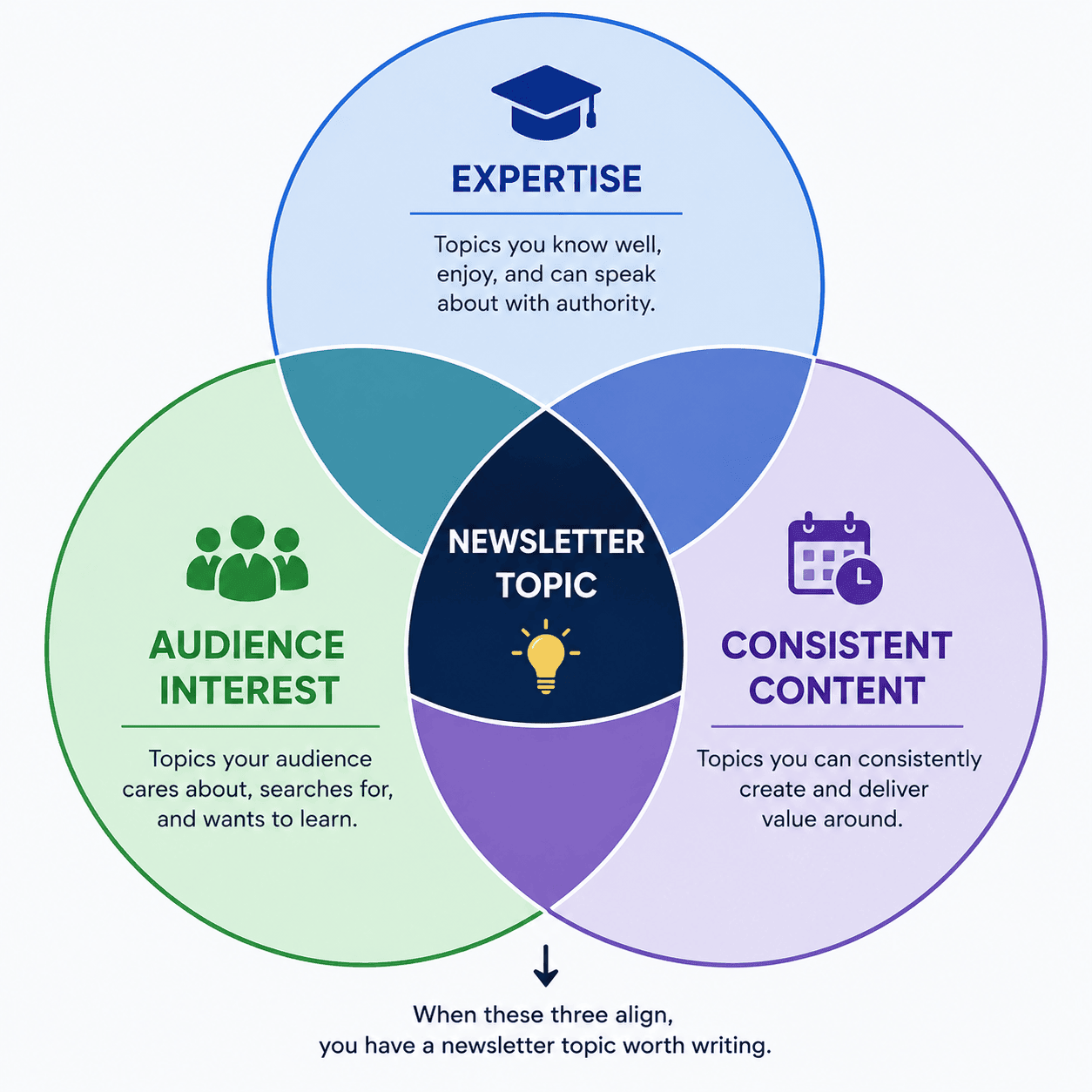
Before writing your first edition, describe the person you want to attract.
Ask:
- What industry are they in?
- What role do they have?
- What problems do they experience?
- What information are they searching for?
- What level of knowledge do they already have?
- What would make them subscribe?
For example, imagine a newsletter about website optimization.
Your audience might be:
Small-business owners who manage their own websites and want practical ways to improve usability, content, and online visibility.
That description is much more useful than:
Anyone interested in websites.
Once you understand your reader, your article topics become easier to choose.
Give Your Newsletter a Memorable Name
Your newsletter name should help communicate its subject.
You can use a straightforward title such as:
The Freelance Systems Guide
or:
SaaS Growth Notes
or:
Practical Web Design
You can also use a more creative name if the subject remains clear.
Avoid making the title unnecessarily complicated.
A reader should be able to see the name and understand the general area covered.
Your newsletter name should also be consistent with your professional identity.
If your personal brand focuses on technology but your newsletter sounds like a completely unrelated lifestyle publication, visitors may become confused.
Create a Repeatable Content Structure
Consistency becomes easier when every edition does not start from a blank page.
Create a basic structure.
For example:
Opening
Introduce the problem or question.
Main Idea
Explain the central concept.
Examples
Show how it works in practice.
Practical Steps
Give readers something they can implement.
Common Mistakes
Explain what to avoid.
Conclusion
Summarize the main lesson.
Discussion Prompt
Invite readers to share their experience.
This does not mean every newsletter needs identical formatting.
The structure is simply a starting framework.
You can change it depending on the subject.
Build a Content Calendar
One of the biggest reasons newsletters stop publishing is lack of planning.
The first edition may be exciting.
The second is manageable.
Then the writer reaches edition three and asks:
“What am I going to write about now?”
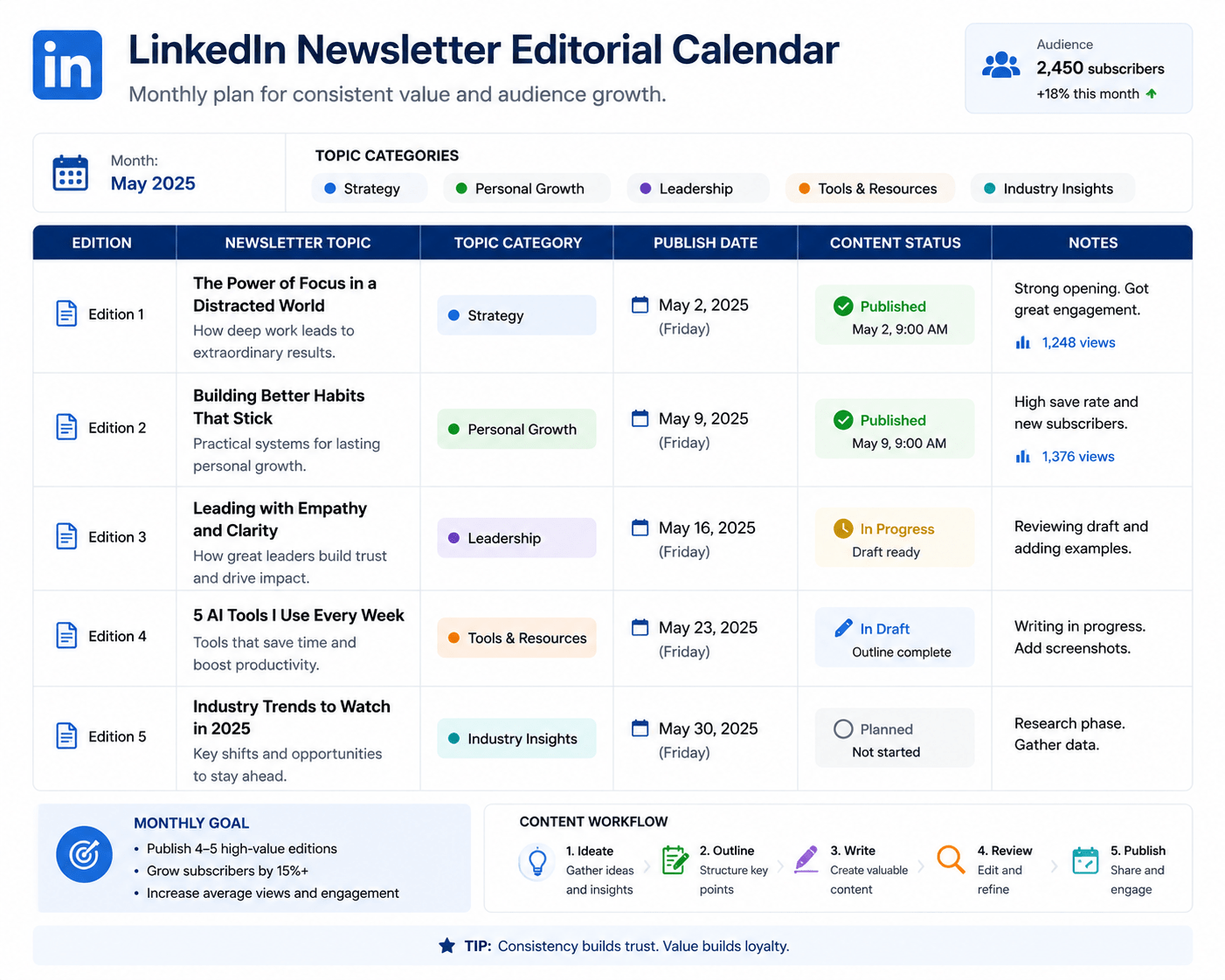
A content calendar solves part of this problem.
Start with 10–20 potential topics.
For example, a newsletter about freelancing might cover:
- Creating a sustainable freelance workflow
- Managing project scope
- Improving client communication
- Building better proposals
- Handling revisions
- Organizing project files
- Setting realistic deadlines
- Creating repeatable processes
- Improving onboarding
- Building a referral system
You do not have to publish these topics in that exact order.
The purpose is to create a reservoir of ideas.
Write Newsletter Editions for Humans First
Search optimization can help your content become discoverable, but a newsletter should not read like a page created entirely for algorithms.
Write naturally.
Use:
- Clear headings
- Short paragraphs
- Specific examples
- Useful explanations
- Simple language
- Relevant terminology
Avoid:
- Repeating the same keyword unnecessarily
- Excessive jargon
- Huge blocks of text
- Empty introductions
- Unsupported claims
- Artificially inflated word counts
If your subject requires technical language, explain it.
The reader should not need a dictionary to understand the article.
Start With a Strong Opening
The first few paragraphs determine whether someone wants to continue reading.
Avoid beginning every edition with:
“Welcome to another edition of my newsletter.”
That does not provide much value.
Instead, start with the problem.
For example:
Many freelancers spend hours looking for new clients while ignoring the systems that could turn existing relationships into repeat work.
Now the reader knows what the article is about.
Another approach is to begin with a surprising observation.
Or you can ask a useful question.
For example:
What happens when your best-performing content stops attracting attention?
The opening should create a reason to continue.
Focus Each Edition on One Main Idea
A newsletter can be long without being unfocused.
The key is to give each edition a central purpose.
Suppose your newsletter is about LinkedIn content.
Instead of trying to cover:
- Profile optimization
- Networking
- Lead generation
- LinkedIn Ads
- Personal branding
- Company Pages
- Video
- Newsletters
in one article, choose one subject.
For example:
How to Create a LinkedIn Content Calendar
Then explore that topic properly.
Depth often creates more value than trying to cover everything at once.
Use Examples to Make Ideas Concrete
Readers understand concepts more easily when they can see them in action.
Suppose you are explaining a content strategy.
Instead of saying:
“Create audience-focused content.”
show an example.
Generic:
“Our company provides digital solutions.”
Audience-focused:
“We help local service businesses turn outdated websites into mobile-friendly websites that make it easier for customers to request quotes.”
The second example gives the reader something concrete to understand.
Examples also make your writing more memorable.
Include Practical Takeaways
A good newsletter should leave the reader with something they can use.
At the end of each edition, consider including:
Quick Checklist
A list of actions.
Three Things to Try
Simple recommendations.
Questions to Consider
Useful reflection prompts.
Next Steps
A small implementation plan.
This converts the newsletter from passive reading into practical learning.
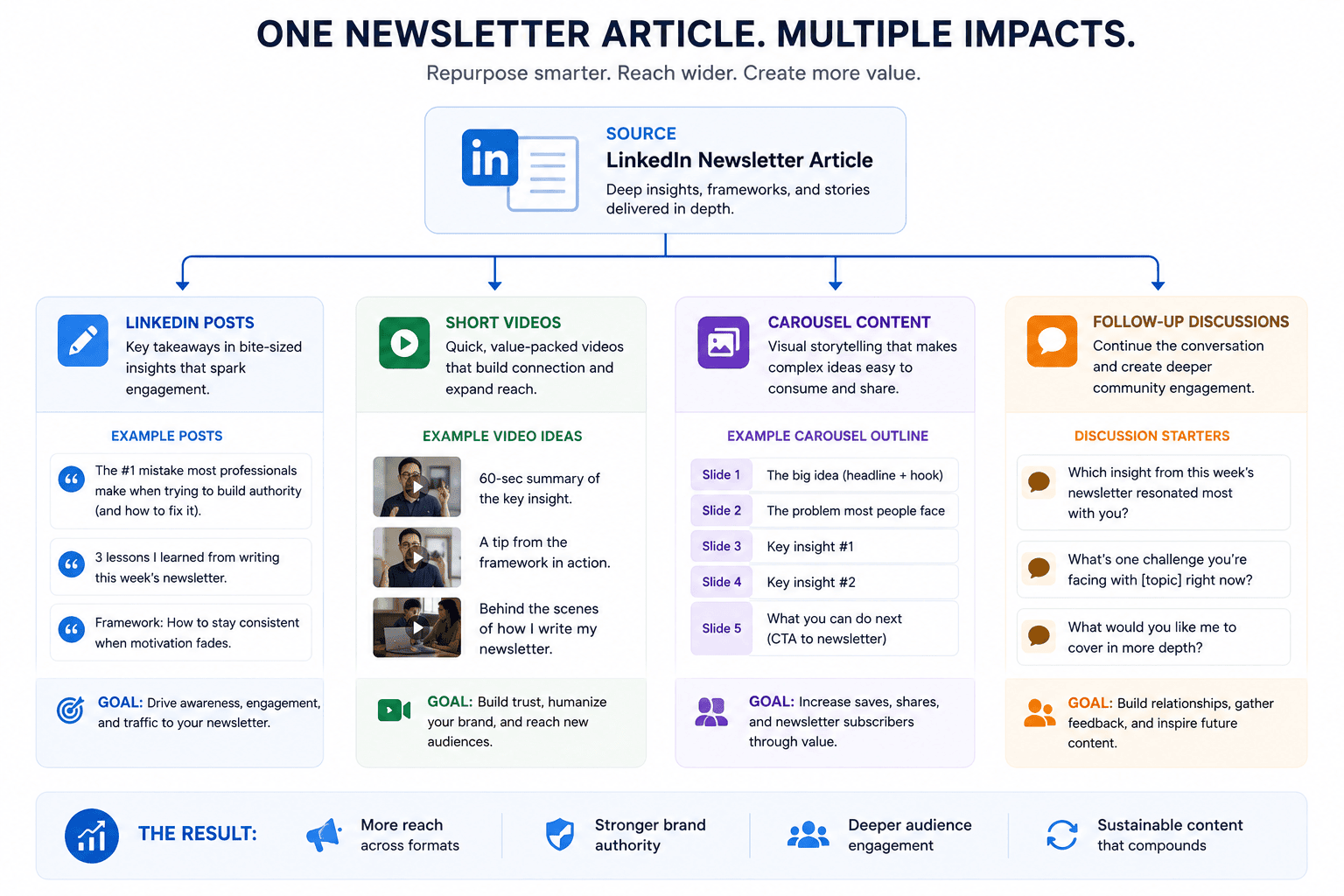
Use the LinkedIn Newsletter as Part of a Larger Content System
You do not have to create completely separate ideas for every format.
One strong newsletter topic can generate multiple pieces of content.
For example:
Newsletter
“Complete Guide to Building a Freelance Content System”
LinkedIn Post 1
Three mistakes freelancers make when planning content.
LinkedIn Post 2
A simple weekly content workflow.
LinkedIn Post 3
How to turn one article into five posts.
Short Video
A two-minute explanation of the workflow.
Follow-Up Newsletter
How to measure whether your content system is working.
This is called content repurposing.
The goal is not to copy and paste the same article everywhere.
Instead, take the central idea and adapt it to different formats.
Encourage Discussion Without Begging for Engagement
At the end of your newsletter, you can invite readers to share their experience.
But avoid generic requests such as:
“Like, comment, and share!”
Instead, ask a relevant question.
For example:
What is the biggest challenge you face when planning professional content?
Or:
Which part of your content workflow takes the most time?
Specific questions are easier to answer.
They also help you understand what your audience actually cares about.
That information can become a source of future newsletter ideas.
Make Your Newsletter Useful Before Making It Promotional
A common mistake is turning every edition into a sales pitch.
Imagine subscribing to a newsletter because it promises useful marketing advice.
Then every edition says:
“Book my consultation.”
Readers may stop paying attention.
A better approach is to provide genuine value first.
If your newsletter consistently helps readers understand something, solve problems, or make better decisions, your professional reputation can benefit naturally.
Promotional content can still have a place.
For example, you can mention a relevant service when it genuinely connects to the subject.
But the newsletter should not feel like a collection of advertisements.
Add Your Own Experience
One of the easiest ways to make professional content more valuable is to include experience.
Instead of writing only:
“Businesses should create clear landing pages.”
explain what you have observed.
For example:
“One recurring problem in website projects is that businesses try to place every service on their homepage. The result is often a page that contains plenty of information but gives visitors no clear next step.”
That sounds more useful because it comes with context.
You can discuss:
- Lessons learned
- Mistakes
- Experiments
- Processes
- Unexpected results
- Client questions
- Industry observations
Do not reveal confidential client information.
Generalized examples are often enough.
Build Trust Through Accuracy
Professional newsletters should be careful with facts.
Do not invent:
- Statistics
- Client results
- Testimonials
- Industry studies
- Revenue figures
- Research findings
If you mention a statistic, verify its source.
If you discuss a rapidly changing platform feature, check current documentation.
LinkedIn features and eligibility can change, so writers should verify platform-specific details before publishing.
This is especially important when your newsletter positions itself as an educational resource.
Accuracy is part of your brand.
Use Images Strategically
A newsletter article does not need an image after every paragraph.
Instead, use visuals where they improve understanding.
Useful image types include:
- Screenshots
- Diagrams
- Checklists
- Process illustrations
- Charts
- Before-and-after examples
- Workflow graphics
For this Zynprint article, six image positions have been marked.
When creating the actual images, keep them visually consistent.
Use readable text.
Avoid overcrowded graphics.
Make sure the images support the section rather than simply filling space.
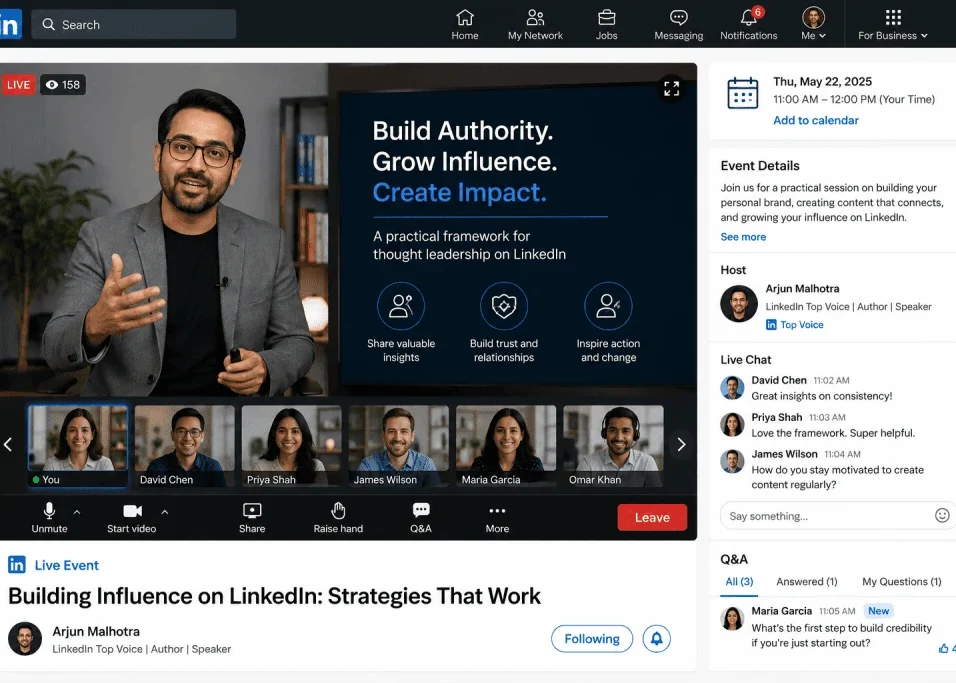
Use Video to Add Another Learning Format
Some subjects are easier to explain through video.
A newsletter about LinkedIn content planning, for example, could include a short tutorial showing:
- Where newsletter tools are located
- How to create an edition
- How to format an article
- How to review publishing options
However, video should be relevant.
Do not add a random video simply because the article requires one.
The video should help the reader understand or implement the topic.
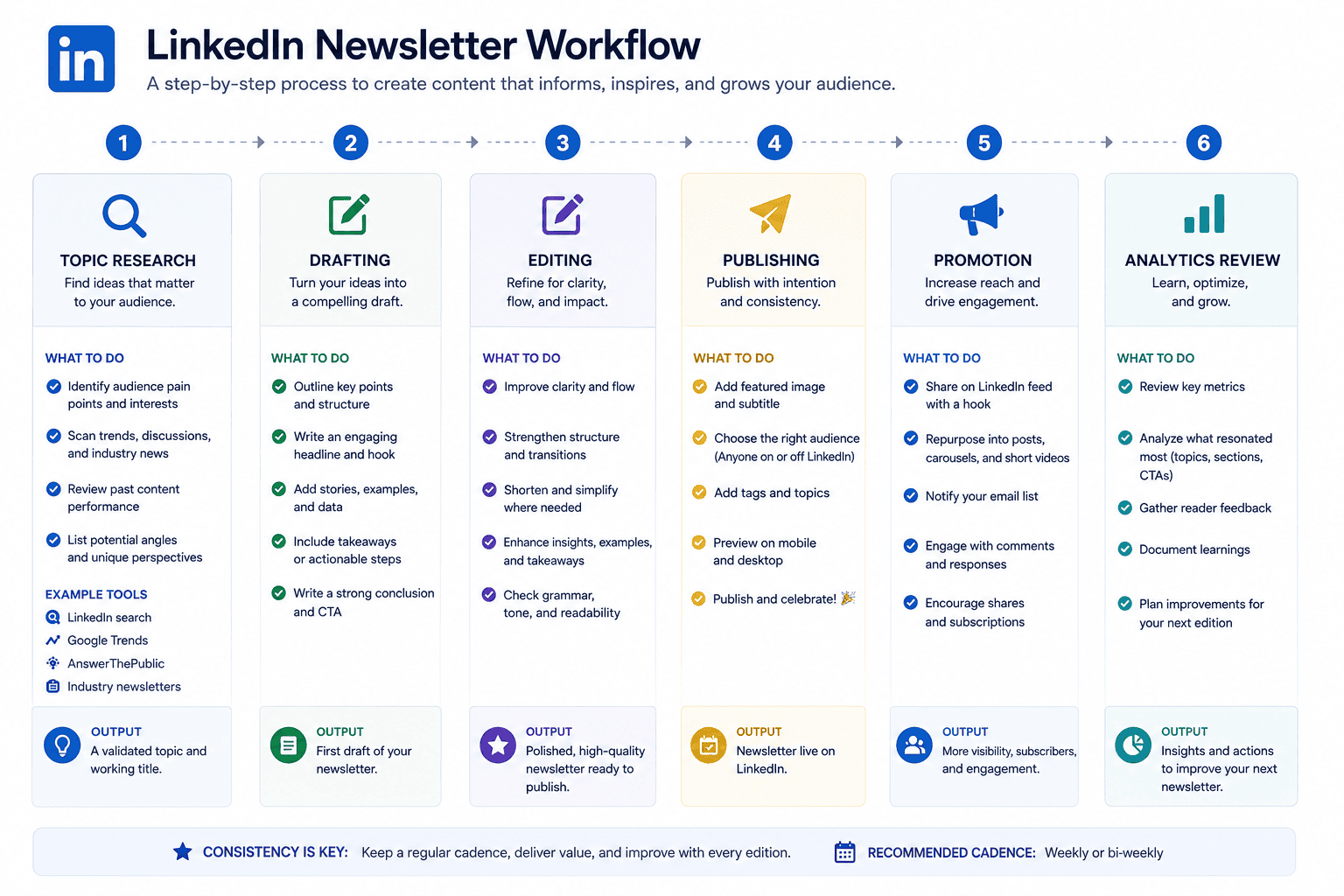
How to Promote Each Newsletter Edition
Publishing an edition does not necessarily mean everyone who could benefit from it will see it.
You can support distribution by creating related LinkedIn content.
For example:
Before Publishing
Create a short post introducing the problem your upcoming edition will address.
At Publication
Share the new edition with a concise explanation of what readers will learn.
After Publication
Create another post highlighting one practical lesson from the article.
Later
Return to the topic with a new example or follow-up question.
The important thing is to avoid repeatedly posting:
“Read my newsletter.”
Give people a reason to care.
Tell them what problem the edition solves.
Understand Newsletter Analytics
Publishing without reviewing performance makes it difficult to improve.
LinkedIn provides newsletter-related analytics and creator tools, although available metrics and interfaces can change over time.
Depending on the feature set available to your account, useful signals may include:
- Views
- Engagement
- Subscriber activity
- Reactions
- Comments
- Shares
- Follower growth
- Audience characteristics
Do not obsess over a single number.
A newsletter with fewer views but highly relevant readers may be more valuable than one with large exposure and no meaningful audience response.
Look for patterns.
Which subjects generate discussion?
Which topics receive little attention?
Which editions attract the most relevant audience?
What questions repeatedly appear in comments?
Those observations can guide future topics.
Turn Reader Questions Into Future Editions
Your audience can become a source of content ideas.
Suppose several readers ask:
“How do I choose between LinkedIn posts and a newsletter?”
That question could become an entire future edition.
Another reader might ask:
“How often should I publish?”
That could become another topic.
Instead of constantly guessing what your audience wants, pay attention to the questions people already ask.
This creates a feedback loop:
Publish → Listen → Learn → Improve → Publish again
Over time, that process can make the newsletter increasingly relevant.
How Often Should You Publish?
There is no universal publishing schedule that guarantees success.
The right frequency depends on:
- Your topic
- Your available time
- Your writing process
- Audience expectations
- Content depth
- Your ability to maintain quality
Weekly publishing can work for some creators.
Biweekly or monthly publishing may be more realistic for others.
The worst schedule is one you cannot maintain.
If you promise frequent editions and disappear for several months, readers may stop expecting your publication.
Choose a sustainable schedule.
Consistency matters more than forcing yourself into an unrealistic publishing routine.
What Makes a LinkedIn Newsletter Worth Subscribing To?
Imagine that someone sees your newsletter for the first time.
They should be able to answer:
What is this about?
The subject is clear.
Who is it for?
The intended audience is obvious.
What will I learn?
The benefit is understandable.
Why should I trust the author?
The author’s experience or perspective provides credibility.
What can I expect in future editions?
The publication has a recognizable direction.
If those questions are difficult to answer, your newsletter may need clearer positioning.
Common LinkedIn Newsletter Mistakes
1. Choosing a Topic That Is Too Broad
“Business” is difficult to own.
A more specific subject creates clearer expectations.
2. Publishing Without a Content Plan
Running out of ideas after two editions is avoidable.
Create a topic bank before launching.
3. Making Every Edition Promotional
Readers subscribe for value, not constant sales messages.
4. Writing Extremely Long Introductions
Get to the useful material quickly.
5. Using Excessive Jargon
Professional does not mean complicated.
6. Ignoring Reader Questions
Questions can provide excellent future topics.
7. Publishing Inconsistent Quality
A smaller number of genuinely useful editions can be better than constant low-value publishing.
8. Chasing Vanity Metrics
Large view counts do not automatically mean a relevant audience.
9. Copying Popular Creators
Study successful formats, but develop your own perspective.
10. Ignoring Platform Changes
LinkedIn features can change, so verify current platform documentation before relying on old instructions.
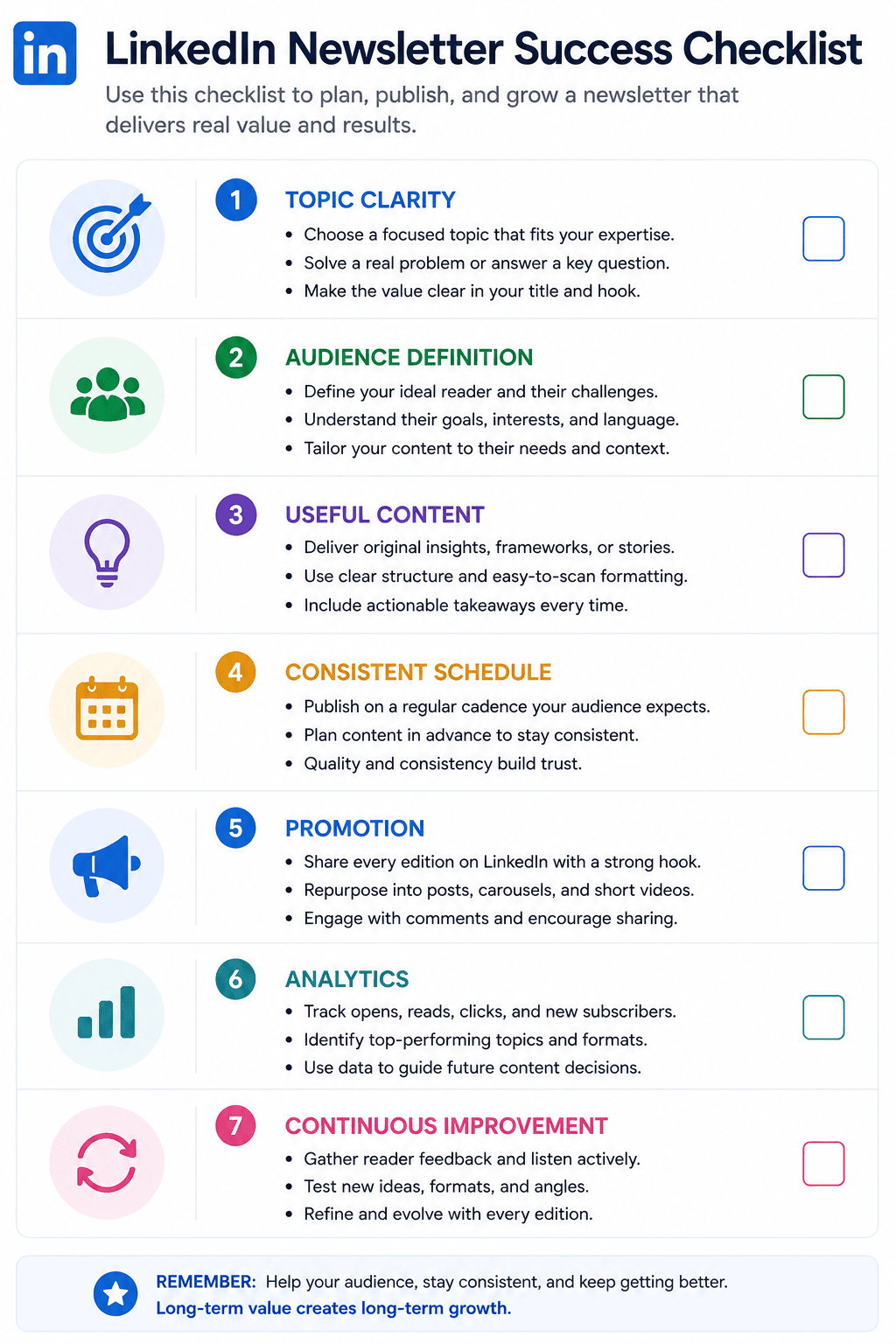
A Simple 30-Day LinkedIn Newsletter Plan
If you are starting from zero, avoid trying to build an enormous publication immediately.
Use a simple four-week system.
Week 1: Research
Define:
- Audience
- Topic
- Newsletter name
- Main content categories
- Publishing frequency
Create at least 10 potential article ideas.
Week 2: Prepare
Choose your first topic.
Create an outline.
Collect reliable information.
Prepare relevant visuals.
Draft the article.
Week 3: Publish
Edit the article carefully.
Check:
- Headings
- Grammar
- Facts
- Links
- Images
- Formatting
- Call to action
Publish the edition.
Then create a supporting LinkedIn post.
Week 4: Learn
Review the available analytics.
Read comments.
Look at audience reactions.
Write down questions people asked.
Then choose your next topic.
This creates a repeatable cycle.
A Practical LinkedIn Newsletter Template
You can use this structure for future editions:
Title
Make the subject specific.
Opening
Introduce the problem.
Why It Matters
Explain why the reader should care.
Main Explanation
Teach the concept.
Examples
Show practical situations.
Action Steps
Give readers a process to follow.
Common Mistakes
Explain what to avoid.
Key Takeaways
Summarize the important points.
Question
Invite relevant discussion.
This framework can be adapted to almost any professional topic.
LinkedIn Newsletter SEO and Discoverability
Although a LinkedIn Newsletter is not the same as a traditional website blog, clear writing still matters.
Use descriptive titles.
For example:
Weak:
Some Thoughts on Content
Better:
How to Build a Consistent LinkedIn Content Calendar
The second title tells readers what they will learn.
Use relevant terms naturally throughout the article.
If the edition is about freelance proposals, discuss terms that genuinely relate to proposals.
If it is about SaaS marketing, use relevant terminology when appropriate.
Do not repeat keywords simply to manipulate search visibility.
Your first priority should always be usefulness.
Build a Recognizable Newsletter Style
Over time, readers should begin to recognize your publication.
You can create consistency through:
- Similar article structure
- Consistent title style
- Recurring sections
- Similar visual presentation
- A recognizable introduction
- Consistent publishing schedule
- Recurring content themes
For example, every edition could end with:
One Practical Action
Then provide one thing readers can implement that week.
A recurring section gives the newsletter personality.
When Should You Change Your Newsletter Topic?
Sometimes a newsletter starts with one subject and gradually evolves.
That is normal.
However, changing direction too frequently can confuse subscribers.
Before making a major change, ask:
- Are readers still interested?
- Does the new topic fit my professional identity?
- Can I produce useful content about it?
- Is the change an expansion or a completely different subject?
- Would the existing subscribers understand why the publication changed?
If the new subject is completely unrelated, creating a separate publication may make more sense than changing the identity of an existing one.
Final Thoughts
A LinkedIn Newsletter should not be viewed simply as another place to publish content.
It can become a focused professional publication built around a specific subject and audience.
The strongest newsletters are usually clear about what they offer.
They do not try to teach everyone everything.
They choose a subject.
They understand their audience.
They publish useful information.
They maintain a recognizable structure.
They listen to readers.
They improve based on evidence.
And they remain consistent enough for readers to know what to expect.
If you are planning your first newsletter, start small.
Choose one topic that you understand well.
Identify the people who would genuinely benefit from your knowledge.
Create a list of potential subjects.
Build a realistic publishing schedule.
Write the first edition with practical value in mind.
Then learn from the response.
Do not become obsessed with subscriber numbers immediately.
A professional audience is built over time.
One useful edition can lead to a question.
That question can lead to another edition.
Another edition can create a conversation.
A conversation can introduce you to someone new.
And gradually, your publication can become a recognizable part of your professional presence.
The most important principle is simple:
Give people a clear reason to subscribe and a good reason to keep reading.
If every edition respects the reader’s time and provides something genuinely useful, you are building more than a collection of articles.
You are building a professional information resource.
Frequently Asked Questions
What is a LinkedIn Newsletter?
A LinkedIn Newsletter is a recurring publication on LinkedIn that allows creators or organizations to publish articles around a specific topic and develop a subscriber audience. Available features can vary by account and platform updates.
Is a LinkedIn Newsletter the same as a LinkedIn post?
No. Posts are generally suited to shorter updates and discussions, while newsletter editions provide a format for longer, recurring topic-focused articles.
What should I write about in a LinkedIn Newsletter?
Choose a subject that combines your expertise with the interests and problems of a specific professional audience.
How often should I publish?
Choose a schedule you can maintain consistently. Weekly, biweekly, or monthly publishing can all be reasonable depending on your content and available time.
Can freelancers create LinkedIn Newsletters?
Where newsletter functionality is available to the account, freelancers and other professionals can use the format to share expertise and build a focused professional audience.
Should every newsletter edition promote my services?
No. Consistent value should be the primary purpose. Relevant services can be mentioned when they naturally connect to the topic.
How can I get more newsletter subscribers?
Create useful content, clearly communicate what the newsletter covers, promote editions through relevant LinkedIn activity, and consistently address subjects your intended audience cares about.
What should the first newsletter edition be about?
A strong first edition can introduce the core problem your publication will address and demonstrate the type of practical value readers can expect.
How do I find future newsletter topics?
Use audience questions, recurring professional problems, industry developments, common mistakes, case studies, tutorials, and lessons from your own experience.
Should I publish the same content as a LinkedIn post and newsletter?
You can repurpose ideas, but avoid simply duplicating the entire article. Adapt the central idea to the format and purpose of each piece.