LinkedIn Event Guide: How to Create, Promote, and Host Professional Events
- by Muhammad Raza
- 0 Comments
- 18 minutes read
- 44 Views
LinkedIn Events give professional audiences more than static social media posts: they create a dedicated place to learn, ask questions, hear from experts, discover new ideas, and interact with people who share similar professional interests.
They want opportunities to learn, ask questions, hear from experts, discover new ideas, and interact with people who share similar professional interests.
That is where LinkedIn Events can become useful.
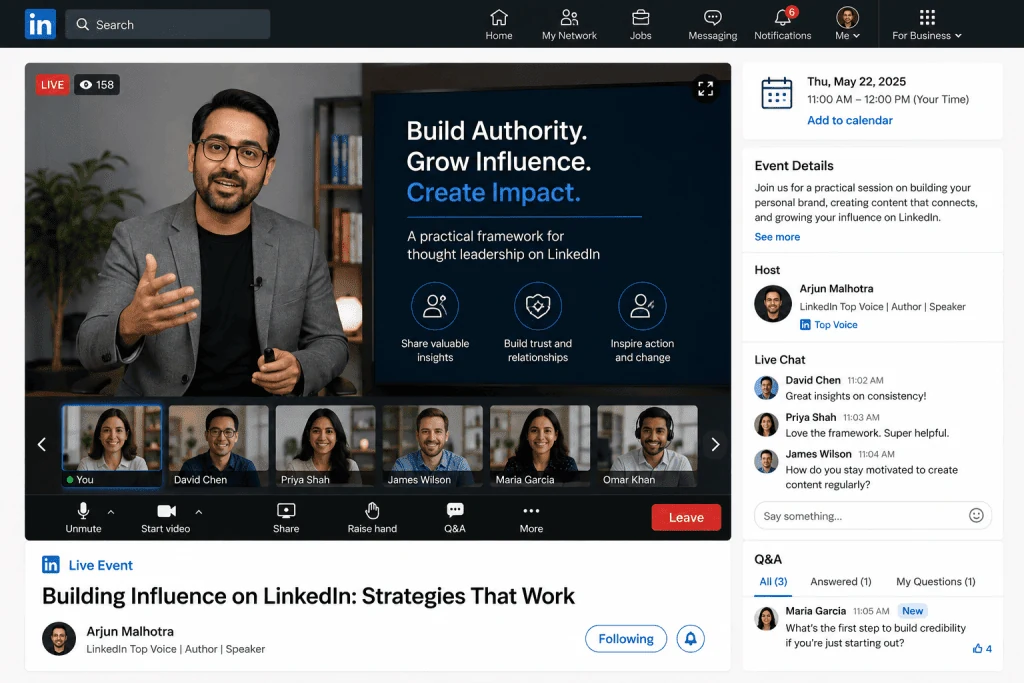
A LinkedIn Event provides a dedicated space for organizing and promoting a professional gathering through the LinkedIn platform. Events can be used for online sessions, in-person gatherings, and certain live video formats. LinkedIn describes Events as a way for individuals and organizations to create, promote, and host professional gatherings.
For a business, an event could be a webinar, product discussion, educational session, panel, workshop, networking session, or industry presentation.
For an individual professional, it could be a virtual discussion, expert interview, community session, or educational event.
The important thing is that a LinkedIn Event should have a clear reason for existing.
Creating an event simply because the platform provides an event feature is unlikely to produce a useful experience.
A successful event begins with a specific audience problem or interest.
For example:
“How can small businesses improve their websites?”
is a reasonable subject for an educational webinar.
But:
“Our company is hosting an event.”
does not immediately communicate why someone should attend.
The difference is value.
Your event should make the potential attendee understand what they will learn, experience, or gain by participating.
This guide explains how LinkedIn Events work, how to choose an event topic, how to structure the event page, how to promote the event before it begins, how to keep attendees engaged, what to do after the event, and how to turn one event into multiple pieces of professional content.
What Are LinkedIn Events?
LinkedIn Events are dedicated event pages that allow individuals and organizations to organize and promote professional gatherings.
According to LinkedIn’s current documentation, Events can be online or in person. Online events can use LinkedIn Live when the organizer has access to that feature, or they can use an external event link.
Each event has an Event Page containing information such as:
- Event title
- Date
- Time
- Description
- Speakers
- Agenda or theme
- Organizer
- Event format
The Event Page becomes the central location for information about the gathering.
This is useful because potential attendees do not have to search through multiple posts to understand what the event is about.
They can view the main event information in one place.
LinkedIn also allows organizers and attendees to share events with their networks, which can help extend visibility beyond the initial audience.
Why Should You Use LinkedIn Events?
A normal LinkedIn post can announce an upcoming webinar.
But an Event can provide a more structured experience.
Instead of posting:
“We are hosting a webinar next Thursday.”
you can create an event with:
- A dedicated title
- Event date and time
- Description
- Speakers
- Event format
- Cover image
- Promotion posts
- Attendee information
This makes the event easier to understand and share.
LinkedIn Events can be particularly useful for:
- Webinars
- Workshops
- Online training
- Panel discussions
- Industry conversations
- Product demonstrations
- Educational sessions
- Professional communities
- Networking events
- Company announcements
The best use case depends on your audience.
A technical audience might prefer an educational workshop.
A marketing audience might respond better to a panel discussion.
A local professional community might prefer an in-person networking event.
The event format should match the audience rather than forcing every topic into the same structure.
LinkedIn Event Types and Formats
LinkedIn currently supports different event arrangements.
An event can be in person or online.
For online events, LinkedIn documentation describes options including LinkedIn Live and external event links.
In-Person Events
An in-person event takes place at a physical location.
Examples include:
- Business workshops
- Conferences
- Networking sessions
- Training events
- Local professional meetups
If you choose an in-person format, you need to provide appropriate location information.
Online Events
Online events can be hosted digitally.
Depending on your eligibility and setup, you may use LinkedIn Live or direct attendees to an external event or broadcast location.
LinkedIn notes that LinkedIn Live requires access to the feature and the use of a third-party streaming tool.
Because platform features can change, always verify the current requirements before planning an event around a specific live-streaming feature.
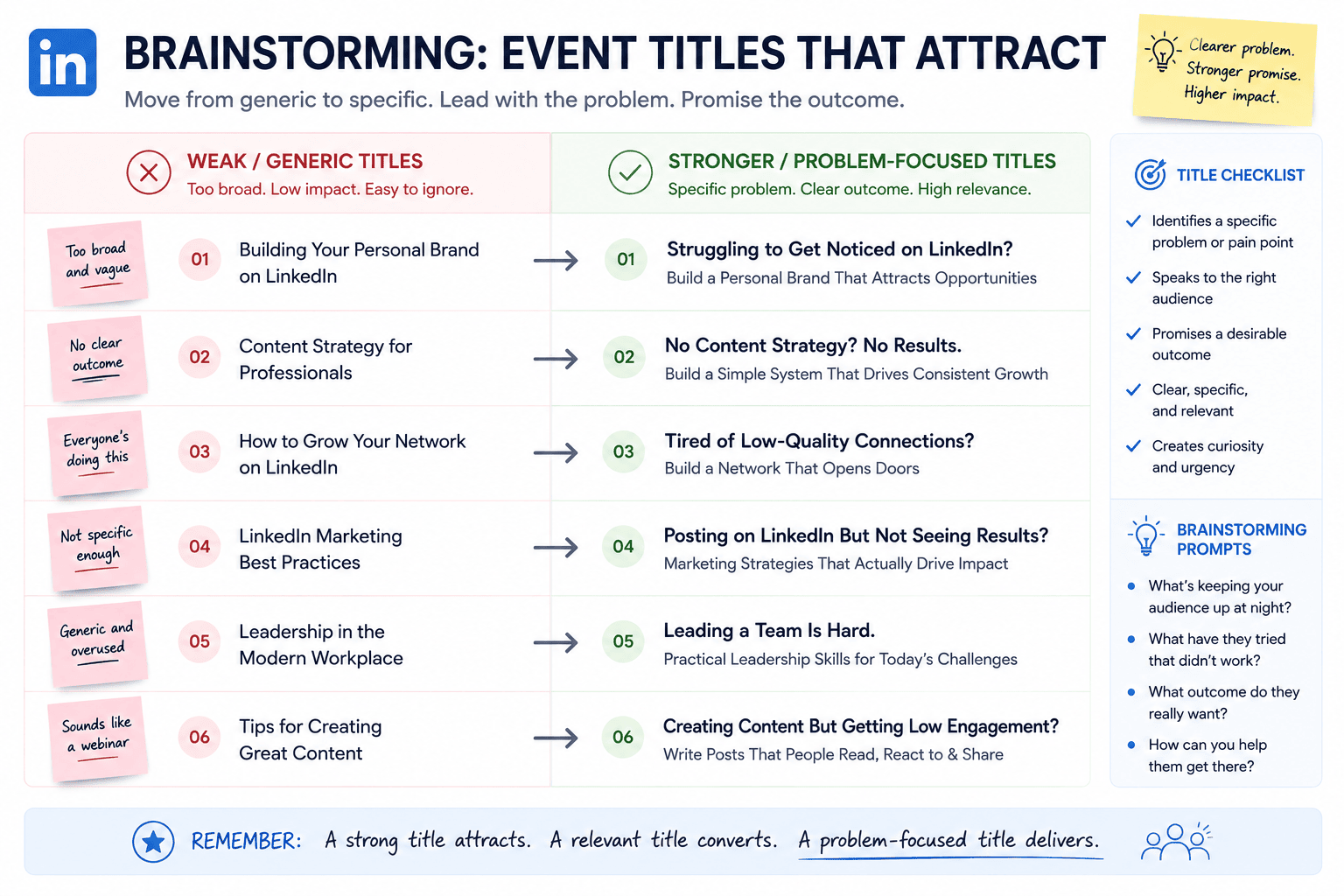
Choose a Clear Event Topic
The event topic is one of the most important elements of the entire strategy.
A weak event topic makes promotion difficult.
Consider the difference between:
Weak:
Digital Marketing Webinar
and:
Stronger:
How Small Businesses Can Build a Practical Digital Marketing Strategy
The second title provides context.
It tells potential attendees what they are going to learn.
Your topic should ideally answer a question or address a meaningful problem.
Good event topics often include:
- How to…
- A practical guide to…
- What businesses need to know about…
- The future of…
- Common mistakes in…
- Building a strategy for…
- Expert discussion: …
- Workshop: …
The goal is not to make the title sensational.
The goal is clarity.
Define Your Target Attendee
Before creating an event, identify who should attend.
Do not simply say:
“Everyone interested in business.”
That audience is too broad.
Instead, define a specific group.
For example:
Freelance designers who want to improve their project management process.
Or:
Small-business owners who want to understand website conversion basics.
Or:
SaaS founders preparing for their first major product launch.
The more clearly you understand your audience, the easier it becomes to create:
- Event titles
- Descriptions
- Promotional posts
- Speaker selections
- Questions
- Follow-up content
A specific audience also makes your promotional messaging stronger.
Create a Strong Event Title
The title should communicate the subject quickly.
Avoid unnecessary words.
Instead of:
An Amazing and Exciting Webinar Event About the Future of Artificial Intelligence for Businesses
try:
AI for Small Businesses: Practical Applications and Real-World Use Cases
The second version is easier to understand.
Your title should ideally communicate:
Topic + Audience Benefit
For example:
LinkedIn Content Strategy: Build a Consistent Professional Presence
or:
SaaS Pricing Workshop: How to Structure Your Plans
or:
Freelancing Systems: Build a More Efficient Client Workflow
A clear title can make promotion much easier.
Write a Useful Event Description
Your description should answer the questions a potential attendee is likely to have.
What is the event about?
Explain the subject.
Who should attend?
Describe the intended audience.
What will attendees learn?
Provide specific outcomes.
Who is speaking?
Introduce the speakers.
When is it happening?
Clearly communicate date and time.
What format is being used?
Explain whether the event is online or in person.
Avoid writing a huge block of promotional language.
Make the description easy to scan.
Use short sections and bullet points where appropriate.
Build an Event Agenda
An agenda gives attendees an idea of what to expect.
For example:
7:00 PM — Welcome
Introduction and event overview.
7:05 PM — Main Presentation
Core educational session.
7:35 PM — Expert Discussion
Questions and discussion with speakers.
7:50 PM — Audience Q&A
Attendee questions.
8:00 PM — Closing
Key takeaways and next steps.
The exact schedule will depend on your event.
The important point is to create structure.
A clear agenda also helps speakers understand their responsibilities.
Choose the Right Speakers
Speakers can significantly influence an event’s perceived value.
However, do not choose speakers simply because they have large audiences.
Look for relevance.
A good speaker should have:
- Knowledge of the subject
- Practical experience
- Ability to communicate clearly
- Relevant examples
- Understanding of the target audience
For a technical webinar, a highly relevant specialist may provide more value than a general influencer.
For a panel, choose people with different but complementary perspectives.
This creates a better discussion.
LinkedIn’s current Event creation workflow allows organizers to add speakers, with speaker selection depending on the available LinkedIn connection and event setup.
Design a Professional Event Cover Image
The cover image is one of the first visual elements people encounter.
Keep it simple.
Include:
- Event title
- Short subtitle if necessary
- Date
- Speaker names or photos when appropriate
- Brand identity
Avoid filling the image with paragraphs of text.
The design should remain readable on smaller screens.
LinkedIn’s current documentation specifies that Event cover images use a 16:9 aspect ratio, with examples including 480×270 and 1280×720 pixels. LinkedIn also provides an Alt Text option for the cover image.
For accessibility, write descriptive alt text rather than stuffing keywords into it.
Plan the Event Before Publishing It
Do not create the event five minutes before you want people to attend.
Give yourself enough preparation time.
Your planning checklist should include:
- Topic
- Audience
- Speakers
- Date
- Time zone
- Event format
- Description
- Agenda
- Cover image
- Promotion plan
- Presentation materials
- Technical test
- Follow-up strategy
For larger events, create a detailed production checklist.
For smaller events, a simple checklist may be enough.
The goal is to reduce avoidable problems.
Choose a Practical Date and Time
Think about your audience’s schedule.
If your target audience is spread across multiple countries, time zones become especially important.
For example, a time that works well for Pakistan may not be convenient for professionals in North America.
Before choosing a time, consider:
- Audience location
- Working hours
- Weekdays vs weekends
- Industry schedule
- Holiday periods
- Event duration
You do not need to find a perfect time.
You need a reasonable time for the majority of your intended audience.
Promote the Event Before It Starts
Creating the Event Page is only the beginning.
You also need to communicate why people should attend.
A strong promotion strategy can include several stages.
Announcement Post
Introduce the event.
Explain:
- What it is
- Who it is for
- Why it matters
- When it happens
Speaker Post
Introduce individual speakers.
Share their experience and explain what they will discuss.
Educational Post
Share one useful idea related to the event topic.
Then explain that the full subject will be covered during the event.
Reminder Post
As the event approaches, publish a reminder.
Avoid repeating exactly the same message every time.
Change the angle.
Give People a Reason to Attend
Simply saying:
“Join our event.”
is not enough.
Explain what they will get.
For example:
By the end of this workshop, attendees will have a simple framework for evaluating their website’s conversion process.
That is a tangible benefit.
Other examples include:
- A checklist
- A framework
- Expert insights
- A live demonstration
- Audience Q&A
- Practical examples
- Industry discussion
- A downloadable resource
People are more likely to pay attention when the value is clear.
Use LinkedIn Posts to Support the Event
Your event and regular LinkedIn content should work together.
For example, if your event is about website conversion:
Post 1
Three common website conversion mistakes.
Post 2
A short case example.
Post 3
A question asking professionals what conversion problem they face.
Post 4
Speaker introduction.
Post 5
Event reminder.
This creates a content sequence rather than one isolated announcement.
Use Questions to Generate Interest
Questions can create curiosity.
For example:
Why do some websites receive traffic but generate very few inquiries?
Then provide a short explanation.
At the end:
We will explore this problem in our upcoming workshop.
The content should still provide some value.
Do not hide all useful information behind the event.
Give people enough to understand that you know the subject.
Invite Relevant Connections
LinkedIn allows organizers and attendees to invite first-degree connections to Events. LinkedIn’s current documentation also states that organizers and attendees can share events through posts, messages, and other platforms.
However, relevance matters.
Do not invite everyone simply because you can.
Ask:
Would this person genuinely benefit from this event?
If the answer is no, the invitation may not be useful.
A smaller audience with strong relevance can be more valuable than a large group with no interest.
Prepare the Technical Setup
For online events, technical preparation is essential.
Test:
- Microphone
- Camera
- Internet connection
- Presentation
- Screen sharing
- Lighting
- Background
- Streaming software
- Event link
- Backup communication method
If you have multiple speakers, run a rehearsal.
Check that everyone knows:
- When to join
- When to speak
- How long they have
- How questions will be handled
- What happens if the stream fails
Technical problems can happen even when everything appears ready.
Preparation reduces the risk.
Important 2026 LinkedIn Live Change
There is an important current LinkedIn change that event organizers should know.
LinkedIn states that, as of June 22, 2026, spontaneous “go live instantly” functionality was discontinued. LinkedIn Live events now need to be scheduled in advance, although organizers can schedule an event only a few minutes before going live if necessary.
This matters if you previously relied on the ability to start an unscheduled live broadcast.
If your event strategy depends on LinkedIn Live, verify the latest requirements before the event.
Platform features can change, and old tutorials may no longer accurately describe the current workflow.
Make the Opening Five Minutes Count
The beginning of the event sets the tone.
Avoid spending ten minutes discussing technical issues or introducing every person in extreme detail.
Start with the value.
A strong opening might look like:
Minute 1: Welcome.
Minute 2: Explain the problem.
Minute 3: Explain what attendees will learn.
Minute 4: Introduce the speaker.
Minute 5: Begin the main discussion.
The audience should understand quickly why staying is worthwhile.
Keep the Presentation Practical
People often remember examples better than abstract explanations.
Instead of saying:
“Businesses should improve customer experience.”
show a situation.
For example:
A customer visits a website, cannot find pricing information, cannot determine the next step, and leaves without contacting the company.
Then explain how the experience could be improved.
Examples make presentations more understandable.
Encourage Audience Participation
An event should not feel like a one-way lecture if interaction is appropriate for the format.
You can ask:
- Where are you joining from?
- What is your biggest challenge?
- Which option would you choose?
- Has your company experienced this problem?
- What would you like the speaker to explain?
For larger events, collect questions throughout the session.
For smaller workshops, direct discussion may work better.
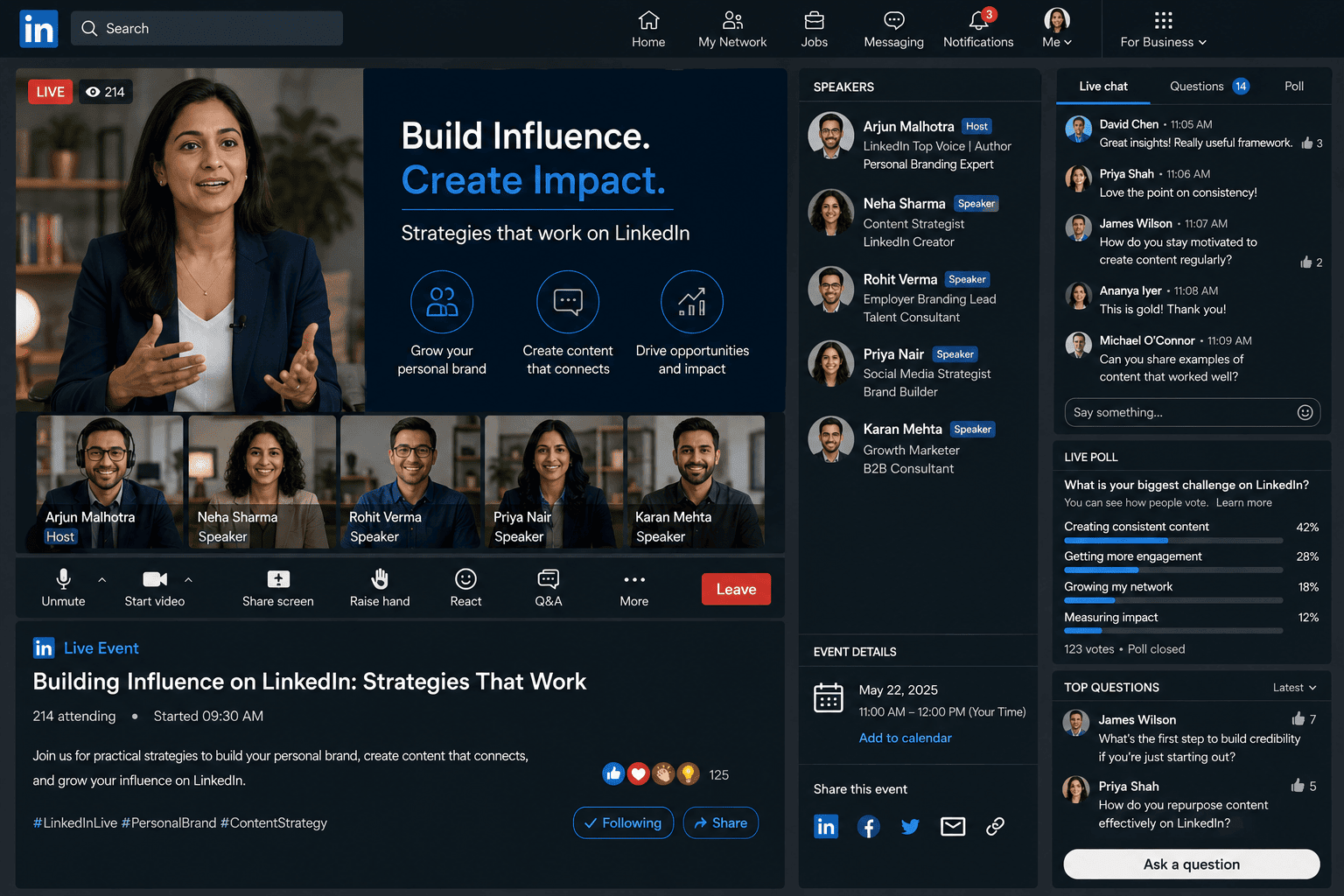
Include a Q&A Session
A Q&A section can be one of the most valuable parts of an event.
Attendees often have questions that were not included in the original presentation.
Leave enough time for them.
If the event is one hour long, do not use every minute for prepared slides.
Reserve time for discussion.
The questions may also reveal topics that deserve future content.
For example, if five attendees ask about pricing, you could create a future article or webinar about pricing strategy.
Record and Repurpose the Event
One event can produce much more content than a single live session.
After the event, consider turning the material into:
- LinkedIn posts
- Short video clips
- Quotes
- Educational articles
- Frequently asked questions
- Carousel posts
- Newsletter topics
- Blog content
- Future webinar subjects
For example:
Original Event
“How to Build a Better Freelance Workflow”
Repurposed Content
Post 1: Three workflow mistakes freelancers make.
Post 2: The five-step workflow discussed during the event.
Video Clip: One speaker explains time management.
Article: Complete guide to freelance workflow design.
Follow-Up Event: Live Q&A about freelancer productivity.
This is one of the biggest advantages of event-based content.
Follow Up With Attendees
The event should not be considered finished when the presentation ends.
Follow-up helps maintain the relationship.
You can share:
- Key takeaways
- Recording information
- Helpful resources
- Answers to unanswered questions
- Future event announcements
- Related content
Keep the follow-up useful.
Avoid immediately sending an aggressive sales pitch to everyone.
The first goal is to continue the conversation.
Turn Questions Into Future Content
Audience questions are valuable research.
Imagine someone asks:
“How should a small business decide which marketing channel to focus on?”
That question could become:
LinkedIn Post:
How to choose your first marketing channel.
Article:
Complete guide to selecting marketing channels for small businesses.
Video:
Three questions to ask before choosing a marketing channel.
Future Event:
Marketing Channel Strategy Workshop.
One question can therefore create an entire content cluster.
Measure Event Performance
After the event, review what happened.
Do not focus only on attendance.
Consider:
- Number of attendees
- Registrations where applicable
- Engagement
- Questions
- Comments
- Shares
- Post-event interactions
- Audience relevance
- Follow-up conversations
- Content generated from the event
The exact metrics available can vary depending on your event type, organizer setup, and current LinkedIn tools.
For Page-organized events, LinkedIn provides event and registration functionality, including registration forms in eligible setups.
The goal is to understand what worked.
Attendance Is Not the Only Success Metric
Imagine two events.
Event A
1,000 people register.
100 attend.
Very little discussion occurs.
Event B
150 people register.
100 attend.
30 ask questions.
Several attendees share the event.
The second event may produce a stronger professional outcome even though it started with fewer registrations.
Numbers need context.
Ask:
Did the event reach the right people?
That question is often more useful than:
How many people attended?
Learn From Drop-Off
If your online event loses viewers quickly, investigate why.
Possible causes include:
- Weak opening
- Slow introduction
- Poor audio
- Unclear topic
- Excessive presentation length
- Lack of interaction
- Content that does not match the event description
Do not automatically assume the audience was the problem.
Review the experience.
Then make one or two improvements in the next event.
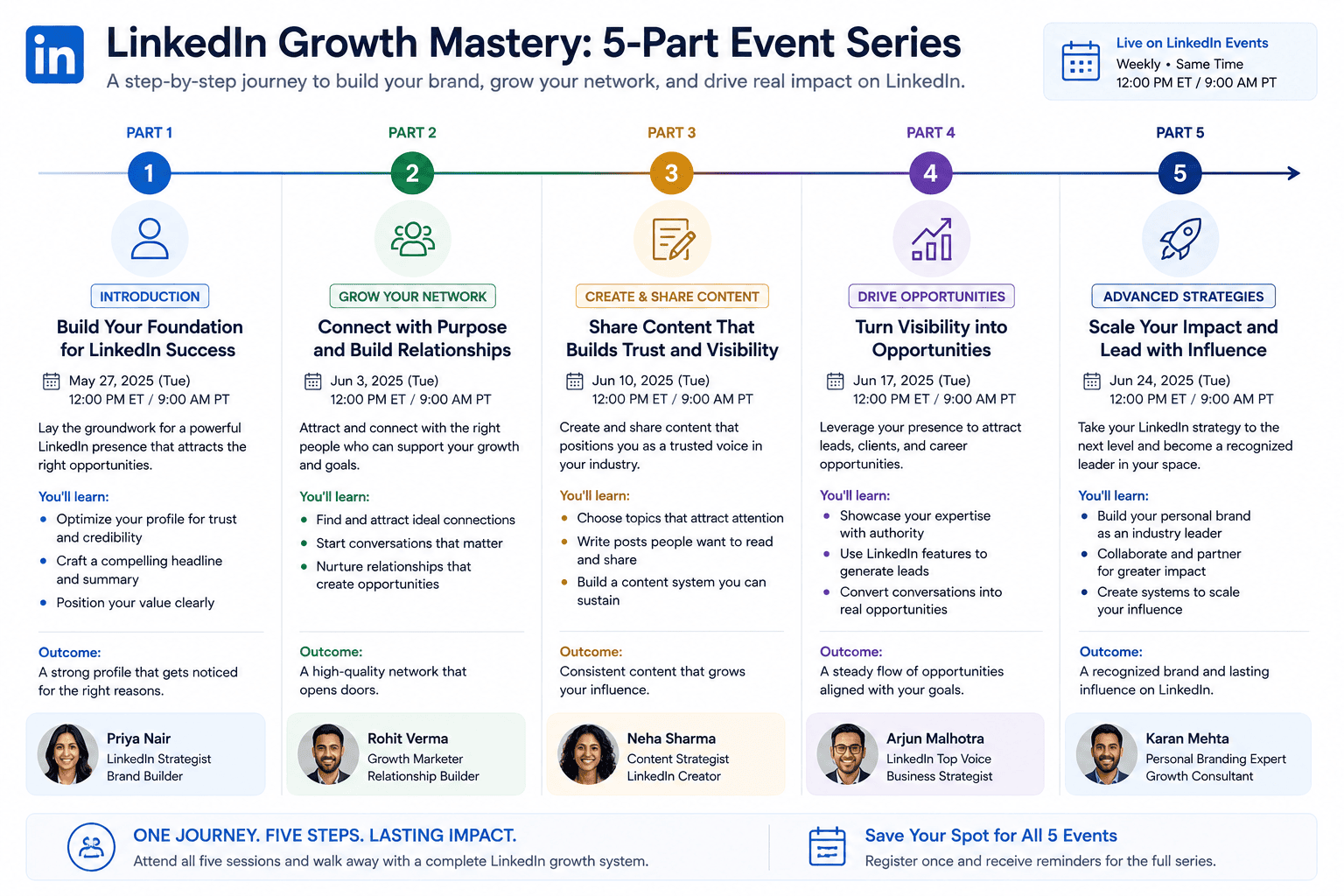
Use Events to Build a Content Series
One event can be useful.
A series can create stronger consistency.
For example:
Event 1
Website Strategy Basics
Event 2
Website Conversion Optimization
Event 3
Content Strategy
Event 4
SEO Fundamentals
Event 5
Analytics and Measurement
Now the audience understands that there is an ongoing educational program.
A series also makes future planning easier.
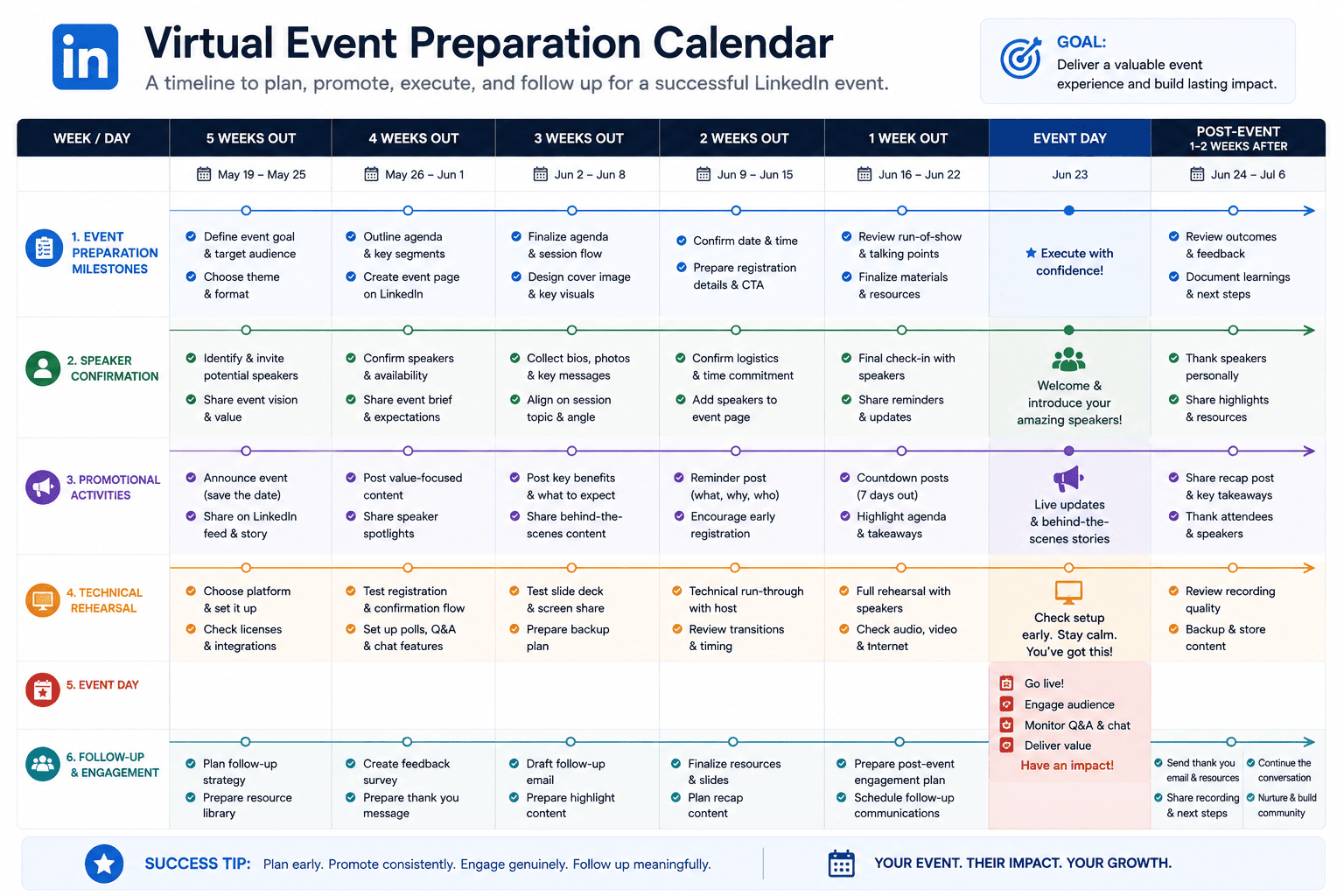
LinkedIn Event Promotion Timeline
A simple timeline can help organize your campaign.
2–4 Weeks Before
Create the event.
Confirm speakers.
Prepare promotional materials.
1–2 Weeks Before
Publish educational posts.
Introduce speakers.
Share event benefits.
3–5 Days Before
Publish a reminder.
Answer common questions.
Highlight the agenda.
24 Hours Before
Publish a final reminder.
Make sure attendees know the time zone and joining details.
Event Day
Share a reminder.
Start on time.
Engage attendees.
After the Event
Share key takeaways.
Answer questions.
Publish clips or insights.
Announce the next step.
The exact timeline depends on event size, but the principle remains useful.
Common LinkedIn Event Mistakes
1. Generic Event Titles
If people cannot understand the topic, they have little reason to attend.
2. No Clear Audience
Trying to attract everyone usually produces weak messaging.
3. Overly Promotional Descriptions
Explain value instead of filling the description with marketing language.
4. Choosing Speakers Only for Popularity
Relevance and expertise matter.
5. Poor Audio
Bad sound can ruin an otherwise excellent presentation.
6. No Rehearsal
Technical problems are easier to solve before the event.
7. Weak Opening
Do not spend the first ten minutes explaining logistics.
8. No Audience Interaction
A presentation can become passive if attendees are never invited into the discussion.
9. No Follow-Up
The audience relationship should not end when the event ends.
10. Relying on Old Tutorials
LinkedIn changes features and workflows. Verify current documentation before following older instructions.
How Businesses Can Use LinkedIn Events
Businesses can use Events for multiple purposes.
Educational Marketing
Teach potential customers something useful.
Product Education
Demonstrate how a product works.
Customer Training
Help existing users get more value from a product.
Industry Discussions
Bring multiple experts together.
Community Building
Create recurring conversations around a subject.
Thought Leadership
Share practical expertise through presentations and discussions.
The best approach depends on the company’s audience and goals.
How Freelancers Can Use LinkedIn Events
Freelancers do not need a large company to create useful professional events.
A freelancer could host:
“Website Audit Workshop for Small Businesses”
or:
“How to Prepare a Better Freelance Project Brief”
or:
“Content Planning for Local Businesses”
The event can demonstrate expertise without directly turning the entire session into a sales presentation.
The audience gets value.
The freelancer demonstrates knowledge.
The relationship can continue after the event.
How LinkedIn Events Can Support Personal Branding
Personal branding is often associated with posts and profiles.
Events add another dimension.
They allow professionals to demonstrate:
- Communication skills
- Subject knowledge
- Leadership
- Organization
- Industry experience
- Ability to facilitate discussions
A professional who consistently hosts useful events can become associated with a specific subject.
That association develops over time.
Use a Consistent Event Visual Identity
If you plan to host multiple events, create a recognizable visual system.
Keep elements consistent such as:
- Logo
- Typography
- Layout
- Image treatment
- Event naming
- Color usage
- Speaker presentation
However, avoid making every event cover identical.
The audience should recognize the series while still understanding that each event has a different topic.
LinkedIn Events and Content Strategy
Events should not exist separately from your broader content strategy.
A strong system can look like this:
Research
Identify audience questions.
↓
Content
Publish educational posts.
↓
Event
Bring the audience together for deeper discussion.
↓
Recording / Insights
Extract useful material.
↓
Articles
Develop deeper explanations.
↓
Follow-Up
Continue the conversation.
↓
Next Event
Address the next audience problem.
This turns Events into part of a larger content engine.
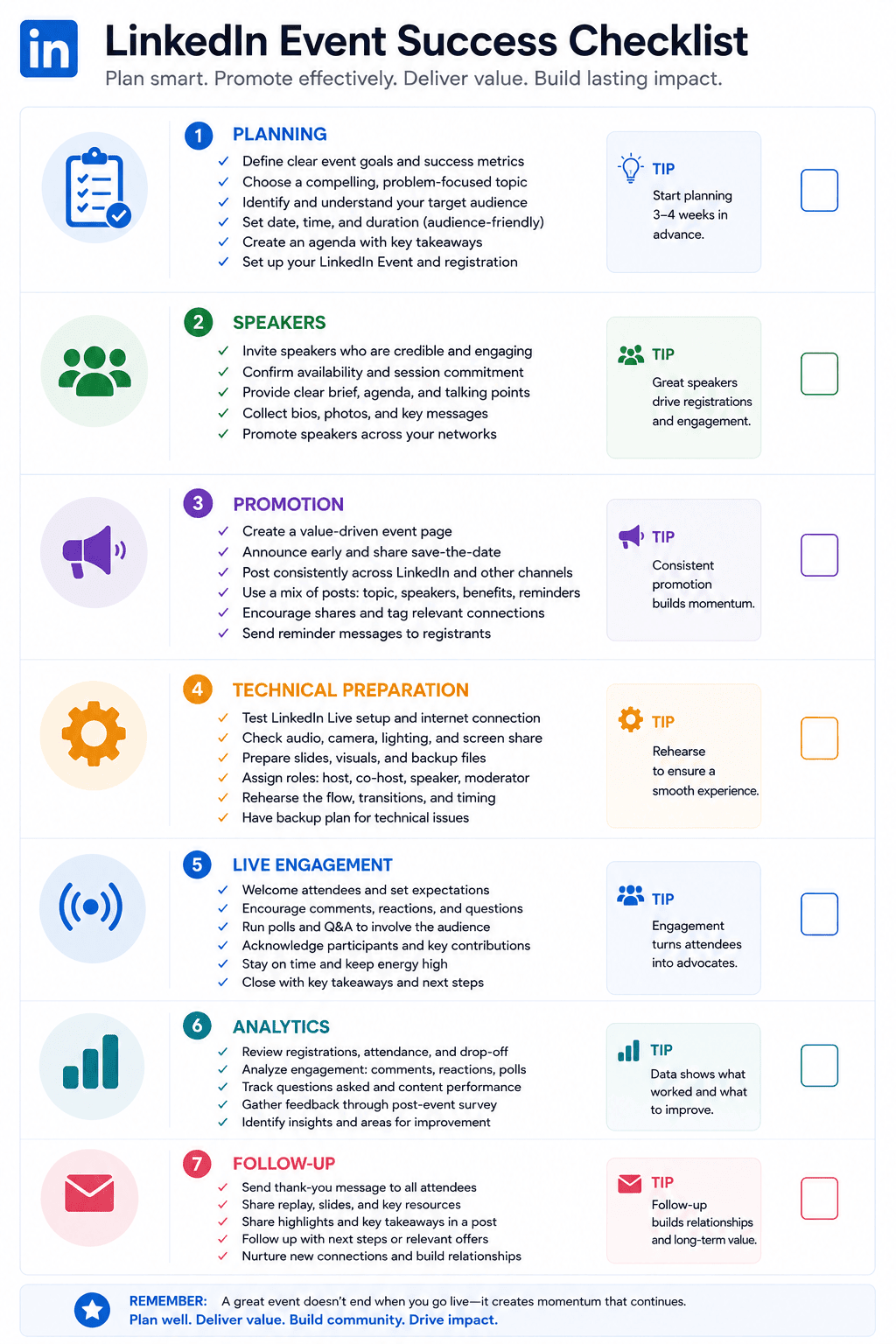
A Simple LinkedIn Event Checklist
Before publishing, confirm:
Event Strategy
- Is the topic specific?
- Is the audience clearly defined?
- Is there a genuine reason to attend?
Event Page
- Is the title clear?
- Is the description useful?
- Is the date correct?
- Is the time zone correct?
- Is the format correct?
- Are speakers listed?
Visuals
- Is the cover image professional?
- Is it readable?
- Does it have appropriate alt text?
Promotion
- Are announcement posts ready?
- Are speaker posts ready?
- Is there a reminder plan?
Technical
- Has the equipment been tested?
- Have speakers rehearsed?
- Is the presentation ready?
Follow-Up
- Will you share takeaways?
- Will you answer unanswered questions?
- Will you repurpose useful content?
Frequently Asked Questions
What are LinkedIn Events?
LinkedIn Events are dedicated event pages that allow professionals and organizations to create, promote, and host professional gatherings. Events can be online or in person.
Can individuals create LinkedIn Events?
Yes, LinkedIn’s current documentation states that LinkedIn members can create Events, while Page admins can also create Events on behalf of their Pages.
Can LinkedIn Events be online?
Yes. Online Events can use LinkedIn Live when available or an external event link depending on the event setup.
Can I host a LinkedIn Live event without scheduling it?
LinkedIn changed this functionality in 2026. As of June 22, 2026, spontaneous “go live instantly” functionality is no longer available; LinkedIn Live events need to be scheduled in advance.
How do I promote a LinkedIn Event?
You can promote it through LinkedIn posts, messages, and other social platforms. LinkedIn also allows organizers and attendees to share events with their networks.
What should I include in a LinkedIn Event description?
Include the event topic, intended audience, learning outcomes, speakers, format, date, time, and any important participation information.
How long should a LinkedIn Event be?
There is no universal ideal duration. Keep the event long enough to provide meaningful value while leaving sufficient time for discussion and questions.
Can a LinkedIn Event have multiple speakers?
Yes. LinkedIn’s Event creation workflow allows organizers to add speakers where supported by the event setup.
Should I record my LinkedIn Event?
If your event format and permissions allow recording, retaining useful material can help you create follow-up content. Always verify the current platform and speaker permissions before republishing recordings.
How can I improve LinkedIn Event attendance?
Use a specific topic, clearly communicate the benefit, choose a relevant time, introduce speakers, publish useful promotional content, and remind your intended audience before the event.
Conclusion
LinkedIn Events can turn professional content from a one-way publishing activity into a structured conversation.
Instead of simply publishing another post, you can bring professionals together around a specific problem, question, or area of expertise.
The strongest Events are not necessarily the biggest ones.
They are the ones that attract the right audience, provide genuine value, encourage useful discussion, and create opportunities for continued learning after the event.
Start with a focused topic.
Understand your audience.
Choose relevant speakers.
Build a clear event page.
Promote the event through useful content rather than repetitive announcements.
Test your technology.
Start the session with a clear promise of value.
Give attendees opportunities to participate.
Then follow up.
Most importantly, treat the event as part of a larger content strategy.
One successful event can produce articles, posts, videos, questions, discussions, and ideas for future events.
That means your work does not end when the event finishes.
If you approach LinkedIn Events as a long-term professional content and community strategy rather than a single promotional activity, the platform can become a useful place to educate your audience, demonstrate expertise, and build meaningful professional relationships.