Crypto Wallet Security: 12 Practical Ways to Protect Your Digital Assets
- by Muhammad Raza
- 0 Comments
- 16 minutes read
- 31 Views
Cryptocurrency gives users a level of control that traditional financial systems do not always provide. Depending on the setup, you may be able to hold and transfer digital assets without relying on a bank to authorize every transaction.
But that control comes with responsibility.
When you use a self-custody crypto wallet, protecting access to your assets becomes your responsibility. A lost recovery phrase, compromised device, malicious website, fake support message, or careless transaction approval can create serious problems.
That is why crypto wallet security should be treated as an ongoing habit rather than a one-time setup.
Many beginners focus on choosing a wallet but overlook everything surrounding it. The wallet application or hardware device is only one part of the security picture. Your recovery information, device, browser, passwords, authentication methods, transaction habits, and ability to recognize scams all matter.
This guide explains practical ways to improve your cryptocurrency wallet security without turning the process into an unnecessarily complicated technical exercise.
The objective is not to make your setup completely risk-free. No digital system can offer that guarantee.
Instead, the goal is to reduce avoidable mistakes and create multiple layers of protection around your assets.
What Is Crypto Wallet Security?
Crypto wallet security refers to the practices and technologies used to protect access to cryptocurrency assets and the information that controls them.
This can include:
- Protecting private keys
- Protecting recovery or seed phrases
- Securing wallet devices
- Using strong authentication
- Avoiding phishing websites
- Verifying transactions
- Checking wallet addresses
- Reviewing application permissions
- Keeping software updated
- Separating different types of crypto activity
- Preparing for device loss
- Maintaining secure backups
The exact security requirements depend on how you use cryptocurrency.
Someone holding a small amount for occasional transactions may have different needs from someone managing significant long-term holdings or interacting frequently with decentralized applications.
The important principle is to understand what your wallet protects and where the biggest risks actually come from.
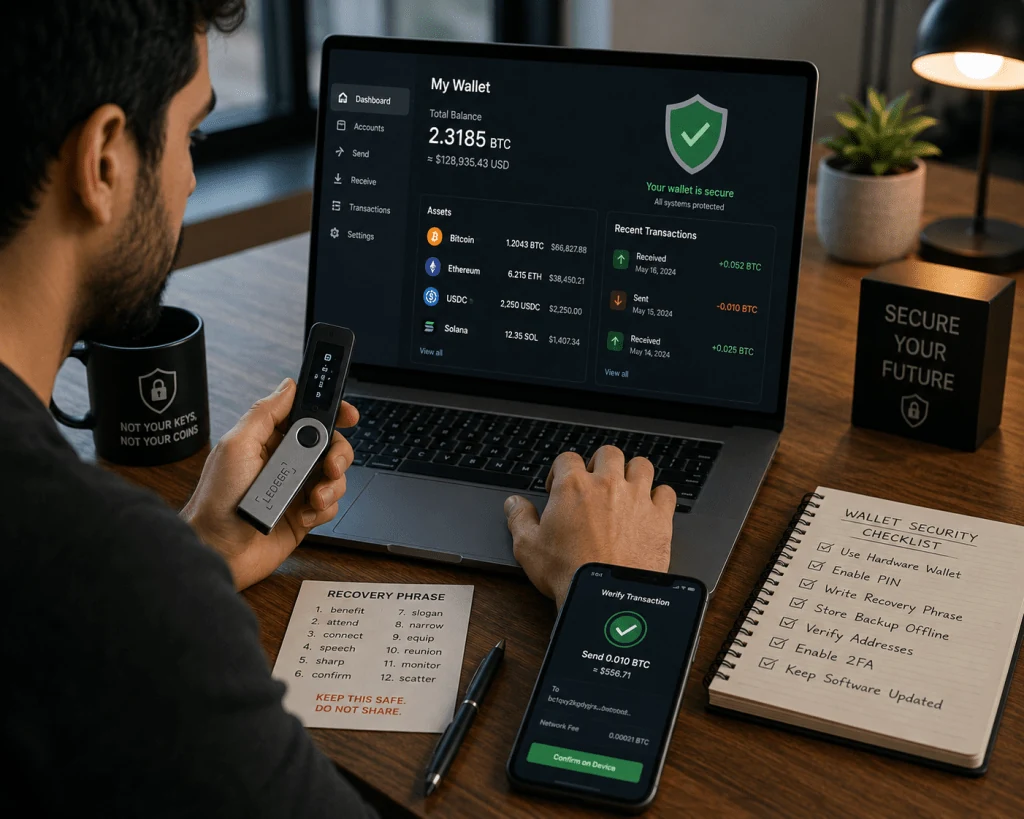
A recovery phrase can provide access to a wallet, so exposing it can be far more serious than simply losing access to the wallet application itself. Official wallet-security guidance from Ledger and Coinbase emphasizes that recovery phrases and private keys should never be shared with other people.
1. Protect Your Recovery Phrase
For many self-custody wallets, the recovery phrase is one of the most sensitive pieces of information you will ever handle.
It may also be called:
- Seed phrase
- Secret recovery phrase
- Recovery phrase
- Wallet backup phrase
Depending on the wallet, it may consist of a sequence of words used to recover access to the wallet.
If someone obtains the recovery phrase, they may be able to restore the wallet elsewhere.
That means you should treat the phrase like a master credential.
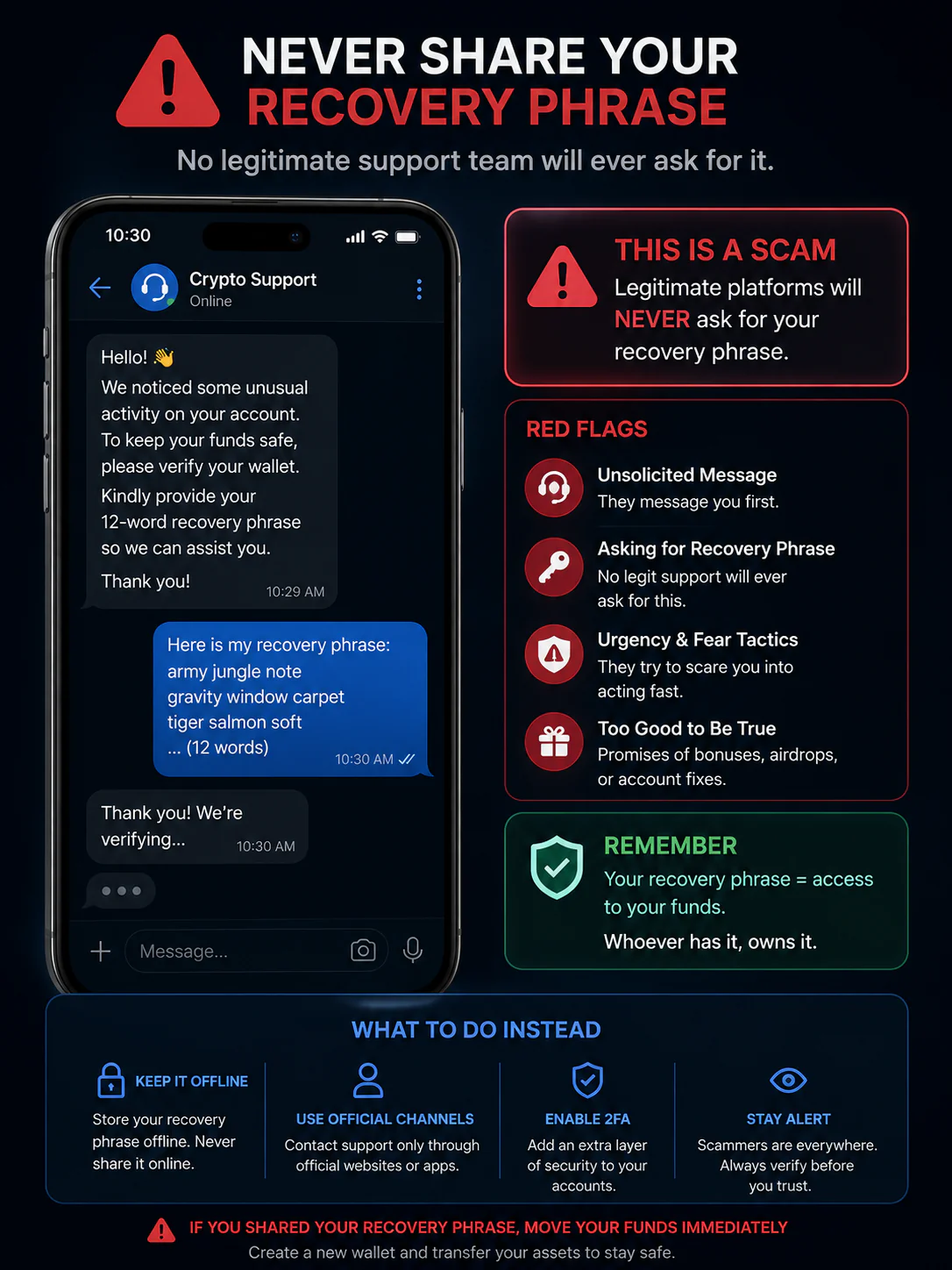
Never share it with:
- Friends
- Family members
- Online support agents
- Telegram contacts
- Discord moderators
- Social media accounts
- Wallet “representatives”
- Anyone contacting you unexpectedly
A legitimate support representative should not need your recovery phrase to “unlock” your wallet.
Coinbase’s security guidance similarly warns users never to provide recovery phrases and highlights phishing attempts designed to trick users into revealing sensitive wallet information.
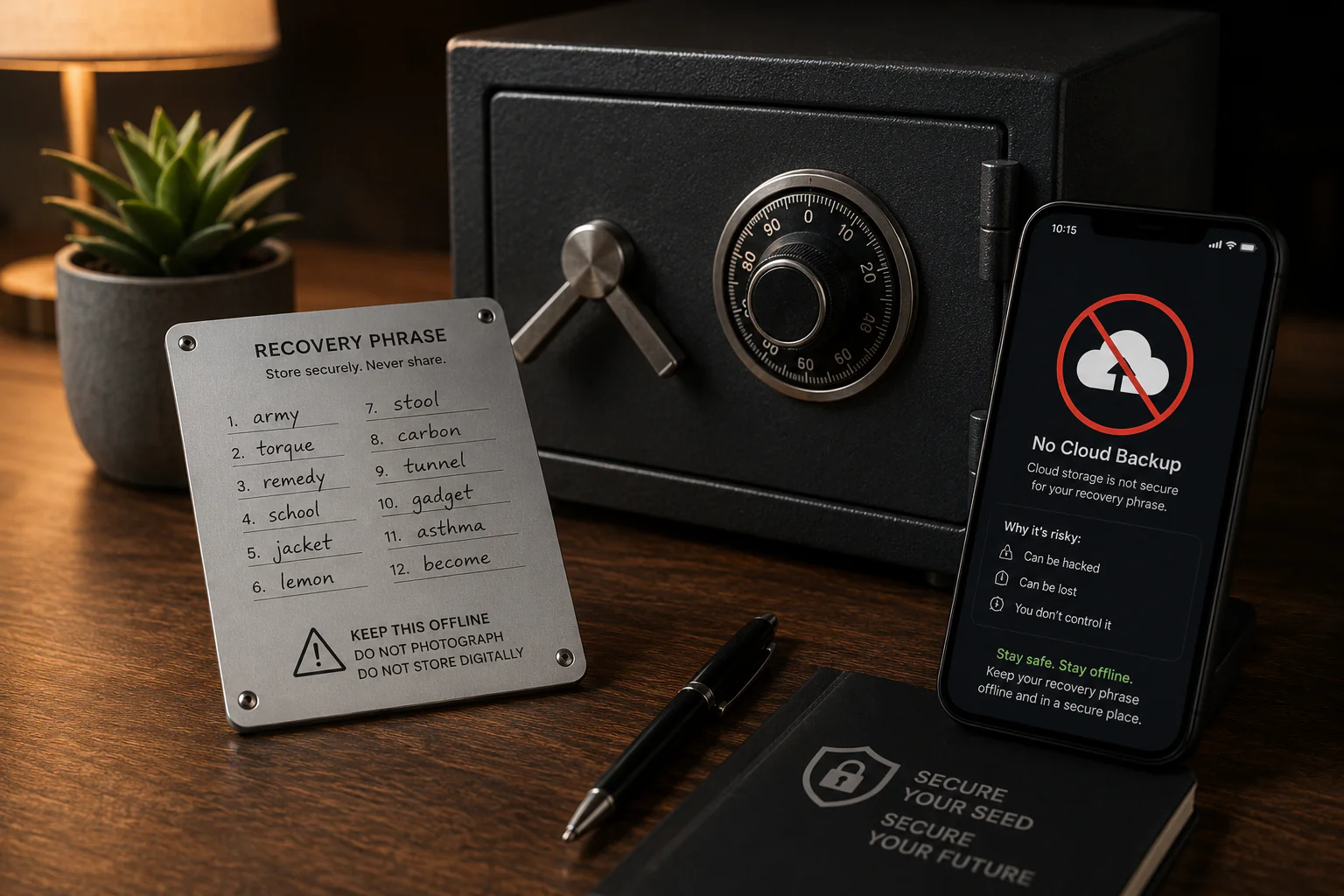
2. Do Not Store Your Recovery Phrase as a Normal Digital File
One of the easiest mistakes is taking a screenshot of your recovery phrase.
It may feel convenient.
You might think:
“I can keep it in my phone so I never lose it.”
But convenience can introduce additional risks.
A screenshot may be synchronized with cloud services.
A text file may be backed up automatically.
A note application may be accessible from multiple devices.
A compromised computer could expose locally stored information.
For this reason, security guidance commonly recommends keeping recovery information offline rather than storing an unencrypted copy on an internet-connected device.
For long-term storage, some users choose durable physical backups designed to withstand environmental damage.
The exact method depends on your circumstances and risk tolerance.
The principle remains the same:
Do not turn your most sensitive wallet backup into an easily accessible digital file.
3. Use a Wallet That Matches Your Needs
There is no single wallet setup that is perfect for everyone.
Software wallets can be convenient because they are accessible through phones, computers, or browser extensions.
Hardware wallets are designed to keep key material more isolated from general-purpose devices.
The right choice depends on:
- How frequently you transact
- What assets you use
- Your technical comfort
- Your security requirements
- Your transaction habits
- Your tolerance for managing backups
A beginner should not choose a complicated security system that they cannot operate correctly.
Likewise, someone managing substantial long-term holdings should think carefully about whether a basic browser wallet provides enough protection for their circumstances.
Security is not simply about buying the most expensive device.
It is about creating a setup you understand and can maintain correctly.
4. Separate Everyday Wallet Activity From Long-Term Holdings
One useful security concept is separation.
Instead of putting every asset into one wallet that you use for everything, some users maintain separate wallets for different purposes.
For example:
Wallet A — Long-term holdings
Used infrequently.
Wallet B — Everyday transactions
Used for normal transfers.
Wallet C — DApp activity
Used when interacting with decentralized applications.
The purpose is to limit exposure.
If a wallet used for experimental DApp activity encounters a problem, separating funds may reduce the amount potentially exposed.
This does not eliminate risk.
It also introduces additional management responsibilities.
More wallets mean more recovery information, addresses, and operational decisions to track.
Therefore, separation should be used thoughtfully rather than simply creating dozens of wallets without a clear reason.
5. Verify the Website Before Connecting Your Wallet
Phishing is one of the most persistent risks in cryptocurrency.
A fake website can look remarkably similar to a legitimate platform.
Attackers may use:
- Similar domain names
- Fake social media profiles
- Search advertisements
- Sponsored results
- Fake support accounts
- Direct messages
- Fake airdrop pages
- Urgent security warnings
The safest habit is to avoid clicking unexpected wallet-related links.
Instead, navigate to the official service through a trusted source or a bookmark you created yourself.
Coinbase specifically recommends checking that a decentralized application website is legitimate and verifying the URL before interacting with it.
A website looking professional does not prove that it is legitimate.
6. Slow Down When a Message Creates Urgency
Scammers often try to make people act before they think.
A message may claim:
“Your wallet will be frozen in 10 minutes.”
Or:
“You have received a reward. Claim it immediately.”
Or:
“Your account has been compromised. Transfer your funds to this secure wallet.”
The urgency is the trap.
When money is involved, slow down.
Ask:
- Who sent this?
- Did I request this?
- Is the website correct?
- Is this communication from an official channel?
- Can I independently verify the claim?
- Why am I being asked to transfer assets?
A legitimate security process should not require you to panic.
Coinbase’s phishing guidance warns that scammers can impersonate companies and pressure users into moving funds or revealing authentication information.
7. Never Trust Someone Who Requests Your Private Key
This deserves its own rule because it is so important.
Your private key and recovery phrase should be treated as confidential.
A person claiming to be:
- Wallet support
- An exchange employee
- A blockchain developer
- A moderator
- A security specialist
- A tax representative
- A recovery expert
does not automatically deserve access to your credentials.
If someone asks you to send your seed phrase or private key so they can “verify,” “recover,” “synchronize,” or “secure” your wallet, stop.
You should not provide it.
A legitimate service may ask you to verify account information through its official process, but handing over your wallet’s secret recovery information is fundamentally different.
8. Secure the Device You Use for Crypto
Your wallet may be secure, but the device you use to access it can still become a weak point.
Good device hygiene includes:
- Keeping the operating system updated
- Installing wallet software only from trusted sources
- Avoiding unknown applications
- Using a strong device password or PIN
- Enabling available security protections
- Avoiding suspicious browser extensions
- Keeping your browser updated
- Locking the device when not in use
Do not install random software because someone in a chat told you it is required to fix your wallet.
Remote-access requests deserve particular caution.
A scammer may claim:
“Install this support application so I can repair your wallet.”
That can give an attacker access to your computer.
Your device is part of your wallet-security environment.
Treat it accordingly.
9. Use Strong Authentication for Exchange Accounts
A crypto wallet and a cryptocurrency exchange account are not the same thing.
If you use an exchange, you also need to protect the exchange account itself.
Consider using:
- A unique password
- Strong authentication
- A password manager
- Hardware-based authentication where supported
- Account security notifications
- Withdrawal controls where available
Do not reuse your cryptocurrency password on social media, email, or other websites.
If another service suffers a credential breach and you reused the same password, attackers may attempt to use those credentials elsewhere.
Strong authentication can reduce the damage caused by stolen passwords, although no authentication method eliminates every possible risk.
10. Verify Every Transaction Before Signing
One of the most important crypto-security habits is simple:
Read what you are approving.
Do not blindly click “Confirm.”
Before sending funds, check:
- Recipient address
- Network
- Asset
- Amount
- Transaction fee
- Destination
- Contract interaction where applicable
Copy-and-paste can also introduce problems.
Malware may manipulate copied wallet addresses.
For important transactions, independently verify the destination rather than assuming that the clipboard contains what you intended.
For larger transfers, some users prefer sending a small test transaction first.
This can add an extra step, but it may reduce the chance of a catastrophic address or network mistake.
11. Be Careful With Token Approvals and DApps
Decentralized applications can provide useful functionality, but connecting a wallet to an application can involve permissions and transaction requests that users may not fully understand.
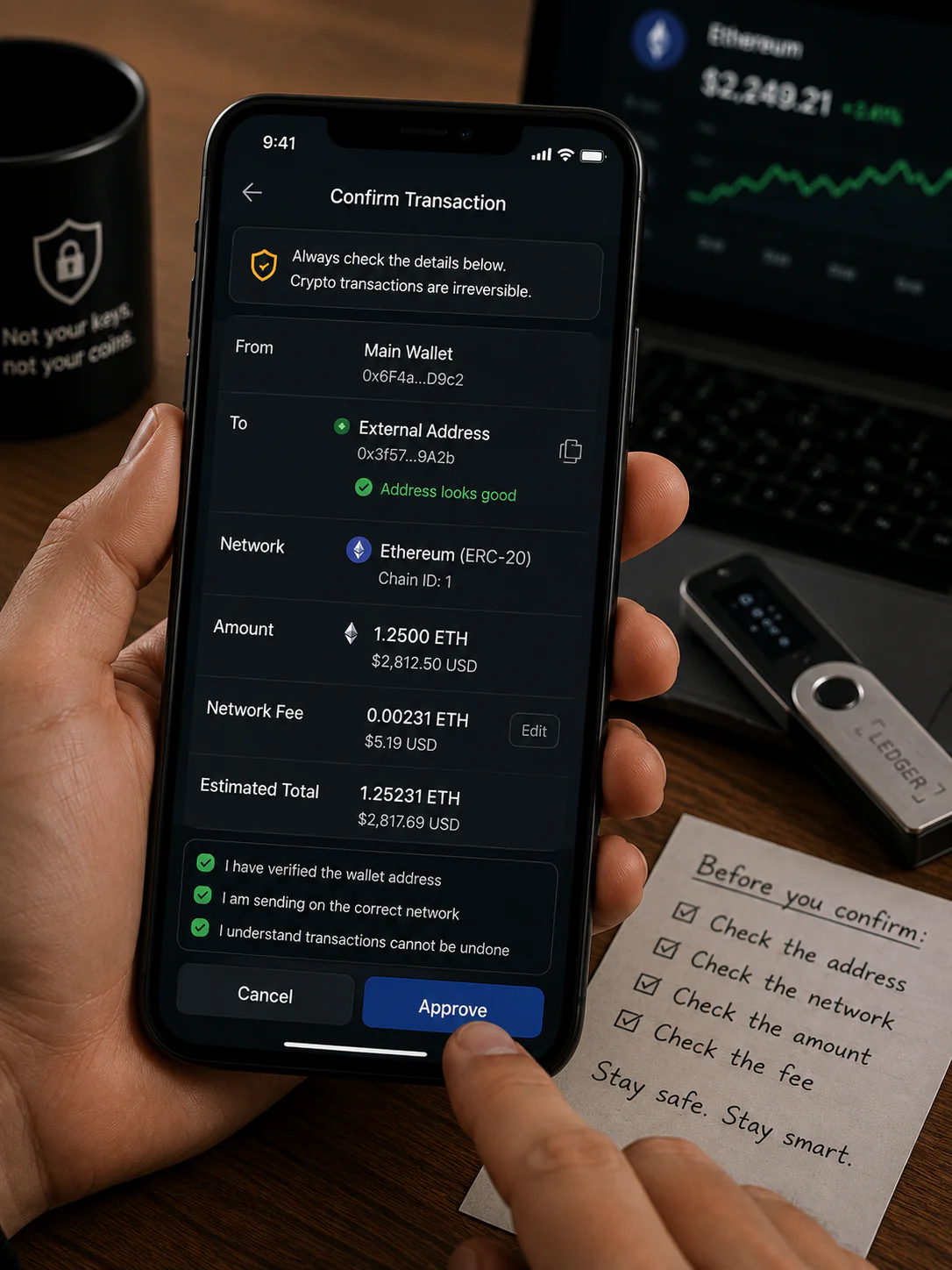
Before interacting with a DApp, ask:
- Is this the correct website?
- Do I understand what the application does?
- Why does it need this permission?
- What am I being asked to sign?
- Is the contract address correct?
- Do I still need this approval later?
Do not assume that every transaction prompt is harmless simply because it appears inside a familiar wallet interface.
A wallet can accurately display a request generated by an application that you should not trust.
The wallet is not necessarily judging whether the business purpose of the transaction is safe.
You still need to understand what you are approving.
12. Keep Your Wallet Software Updated
Updates can contain:
- Security fixes
- Compatibility improvements
- Bug fixes
- Performance changes
- New security features
That does not mean you should install every file someone sends you.
Update through the wallet provider’s official application or verified source.
Be especially careful with messages claiming:
“Urgent wallet update — download this file.”
Scammers can use fake updates to distribute malicious software.
The safest approach is to navigate to the provider’s official website or application yourself instead of following an unexpected download link.
Why Crypto Wallet Security Is a System, Not a Single Feature
It is tempting to think:
“I bought a hardware wallet, so I am safe.”
A hardware wallet can be an important part of a security strategy, but it does not eliminate every risk.
For example, you could still:
- Give your recovery phrase to a scammer
- Approve a malicious transaction
- Visit a fake website
- Send funds to the wrong address
- Lose your recovery backup
- Fall for social engineering
- Use a compromised computer
- Misunderstand a DApp permission
Ledger’s hardware-wallet guidance explicitly notes that hardware wallets do not make users invulnerable to social engineering, physical threats, or human error.
That is why the strongest approach combines technology with careful habits.
A Simple Crypto Security Setup for Beginners
If you are new to cryptocurrency, you do not need to build an extremely complicated security system on day one.
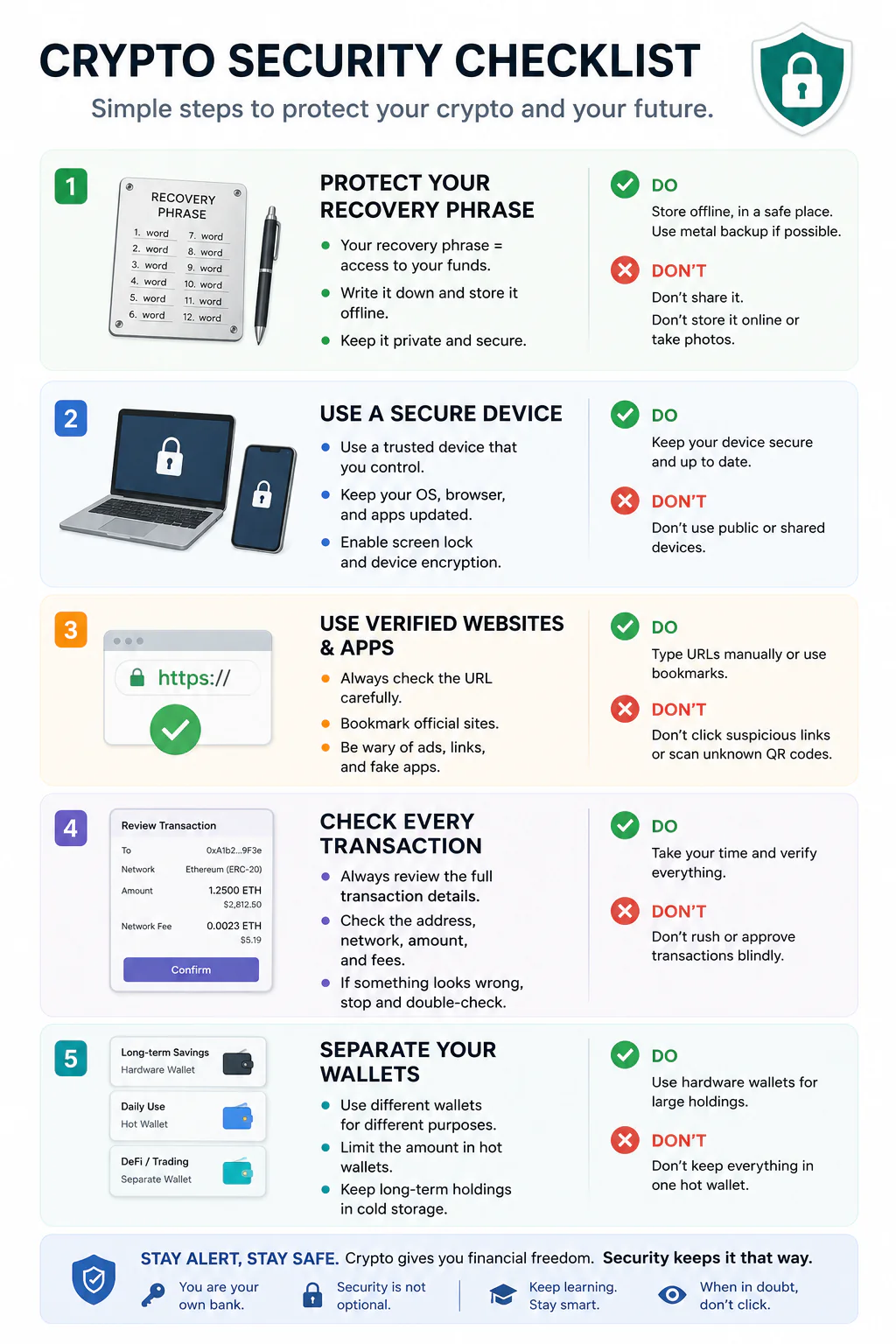
Step 1: Understand your wallet
Know whether it is custodial or self-custodial.
Step 2: Protect your recovery information
Never share your recovery phrase.
Step 3: Keep sensitive backups offline
Avoid ordinary cloud storage and screenshots.
Step 4: Secure your device
Use strong authentication and keep software updated.
Step 5: Verify websites
Do not trust random links.
Step 6: Verify transactions
Check the address, network, amount, and destination.
Step 7: Separate funds when appropriate
Do not expose all your holdings to the same type of activity without considering the risk.
Step 8: Learn before using DApps
Understand what you are signing.
These steps establish a useful foundation without overwhelming a beginner.
What to Do If You Think Your Wallet Is Compromised
If you believe your recovery phrase or private key has been exposed, do not treat the situation casually.
The appropriate response depends on exactly what happened.
For example:
If your recovery phrase was exposed
Assume that the wallet may no longer be secure.
Do not continue using it as though nothing happened.
If you connected to a suspicious DApp
Review what permissions or transactions were approved and determine whether additional action is necessary.
If your exchange account was compromised
Use the exchange’s official security process and secure the account through verified channels.
If you clicked a suspicious link
Do not provide further information.
Disconnecting from a suspicious page does not automatically undo anything you may already have signed or submitted, so review the situation carefully.
If significant assets are involved, consider seeking qualified professional assistance rather than relying on anonymous people contacting you through social media.
Create a Wallet Recovery Plan
Security is not only about preventing theft.
It is also about preventing accidental loss.
Ask yourself:
What happens if my phone breaks?
What happens if my hardware wallet stops working?
What happens if my computer is lost?
What happens if I become unavailable?
A recovery plan should consider how you will regain access without unnecessarily exposing your credentials.
Your backup should be:
- Correct
- Accessible when genuinely needed
- Protected from unauthorized people
- Protected from accidental destruction
- Documented clearly enough for you to understand
Do not create a complicated backup system that you will forget how to use.
The best recovery plan is one you can actually maintain.
Physical Security Matters Too
Digital security gets most of the attention, but physical security is also important.
If someone can physically access your recovery information, your digital protections may not matter.
Think about:
- Where the backup is stored
- Who can access it
- Whether it is protected from fire
- Whether it is protected from water
- Whether it can be accidentally thrown away
- Whether another person can photograph it
Some users choose durable physical storage for important recovery information.
The exact solution depends on your circumstances.
The key principle is to protect the recovery information from both digital and physical threats.
Crypto Wallet Security Checklist
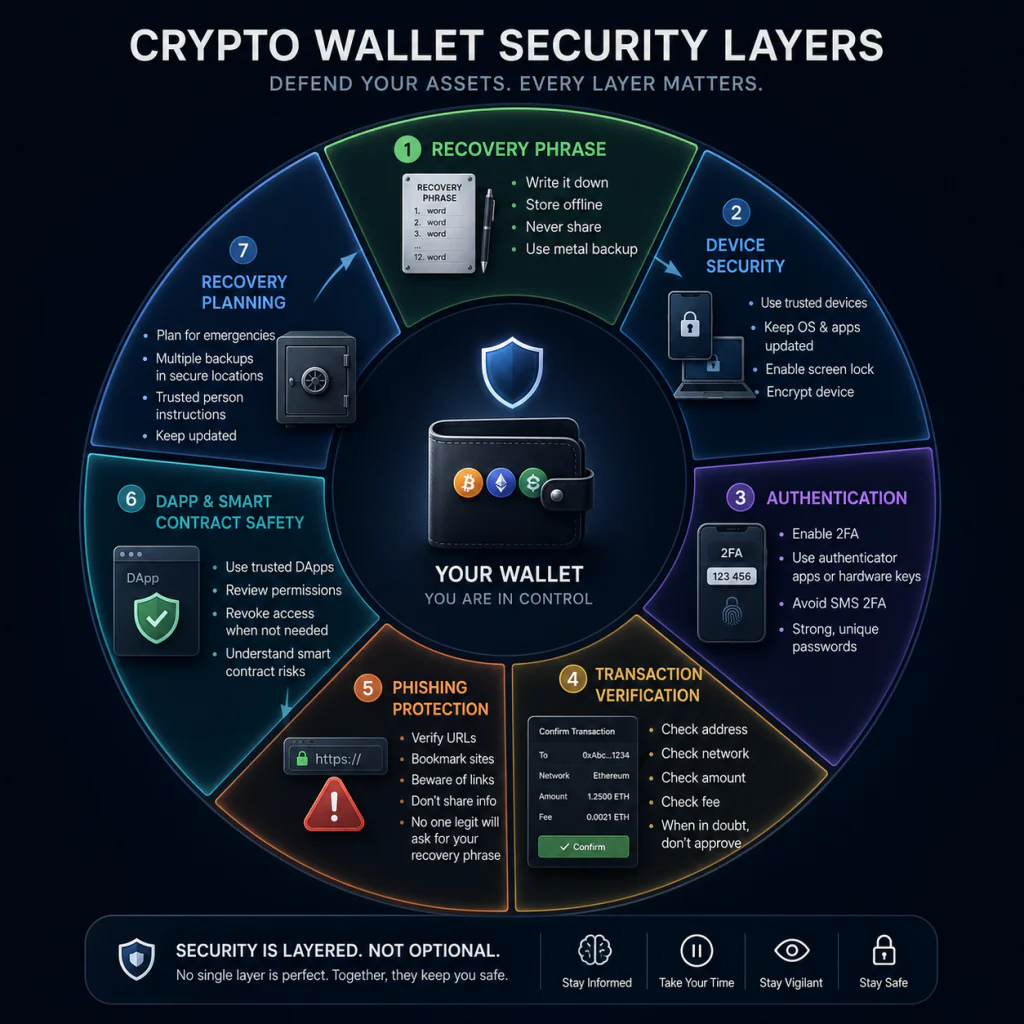
Use this checklist regularly:
Recovery
Recovery phrase is not shared
Recovery phrase is not stored in ordinary cloud storage
Backup is physically protected
Recovery information can be accessed when genuinely needed
Device
Operating system is updated
Wallet software comes from a trusted source
Device has a strong lock
Suspicious applications have been removed
Unknown remote-access tools are not installed
Accounts
Exchange password is unique
Strong authentication is enabled
Security notifications are active
Recovery email is protected
Transactions
Recipient address is verified
Network is correct
Amount is correct
Fees are understood
Transaction request is understood before signing
DApps
Website URL is verified
Application is known
Contract interaction is understood
Permissions are reviewed
Unnecessary approvals are not left unchecked
Emergency Planning
You know what to do if a credential is exposed
You know how to contact your exchange through official channels
Your recovery plan is documented
You periodically review your security setup
Common Crypto Wallet Security Mistakes
Saving the Seed Phrase in a Screenshot
This creates a digital copy that may synchronize across devices or cloud services.
Giving the Phrase to “Support”
Legitimate support should not require your recovery phrase.
Clicking Search Ads Without Checking the Domain
Attackers can create misleading pages that resemble legitimate services.
Signing Transactions Without Reading Them
A familiar wallet interface does not mean every transaction request is safe.
Using One Wallet for Everything
Separating certain activities may help reduce exposure.
Reusing Passwords
A password compromised elsewhere can become a problem for your exchange account.
Trusting Urgent Messages
Pressure is often used to prevent careful verification.
Assuming Hardware Wallets Eliminate All Risk
They can improve security but do not remove social engineering, physical, or human-error risks.
Crypto Wallet Security vs Convenience
There is always some tension between convenience and security.
A wallet that makes every transaction extremely easy may expose you to more interaction risk.
A highly isolated setup may be more secure but less convenient.
The goal is not maximum inconvenience.
The goal is an appropriate balance.
For example:
Frequent small transactions
Convenience may matter more.
Long-term holdings
Stronger isolation and careful backup practices may matter more.
Frequent DApp activity
Transaction verification and wallet separation become particularly important.
Your security setup should therefore match what you actually do with cryptocurrency.
Should You Use Multiple Crypto Wallets?
There is no universal requirement to use multiple wallets.
However, separating activities can be useful for some users.
A simple example could be:
Long-term wallet: limited interaction.
Daily wallet: routine transactions.
Experimental wallet: DApps and unfamiliar applications.
This arrangement can create boundaries between different activities.
But remember that each wallet introduces additional operational responsibility.
You need to know:
- Which wallet holds what
- Where its recovery information is
- Which addresses belong to which wallet
- What each wallet is used for
Complexity itself can become a risk.
Use separation when it solves a real problem.
How Often Should You Review Crypto Wallet Security?
Security should not be something you think about only when you hear about a new scam.
A periodic review can help you identify outdated or forgotten risks.
For example, you can review:
- Wallet software
- Device security
- Exchange authentication
- Recovery backups
- DApp connections
- Token approvals
- Old accounts
- Stored passwords
- Recovery procedures
A monthly or quarterly review may be appropriate depending on how actively you use cryptocurrency.
Recent wallet-hygiene guidance also recommends treating security maintenance as a recurring process rather than a one-time setup.
Final Thoughts
Cryptocurrency security does not begin with buying a particular wallet.
It begins with understanding what actually controls access to your assets.
Protect your recovery information.
Secure the devices you use.
Verify websites before connecting.
Slow down when someone creates urgency.
Use strong authentication for exchange accounts.
Read transactions before signing them.
Understand DApp permissions.
Keep software updated.
Maintain a recovery plan.
Most importantly, build habits that you can follow consistently.
A complicated security setup that you do not understand can create its own problems.
A simple system that you understand, review, and maintain can provide a much stronger foundation.
Remember that cryptocurrency transactions can be difficult or impossible to reverse once completed. That makes prevention particularly important.
You do not need to become a cybersecurity expert to improve your wallet security.
You do need to develop a healthy level of skepticism.
When someone asks for your recovery phrase, stop.
When a website looks slightly different, verify it.
When a message says you must act immediately, slow down.
When a transaction displays an unfamiliar destination, investigate it.
When you do not understand what you are signing, do not sign it until you understand it.
These simple habits can prevent many avoidable mistakes.
Crypto gives users significant control over their digital assets.
With that control comes responsibility.
Good crypto wallet security is ultimately about respecting that responsibility and building layers of protection around the things that matter most.
Frequently Asked Questions
What is the most important crypto wallet security rule?
Never share your recovery phrase or private key. Anyone who gains access to sensitive wallet credentials may be able to access the associated assets.
Should I save my seed phrase on my phone?
Avoid storing an unencrypted recovery phrase in screenshots, notes, cloud storage, or other ordinary digital locations. Physical offline storage is commonly recommended for recovery information.
Is a hardware wallet completely safe?
No wallet is completely risk-free. Hardware wallets can improve key isolation, but users still face phishing, social engineering, physical-security, and transaction-signing risks.
How can I identify a crypto phishing website?
Check the exact domain, avoid unexpected links, verify the platform independently, and never enter your recovery phrase because a website claims it is required for verification.
Should I use different wallets for different purposes?
Some users choose to separate long-term holdings, everyday transactions, and DApp activity. The benefit is reduced exposure between activities, but additional wallets also create more management responsibilities.
What should I do if someone asks for my seed phrase?
Do not provide it. Stop communicating with the person and verify any support request through the service’s official website or application.
Is public Wi-Fi safe for crypto transactions?
Public networks can introduce additional security risks. A safer approach is to use a trusted network and maintain good device security, particularly when handling sensitive accounts or transactions.
How often should I review my wallet security?
A periodic review is useful. Depending on how actively you use cryptocurrency, a monthly or quarterly security check can help you identify outdated software, forgotten connections, weak authentication, and backup problems.
Can crypto transactions be reversed?
Many blockchain transactions are designed to be final once confirmed. This is why checking the recipient, network, amount, and transaction details before signing is so important.
Does a wallet protect me from scams?
A wallet can provide security features, but it cannot automatically protect you from every scam. Users still need to verify websites, understand transaction requests, and protect recovery information.