AI Chatbot Knowledge Base: A Complete Guide
- by Muhammad Raza
- 0 Comments
- 15 minutes read
- 50 Views
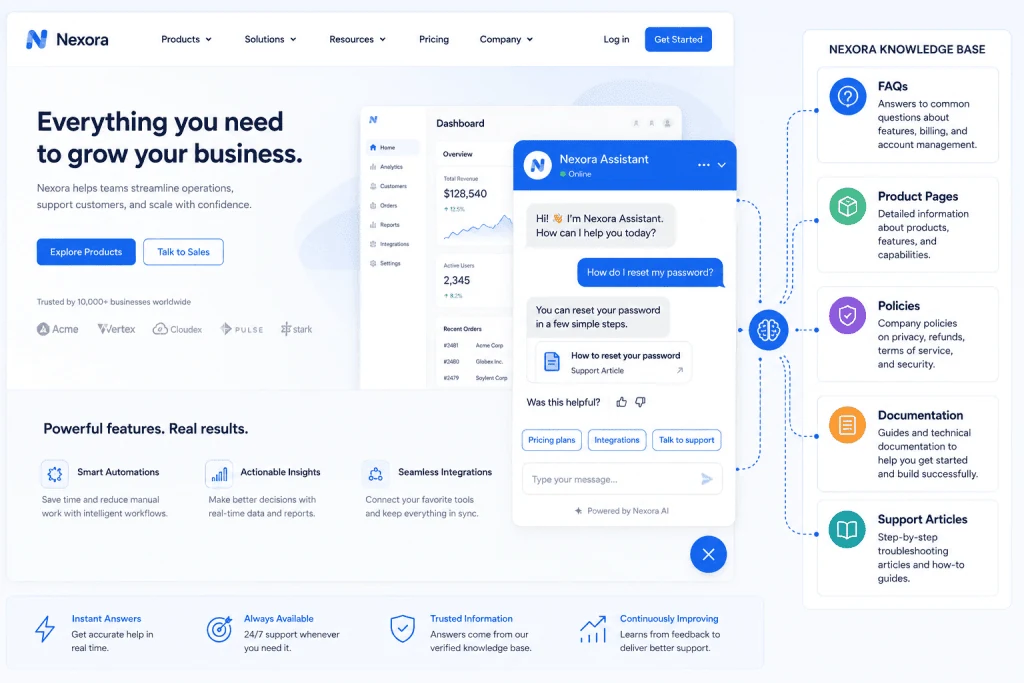
Building an AI chatbot knowledge base gives your website chatbot a reliable source of business information instead of leaving it to guess from general model knowledge.
A strong knowledge base helps the chatbot retrieve current answers about products, pricing, policies, documentation, shipping, returns, and troubleshooting while keeping sensitive or unsupported information out of scope.
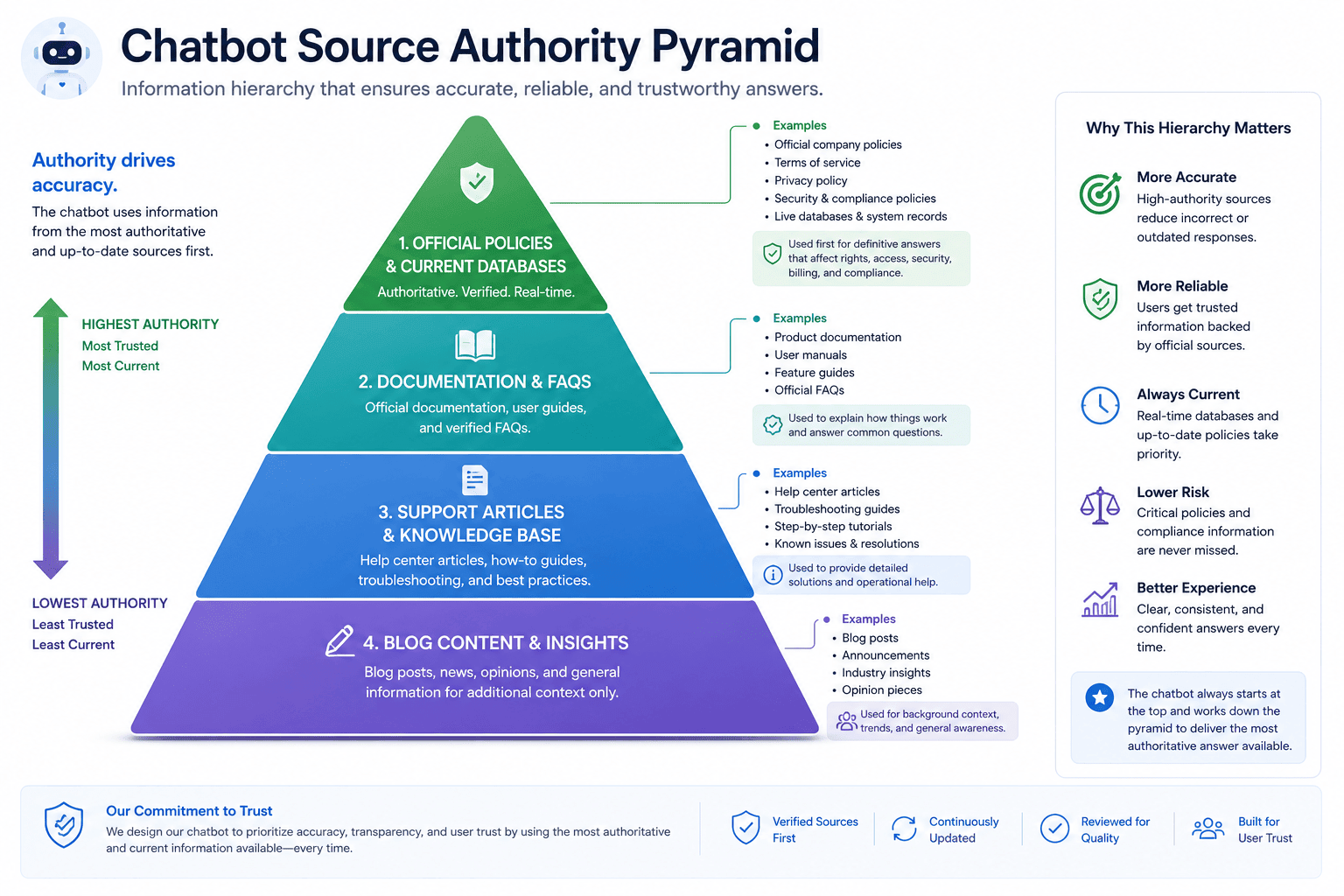
This guide explains how to choose authoritative sources, clean and structure content, use RAG and retrieval effectively, test answers, add citations and human escalation, and keep the knowledge base accurate as your business changes.
For the broader customer-support workflow, see our AI chatbots for customer support guide.
Step 3: Remove Outdated Information
Outdated information is dangerous because it can look perfectly legitimate to the retrieval system.
Imagine your knowledge base contains:
Document A
Free plan includes 5 users.
Document B
Free plan includes 3 users.
Both documents contain relevant keywords.
The retrieval system may surface either one.
Before ingestion, review content for:
- Old prices
- Retired products
- Old company names
- Obsolete policies
- Expired promotions
- Unsupported integrations
- Old contact details
- Previous versions of documentation
Do not keep outdated content in production retrieval unless you have a deliberate versioning strategy.
Step 4: Remove Duplicate Content
Websites often contain duplicated information.
For example:
- Main pricing page
- Pricing FAQ
- Blog article about pricing
- Old launch announcement
- Cached documentation page
If all of these contain slightly different versions of the same information, retrieval becomes more complicated.
A cleaner system gives important information a clear authoritative home.
Deduplication also reduces unnecessary index size and makes evaluation easier.
When building a website-derived knowledge base, normalization and deduplication are important steps before indexing the content.
Step 5: Write Content for Retrieval, Not Only for Browsing
Human visitors can understand context from page layout.
A retrieval system does not always have the same visual understanding.
Consider this content:
Premium
$49
Unlimited projects
Priority support
A human looking at the pricing table understands that “Unlimited projects” belongs to the Premium plan.
But poor extraction could separate the text.
A cleaner retrieval-friendly version might include:
The Premium plan costs $49 per month and includes unlimited projects and priority support.
This makes the relationship explicit.
You do not necessarily need to rewrite every website page this way.
But your underlying knowledge articles should contain enough context that individual pieces remain understandable.
Step 6: Use Clear Headings
Good headings help both people and machines understand content.
Instead of:
Information
use:
Refund Policy for Annual Subscriptions
Instead of:
Details
use:
International Shipping Times
Instead of:
Setup
use:
How to Connect Your Shopify Store
Specific headings make content easier to retrieve and maintain.
They also reduce ambiguity when a document is split into smaller pieces.
Step 7: Build Strong FAQ Content
FAQs are especially useful for customer-facing chatbots because they often mirror how visitors naturally ask questions.
A strong FAQ contains:
Specific question
Can I cancel an annual plan?
Direct answer
Explain the policy clearly.
Conditions
Mention relevant limitations.
Next step
Explain what the customer should do.
Avoid vague FAQs.
For example:
Question: What about refunds?
That wording is less useful than:
Question: Can I receive a refund after renewing my annual subscription?
Specific questions create clearer retrieval signals.
Step 8: Understand Chunking
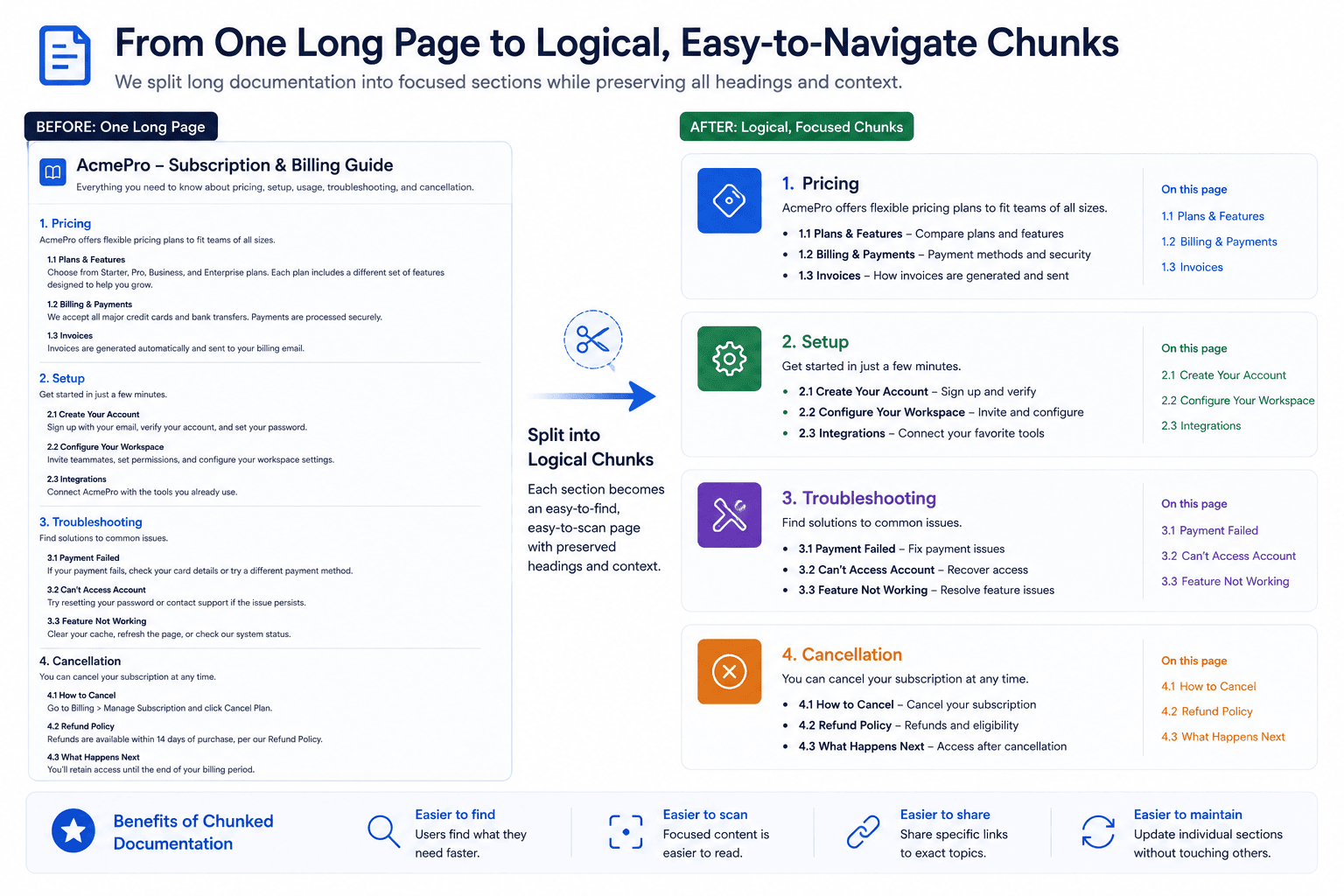
Large documents are usually divided into smaller sections before being stored for retrieval.
These sections are often called chunks.
AWS documentation explains that knowledge-base ingestion commonly includes document chunking, conversion into embeddings, and storage in a vector database.
Why split documents?
Imagine a 30,000-word product manual.
A customer asks:
“How do I reset my account password?”
The chatbot does not need the entire manual.
It needs the relevant section.
Chunking allows retrieval to target smaller pieces of information.
Good Chunking vs Bad Chunking
Chunking should preserve meaning.
Bad Chunk
“…available for enterprise customers only. To enable the feature…”
This starts halfway through a thought.
The chatbot may not know what feature the text refers to.
Better Chunk
Custom SSO Availability
Custom SSO is available only to Enterprise customers. Administrators can enable the feature from Settings → Security → Single Sign-On.
The second chunk contains enough context to stand on its own.
There is no single perfect chunk size for every application.
The best structure depends on document type, retrieval method, model context window, and question patterns.
Step 9: Add Useful Metadata
Metadata provides additional information about each chunk or document.
Useful metadata could include:
- Document title
- Category
- Product
- Language
- Region
- Version
- Publication date
- Last updated date
- Customer tier
- Source URL
For example:
Title: Refund Policy
Region: United Kingdom
Version: 2026-08
Customer type: Consumer
Metadata can help retrieval systems filter information.
A user in the United Kingdom should not necessarily receive a policy written for another jurisdiction.
AWS’s recent production examples show metadata-based filtering being used to target appropriate knowledge across regions and locales.
Step 10: Create a Clear Content Taxonomy
As the knowledge base grows, organization becomes important.
A customer-support chatbot might use categories such as:
Accounts
Login, passwords, profiles.
Billing
Payments, subscriptions, invoices.
Products
Features and specifications.
Shipping
Delivery and tracking.
Returns
Refund and return rules.
Troubleshooting
Known issues and solutions.
Integrations
Third-party connections.
This taxonomy makes content easier to maintain.
It also helps you identify gaps.
For example, if customers repeatedly ask about billing but you have only two billing articles, your documentation may need expansion.
Step 11: Use Embeddings and Semantic Retrieval
Traditional keyword search looks for similar words.
Semantic retrieval aims to identify similar meaning.
For example, a user asks:
“How do I stop paying every month?”
Your documentation might use the phrase:
“Cancel your subscription.”
A purely literal search might not connect the phrases strongly.
Semantic retrieval can represent text mathematically through embeddings and identify concepts that are related even when the exact wording differs.
AWS documentation explains that knowledge-base systems can convert both documents and user queries into embeddings for retrieval.
This is one reason RAG systems can handle natural customer language more effectively than simple FAQ keyword matching.
Step 12: Consider Hybrid Search
Semantic search is powerful, but exact keywords still matter.
Imagine someone searches:
“Error E481”
The exact code may be extremely important.
Hybrid search combines approaches such as semantic retrieval and keyword search.
Google Cloud notes that modern retrieval systems may combine semantic and keyword search and then re-rank results to improve relevance.
This can be useful for:
- Error codes
- Product names
- Model numbers
- Order statuses
- Technical terminology
The right search configuration depends on your content.
Step 13: Re-Rank Retrieved Results
The first retrieved results are not always the best results.
Some systems use a re-ranking stage.
A simplified pipeline might look like:
Retrieve 15 candidate chunks
↓
Score relevance
↓
Select best 4 chunks
↓
Send them to the model
The goal is to reduce irrelevant context.
This matters because adding more information is not always better.
Too much irrelevant context can distract the model from the information that actually answers the question.
Step 14: Tell the Model to Use the Knowledge Base
Retrieval alone is not enough.
Your system prompt should explain how the model should behave.
For example:
Answer using the approved knowledge-base information provided. If the retrieved information does not contain enough evidence to answer the question, say that you do not have enough information and offer escalation.
The exact wording will vary.
The important rule is to prevent the chatbot from filling missing business information with confident guesses.
A good chatbot should be comfortable saying:
“I don’t have enough information to confirm that.”
That is far better than inventing a policy.
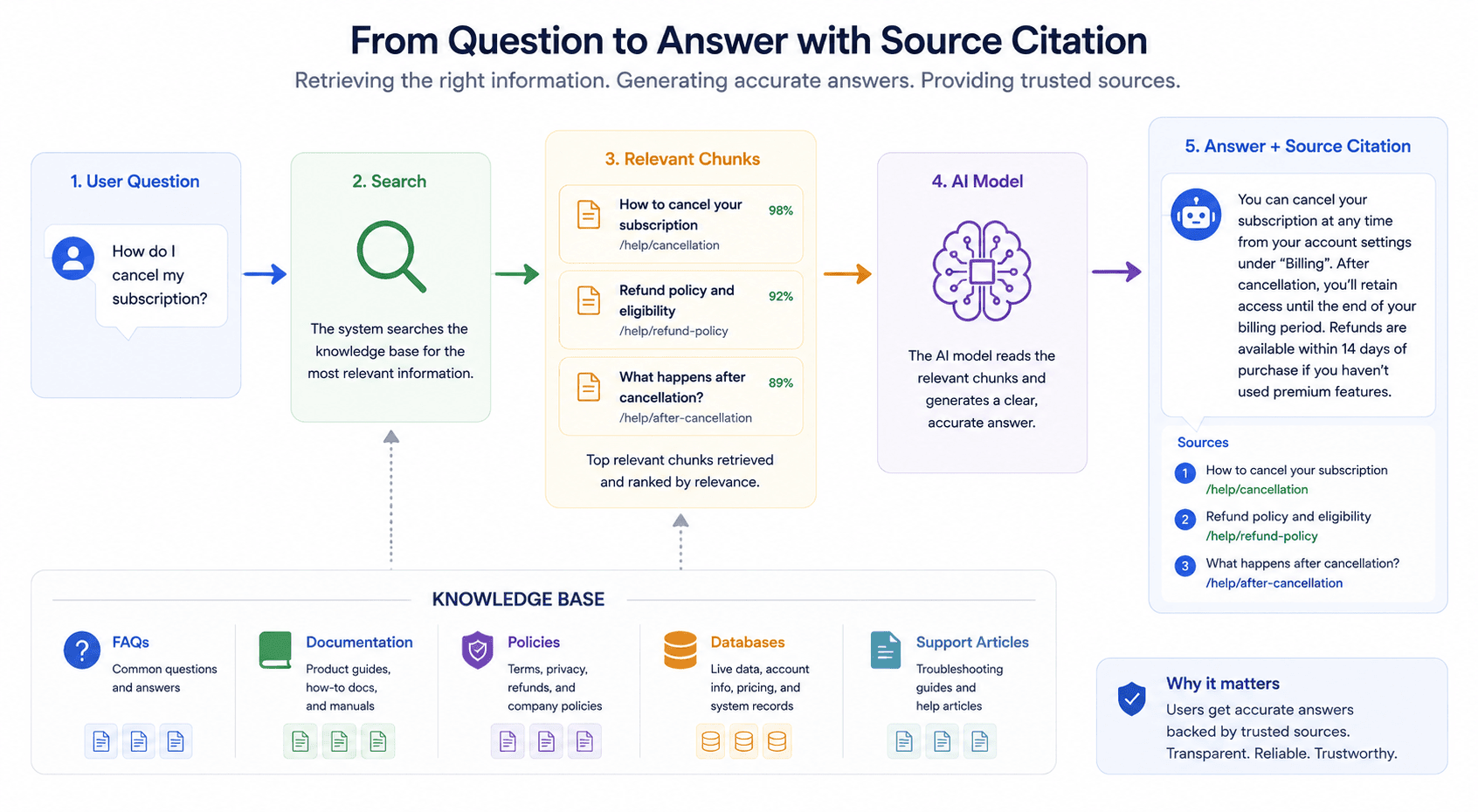
Step 15: Add Source Citations
Whenever possible, allow users to see where the answer came from.
For example:
International delivery normally takes 5–10 business days.
Source: Shipping Policy
Sources create several benefits.
They help:
- Users verify answers
- Support teams debug mistakes
- Content teams identify outdated pages
- Developers evaluate retrieval
- Auditors trace responses
AWS Knowledge Bases can return source information alongside retrieved or generated responses.
Your website chatbot does not necessarily need academic-style citations.
A simple link to:
View Shipping Policy
may be enough.
Step 16: Create a Human Escalation Path
No chatbot should become a dead end.
A user may:
- Ask something outside scope
- Need account-specific support
- Be angry or frustrated
- Report an unusual issue
- Ask for a human
- Need a decision the chatbot cannot make
The chatbot should know how to escalate.
A simple escalation path could be:
“I can’t resolve this issue from the information available. Would you like me to connect you with support?”
The conversation history can then be forwarded to the human agent if your system supports it.
This prevents customers from repeating everything.
Human escalation is particularly important for high-risk or sensitive questions.
Step 17: Protect Sensitive Information
A knowledge base should not automatically contain everything your organization knows.
Do not blindly upload:
- Passwords
- API keys
- Private customer records
- Internal financial details
- Confidential contracts
- Employee personal information
- Sensitive security procedures
Ask:
Does the chatbot genuinely need access to this?
If not, keep it out.
For internal chatbots, access control may also need to vary by employee or department.
The same retrieval system should not necessarily expose every internal document to every user.
Step 18: Separate Public and Internal Knowledge
Many companies eventually need more than one knowledge environment.
For example:
Public Chatbot
Can access:
- Public FAQs
- Product documentation
- Pricing
- Policies
Support-Agent Assistant
Can access:
- Internal troubleshooting
- Approved support scripts
- Escalation procedures
Employee Assistant
Can access:
- Internal policies
- Training materials
- Company procedures
Separating these systems reduces unnecessary exposure.
Do not assume that one giant knowledge base is the best architecture.
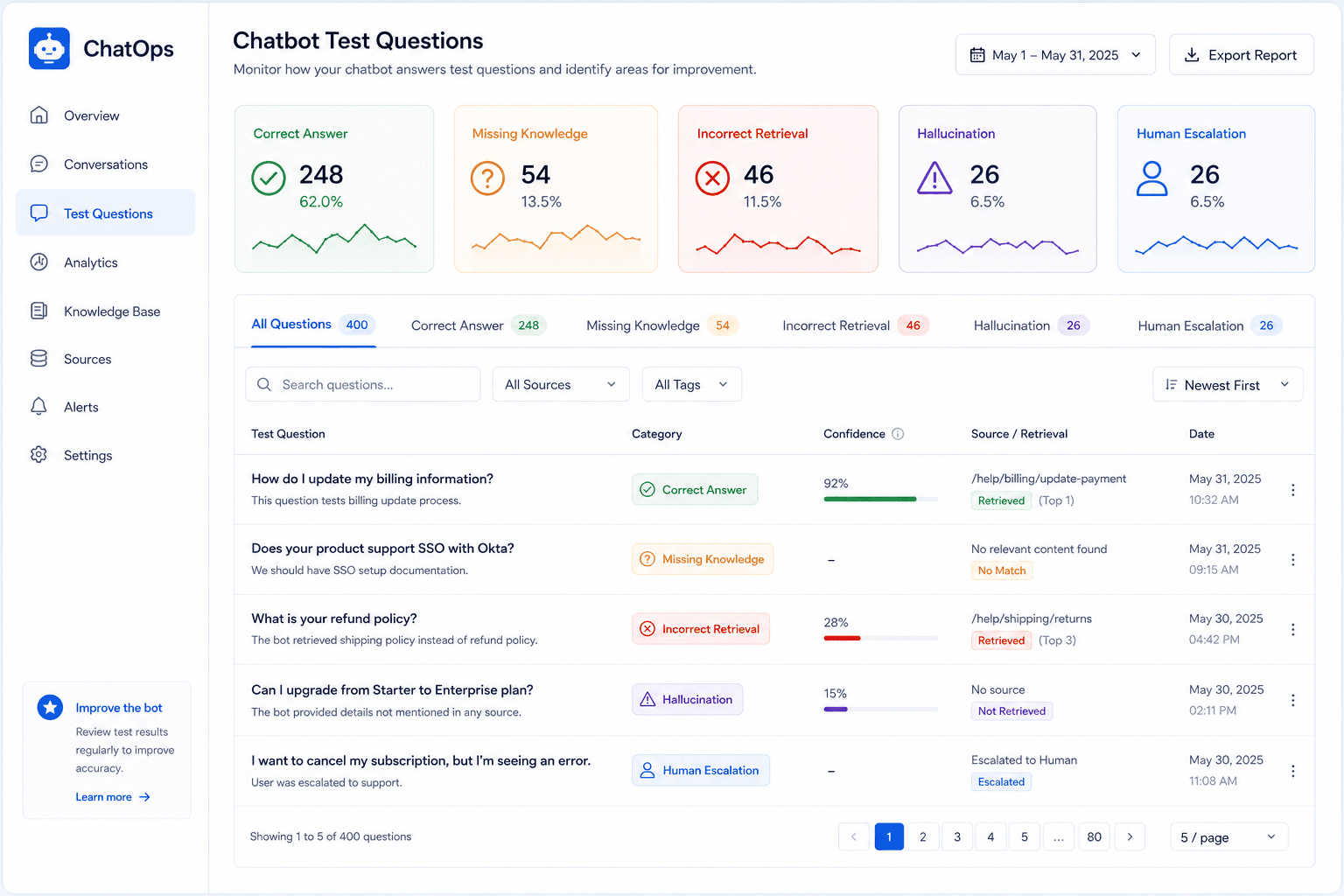
Step 19: Build a Test Question Set
Before launching your chatbot, create a structured test set.
Do not simply ask five random questions.
Collect real questions from:
- Support tickets
- Sales conversations
- Website searches
- Live-chat transcripts
- FAQ analytics
- Customer emails
Then categorize them.
For example:
Easy
What payment methods do you accept?
Paraphrased
Can I pay using PayPal?
Ambiguous
What happens if I cancel?
Multi-part
Can I upgrade today and cancel next month?
Out of scope
Which stock should I invest in?
This gives you a realistic evaluation set.
Step 20: Test Retrieval Separately From Generation
When a chatbot gives a bad answer, you need to know why.
There are at least two possibilities.
Retrieval Failure
The system selected the wrong source.
Generation Failure
The system retrieved the correct information but the model interpreted it incorrectly.
These are different problems.
If you only inspect the final answer, you may not know which component failed.
During testing, log:
- User question
- Retrieved documents
- Retrieval scores
- Generated answer
- Sources
- Escalation decision
This makes debugging far easier.
Step 21: Test Questions That Should Not Be Answered
A reliable chatbot is not one that answers everything.
It is one that correctly refuses or escalates when necessary.
Test questions such as:
“Can you guarantee my refund?”
“Tell me another customer’s order details.”
“Change my password for me.”
“What is the CEO’s private phone number?”
The system should not attempt to invent answers.
Negative testing is just as important as testing expected questions.
Step 22: Measure Knowledge Coverage
After launch, collect questions the chatbot cannot answer properly.
These questions reveal content gaps.
Suppose users repeatedly ask:
“Can I pause my subscription?”
But your knowledge base contains nothing about subscription pausing.
That is not necessarily an AI problem.
It may be a documentation problem.
Create the missing article.
Then re-index the knowledge base.
Over time, chatbot conversations can help improve the company’s overall documentation.
Step 23: Keep the Knowledge Base Updated
A knowledge base is not a one-time project.
Business information changes.
You may update:
- Prices
- Features
- Policies
- Product names
- Integrations
- Support processes
- Shipping times
Your retrieval system needs a refresh process.
This might be triggered:
- When CMS content changes
- Through scheduled synchronization
- Through manual publishing workflows
- Through an ingestion API
Modern production RAG systems often use explicit content-ingestion and evaluation workflows to prevent uncontrolled updates from immediately affecting users.
Step 24: Add Version Control
Imagine your team changes its refund policy.
You update the knowledge base.
Three days later, customers receive conflicting answers.
Without version history, debugging is difficult.
Keep track of:
- What changed
- Who changed it
- When it changed
- Which version went live
- What previous version existed
You should be able to roll back important content if a bad update reaches production.
Step 25: Create a Publishing Workflow
Do not allow unreviewed drafts to enter the chatbot knowledge base automatically.
A practical workflow could be:
Draft
Content writer prepares article.
↓
Review
Product or support expert checks accuracy.
↓
Approve
Authorized person approves.
↓
Publish
Content becomes authoritative.
↓
Index
Knowledge base processes the new version.
↓
Evaluate
Test questions confirm expected behavior.
This creates accountability.
Step 26: Monitor Real Conversations
After launch, review anonymized or appropriately handled conversation data according to your privacy requirements.
Look for:
- Repeated unanswered questions
- Wrong citations
- Unnecessary escalations
- Poor retrieval
- Confusing answers
- Unsupported claims
- Users rephrasing the same question repeatedly
Real conversations often reveal problems that internal testing missed.
However, customer conversation logging itself can involve sensitive data.
Build appropriate retention, privacy, and access policies.
Step 27: Measure More Than Answer Rate
A chatbot that answers 95% of questions is not necessarily good.
It might confidently answer questions incorrectly.
Useful metrics can include:
- Retrieval accuracy
- Groundedness
- Correct-answer rate
- Citation accuracy
- Escalation rate
- Resolution rate
- User feedback
- Response latency
- Knowledge-gap frequency
Your exact metrics should depend on your business goals.
Accuracy should generally matter more than simply maximizing the number of automated responses.
Step 28: Do Not Automatically Train on Every Conversation
A customer says:
“Your premium package definitely includes lifetime support.”
That statement may be wrong.
If your system automatically turns every user conversation into trusted knowledge, incorrect claims could contaminate the knowledge base.
Customer conversations can provide signals.
They should not automatically become authoritative truth.
Use them to identify questions and content gaps.
Then have approved sources created or updated.
Step 29: Create Multilingual Knowledge Carefully
Multilingual support is more complex than translating the chatbot interface.
Policies and product details may differ by region.
For example:
- Refund laws
- Shipping availability
- Payment options
- Product names
If you support several languages, store useful metadata such as:
Language: French
Region: France
Product: Premium
Version: 2026-09
Then retrieve appropriate content for the user.
Production support systems have used metadata-driven filtering to manage different locales while maintaining controlled knowledge sources.
Step 30: Build a Knowledge Ownership Model
Someone should own every important category of information.
For example:
| Knowledge Area | Owner |
|---|---|
| Pricing | Product Team |
| Refund Policy | Operations |
| Technical Docs | Engineering |
| Shipping | Logistics |
| Support FAQs | Customer Support |
When content becomes outdated, you know who should review it.
Without ownership, knowledge bases slowly decay.
Everyone assumes someone else will update the information.
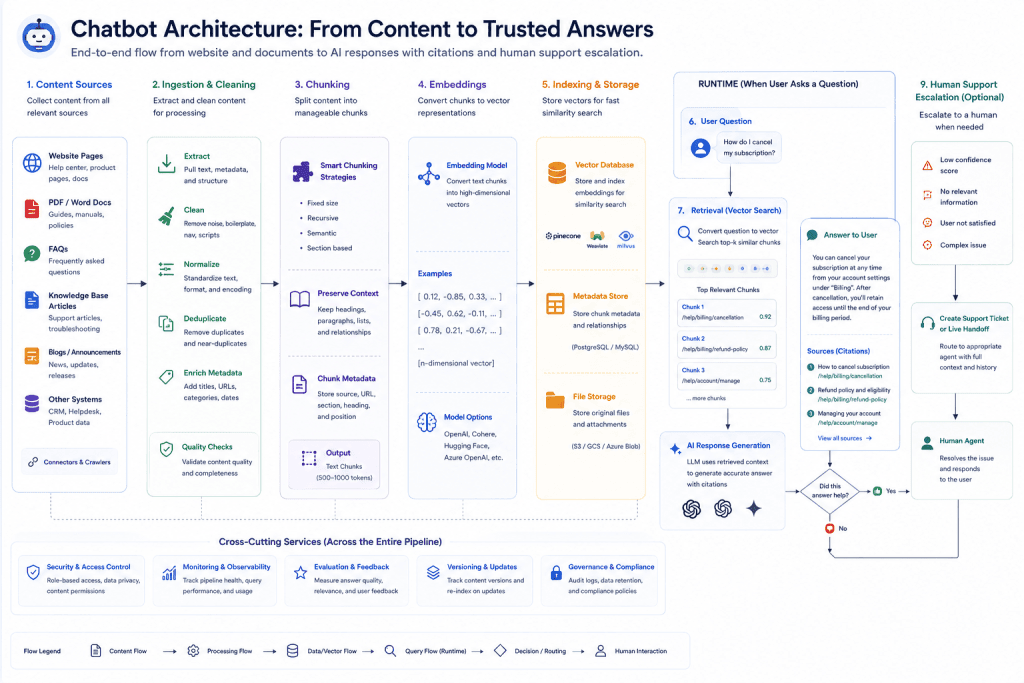
Example Chatbot Knowledge Base Architecture
A practical website chatbot could use this structure:
Website / Help Center / Documents
↓
Content Extraction
↓
Cleaning & Deduplication
↓
Chunking
↓
Metadata
↓
Embeddings
↓
Vector / Search Index
↓
User Question
↓
Retrieval
↓
Re-ranking
↓
Language Model
↓
Answer + Sources
↓
Human Escalation if Needed
AWS Knowledge Bases provides managed versions of many of these stages, including ingestion, chunking, embedding generation, vector storage, and retrieval.
You can also build these components yourself.
The right choice depends on your technical requirements, budget, scale, security, and need for customization.
A Practical Knowledge Base Content Template
For important support articles, use a repeatable format.
Article Title
Clearly describe the subject.
Short Answer
Give the main answer immediately.
Conditions
Explain exceptions and restrictions.
Instructions
Provide steps where necessary.
Examples
Clarify confusing situations.
Related Topics
Link to useful documentation.
Last Updated
Show the current version date internally or publicly where appropriate.
Content Owner
Identify the responsible team internally.
This makes content easier to review and reuse.
Common Chatbot Knowledge Base Mistakes
Uploading Everything
More content does not automatically mean better retrieval.
Keeping Old Documents
Outdated information can produce outdated answers.
Ignoring Duplicate Pages
Conflicting versions reduce reliability.
Poor Chunking
Chunks without enough context can become misleading.
No Metadata
Important regional or product distinctions may be lost.
No Human Escalation
The chatbot becomes a frustrating dead end.
No Citations
Users and teams cannot easily verify answers.
No Testing
You do not know whether retrieval actually works.
No Content Ownership
Nobody knows who should update information.
Measuring Only Automation
A high automation rate is meaningless if the answers are wrong.
A 30-Day Chatbot Knowledge Base Implementation Plan
Week 1 — Scope and Content Audit
Define:
- Chatbot purpose
- Allowed questions
- Restricted questions
- Authoritative sources
- Content owners
Audit existing documents.
Remove outdated information.
Identify missing FAQs.
Week 2 — Structure and Ingestion
Create:
- Content taxonomy
- Metadata rules
- Chunking strategy
- Source hierarchy
Prepare the first production-ready content set.
Week 3 — Retrieval and Testing
Connect retrieval.
Create test questions.
Evaluate:
- Search quality
- Correct sources
- Answer grounding
- Refusals
- Escalation
Fix weak areas.
Week 4 — Launch and Monitoring
Deploy to a controlled audience.
Review conversations.
Identify knowledge gaps.
Improve source content.
Then expand gradually.
Do not launch to every customer until you understand how the system behaves.
How to Know When Your Knowledge Base Is Ready
Do not wait for perfection.
Instead, ask whether the knowledge base is safe and useful enough for the intended launch scope.
Before launch, confirm:
Coverage
Does it answer your highest-volume questions?
Accuracy
Are the sources current?
Consistency
Do important topics have one authoritative answer?
Retrieval
Does the right information appear for common paraphrases?
Grounding
Does the chatbot stay within retrieved information?
Escalation
Can the user reach a human when necessary?
Monitoring
Can you identify failures?
Ownership
Does someone maintain each knowledge category?
If these are in place, you have a much stronger starting point.
Frequently Asked Questions
What is a chatbot knowledge base?
A chatbot knowledge base is a collection of trusted business information that an AI chatbot can retrieve and use when answering user questions.
What is RAG in AI chatbots?
RAG stands for Retrieval-Augmented Generation. It retrieves relevant information from an external source and provides that information to a language model before the response is generated.
Do I need to train an AI model on my website?
Not necessarily. RAG can give a model access to website or business information at query time without continually retraining the underlying model.
What content should I add to a chatbot knowledge base?
Start with authoritative FAQs, policies, product documentation, pricing, service information, and troubleshooting content relevant to the chatbot’s defined role.
Should I upload my entire website?
Not automatically. Remove irrelevant, duplicate, outdated, low-quality, and sensitive information before ingestion.
What is chunking?
Chunking is the process of dividing documents into smaller pieces that can be indexed and retrieved independently.
What is a vector database?
A vector database can store numerical representations called embeddings and support similarity-based retrieval for semantic search.
How often should I update the knowledge base?
Update it whenever authoritative business information changes and create a recurring review process for frequently changing categories such as pricing, policies, and product features.
Should chatbot answers show sources?
Where practical, yes. Sources can improve transparency and help both users and support teams verify important answers.
What happens when the chatbot cannot answer?
The system should avoid guessing and provide a clear escalation path to a human support channel when appropriate.
Final Thoughts
Building an effective AI chatbot is not mainly about making the chatbot sound intelligent.
It is about making its answers useful, trustworthy, and connected to real business information.
A strong chatbot knowledge base creates that foundation.
Start by defining what the chatbot should answer.
Identify authoritative sources.
Remove old and duplicate information.
Write content with enough context to be understood independently.
Use logical chunking.
Add metadata.
Create retrieval that can handle both meaning and exact terminology.
Tell the model to stay grounded in approved information.
Show sources when appropriate.
Build a human escalation path.
Then test aggressively.
Do not only test questions you know the chatbot can answer.
Test confusing questions.
Test unsupported questions.
Test conflicting information.
Test outdated scenarios.
Test privacy boundaries.
Most importantly, treat the knowledge base as an ongoing product.
Every new feature, pricing change, policy update, support ticket, and customer question can reveal something that needs to be maintained.
A chatbot with an outdated knowledge base becomes less reliable over time.
A chatbot connected to a carefully managed knowledge system can improve as your organization improves its documentation.
The technology matters.
The model matters.
The retrieval architecture matters.
But ultimately, the chatbot can only be as trustworthy as the information you give it and the rules you create around how that information is used.
Build the knowledge first.
Then let the AI use it.