15 Best AI Tools in 2026 for Work, Content, Research and Business
- by Muhammad Raza
- 0 Comments
- 17 minutes read
- 75 Views
Artificial intelligence has moved far beyond simple chatbots.
Today, AI tools can help people research topics, write and edit content, analyze files, create images, build presentations, summarize information, generate code, organize projects, and automate repetitive work.
The challenge is no longer finding an AI tool.
The challenge is choosing the right AI tool for the job.
There are now hundreds of AI-powered products competing for attention. Some are designed for writing. Others focus on research, design, coding, automation, meetings, presentations, or business operations. Many platforms also combine several capabilities into one product.
That makes choosing an AI tool confusing, especially for beginners.
In this guide, we will look at 15 useful AI tools and categories that can help freelancers, students, marketers, content creators, entrepreneurs, developers, and small businesses work more efficiently.
The goal is not to claim that one platform is the best for everyone.
Instead, the goal is to understand which AI tool is useful for which type of work.
That distinction matters because the best AI tool for writing an article may not be the best tool for researching that article. Likewise, the best tool for creating graphics may not be the best tool for coding an application.
AI tools are becoming increasingly specialized, while some major platforms are expanding into broader “all-in-one” ecosystems.
For example, ChatGPT can support writing, brainstorming, studying, coding, file analysis, image-related tasks, and other workflows depending on the features available to an account.
Perplexity focuses heavily on web-based research and cited answers, while Canva has expanded its AI capabilities across design, writing, images, presentations, and other creative workflows.
This article will help you understand where different tools fit into a practical AI workflow.
Freelancers can also compare these broader AI tools with our dedicated guide to the best AI tools for freelancers and our guide to AI tools for small businesses.
What Are AI Tools?
AI tools are software applications that use artificial intelligence to perform tasks that traditionally require human input.
These tasks can include:
- Generating text
- Summarizing documents
- Researching information
- Translating languages
- Creating images
- Editing videos
- Writing code
- Analyzing data
- Creating presentations
- Automating workflows
- Answering questions
- Organizing information
Some AI tools are general-purpose assistants.
Others are specialized.
For example, a general AI assistant might help you brainstorm a business idea and then create a draft email.
A specialized research tool may be better suited for finding current information and presenting supporting sources.
The important thing is to match the tool with the task.
Why Choosing the Right AI Tool Matters
It is tempting to use one AI platform for everything.
Sometimes that works.
But specialized tools can offer advantages for particular workflows.
Consider a content creator.
They might use:
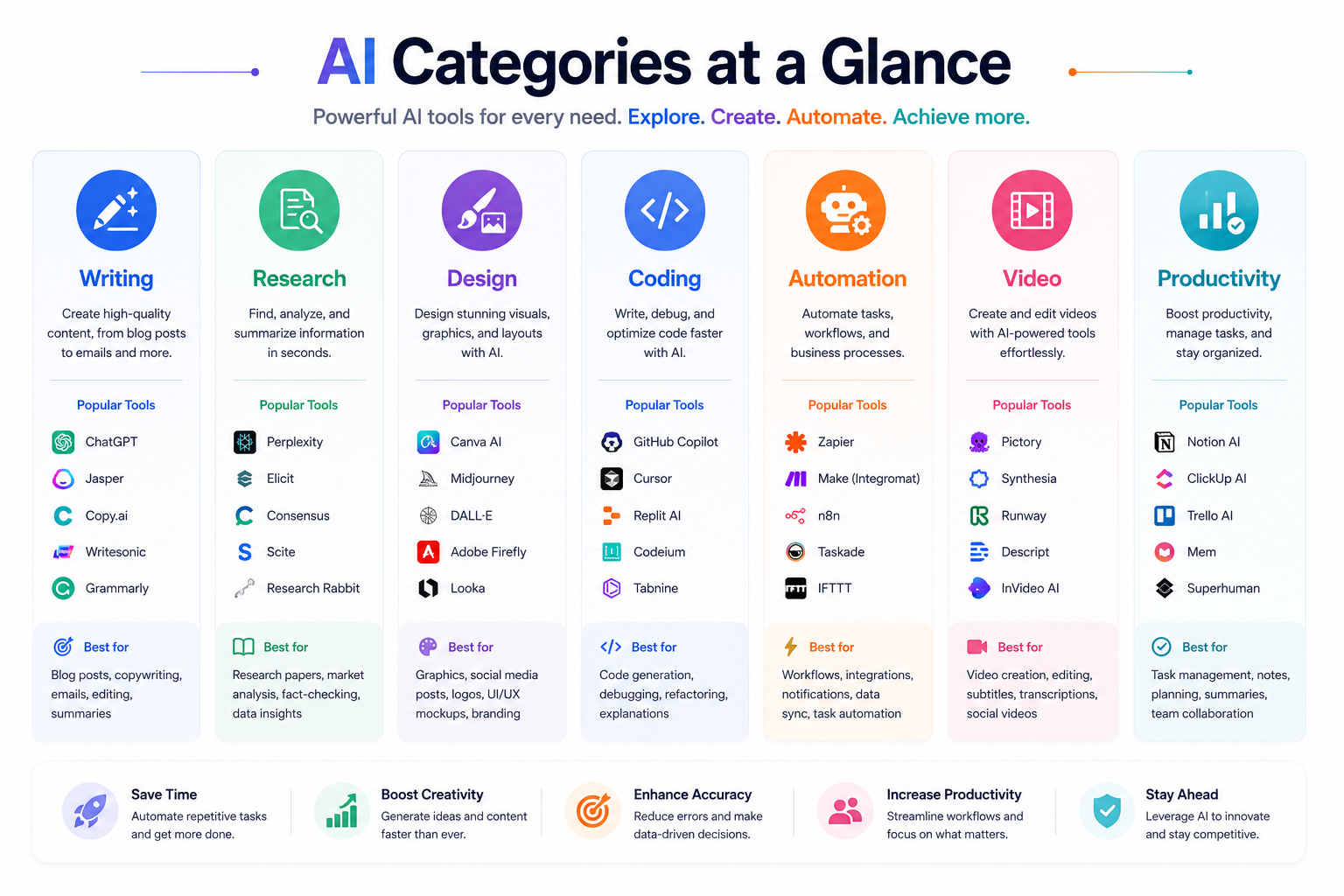
AI research tool → Research
AI writing assistant → Draft
AI image tool → Graphics
Design platform → Thumbnail
Video tool → Short video
Automation platform → Distribution
Instead of asking one AI application to do everything, you can build a workflow where each tool handles the part it is best suited for.
This approach can improve efficiency and quality.
It also reduces unnecessary subscriptions.
Before paying for an AI tool, ask:
What problem does this solve?
How often will I use it?
Can another tool I already have perform the same task?
Does it save enough time to justify its cost?
1. ChatGPT — A Versatile AI Assistant
ChatGPT is one of the most flexible AI assistants for everyday work.
OpenAI describes ChatGPT as an AI assistant that can help with tasks such as brainstorming, writing, studying, planning, mathematics, coding, image and file analysis, depending on available features and settings.
For many users, its biggest advantage is versatility.
You can use it for:
- Article outlines
- Content editing
- Brainstorming
- Research assistance
- Coding help
- Business ideas
- Email drafts
- Summaries
- Translation
- Learning
- Data analysis
- Image-related workflows
A freelancer could use ChatGPT to create a proposal outline.
A student could use it to explain a difficult concept.
A marketer could use it to brainstorm campaign ideas.
A developer could use it to understand code or troubleshoot an error.
The key is to provide clear instructions.
Instead of asking:
“Write something about marketing.”
Try:
“Create a 1,500-word beginner-friendly guide to email marketing for small businesses. Use short paragraphs, practical examples, and clear H2 headings.”
The second prompt provides context, audience, purpose, and structure.
That generally leads to more useful output.
2. Claude — Writing, Analysis and Complex Tasks
Claude is an AI assistant developed by Anthropic.
Anthropic describes Claude as capable of tasks including summarization, search, creative and collaborative writing, question answering, coding, and other text-processing workflows.
Claude can be useful when your task involves long-form writing, careful editing, document analysis, or structured reasoning.
Potential use cases include:
- Long documents
- Writing assistance
- Code analysis
- Research organization
- Business documentation
- Content editing
- Brainstorming
- Summaries
One useful approach is to give Claude a document and ask it to identify the major ideas before requesting a rewrite.
For example:
Step 1: Analyze the document.
Step 2: Identify important points.
Step 3: Find unclear sections.
Step 4: Suggest improvements.
Step 5: Rewrite selected sections.
This is often better than asking an AI to rewrite everything immediately.
3. Google Gemini — AI Across Google’s Ecosystem
Google Gemini is Google’s AI assistant ecosystem.
Gemini can be particularly interesting for users who already work heavily with Google’s products and services.
Google is also integrating Gemini into Chrome and its broader search experience. Google’s current Chrome documentation describes Gemini in Chrome as an AI assistant that can understand web content and help with tasks using the context of open tabs and browsing activity, while AI Mode provides conversational search capabilities.
Possible use cases include:
- Research
- Writing
- Brainstorming
- Summarization
- Planning
- Understanding webpages
- Working with Google ecosystem workflows
- Image-related tasks
- Learning
If your work already revolves around Google services, Gemini may be worth exploring because the broader ecosystem can influence how useful the assistant is for your workflow.
The important point is not simply to choose an AI because it is popular.
Choose it because it fits your existing tools and tasks.
4. Perplexity — AI-Powered Research
Perplexity is particularly useful for research.
Perplexity describes itself as an AI-powered search and answer engine that searches the web and provides conversational responses supported by citations and links to sources.
That makes it useful when you need to investigate a topic rather than simply generate text.
For example, you could ask:
“What are the major changes in WordPress in 2026? Provide sources and separate confirmed information from predictions.”
Perplexity’s current documentation describes features such as Search, Pro Search, Deep Research, file uploads, Projects, and other research-oriented capabilities.
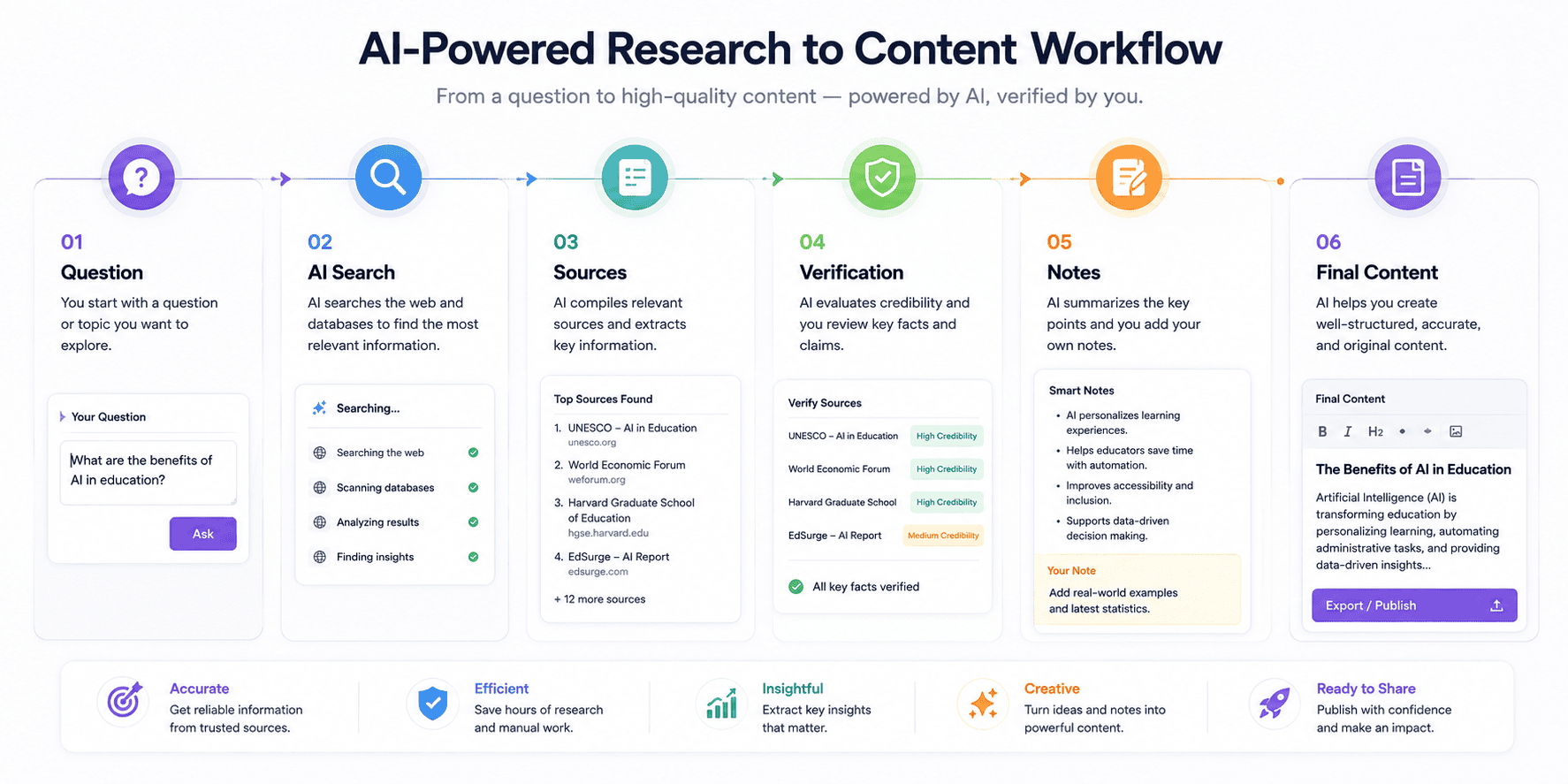
A strong research workflow is:
Question → Search → Sources → Verification → Notes → Writing
Do not blindly copy an AI-generated answer.
Open the sources.
Check the claims.
Then write your own explanation.
This is especially important for health, finance, law, technology news, and other subjects where information can change quickly.
5. Canva AI — Design and Visual Content
Canva is useful for people who need visual content without wanting to become professional graphic designers.
Canva has incorporated AI into its creative ecosystem through tools such as Magic Studio and newer AI capabilities for designs, documents, images, and other creative workflows.
You can use Canva for:
- Blog graphics
- Social media posts
- Presentations
- Thumbnails
- Infographics
- Posters
- Marketing materials
- Visual summaries
For a website owner, a simple workflow could be:
Article → Key points → Canva graphic → Social media post
Canva’s AI features can help accelerate the first draft, but the final design should still be checked for readability, branding, accuracy, and visual consistency.
AI can generate a starting point.
Your judgment creates the final result.
6. GitHub Copilot — AI Assistance for Coding
GitHub Copilot is designed to assist developers with coding workflows.
For developers, AI coding tools can help with:
- Code suggestions
- Explaining code
- Refactoring
- Debugging assistance
- Generating boilerplate
- Learning programming concepts
- Writing tests
- Exploring implementation ideas
However, developers should never assume that generated code is automatically correct.
AI-generated code can contain:
- Bugs
- Security problems
- Incorrect assumptions
- Outdated approaches
- Unnecessary complexity
A better workflow is:
AI suggestion → Developer review → Testing → Security check → Deployment
AI can speed up development, but software still needs engineering discipline.
7. Notion AI — Knowledge and Productivity
Notion combines workspace management with AI capabilities.
For people who already organize projects, notes, documents, or tasks inside Notion, AI can become part of the same workflow.
Potential use cases include:
- Summarizing notes
- Organizing information
- Drafting documents
- Creating project content
- Brainstorming
- Managing knowledge
- Working with internal documentation
This is particularly useful for teams.
Imagine a project workspace containing:
Client information
Meeting notes
Tasks
Research
Content ideas
AI can help transform that information into summaries and action items.
The key benefit is not merely generating text.
It is reducing the time required to move from information to action.
8. Gamma — AI Presentations and Documents
Gamma is designed to help users create presentations, documents, and visual content with AI assistance.
A traditional presentation workflow might require:
Outline → Slide design → Text formatting → Images → Layout → Editing
AI-assisted presentation tools can help accelerate the initial structure.
For example, you might provide:
“Create a presentation explaining AI automation for small businesses.”
The tool can help create a starting structure that you then refine.
This is useful for:
- Freelancers
- Teachers
- Agencies
- Startup founders
- Sales teams
- Students
- Consultants
Again, review matters.
AI-generated slides can contain too much text, weak hierarchy, or inaccurate claims.
The best presentation is not the one generated fastest.
It is the one that communicates the idea clearly.
9. NotebookLM — Researching Your Own Sources
Google’s NotebookLM is designed around working with provided sources.
This type of tool can be useful when you want AI to work from a defined collection of material rather than relying only on a general conversation.
Possible use cases include:
- Study notes
- Research documents
- Reports
- Project documentation
- Meeting material
- Books and papers
- Internal company information
Imagine you have 10 documents related to a project.
Instead of repeatedly searching through each document manually, an AI research workspace can help you summarize and explore the information.
The important principle is source control.
When working on serious projects, know what material the AI is actually using.
10. n8n — AI Workflow Automation
n8n is useful for people who want to connect AI models with other applications and automate workflows.
Instead of using AI only as a chat interface, automation platforms can connect AI to business systems.
For example:
New website inquiry
↓
AI classifies the message
↓
CRM record created
↓
Sales team notified
Another workflow could be:
New article
↓
AI creates summary
↓
Social media draft created
↓
Editorial review
↓
Publishing workflow
This is where AI becomes more than a writing assistant.
It becomes part of a larger process.
Automation should always include appropriate permissions, error handling, and human review for important actions.
11. Runway — AI Video Creation
AI video tools are becoming increasingly useful for creators and marketers.
Runway is one platform associated with AI-powered video generation and creative workflows.
Potential uses include:
- Concept videos
- Marketing visuals
- Creative experiments
- Storyboards
- Short-form content
- Visual effects
- Product concepts
AI video generation can save time during the ideation stage.
However, creators should pay attention to:
- Commercial rights
- Model limitations
- Visual consistency
- Copyright
- Brand requirements
- Human editing
For professional marketing, AI-generated footage often works best as one component of a larger production workflow rather than a complete replacement for creative direction.
12. Adobe Firefly — Generative Creative Work
Adobe Firefly is Adobe’s generative AI ecosystem for creative work.
It can be useful for designers, marketers, and content creators who already work within Adobe’s ecosystem.
Potential tasks include:
- Generating visual concepts
- Creating variations
- Editing images
- Exploring design directions
- Creating marketing visuals
The main advantage of using AI inside a creative workflow is speed.
Instead of spending an hour exploring one concept manually, a designer can generate multiple directions and then refine the strongest one.
Human creativity remains important.
AI can create options.
The designer decides which option communicates the intended message.
13. Descript — AI-Assisted Audio and Video Editing
Descript focuses on editing audio and video through a workflow that combines media editing with text-based tools.
This can be useful for:
- Podcasts
- Interviews
- YouTube videos
- Tutorials
- Training content
- Social clips
For example, a creator can record a long interview and then turn it into:
Full video
↓
Short clips
↓
Quotes
↓
Article
↓
Social posts
AI can help identify useful sections and speed up parts of the editing process.
But creators should still review clips manually.
Automatic editing can miss context, produce awkward cuts, or select sections that are technically interesting but not useful to the audience.
14. Gamma and AI Presentation Workflows
Presentation creation deserves special attention because it is one of the areas where AI can dramatically reduce repetitive formatting work.
An AI presentation workflow might look like:
Topic
↓
Audience
↓
Outline
↓
AI-generated presentation
↓
Brand customization
↓
Fact-checking
↓
Final presentation
This workflow can save time for:
- Business proposals
- Training sessions
- Educational presentations
- Sales decks
- Client reports
- Startup pitches
The most important step is customization.
Do not present a generic AI-generated deck as if it were professionally designed.
Add your:
- Brand
- Data
- Examples
- Visual identity
- Business context
- Original insights
That is what transforms an AI draft into useful professional material.
15. AI Tools for Specialized Workflows
The final category is arguably the most important.
Instead of constantly searching for “the best AI tool,” look for a tool designed specifically for your task.
For example:
Writing: AI writing assistants
Research: AI search and research tools
Design: AI creative platforms
Coding: AI coding assistants
Automation: Workflow platforms
Meetings: AI transcription and meeting tools
Video: AI editing and generation tools
Presentations: AI presentation platforms
Business: AI CRM and workflow tools
The AI market changes rapidly.
A tool that is excellent today may be replaced or significantly changed later.
That means your strategy should be based on workflows rather than brand loyalty.
Best AI Tools by Use Case
If you want a quick starting point, think about the tools this way:
| Task | Useful AI Tool Type |
|---|---|
| General productivity | ChatGPT |
| Long-form writing | Claude |
| Google ecosystem workflows | Gemini |
| Web research | Perplexity |
| Graphic design | Canva AI |
| Coding | GitHub Copilot |
| Knowledge management | Notion AI |
| Presentations | Gamma |
| Source-based research | NotebookLM |
| Workflow automation | n8n |
| AI video | Runway |
| Creative generation | Adobe Firefly |
| Audio/video editing | Descript |
This is not a permanent ranking.
AI tools change quickly, features move between plans, and new competitors appear regularly.
Use this table as a starting point rather than a universal ranking.
How to Choose the Best AI Tool for You
Choosing an AI tool becomes easier when you follow a simple process.
Step 1: Define the Task
Do not start with:
“Which AI tool is best?”
Start with:
“What am I trying to accomplish?”
For example:
“I need to turn long articles into social media content.”
Now you have a specific problem.
Step 2: Measure Frequency
If you perform the task once per month, a complex paid subscription may not make sense.
If you perform it every day, automation could save substantial time.
Step 3: Check Existing Tools
You may already have the capability.
For example, a design platform you already pay for may have AI features that eliminate the need for another subscription.
Step 4: Test Before Paying
Whenever possible, test the workflow before committing.
Ask:
- Is the output good?
- Is it fast?
- Is it easy to use?
- Does it integrate with my workflow?
- Are the limitations acceptable?
Step 5: Check Privacy
Do not upload confidential documents to an AI service without understanding its data policies and your organization’s requirements.
Be especially careful with:
- Client information
- Passwords
- Financial records
- Private business documents
- Personal information
- Proprietary source code
How to Use Multiple AI Tools Together
You do not have to choose only one AI platform.
A multi-tool workflow can be more effective.
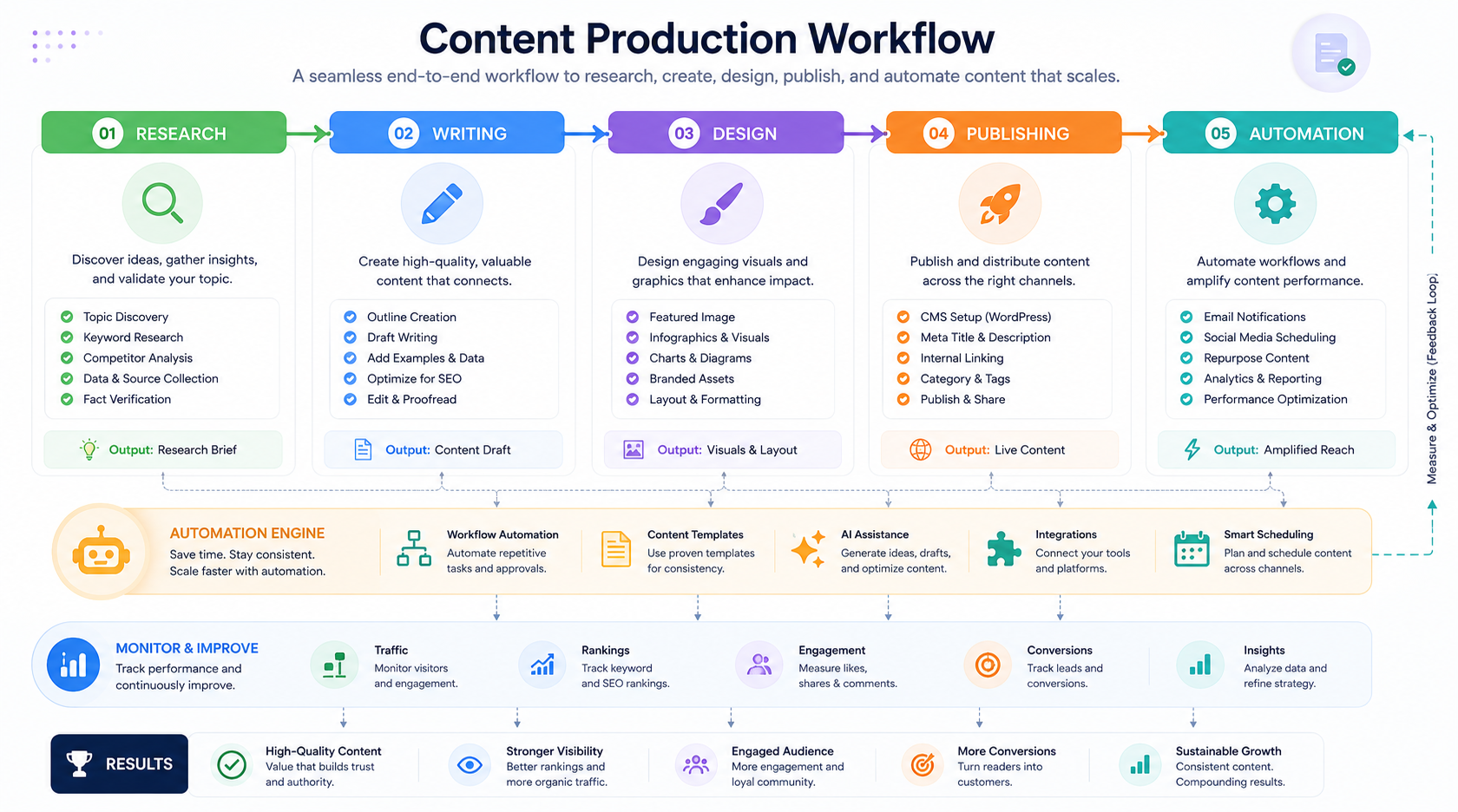
For example:
Content Workflow
Perplexity
Research current information.
↓
ChatGPT or Claude
Create an outline and draft.
↓
Canva
Create visual assets.
↓
WordPress
Publish and organize the content.
↓
Automation platform
Distribute the article.
This approach separates research, writing, design, publishing, and automation.
It also makes it easier to replace one tool without rebuilding your entire system.
AI Tools for Freelancers
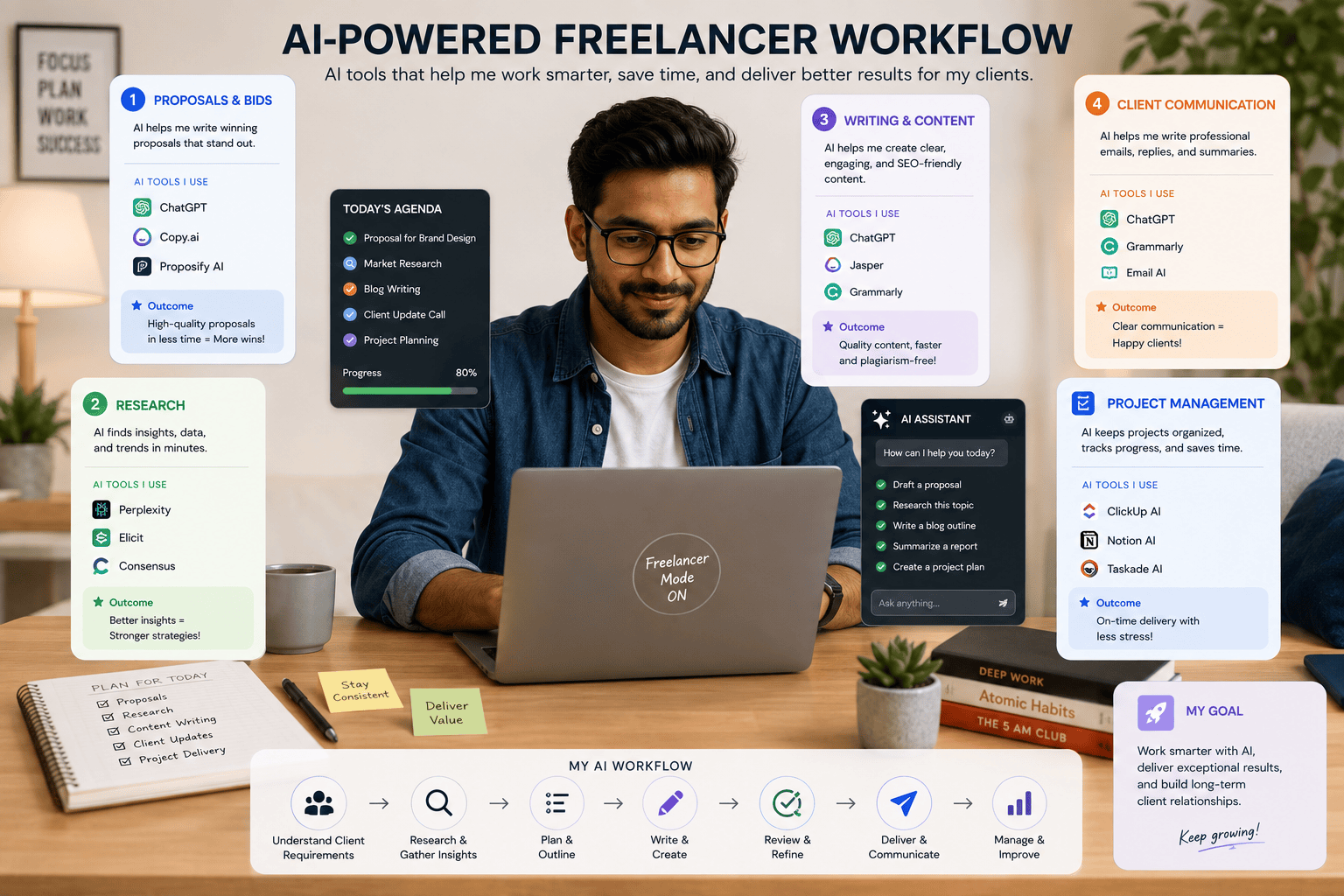
Freelancers can use AI tools to reduce administrative work.
For example:
Client inquiry
↓
AI summarizes requirements
↓
AI identifies project type
↓
Proposal draft
↓
Human review
↓
Client communication
A freelancer could also use AI for:
- Proposals
- Emails
- Research
- Content creation
- Meeting summaries
- Project documentation
- Social media
- Presentations
- Coding
- Data organization
The goal should not be to automate communication completely.
Clients still value human communication.
Use AI to reduce repetitive preparation so you can spend more time understanding the client.
AI Tools for Content Creators
Content creators can combine several tools into a production system.
For example:
Research
Use an AI search tool.
Script
Use a writing assistant.
Images
Use an AI creative tool.
Video
Use an AI video platform.
Editing
Use an AI-assisted editor.
Distribution
Use automation.
This can transform a one-person operation into a much more efficient content workflow.
However, originality remains important.
Do not simply generate generic content at scale.
Your experience, opinions, examples, storytelling, and expertise are what make content valuable.
AI Tools for Small Businesses
Small businesses often have limited time and staff.
AI can help with repetitive tasks such as:
- Customer inquiries
- Marketing drafts
- Meeting summaries
- Research
- Social media
- Reports
- Internal documentation
- Lead classification
- Workflow automation
For example:
Website form
↓
AI analyzes inquiry
↓
Lead classified
↓
CRM updated
↓
Business owner notified
This can save time without requiring a full-time employee for every administrative task.
AI Tools and SEO
AI can support SEO workflows, but it should not become a shortcut for low-quality content.
Useful SEO applications include:
- Keyword brainstorming
- Search intent analysis
- Content outlines
- Meta description drafts
- Internal-link suggestions
- Content updates
- FAQ ideas
- Content summaries
- Competitor research
However, AI-generated information must be verified.
If an article contains inaccurate claims, outdated information, or fabricated sources, publishing it can damage credibility.
A better workflow is:
Research → AI assistance → Human expertise → Fact-checking → Editing → Publishing
Common Mistakes When Using AI Tools
Using Too Many Tools
You do not need 30 AI subscriptions.
Start with a few tools that solve real problems.
Trusting AI Without Verification
AI can make mistakes.
Check important information.
Copying AI Output Without Editing
AI-generated text often needs human refinement.
Ignoring Privacy
Understand what information you are sharing.
Automating Everything
Some tasks need human judgment.
Choosing Tools Based Only on Hype
A viral tool is not necessarily useful for your workflow.
Forgetting Costs
Free tiers can have limits, while paid subscriptions can accumulate quickly.
Not Measuring Results
If an AI tool does not save time or improve quality, reconsider whether you need it.
How to Build Your Personal AI Stack
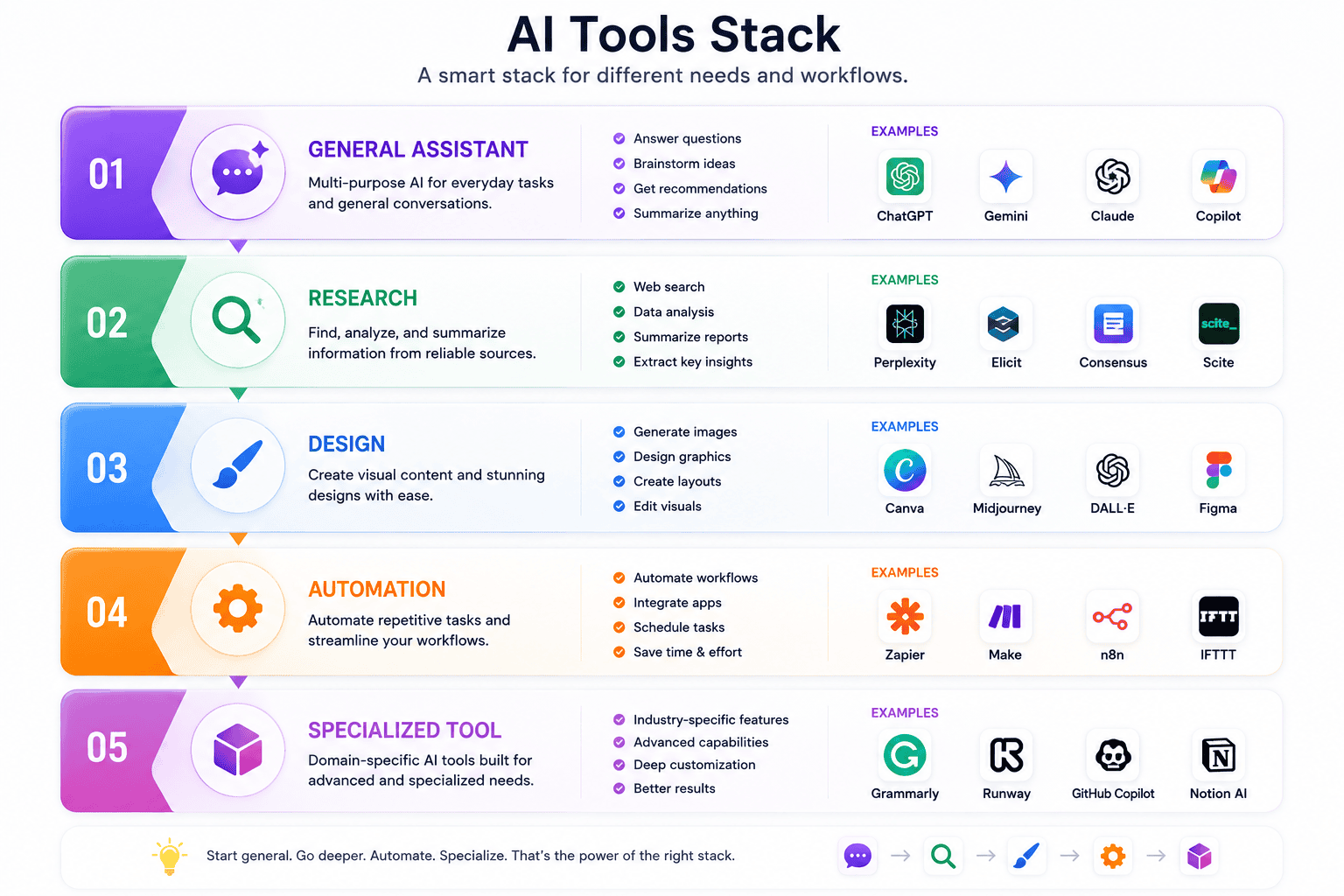
A simple AI stack might contain only five categories:
1. General Assistant
For everyday questions and writing.
2. Research Tool
For current information and sources.
3. Design Tool
For graphics and visual content.
4. Automation Tool
For connecting applications.
5. Specialized Tool
For your profession.
For example, a freelance content creator might use:
ChatGPT → Perplexity → Canva → n8n → specialized video editor
A developer might use:
AI assistant → research tool → coding assistant → automation platform
The ideal stack depends on your work.
What to Look for Before Buying an AI Tool
Before subscribing, check:
Features
Does it actually solve your problem?
Pricing
Are important features locked behind an expensive plan?
Limits
Are there usage restrictions?
Privacy
How does the platform handle your information?
Integrations
Can it connect with the tools you already use?
Export
Can you easily retrieve your work?
Reliability
Does it work consistently?
Support
Can you get help when something goes wrong?
Updates
Is the product actively developed?
This checklist can prevent unnecessary spending.
The Future of AI Tools
The AI industry is moving toward more integrated workflows.
Instead of using separate tools for every task, users may increasingly interact with AI systems that can search, analyze, create, and take actions across multiple applications.
Perplexity, for example, now describes its platform as extending beyond answers into research, building, automation, and agentic workflows.
Canva is also expanding AI beyond simple image generation into broader creative workflows, including conversational creation, interactive experiences, and AI-powered data-related capabilities.
This suggests that the next stage of AI adoption will not simply be about generating text.
It will be about completing workflows.
For example:
Research a topic
↓
Create a report
↓
Generate graphics
↓
Create presentation
↓
Publish content
↓
Analyze performance
The more AI systems become capable of connecting these steps, the more important human supervision, permissions, and verification will become.
Final Thoughts
There is no single AI tool that is perfect for everyone.
The best AI tool depends on the task.
If you need a versatile assistant, explore ChatGPT.
If you need writing and analytical support, consider Claude.
If you work heavily in Google’s ecosystem, Gemini may be useful.
If research and citations are your priority, Perplexity is worth exploring.
If you need visual content, Canva AI can simplify the creative process.
Developers can explore AI coding assistants.
Teams can use AI-powered knowledge and automation platforms.
Creators can combine AI video, image, audio, and design tools into a single production workflow.
The most important lesson is simple:
Do not collect AI tools. Build AI workflows.
A person using 20 tools inefficiently may accomplish less than someone using three tools strategically.
Start with your biggest repetitive task.
Find an AI tool that genuinely improves it.
Test the result.
Measure the time saved.
Then expand your AI stack only when there is a real reason to do so.
AI is most useful when it solves a real problem.
Frequently Asked Questions
What are the best AI tools in 2026?
There is no universal best AI tool. ChatGPT, Claude, Gemini, Perplexity, Canva AI, coding assistants, automation platforms, and specialized AI products each serve different purposes.
Which AI tool is best for writing?
General AI assistants such as ChatGPT and Claude can help with drafting, rewriting, summarization, brainstorming, and editing. The best choice depends on your preferred workflow and the type of writing you produce.
Which AI tool is best for research?
Perplexity is designed around AI-powered web research and cited answers, making it a useful option when source discovery and verification are important.
Which AI tool is best for graphic design?
Canva provides AI-powered creative features within its broader design platform, making it useful for people who want to create graphics without relying entirely on professional design software.
Can I use several AI tools together?
Yes. Combining tools can create a workflow where each platform handles the task it is best suited for.
Are AI tools free?
Some AI tools provide free access or free tiers, while others require subscriptions or charge based on usage. Features and limits can change, so always check the current pricing page before purchasing.
Should freelancers use AI tools?
Yes. Freelancers can use AI to assist with research, proposals, writing, client communication, project documentation, marketing, coding, and automation.
Can AI tools replace human workers?
AI can automate or accelerate certain tasks, but many workflows still require human judgment, creativity, communication, verification, and responsibility.
Are AI-generated results always accurate?
No. AI systems can produce incorrect information. Important claims should be verified against reliable sources.
How many AI tools should I use?
Use as few as necessary to accomplish your goals efficiently. A small, well-designed AI stack is often easier to manage than dozens of overlapping subscriptions.