Ecommerce Product Change Freeze: A Practical Guide for Small Businesses
- by Muhammad Raza
- 0 Comments
- 14 minutes read
- 56 Views
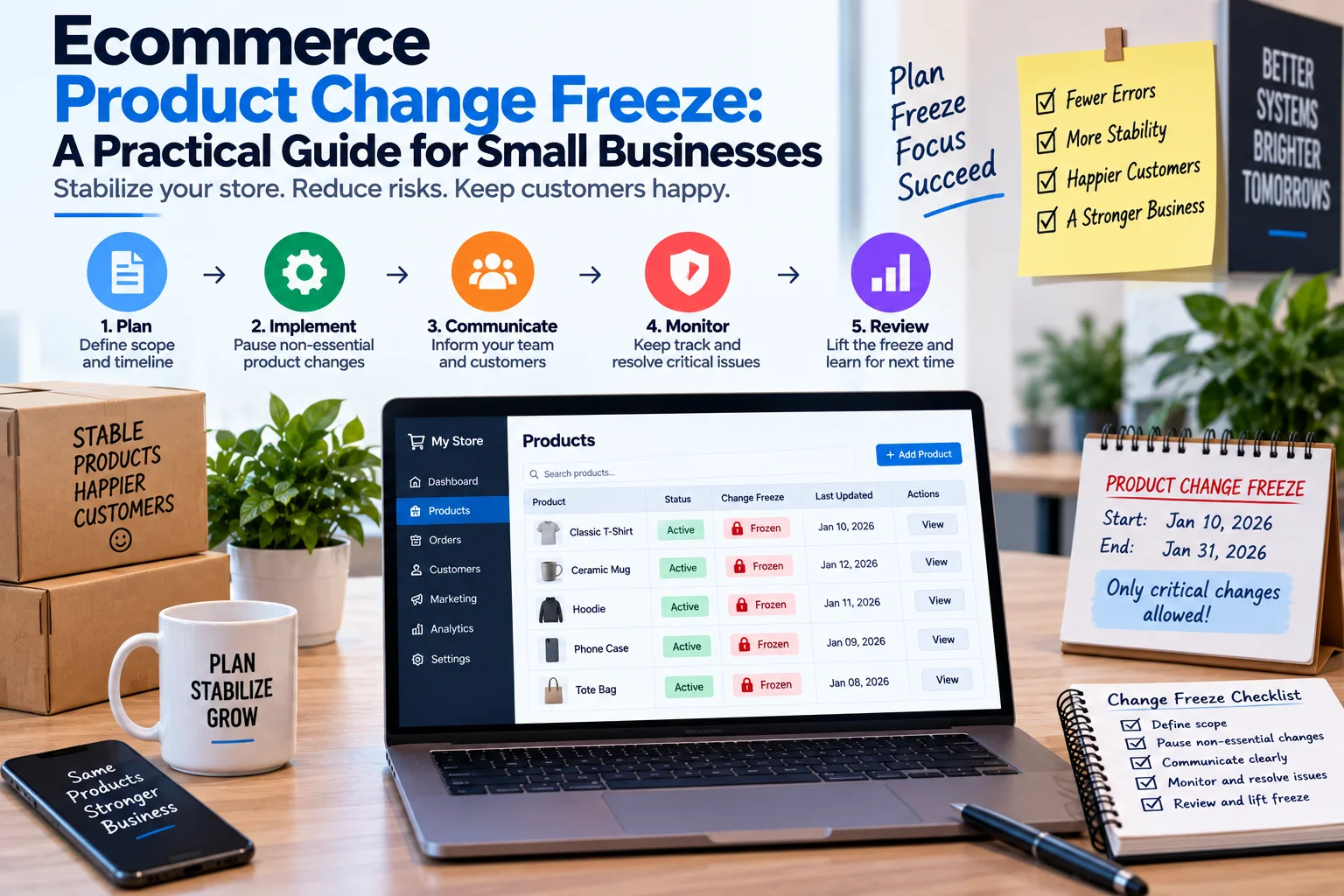
An ecommerce product change freeze gives small businesses a clear way to control high-impact product edits before a major promotion.
Instead of making last-minute changes to prices, inventory, product information, discounts, or shipping promises, the team defines what is frozen, what can still change, and who can approve exceptions.
This guide shows how to build a practical ecommerce product change freeze without creating unnecessary bureaucracy.
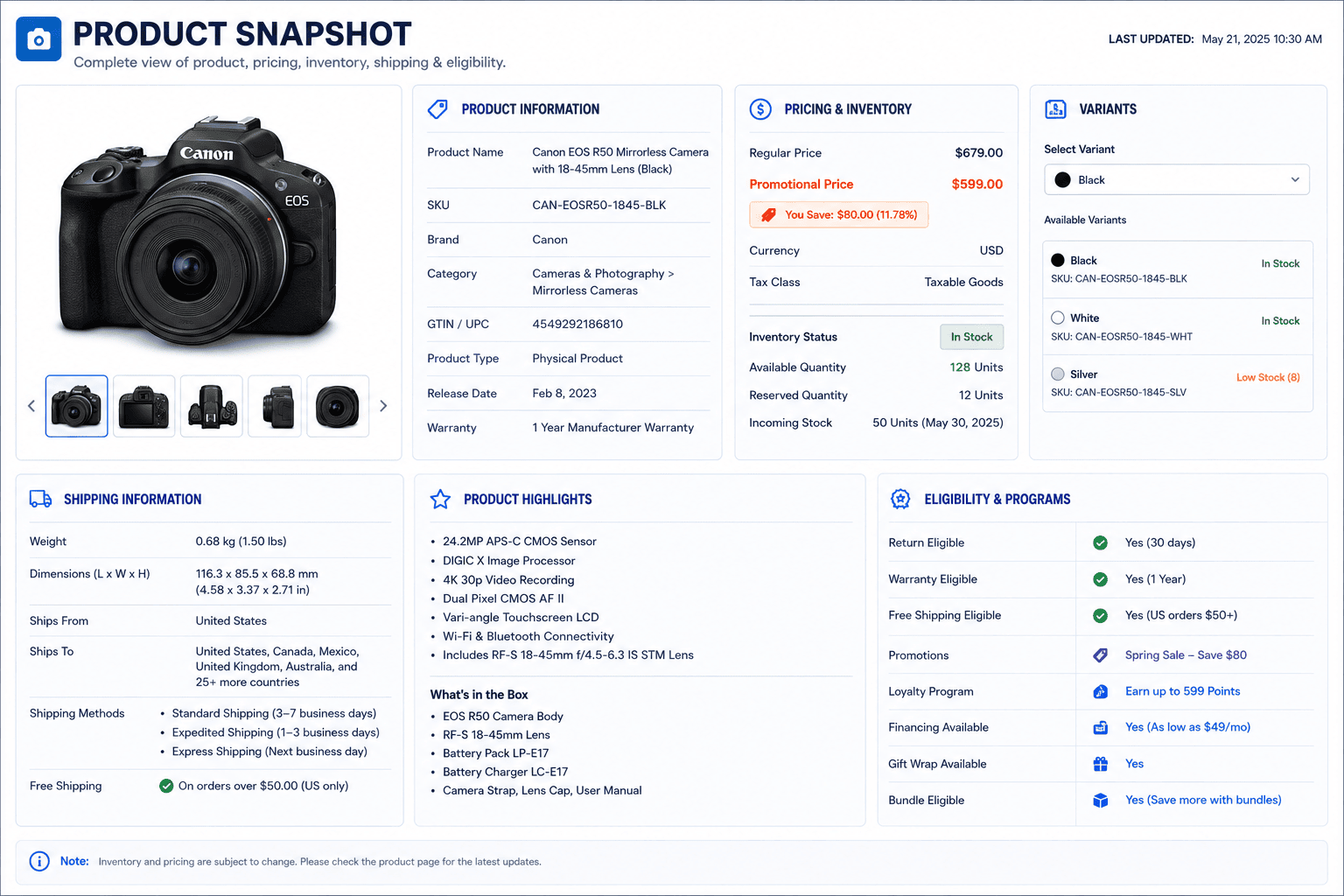
Create a “Change Request Card”
When someone wants to make a change during the freeze, they should not need to write a long explanation.
Use a short card.
PRODUCT CHANGE REQUEST
Product/SKU: ________
Requested change: ________
Why is it needed? ________
Customer impact: ________
Risk level: 1 / 2 / 3 / 4
Requested by: ________
Change owner: ________
Reviewer: ________
Publish time: ________
Rollback plan: ________
This takes very little time.
But it forces the team to think about impact before publishing.
Add a “Why Now?” Question
This is one of the most useful freeze questions.
Ask:
“Why does this change need to happen during the freeze?”
There are usually four possible answers.
Customer Protection
The current information is wrong.
Approve quickly.
Campaign Requirement
The promotion cannot work without the change.
Review and approve.
New Information
A supplier or business team provided important new information.
Validate it before publishing.
Convenience
Someone simply noticed something they would prefer to change.
This may be better left until after the promotion.
The question does not automatically block changes.
It separates urgent needs from late-stage preferences.
Don’t Let “Better” Become an Emergency
This happens frequently.
Someone looks at the product page and says:
“I think we should rewrite this headline.”
Maybe they are right.
But if the campaign launches tomorrow, this is not necessarily a reason to break the freeze.
The question is:
“Does leaving the current version create a meaningful customer or business risk?”
If not, put the improvement into the post-campaign queue.
This prevents perfectionism from disguising itself as urgency.
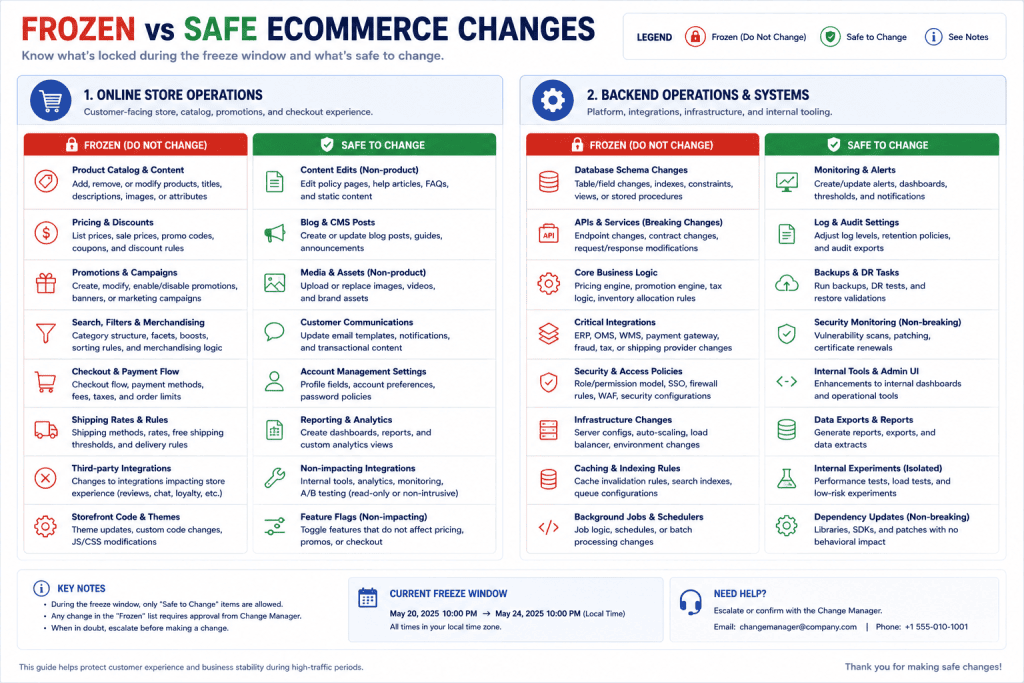
Create a “Do Not Touch” List
Some promotional components should be especially stable.
For example:
Do Not Touch During Freeze
- Promotional prices
- Discount logic
- Product eligibility
- Campaign collection rules
- Inventory allocation
- Shipping thresholds
- Checkout configuration
- Tracking configuration
- Marketplace feed settings
The exact list depends on your store.
The principle is simple:
Identify the settings that can change the economics or mechanics of the campaign, then protect them.
Create a “Safe to Change” List
A freeze becomes easier when employees know what they can still do.
For example:
Safe to Change
- Internal campaign notes
- Non-critical formatting
- Internal task descriptions
- Broken internal links
- Documentation
- Post-campaign improvement notes
This prevents employees from asking permission for every tiny correction.
Good operational systems reduce unnecessary decisions.
Create a Final Product Promise Check
Before the promotion goes live, review the customer-facing promise.
For each important product, ask:
What is the customer being promised?
Price?
Availability?
Delivery?
Product specification?
Discount?
Bundle?
Warranty?
Does the product page support that promise?
The campaign message and product page should not contradict each other.
For example:
Campaign:
“Free delivery on orders over $50.”
Product page:
“Additional delivery charges apply.”
That contradiction needs attention before launch.
Check the Promotion From the Customer’s Perspective
Internal teams often inspect individual settings.
Customers experience the entire journey.
Perform a simple customer-path test:
Advertisement
↓Landing page
↓Product page
↓Variant selection
↓Cart
↓Checkout
↓Confirmation
At each step ask:
“Does the information still agree?”
This is more useful than checking each system independently.

Test the Highest-Risk Products First
You do not necessarily need to inspect every product manually.
Start with products that have:
- High promotional visibility
- Multiple variants
- Complex discounts
- Limited stock
- High order volume
- Special shipping requirements
- Recent product changes
- Multiple sales channels
This creates a risk-based review.
A product with one SKU and stable pricing may require little attention.
A product with six variants, three prices, limited stock, and a promotional bundle deserves more scrutiny.
Use a “Two-Person Release” for High-Risk Changes
For important changes, separate:
Person A — Makes the change
from:
Person B — Confirms the result
The second person does not need to understand every technical detail.
They simply confirm:
- Correct product
- Correct price
- Correct variant
- Correct promotion
- Correct customer-facing information
This is especially useful for changes that affect money or availability.
Don’t Approve From the Same Screen
A useful review principle is:
Do not approve a change only from the editor where it was created.
Preview the customer-facing result.
For example:
The product editor says:
Sale Price: $39
But the customer-facing page may display:
$49
or the cart may calculate a different amount.
The approval should therefore include the actual customer path where practical.
Build a Rollback Point
Every controlled change should have a simple answer to:
“What do we do if this makes things worse?”
That does not require sophisticated disaster recovery.
It could mean:
- Restore previous price
- Remove campaign banner
- Revert product description
- Disable promotion
- Hide affected product
- Restore previous image
- Return to previous configuration
The important thing is knowing the recovery action before the change is made.
Use the “One Variable at a Time” Rule During the Freeze
If you change five things at once and sales behavior changes, you may not know which change caused the result.
During a campaign freeze, prefer smaller changes.
For example:
Bad:
Change price + image + title + discount + collection placement.
Better:
Change the price.
Verify.
Then, if necessary, change the image.
This principle also aligns with practical ecommerce testing guidance: focused changes make it easier to understand what affected performance.
Protect Inventory From Promotional Changes
Inventory deserves special attention.
A product can be technically available while the business cannot realistically fulfill the promotion.
Before a major promotion, ask:
- Is the displayed stock accurate?
- Are variants mapped correctly?
- Is promotional demand included in planning?
- Is any inventory reserved elsewhere?
- Are marketplace quantities synchronized?
- Can the fulfillment team handle the expected order flow?
A product catalog and inventory system are closely connected operationally, and ecommerce platforms increasingly treat product data and stock information as part of the same customer-facing system.
Create a “Promotion Product Set”
Instead of freezing the entire catalog equally, identify the products that are part of the campaign.
For example:
Promotion Product Set
- SKU-101
- SKU-104
- SKU-117
- SKU-125
Then apply stronger controls to those products.
This makes the process practical for a small business.
You do not need to treat a product that is unrelated to the promotion like a high-risk promotional SKU.
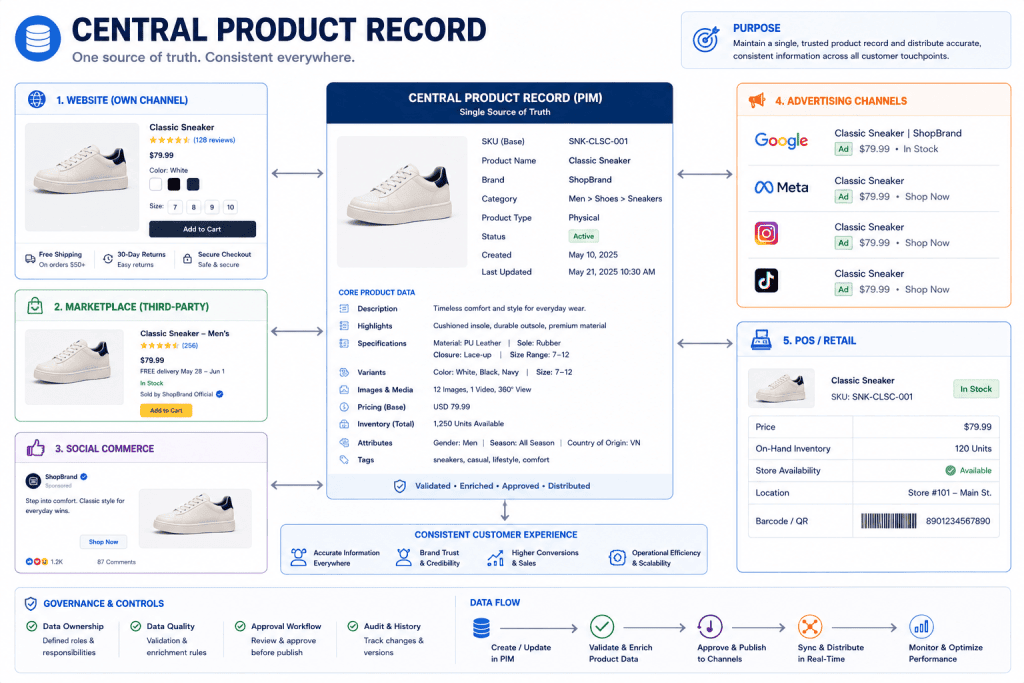
Add a Multi-Channel Check
If you sell through more than one channel, the freeze becomes even more useful.
A product may appear on:
- Your website
- Marketplace
- Social commerce channel
- Retail POS
- Email campaign
- Paid advertising
- Affiliate feed
A price or availability change in one place may not appear everywhere at the same moment.
Therefore ask:
“Where else does this product promise appear?”
Before approving a high-impact change, identify the destinations that may need checking.
Build a “Last Change” Record
During the freeze, keep a simple record.
| Time | Product | Change | Owner | Approved By |
|---|---|---|---|---|
| 8:20 AM | SKU-101 | Corrected shipping text | Sara | Omar |
| 9:05 AM | SKU-117 | Updated sale price | Omar | Nadia |
| 10:10 AM | SKU-125 | Replaced broken image | Sara | Omar |
This creates a short history.
If something looks wrong later, the team has a starting point.
The record does not need to capture every ordinary edit.
It should capture controlled changes.
Create an “Emergency Override”
A freeze without an emergency route encourages people to work around the process.
Define what qualifies as an emergency.
For example:
- Incorrect price
- Incorrect safety information
- Product cannot be fulfilled
- Major checkout problem
- Wrong shipping promise
- Product accidentally included in a promotion
- Serious inventory mismatch
- Broken customer-facing page
Then define:
Who can approve the override?
Who makes the change?
Who verifies it?
Who records it?
This makes the exception legitimate rather than secret.
Don’t Use the Freeze to Hide Problems
A product change freeze should not become:
“We are not allowed to fix anything because the campaign is live.”
If the business discovers a serious customer-facing error, it should be corrected.
The freeze exists to prevent unnecessary changes.
It should never become an excuse for leaving known problems in place.
Create a Post-Promotion Unlock Checklist
When the campaign ends, do not immediately return to unrestricted editing.
First perform a short unlock review.
Check:
- Promotional prices
- Discount codes
- Collection rules
- Campaign banners
- Inventory status
- Shipping messages
- Temporary product descriptions
- Campaign-specific product images
- Marketplace changes
- Tracking or analytics settings
Then officially end the freeze.
This prevents temporary campaign settings from becoming permanent by accident.
Build a “Temporary Change” Label
Some campaign changes should automatically be marked as temporary.
For example:
Campaign banner: Temporary
Sale price: Campaign price
Collection: Promotion-only
Shipping message: Campaign-specific
Product description: Temporary campaign copy
The label reminds the team that the change needs a later review.
Create a Post-Campaign Cleanup Queue
Not every change needs to be reverted immediately.
Create three groups.
Revert
The change existed only for the campaign.
Keep
The change improved the normal customer experience.
Review
The business is unsure whether the change should remain.
This prevents campaign leftovers from accumulating.
Review What Happened Before the Next Promotion
The most valuable freeze process becomes better after every campaign.
Ask:
- Which changes were requested during the freeze?
- Which changes were genuinely urgent?
- Which requests could have waited?
- Which products created confusion?
- Which fields were difficult to verify?
- Which channels became inconsistent?
- Which approvals took too long?
- Which temporary changes were forgotten?
- Which changes should become standard?
- What should be frozen earlier next time?
This turns the freeze into a learning system.
A Fictional Example: Oakline Home
Return to the fictional ecommerce business Oakline Home.
The company is preparing a three-day storage-product promotion.
Seven days before launch, the team identifies 18 promotional SKUs.
They create a Promotion Product Set.
Two days before launch, they create a snapshot of:
- Prices
- Promotional prices
- Stock
- Images
- Shipping information
- Discount eligibility
Twenty-four hours before launch, the freeze begins.
Marketing can still update internal campaign notes.
Customer support can report problems.
Operations can correct serious inventory issues.
But promotional prices, discount rules, and shipping settings require approval.
The next morning, marketing requests a new product headline.
The team asks:
“Why now?”
The answer:
“It sounds better.”
No customer-facing error exists.
The change is moved to the post-campaign queue.
Later, operations discovers that one product’s inventory is lower than expected.
That qualifies as an emergency.
The inventory is corrected, the change is recorded, and another team member verifies the customer-facing availability.
The campaign launches.
After the promotion, the team performs an unlock review.
Two campaign banners are removed.
One improved product description is retained.
The new product photography is marked for permanent use.
The temporary shipping message is reverted.
The process worked because the business did not try to prevent every change.
It controlled the changes that mattered.
This example is fictional and is included only to demonstrate the framework.
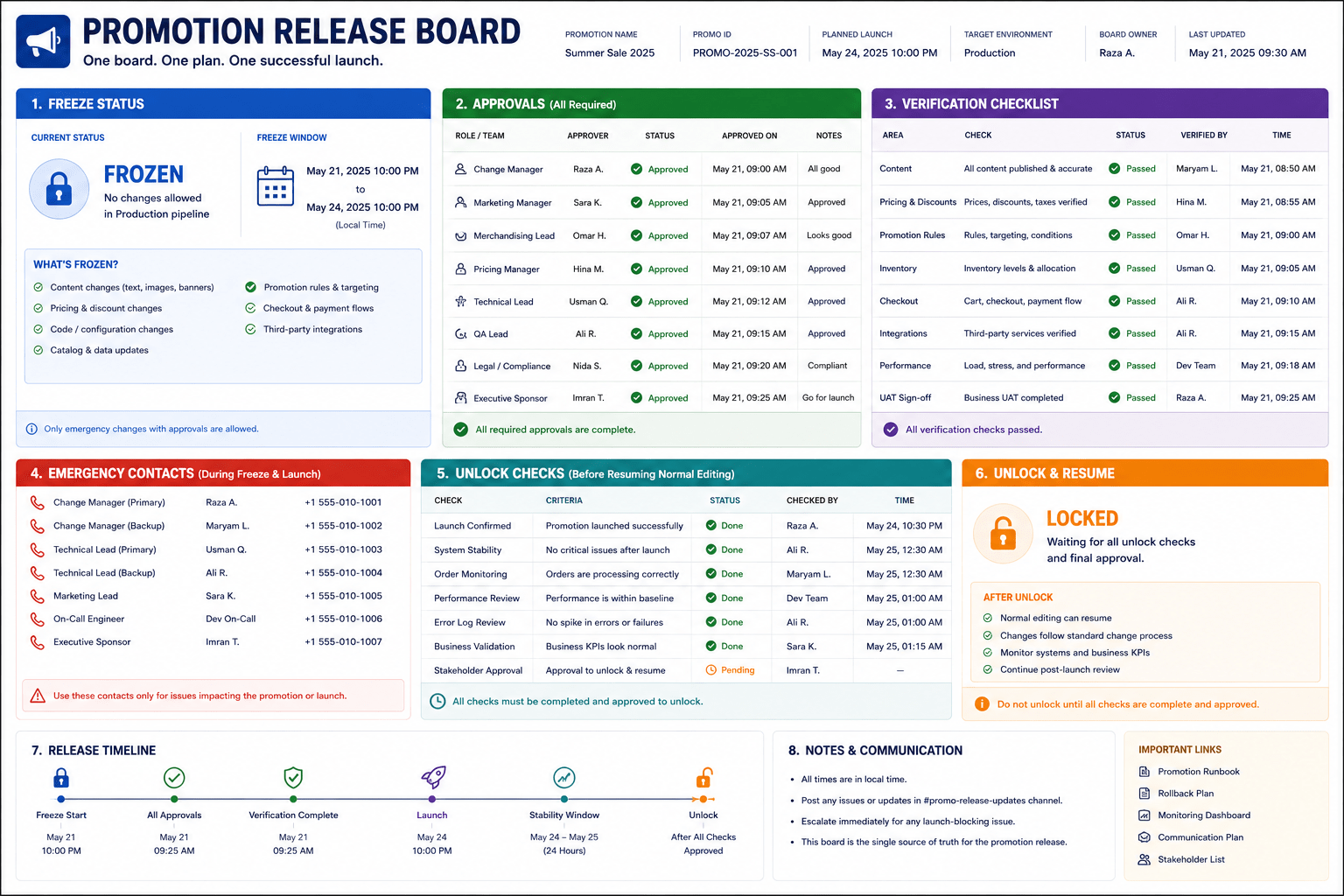
Build a Small Business Freeze Board
You can manage the entire process with a simple table.
| Area | Status | Owner | Last Checked |
|---|---|---|---|
| Promotional prices | Locked | Merchandising | Sept 3 |
| Discount rules | Locked | Operations | Sept 3 |
| Inventory | Verified | Fulfillment | Sept 3 |
| Product images | Verified | Marketing | Sept 3 |
| Shipping information | Verified | Operations | Sept 3 |
| Campaign banner | Approved | Marketing | Sept 3 |
| Checkout | Tested | Operations | Sept 3 |
The board answers a useful question:
“What has actually been checked?”
That is better than relying on:
“I think we looked at it.”
Create the “No Silent Changes” Rule
During the freeze:
No high-impact change should happen without being visible to the responsible team.
That does not mean everyone must approve everything.
It means controlled changes should leave a trace.
If someone changes a promotional price, the team should be able to see:
- What changed
- Why
- Who changed it
- Who approved it
- When it happened
This is particularly valuable in small businesses where one person may normally make many different decisions.
Don’t Create a Bureaucracy Monster
The freeze should be lighter than the problem it solves.
For a five-person ecommerce business, you may only need:
One product list
One freeze window
One change-request form
One approval owner
One change log
One post-campaign review
That may be enough.
Do not build an enterprise change-management department around a weekend promotion.
The system should protect the business without slowing ordinary work.
When Should a Small Ecommerce Business Use a Product Change Freeze?
Consider using one when:
- A major promotion is launching
- Paid advertising is increasing significantly
- A new collection is going live
- A large email campaign is scheduled
- A marketplace event is approaching
- Inventory is limited
- Several team members are editing products
- Multiple sales channels are involved
- Pricing is changing
- A high-volume campaign is expected
- A major influencer or partner campaign is launching
For ordinary low-risk days, normal editing can continue.
When You Probably Don’t Need One
A freeze may be unnecessary when:
- The store has very few products
- There is no major promotion
- Only one person manages the catalog
- Changes are low risk
- There are no complex discounts
- Inventory is stable
- There are no multiple-channel dependencies
The goal is not to create process for its own sake.
The goal is to introduce control when the cost of an error becomes unusually high.
A Simple Ecommerce Product Change Freeze Template
PRODUCT CHANGE FREEZE
Campaign: ______________________
Launch Date: ___________________
Freeze Begins: _________________
Freeze Ends: ___________________
PROMOTION PRODUCT SET
- SKU: __________
- SKU: __________
- SKU: __________
- SKU: __________
FROZEN AREAS
☐ Promotional prices
☐ Discount rules
☐ Product eligibility
☐ Inventory allocation
☐ Shipping rules
☐ Checkout settings
☐ Marketplace pricing
☐ Campaign-specific product claims
SAFE AREAS
☐ Internal documentation
☐ Internal notes
☐ Low-risk formatting
☐ Post-campaign improvement ideas
APPROVAL OWNER
EMERGENCY APPROVER
REQUIRED CHECKS
☐ Product price verified
☐ Promotion verified
☐ Inventory verified
☐ Product image verified
☐ Shipping information verified
☐ Customer journey tested
☐ Multi-channel consistency checked
☐ Rollback path confirmed
CHANGE LOG
Time: __________
Product: ________
Change: _________
Owner: __________
Approved by: _____
Verified by: _____
UNLOCK CHECK
☐ Temporary campaign changes reviewed
☐ Temporary prices removed or confirmed
☐ Temporary banners reviewed
☐ Shipping messages restored or confirmed
☐ Product changes reviewed
☐ Campaign officially unlocked
Common Product Change Freeze Mistakes
Freezing Everything
A freeze should control risky changes, not prevent necessary corrections.
Starting Too Late
If the team starts the freeze after last-minute changes have already begun, much of the benefit disappears.
Not Naming an Owner
A rule without ownership becomes a suggestion.
Approving Changes Verbally
Important changes should leave a visible record.
Forgetting Inventory
Price and copy receive attention, while availability gets ignored.
Checking Only the Admin Screen
The customer sees the storefront, cart, and checkout—not the product editor.
Ignoring Other Sales Channels
A website change may not automatically create the same customer experience elsewhere.
Allowing “Better” to Equal “Urgent”
A preferred improvement is not automatically an emergency.
No Rollback Plan
If a change causes trouble, the team should know what to reverse.
No Post-Campaign Cleanup
Temporary campaign settings can quietly become permanent.
No Learning Review
If every promotion starts from zero, the business keeps repeating the same mistakes.
Making the Process Too Complicated
A small business needs a practical control system, not a giant approval bureaucracy.
Frequently Asked Questions
What is an ecommerce product change freeze?
It is a defined period before or during an important ecommerce event when high-impact product and store changes are restricted unless they meet an approval or emergency rule.
Why use a product change freeze?
It reduces unnecessary last-minute changes that can create conflicting prices, inventory information, product details, discounts, shipping messages, or customer experiences.
Should everything be frozen?
No. Low-risk work and necessary corrections should still be possible. The freeze should focus on changes that can materially affect customers, transactions, or campaign performance.
How long should an ecommerce freeze last?
There is no universal duration. A small promotion might need a short freeze, while a complex campaign involving multiple teams and channels may require a longer controlled period.
What should be frozen first?
Start with changes that affect the customer transaction or commercial promise, such as promotional pricing, discounts, inventory availability, shipping rules, and campaign eligibility.
Can I still fix a product during the freeze?
Yes, particularly when the existing information is materially wrong or creates a customer or operational problem. Use an emergency or controlled-change route rather than treating the freeze as an absolute prohibition.
Who should approve changes?
Choose someone with enough authority to understand the campaign and the consequences of the change. In a small business, this might be the owner, operations lead, merchandising lead, or another designated manager.
Do I need special software?
No. A spreadsheet, shared document, project-management board, or ecommerce platform record may be enough for a small store.
What is a promotion product set?
It is the list of products or SKUs that are directly involved in a specific promotion. Applying stronger controls to this set allows the rest of the catalog to operate normally.
Should product changes be tested after approval?
Yes. Where practical, verify the customer-facing result rather than assuming that a successful edit in the admin system means the customer experience is correct.
What happens when the promotion ends?
Review temporary changes, restore anything that should not remain, confirm permanent improvements, and officially end the freeze.
Can a product change freeze help multi-channel ecommerce stores?
Yes. When the same product appears across websites, marketplaces, advertising, social commerce, or physical systems, controlled changes can make it easier to identify where consistency needs to be checked.
Can small ecommerce businesses use this process?
Yes. In fact, the process can be very small. One product list, one freeze window, one change-request method, one approval owner, and one release checklist may be enough.
Final Thoughts
The most dangerous ecommerce changes are not always the biggest ones.
Sometimes the problem begins with:
“Let’s just change this quickly.”
Then another person changes something else.
Then a third person fixes the first change.
Then someone updates the promotion.
By launch time, nobody is completely certain which version is correct.
A product change freeze introduces a pause.
Not a complete stop.
A pause before important changes become live.
The system can be simple:
Identify the promotional products.
List the customer promise fields.
Set the freeze window.
Separate safe, controlled, and emergency changes.
Give every controlled change an owner.
Ask why the change is needed now.
Verify the customer-facing result.
Keep a short change record.
Create a rollback path.
Review temporary changes after the campaign.
The purpose is not to prevent your team from improving the store.
It is to prevent improvement work from becoming accidental instability at the worst possible time.
A major promotion should create a period of deliberate execution.
The team should know what is locked.
They should know what can still change.
They should know who can approve an exception.
And they should know what to do when something genuinely goes wrong.
That clarity is especially valuable for small ecommerce businesses because the same person may be responsible for marketing, merchandising, operations, customer support, and technology.
A freeze gives those responsibilities a temporary operating boundary.
The best ecommerce campaign is not necessarily the one with the most last-minute optimization.
Sometimes it is the one where everyone knows:
“This is the version we checked, this is what is allowed to change, and this is who decides if something unexpected happens.”
Stability is not the enemy of improvement.
During a major promotion, stability is what gives improvement a safe place to happen.