How to Replace SaaS Software Without Breaking Your Business Workflows
- by Muhammad Raza
- 0 Comments
- 15 minutes read
- 49 Views
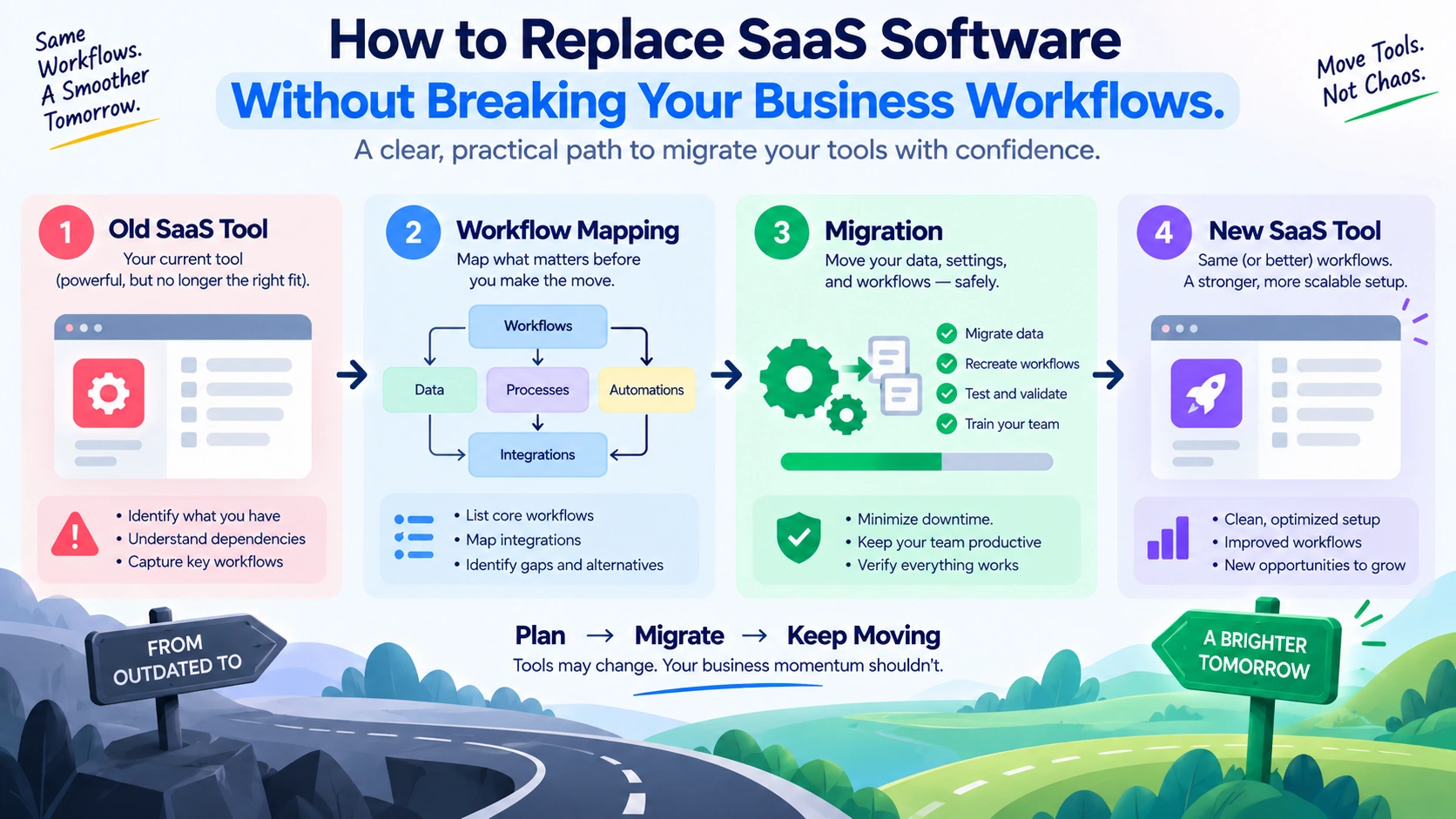
Replacing a SaaS application can look simple: choose a new tool, move the data, train the team, and cancel the old subscription.
The problem is that the application is rarely the entire workflow.
A small business may depend on a SaaS tool for reports, notifications, calendar events, spreadsheets, integrations, customer records, approvals, or manual tasks that are easy to forget.
That means you can successfully move the data and still break an important business process.
Before replacing an important SaaS application, map how the tool is actually used. Identify what enters the system, what work happens around it, what comes out, who depends on those outputs, and which other tools or people are connected to the process.
This guide shows small businesses how to assess those dependencies, create a practical SaaS workflow map, plan the replacement, test important workflows, and verify that essential business work continues after the switch.
Why Replacing SaaS Software Can Break Existing Workflows
Imagine a small consulting company using a project-management platform.
The owner sees:
“We use this application for project management.”
That description is too broad.
The actual workflow may be:
Client request → project record → task assignment → deadline reminder → weekly status report → client update → completed-project archive
The application may support only part of that chain.
The rest may happen through email, spreadsheets, calendars, documents, or human memory.
If the company replaces the project-management tool based only on its feature list, it may successfully migrate the projects while accidentally losing an important surrounding process.
This is why the first question should not be:
“What features does our current SaaS application have?”
Instead ask:
“What work passes through this application?”
That question produces a much more useful picture.
What Is a SaaS Workflow Map?
A SaaS Application Workflow Map is a lightweight record showing how a particular software application participates in the business’s real work.
A simple map can contain six elements:
- Input
- Action
- Output
- Owner
- Connection
- Dependency
For example:
| Element | Example |
|---|---|
| Input | New client request |
| Action | Create project |
| Output | Assigned task list |
| Owner | Account manager |
| Connection | Calendar |
| Dependency | Weekly client report |
The map doesn’t try to describe every button inside the software.
It describes the business activity surrounding the software.
Start With Work, Not Features
When reviewing an existing SaaS application, avoid opening the vendor’s feature page first.
That encourages feature-based thinking.
Instead, ask the team:
“What do you actually use this application for?”
The answers may be surprisingly narrow.
A company may pay for a platform with dozens of capabilities but rely on only four:
- Creating records
- Assigning work
- Producing a report
- Exporting information
Those four activities matter more to the replacement decision than the application’s unused feature catalogue.
Build Your SaaS Workflow Map
For each important workflow, record six things:
Input — What enters the application?
Action — What happens to that information?
Output — What does the application produce?
Owner — Who is responsible for the next step?
Connection — Which other tool or process receives or provides information?
Dependency — What would stop or become difficult if this application disappeared?
For example:
New client request → CRM record → sales review → follow-up reminder → weekly report
The purpose isn’t to document every software feature. It is to understand the business work surrounding the application.
Find Hidden Outputs
Businesses usually know the obvious purpose of an application, but important outputs can be easy to overlook.
Ask:
“What do people regularly download, export, copy, or send somewhere else?”
Look for:
- CSV exports
- PDF reports
- customer lists
- financial data
- project summaries
- audit records
- backup files
- spreadsheets
A recurring export may indicate that the SaaS application feeds another business process.
The download itself may not be important. What happens after the download may be.
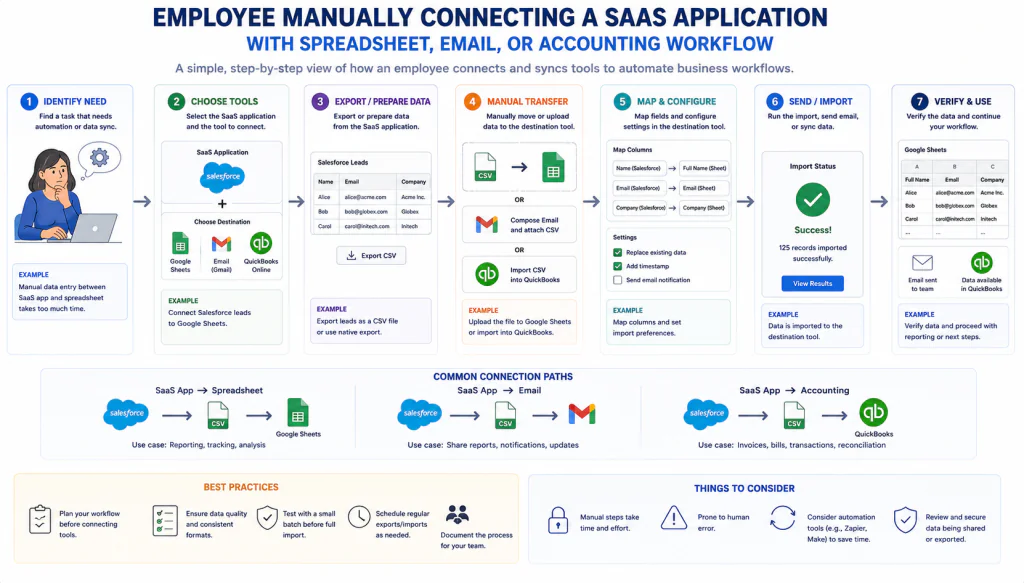
Identify Human Connections
Not every integration is technical.
Sometimes the connection between two systems is a person.
For example:
CRM → Employee → Spreadsheet
The employee may download information from the CRM and manually update another system.
From a technical perspective, there is no integration.
From a business perspective, there is a workflow connection.
Document these human connections because they can easily be forgotten during a software replacement.
Create a Dependency Ladder
Not every workflow deserves the same attention.
Classify each dependency into four levels.
Level 1 — Convenient
The application makes the task easier, but the business can continue without it.
Example:
A saved dashboard used for occasional review.
Level 2 — Useful
The application saves significant time, but another process could replace it.
Example:
A recurring report that could be recreated manually.
Level 3 — Important
Replacing the application would disrupt an active business process.
Example:
Customer requests are routed through the platform.
Level 4 — Critical
Removing the application without a replacement would stop an important business activity.
Example:
Orders cannot be processed without the system.
This ladder helps the team focus migration planning where it matters most.
User Count Does Not Equal Business Importance
A SaaS application used by three people can be more important than one used by thirty.
Dependency is about the work being performed, not simply the number of accounts.
Ask:
“What happens if the people using this application lose access?”
That question reveals operational importance much better than user count alone.
Record Manual Work Separately
A common mistake is to document only automated workflows.
Manual work deserves its own category.
For example:
Automated:
Website → SaaS application
Manual:
Employee reviews new record → adds category
Manual:
Employee exports report → updates spreadsheet
Automated:
SaaS application → notification email
This makes the real workflow visible.
It also shows where a replacement application may create more or less manual work.
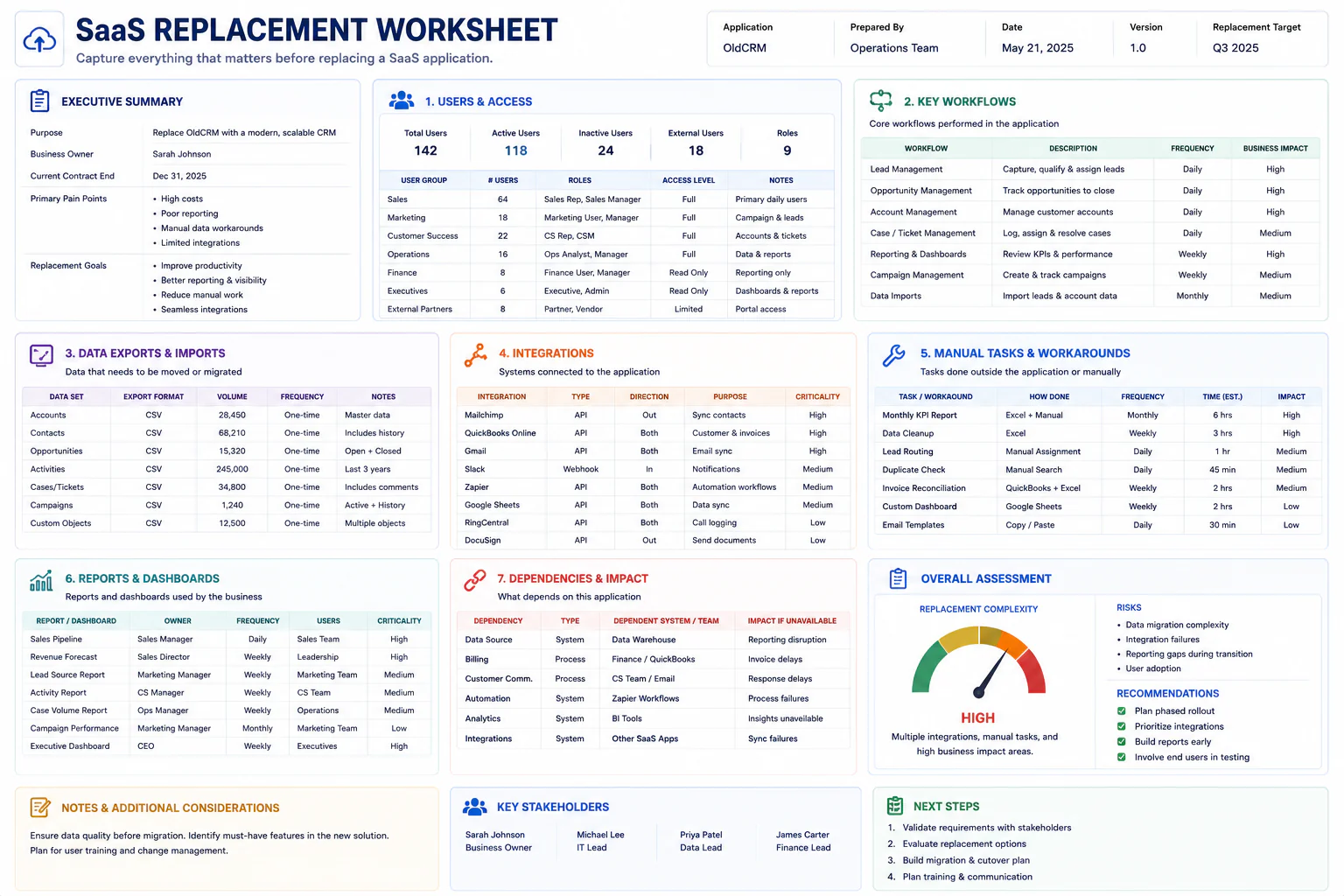
Build a “Before Replacement” Snapshot
Before changing software, capture the current state.
Record:
- Main workflows
- Key users
- Important exports
- Connected applications
- Manual steps
- Recurring reports
- Notifications
- Saved views
- Templates
- Important fields
- Critical dates
- Data ownership
- Backup location
This is your Before Replacement Snapshot.
It gives the business something to compare against after the migration
Identify Single-Person Knowledge
Ask:
“Is there an important process that only one person knows how to perform?”
For example, one employee may know:
- how to create a monthly export
- where a report is stored
- which field must be updated before billing
- how to restore a record
- how to prepare a client summary
- which integration requires manual approval
Record these processes before replacing the application.
The software may be replaceable.
The undocumented knowledge may not be.
Map the Calendar Around the Application
Some SaaS workflows happen only at particular times.
For example:
- Monday sales review
- Friday finance export
- Month-end reporting
- Quarterly client review
- Annual renewal process
Add these dates to the workflow map.
A replacement launched on an ordinary Tuesday may look successful until the first month-end process arrives.
That is why calendar dependency matters.
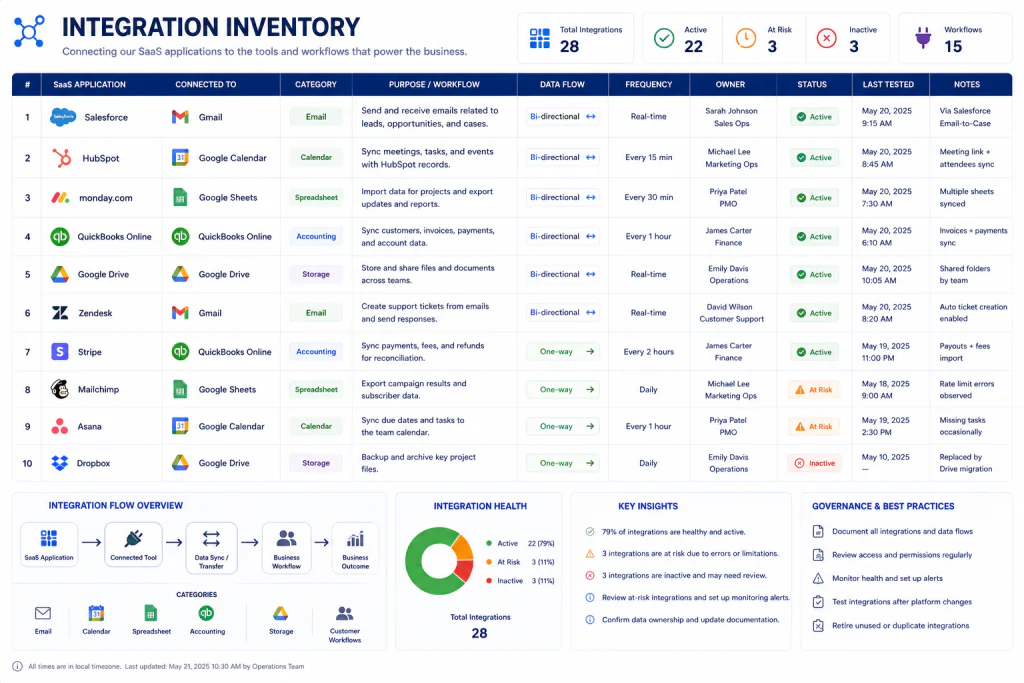
Identify the “Noisy” Integrations
Not every connection deserves equal investigation.
Some are obvious.
Others create small amounts of activity that are easy to overlook.
Examples:
- A notification sent to one shared inbox
- A weekly export to a spreadsheet
- A calendar event created after a form submission
- A webhook that triggers a small internal process
- A file copied into a shared folder
These may look insignificant.
But a replacement can break them without anyone noticing immediately.
Create an Integration Inventory.
Use the “What Breaks First?” Question
For each dependency, ask:
“If this application stopped working tomorrow morning, what would break first?”
Write down the first practical consequence.
Examples:
Customer support
New tickets would stop entering the team queue.
Finance
The monthly export would not be available.
Sales
New leads would not appear in the normal dashboard.
Operations
Scheduled tasks would need manual assignment.
This question produces concrete information quickly.
Then Ask “What Breaks Later?”
The second question is just as important:
“What would break after one day, one week, or one month?”
A system may appear non-critical initially.
But a missing monthly report may become important later.
For example:
Immediately: No new dashboard data
After one week: Management reporting becomes incomplete
After one month: Financial review lacks historical information
This is a delayed dependency.
Do not overlook it.
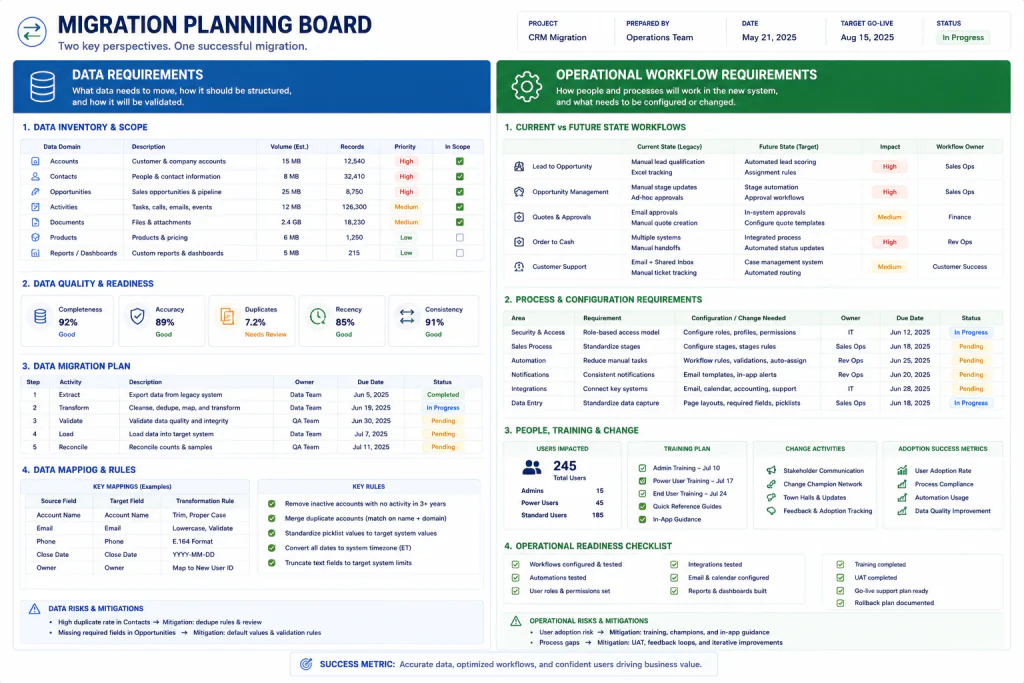
Separate Data From Process
When replacing a SaaS application, businesses often focus heavily on data migration.
That is necessary.
But data is only one part of the problem.
You also need to preserve:
- Processes
- Ownership
- Timing
- Templates
- Reports
- Notifications
- Decisions
- Human steps
- Business rules
A replacement can migrate every customer record perfectly and still fail if nobody knows what happens after the record arrives.
Create a “Data + Work” Checklist
Before replacing the application, verify both sides.
DATA
- What data exists?
- Who owns it?
- What must be exported?
- What must be retained?
- What needs cleaning?
- What needs transformation?
WORK
- What tasks happen?
- Who performs them?
- When do they happen?
- What triggers them?
- What output is required?
- Who receives the output?
This distinction is one of the most useful parts of the workflow map.
Build the Replacement Around Outcomes
Once the current workflow is mapped, compare the replacement application against the actual work.
Instead of asking:
“Does the new application have feature X?”
ask:
“Can the new application support the workflow that depends on feature X?”
That distinction matters.
A feature may exist but behave differently.
A familiar workflow may require extra steps.
An old manual workaround may become unnecessary.
A new application may introduce a different dependency.
Evaluate the workflow outcome, not just the feature checkbox.
Use a Workflow Equivalence Test
For every important workflow, compare:
Current
How is the work performed today?
Replacement
How will the same work be performed after the change?
Difference
What changes?
Risk
What could go wrong?
Owner
Who verifies the new process?
For example:
| Workflow | Current | Replacement | Risk | Owner |
|---|---|---|---|---|
| Weekly report | Export + spreadsheet | Native report | Medium | Operations |
| New lead entry | Form + manual review | Form + automation | Low | Sales |
| Client archive | Manual folder upload | Automatic storage | Medium | Account Manager |
This is much more useful than comparing dozens of software features.
Do Not Rebuild Every Old Habit
There is another danger.
During a software replacement, teams sometimes recreate every existing workflow exactly.
That may be unnecessary.
Ask:
“Is this workflow still valuable?”
Some processes exist only because the old application was limited.
For example:
The old system may require a weekly spreadsheet export.
The replacement may provide the same information automatically.
Do not migrate the workaround simply because it has existed for years.
Use Three Migration Decisions
Each existing workflow should receive one of three decisions.
Keep
The workflow remains valuable and should continue.
Redesign
The outcome is valuable, but the process can be improved.
Retire
The workflow no longer creates enough value to justify keeping it.
This prevents the replacement project from becoming a historical archive of old habits.
Test the Workflow With Realistic Scenarios
A replacement application should be tested with actual business situations.
Choose several examples:
Normal Case
What happens during an ordinary day?
Busy Case
What happens when requests arrive quickly?
Exception Case
What happens when something is incomplete?
Human Handoff
What happens when another employee takes over?
Reporting Case
What happens at the next reporting cycle?
Recovery Case
What happens if a step fails?
This gives the team a more realistic test than simply confirming that users can log in.

Create a “First Week After Replacement” Watchlist
The migration is not finished when users receive new login credentials.
For the first week, watch:
- New records
- Missing notifications
- Failed exports
- Unexpected manual work
- Broken integrations
- Duplicate entries
- Delayed reports
- User confusion
- Customer-facing problems
- Unowned tasks
Keep the list short.
The goal is to catch differences between the documented replacement workflow and reality.
Compare the New Workflow With the Old Map
After the replacement goes live, review the original map.
Ask:
“Is every important business outcome still happening?”
Do not ask only:
“Is the new application working?”
Those are different questions.
The software can be functioning perfectly while the business workflow is incomplete.
Keep the Workflow Map After the Replacement
Do not throw away the map after the migration succeeds.
Update it.
The new version becomes a useful operational document.
It can help with:
- Employee onboarding
- Process documentation
- Software reviews
- Vendor changes
- Business continuity
- Training
- Troubleshooting
- Future migrations
A good workflow map becomes more valuable as the business changes.
Review SaaS Applications Before Renewal
The workflow map can also improve software-renewal decisions.
Before renewing a major application, ask:
- What work still depends on it?
- Which workflows changed?
- Which features are actually used?
- Which workflows are now handled elsewhere?
- Are any dependencies unnecessary?
- Are there new manual steps?
- Has the application become more or less important?
This makes renewal decisions about business usefulness rather than habit.
The One-Page SaaS Workflow Map Template
Use this template before replacing an important SaaS application.
SAAS APPLICATION WORKFLOW MAP
Application: __________________________
Owner: _______________________________
Review Date: __________________________
PRIMARY PURPOSE
What business job does this application support?
WORKFLOW 1
Input: _______________________________
Action: ______________________________
Output: ______________________________
Owner: _______________________________
Frequency: ___________________________
Connected Tool: _______________________
Dependency Level: 1 / 2 / 3 / 4
WORKFLOW 2
Input: _______________________________
Action: ______________________________
Output: ______________________________
Owner: _______________________________
Frequency: ___________________________
Connected Tool: _______________________
Dependency Level: 1 / 2 / 3 / 4
HUMAN CONNECTORS
Who manually moves information between this application and another process?
HIDDEN OUTPUTS
What reports, exports, files, or information leave the application?
SINGLE-PERSON KNOWLEDGE
Is any important process known by only one person?
CALENDAR DEPENDENCIES
What weekly, monthly, quarterly, or annual activities depend on this application?
WHAT BREAKS FIRST?
If the application disappeared tomorrow, what would stop immediately?
WHAT BREAKS LATER?
What would become a problem after several days or weeks?
REPLACEMENT DECISION
☐ Keep
☐ Redesign
☐ Retire
☐ Investigate Before Migration
VERIFICATION OWNER
Who confirms that the replacement supports the required business workflows?
A Fictional Example: Replacing a Client Management Platform
Consider a fictional small agency called Northfield Studio.
The owner believes its current client-management application is mainly used to store client contacts.
During a workflow review, the team discovers much more.
The application is used to:
- Record new client requests
- Assign account owners
- Create follow-up reminders
- Produce a weekly pipeline report
- Export client data for finance
- Trigger internal notification emails
- Store a custom client classification
- Provide information for the monthly management meeting
The application has seven meaningful workflow dependencies.
The team then evaluates a replacement.
The replacement handles the client records well.
But the weekly pipeline report requires a different process.
Finance also needs a different export.
Instead of discovering these issues after cancellation, Northfield Studio identifies them before migration.
The team decides:
Client records: Keep
Follow-up reminders: Redesign
Weekly pipeline report: Rebuild
Old monthly report: Retire
Finance export: Test before migration
The software replacement is now based on actual business work rather than a feature comparison.
This example is fictional and is included only to demonstrate the framework.
SaaS Application Workflow Mapping for Small Teams
A small business does not need an enterprise architecture department to use this method.
A team of two or three people can build a useful map in a spreadsheet.
Create columns for:
- Application
- Workflow
- Input
- Action
- Output
- Owner
- Frequency
- Connected tool
- Human connector
- Dependency level
- Replacement decision
Then review the rows together.
The goal is not perfection.
The goal is visibility.
SaaS Application Workflow Mapping for Freelancers
Freelancers can use the same idea on a smaller scale.
Suppose a freelancer uses several SaaS applications for:
- Lead collection
- Proposals
- Client communication
- Project tracking
- Invoicing
- File delivery
Instead of documenting every feature, map the client journey.
For example:
Lead arrives → qualification → proposal → approval → project setup → delivery → invoice → archive
Now identify which application supports each stage.
If one application is replaced, the freelancer can see what needs to change around it.
This is especially useful when a solo business has accumulated tools gradually over several years.
Watch for SaaS Tool Sprawl
The workflow map may reveal that several applications perform overlapping jobs.
For example:
Application A: Client records
Application B: Client records
Spreadsheet: Client records
Application C: Reporting based on client records
The problem is not necessarily that the business has too many applications.
The problem is that the same information may be maintained in several places.
The workflow map makes duplication easier to see.
Find the Source of Truth
For important information, identify:
“Which system should be trusted as the source of truth?”
Examples:
Customer contact: CRM
Invoice status: Accounting platform
Project deadline: Project system
Final document: Shared document repository
A replacement project is an opportunity to clarify these ownership decisions.
Without a source of truth, the business may migrate one system while leaving conflicting copies elsewhere.
Don’t Let the Map Become Outdated
A workflow map is only useful if someone updates it.
A simple rule is enough:
Update the map whenever a major SaaS workflow changes.
That could mean:
- New application
- Removed application
- New integration
- New recurring report
- New owner
- Major process change
- New manual workaround
You do not need to update it for every tiny software setting.
Focus on changes that affect business work.
Common Mistakes When Replacing SaaS Applications
- Comparing features before mapping work
- Migrating data without processes
- Ignoring manual connections
- Forgetting recurring reports
- Assuming low user count means low importance
- Rebuilding every old workflow
- Ignoring single-person knowledge
- Testing only the login
Frequently Asked Questions
What is a SaaS application workflow map?
It is a practical record showing how a SaaS application participates in real business workflows, including inputs, actions, outputs, people, connections, and dependencies.
Why should a business create one before replacing software?
Because the application may support processes that are not obvious from its feature list. Mapping those processes helps prevent important work from being forgotten during replacement.
Is a workflow map the same as a software architecture diagram?
No. A technical architecture diagram focuses on systems and technical relationships. A workflow map focuses primarily on how people, applications, information, and business activities work together.
Does a small business really need one?
Not for every application. It is most useful for software that supports important recurring work, customer processes, financial activities, reporting, or multiple connected workflows.
What should I map first?
Start with the workflows that would cause the most disruption if they stopped. Then map recurring reports, exports, integrations, manual processes, and single-person knowledge.
Should manual work be included?
Yes. Manual steps are often hidden dependencies. An employee copying information between two applications can be just as important to the workflow as a technical integration.
What is a human connector?
A human connector is a person who manually transfers information or work between two systems. For example, an employee may export data from one application and update a spreadsheet.
Should every old process be recreated in the replacement?
No. Separate valuable workflows from outdated habits. A replacement project is an opportunity to keep useful outcomes while redesigning or retiring unnecessary processes.
What is the most important question during SaaS replacement?
A useful question is: “What business work would stop if this application disappeared tomorrow?” The answer reveals dependencies that feature comparisons can miss.
How often should a SaaS workflow map be reviewed?
Review it when a major workflow, integration, application, or ownership arrangement changes. A broader review every six or twelve months can also be useful for important applications.
Can a freelancer use a SaaS workflow map?
Yes. A freelancer can map the client journey across lead collection, proposals, projects, communication, invoicing, delivery, and archiving without creating a complicated technical document.
Can this help reduce SaaS tool sprawl?
It can reveal overlapping applications, duplicated data, unnecessary manual transfers, and workflows that no longer need separate tools. The final consolidation decision should still consider business requirements, data, contracts, security, and operational risk.
Final Thoughts
A SaaS application is rarely just a place where employees log in. It may sit inside a much larger chain of business work.
When replacing software, start by mapping that work. Identify the inputs, actions, outputs, owners, connections, and dependencies that matter.
Then compare the current workflow with the replacement.
Some processes should stay. Some should be redesigned. Some should be retired.
The goal isn’t to find another application with exactly the same features. The goal is to make sure the important business outcomes continue after the software changes.
Map the work before you move the software.