SaaS Configuration Baseline: A Practical Guide for Small Businesses
- by Muhammad Raza
- 0 Comments
- 17 minutes read
- 58 Views
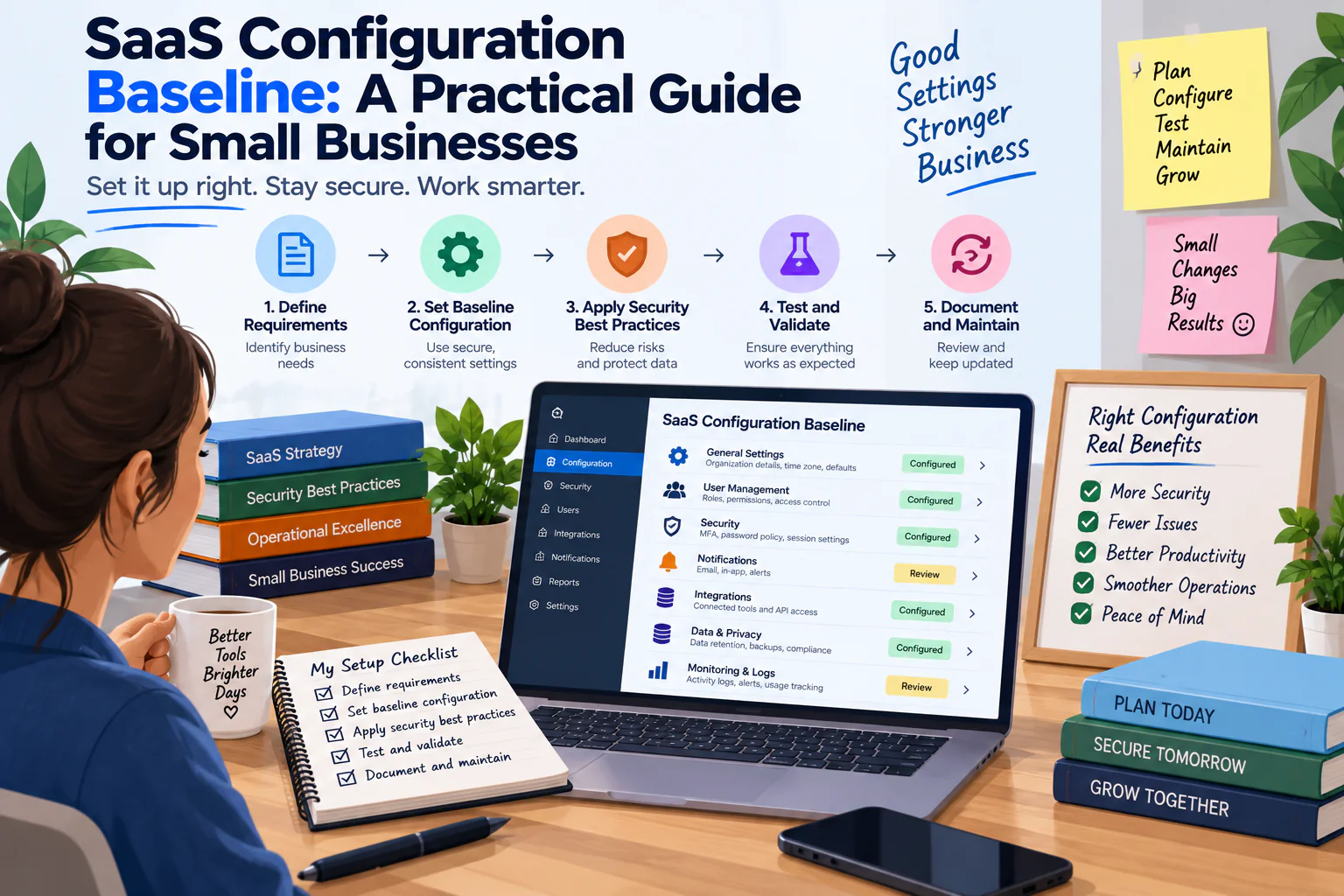
SaaS configuration baseline management helps small businesses document important settings, clarify ownership, understand changes, and keep critical workflows easier to restore when configuration drifts.
Setting Card
Setting: __________________
Current Value: __________________
Purpose: __________________
Business Workflow: __________________
Owner: __________________
Sensitivity: Low / Medium / High
Last Verified: __________________
Changed By: __________________
Change Reason: __________________
Restoration Note: __________________
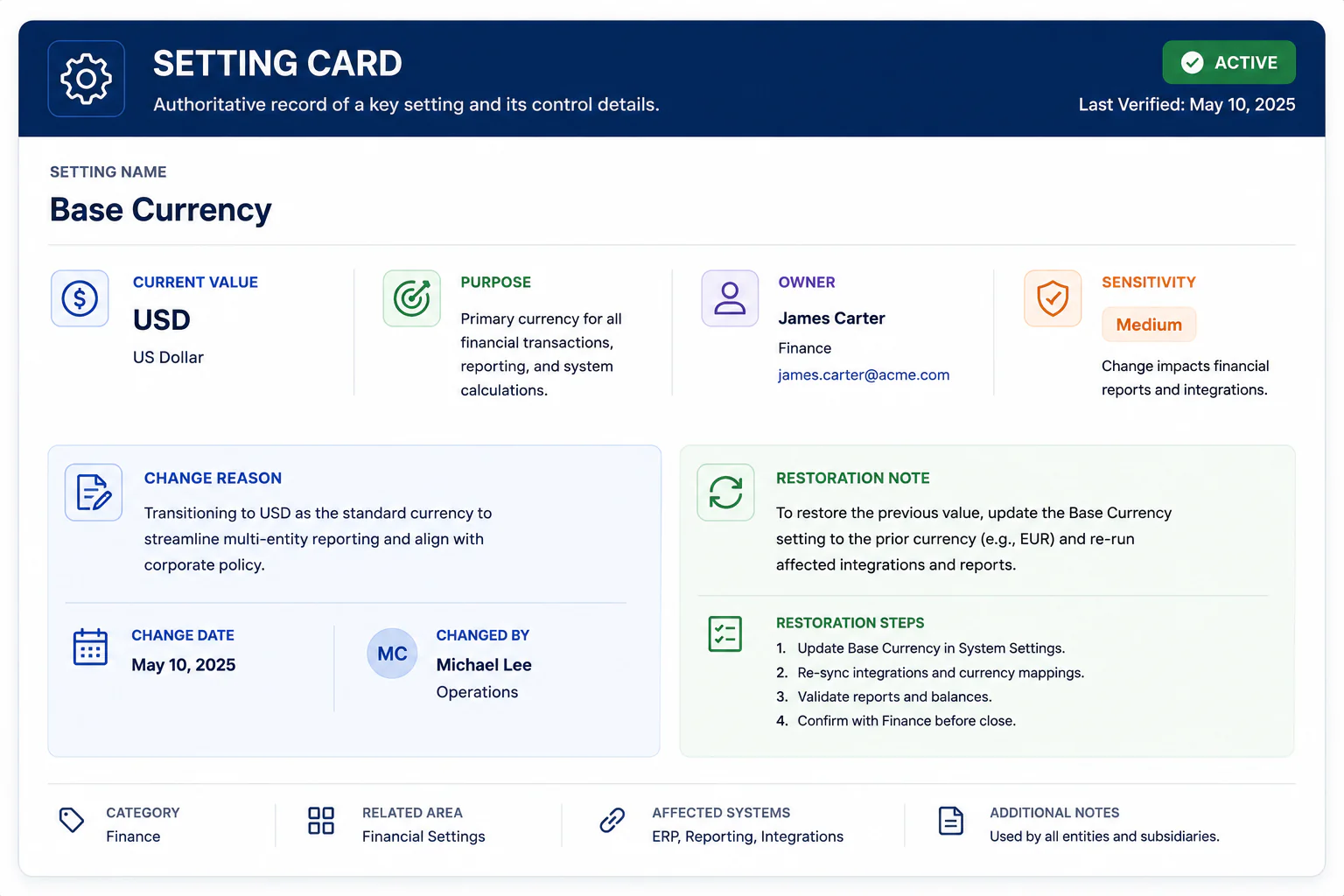
This creates a lightweight record without turning configuration management into a major project
Create a Configuration Sensitivity Ladder
Not every setting deserves the same review process.
Use four levels.
Level 1 — Cosmetic
Changes affect appearance or personal convenience.
Examples:
- Dashboard arrangement
- Personal display preferences
- Non-critical view settings
These generally need little documentation.
Level 2 — Operational
Changes affect normal team work.
Examples:
- Assignment rules
- Notification schedules
- Required fields
- Standard views
These should be recorded.
Level 3 — Workflow-Critical
Changes can interrupt an important business process.
Examples:
- Automation triggers
- Customer routing
- Approval rules
- Important integrations
These deserve stronger change control.
Level 4 — Business-Critical
Changes could affect financial activity, customer-facing operations, important records, or access to critical information.
These should have clear ownership and verification.
The ladder prevents the business from applying the same amount of bureaucracy to every setting.
The “If Changed” Question
For each Level 3 or Level 4 setting, write:
“If this changes unexpectedly, what would someone notice?”
Examples:
Assignment rule
New customer requests could go to the wrong team.
Notification rule
Urgent requests might not reach the intended person.
Integration
Information may stop moving between systems.
Approval setting
A person could gain or lose the ability to approve an important action.
This turns configuration documentation into practical risk awareness.
Someone changes a notification.
A new administrator adjusts a permission.
A team creates another workflow.
An old integration is modified.
A field becomes mandatory.
A default setting is replaced with a custom one.
A report gets a new filter.
None of these changes may seem important on its own.
Then, several months later, something stops behaving the way the business expects.
Nobody knows whether the application changed.
Nobody remembers who changed the setting.
The original configuration is difficult to reconstruct.
The business has a functioning SaaS application, but no clear picture of how it is configured.
This is where a SaaS Configuration Baseline becomes useful.
A configuration baseline is a practical record of the settings that matter to the way a business uses an application.
It does not need to document every available option.
It should document the settings that influence:
- Business workflows
- User access
- Notifications
- Integrations
- Data handling
- Automation
- Customer-facing behavior
- Reporting
- Administrative control
The objective is not to freeze every setting forever.
The objective is to make important changes visible, explainable, and reversible.
Identify the Settings That Affect Customers
Some configuration is invisible to customers.
Other settings directly influence their experience.
Examples include:
- Form fields
- Automated emails
- Confirmation messages
- Appointment availability
- Customer notifications
- Ticket routing
- Status messages
- Required information
Mark these as Customer-Visible Settings.
They deserve additional care because a small configuration change can alter what customers experience.
Find the “Silent Settings”
Some settings can change business behavior without producing an obvious warning.
For example:
A notification is disabled.
A filter excludes a category.
A workflow condition changes.
A user loses access to a view.
A report schedule is modified.
The application may not display a dramatic error.
The business simply starts receiving different results.
Call these Silent Settings.
They deserve attention because their failure may first appear as an unexplained business problem.
Create a Configuration Dependency Map
Some settings depend on others.
For example:
Form setting
↓
creates
New customer record
↓
triggers
Assignment rule
↓
sends
Notification
↓
creates
Follow-up task
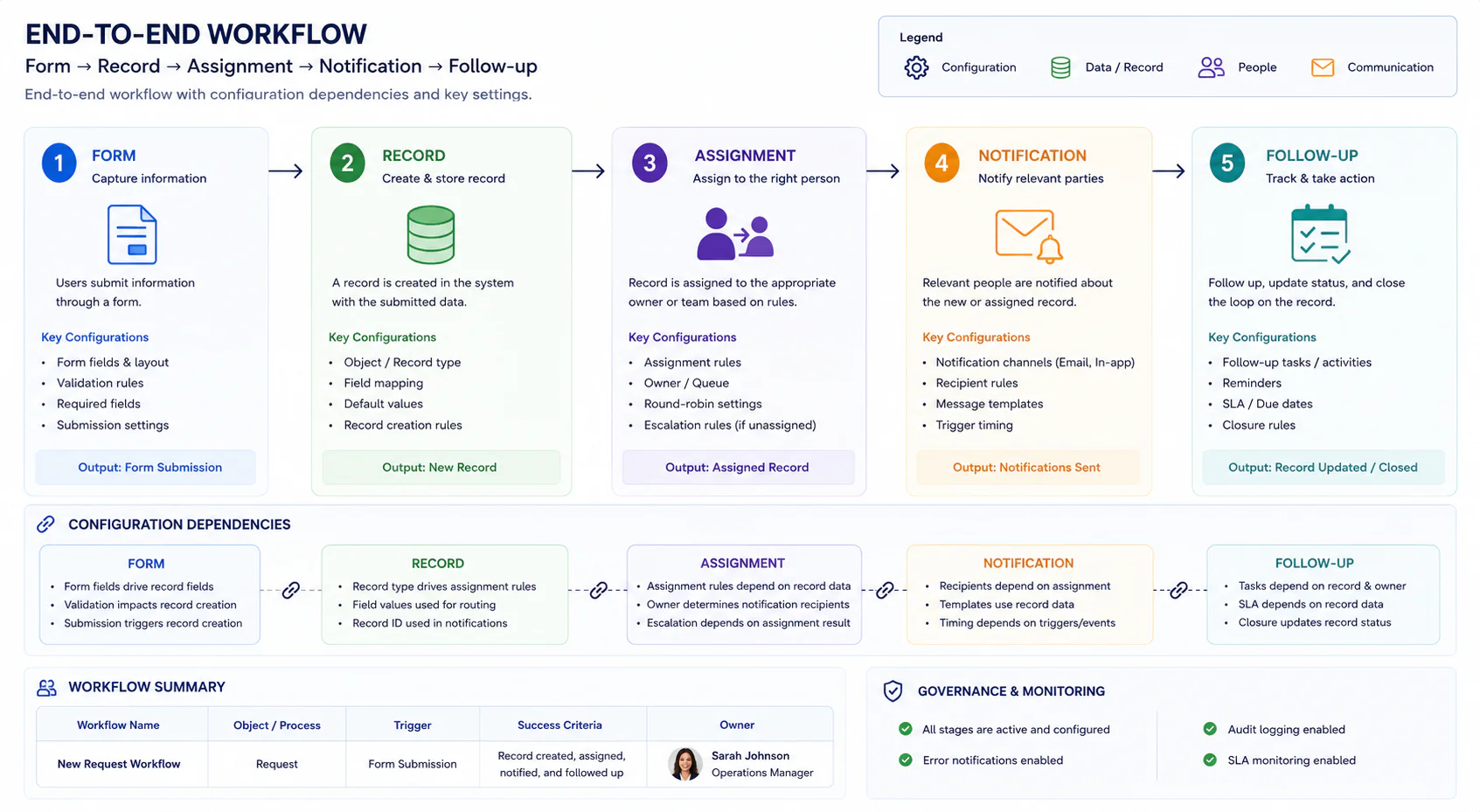
If the first setting changes, several downstream actions may change too.
Document these relationships.
You do not need a technical diagram.
A simple arrow-based map is enough.
Find the Configuration Owner
Every important SaaS application should have someone responsible for configuration decisions.
That does not necessarily mean the person changes every setting.
The owner is the person who can answer:
“Who decides whether this setting should change?”
For a small company, this may be:
- Founder
- Operations manager
- Team lead
- Finance lead
- IT administrator
The important thing is that ownership is explicit.
Separate Owner From Editor
The person who can change a setting is not always the person who should decide whether it changes.
For example:
Editor: Operations assistant
Decision owner: Operations manager
That separation can be useful for sensitive settings.
It creates a basic distinction between:
Can change
and
Should approve
Not every application needs this separation for every configuration item.
Use it where the consequences justify it.
Create a “Configuration Change Note”
Whenever an important setting changes, record five things:
- What changed?
- Why did it change?
- Who approved it?
- What workflow does it affect?
- How will we know it worked?
This is much more useful than writing:
“Updated settings.”
The note creates a small historical record.
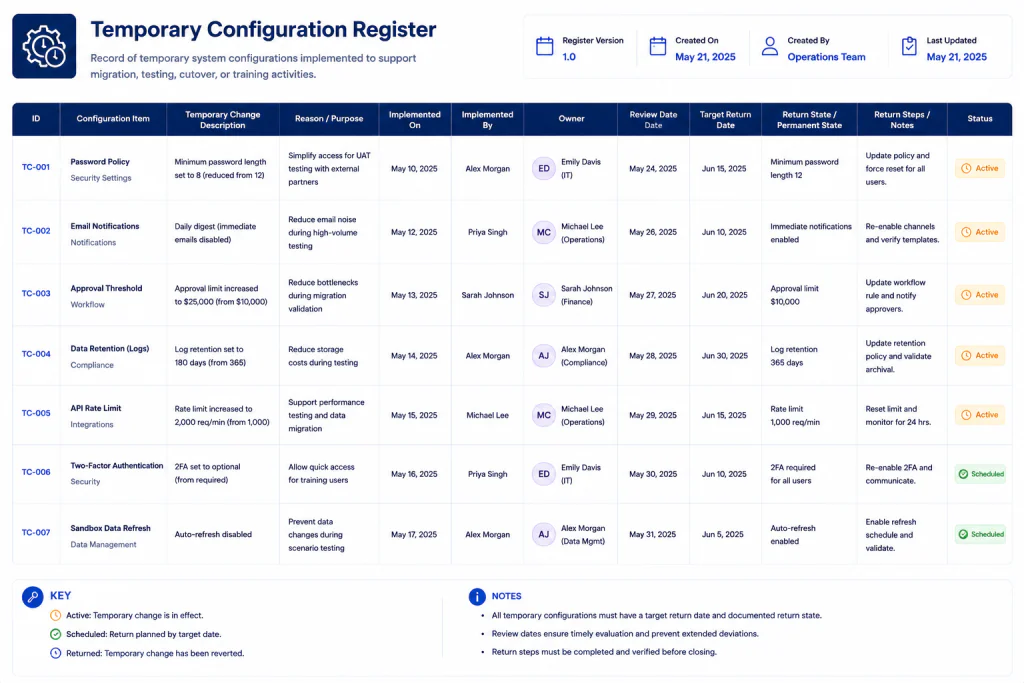
Don’t Use “Temporary” Without an Expiry
Temporary configuration changes are a common source of drift.
For example:
“Turn this notification off until the busy period ends.”
Then the busy period ends.
The setting remains.
Months later, someone assumes it was intentional.
Whenever possible, temporary changes should have:
Start date
Reason
Owner
Review date
Return state
This makes temporary configuration genuinely temporary.
Build a Temporary Setting Register
Use a small table:
| Setting | Temporary Reason | Owner | Review Date | Return State |
|---|---|---|---|---|
| Extra notification | Launch week | Operations | Sept. 12 | Disabled |
| Additional user access | Contractor project | Admin | Sept. 30 | Remove access |
| Custom report | Campaign review | Marketing | Oct. 5 | Archive |
The important field is the review date.
Without it, “temporary” often becomes permanent.
Create a Known-Good Configuration Snapshot
At a useful point in the application’s life, create a Known-Good Snapshot.
This means:
“We have verified that these important settings support the business workflows we currently rely on.”
The snapshot does not have to contain screenshots of everything.
It can simply reference the important configuration values.
For example:
Known-Good Snapshot
Verified: September 3, 2026
Application: Customer Management Platform
Configuration Owner: Operations
Critical workflows tested: 5
Important settings reviewed: 18
Temporary settings: 2
Open configuration questions: 1
Now the business has a reference point.
Don’t Treat the Snapshot as Permanent
A baseline is not a museum exhibit.
Businesses change.
Processes change.
Teams change.
Applications change.
The baseline should change with them.
The important distinction is:
Unrecorded change
versus
Intentional change
You are not trying to stop change.
You are trying to make meaningful change understandable.
Create a “Change Before Baseline” Rule
Before an important configuration change is made, ask:
“Do we know the current state?”
If the answer is no, capture the current state first.
This prevents a common problem:
Someone changes a setting.
The new behavior causes an issue.
The team tries to return to the old configuration.
Nobody remembers what the old configuration was.
The baseline provides a reference.
Verify the Setting After a Change
A configuration change is not complete simply because the new value appears on screen.
Test the business outcome.
For example:
Changed: Customer routing rule
Test: Submit a realistic customer request
Expected: Request reaches the correct team
Result: Passed
This is more meaningful than:
“The setting saved successfully.”
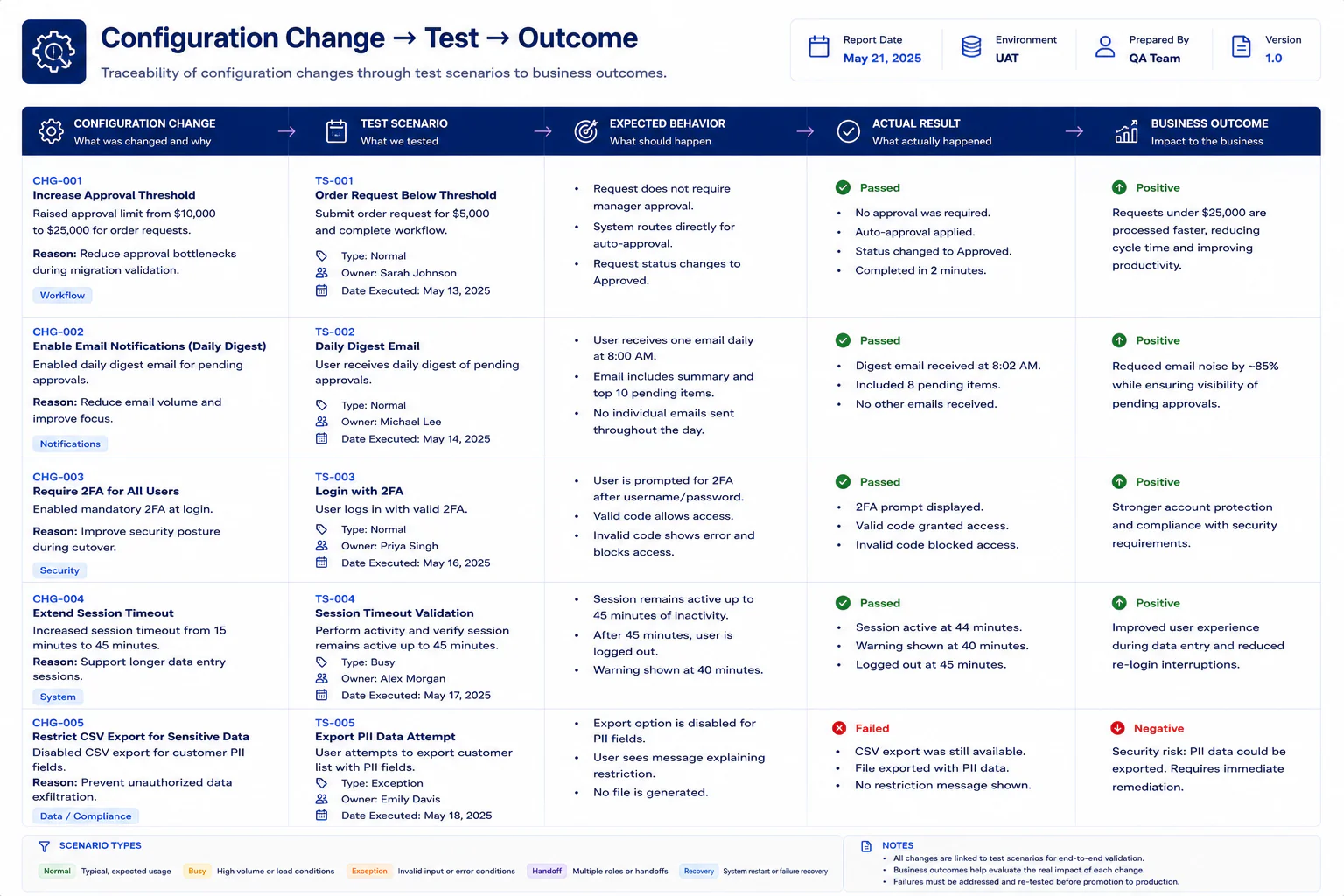
Use the “Configuration → Outcome” Test
For every important change, connect:
Configuration
→
Expected behavior
→
Business outcome
Example:
Configuration: New lead assignment rule
Expected behavior: Leads from the website go to the sales queue
Business outcome: Sales receives new leads without manual forwarding
This creates a bridge between technical configuration and actual business work.
Test With a Realistic Example
Avoid testing only with perfect sample data.
Use realistic scenarios.
For a customer-support application, test:
Normal request
Does it route correctly?
Urgent request
Does the correct notification appear?
Incomplete request
Does the system handle missing information?
Different customer type
Does the correct workflow apply?
Handoff
Can another team member understand the resulting record?
These tests reveal configuration problems that a simple settings review can miss.
Create a Configuration Drift Review
A small business does not need to review every setting every week.
Instead, create a periodic review for important configuration.
Ask:
What changed?
Compare the current state with the baseline.
Why did it change?
Look for a documented reason.
Is the change still needed?
Temporary changes may no longer be useful.
Who owns the setting now?
Ownership can change when employees change roles.
Does the setting still support the workflow?
The business may have evolved.
Does the baseline need updating?
If the change is intentional, update the reference.
Use a Drift Classification
When you find a difference, classify it.
Expected Drift
The business intentionally changed the setting.
Action: Update the baseline.
Temporary Drift
The setting changed for a limited period.
Action: Confirm the review date.
Unknown Drift
Nobody knows why it changed.
Action: Investigate.
Harmful Drift
The change is creating unwanted behavior.
Action: Correct and document.
This prevents every difference from becoming an emergency.
Don’t Automatically Restore the Old Setting
Suppose you discover that a configuration differs from the original baseline.
Do not immediately change it back.
First ask:
“Was the change intentional?”
Someone may have improved the workflow.
The old configuration may no longer be appropriate.
The purpose of a baseline is not to force the business backward.
It is to provide context for decisions.
Create a Configuration Decision Log
For important changes, maintain a small decision log.
| Date | Setting | Decision | Reason | Owner |
|---|---|---|---|---|
| Sept. 3 | Routing rule | Keep new value | Faster assignment | Operations |
| Sept. 3 | Reminder | Restore old value | New schedule caused confusion | Support |
| Sept. 4 | Customer field | Redesign | No longer needed | Admin |
This becomes a history of configuration decisions.
It can be extremely useful when someone later asks:
“Why is it set up this way?”
Identify Configuration That Should Not Be Changed Casually
Create a Do Not Change Casually list.
It may include:
- Critical automation triggers
- Important customer routing rules
- Financial workflows
- Core integrations
- Administrative permissions
- Data retention settings
- Customer-facing notifications
The purpose is not to prohibit change.
It is to signal:
“Understand the consequence before touching this.”
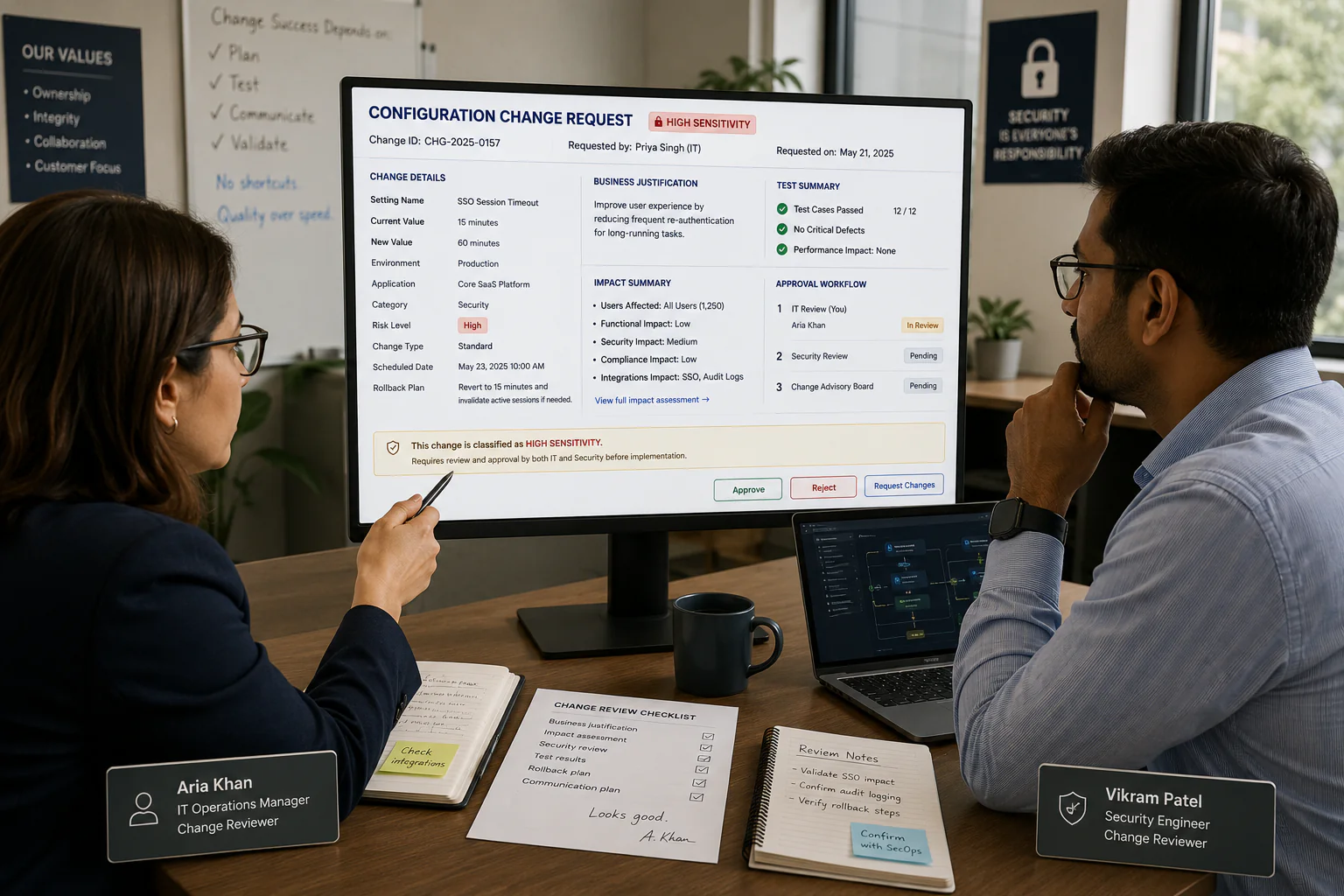
Add a “Second Look” Rule
For high-sensitivity settings, require a second person to review the proposed change.
The second person does not need to be a technical expert.
They simply confirm:
- The reason is clear
- The affected workflow is understood
- The expected result is defined
- The owner is identified
- A rollback or restoration path exists
This is particularly useful for small teams where one person may otherwise make configuration decisions in isolation.
Build a Simple Configuration Change Path
A useful change process can be:
Need identified
↓
Current setting checked
↓
Reason documented
↓
Impact identified
↓
Change made
↓
Realistic test completed
↓
Result recorded
↓
Baseline updated
This is enough for many small businesses.
You do not need a complicated change-management platform.
Keep a Restoration Note
For important settings, document how to return to the known-good state.
For example:
Current setting: Route new inquiries to Sales Queue A
Previous setting: Route new inquiries to General Queue
Restoration condition: Restore if automated assignment fails testing
The note does not need to explain every technical detail.
It should give the responsible person enough context to reverse the decision safely.
Know What Cannot Be Restored Easily
Some SaaS settings are simple to change back.
Others may create consequences that cannot be completely reversed.
Examples could include:
- Data transformations
- Deleted records
- Customer communications
- Historical workflow changes
- Integration-side changes
Mark these as Irreversible or High-Impact Changes.
They deserve more preparation than ordinary configuration edits.
Document the Configuration Before a Major Business Event
A useful time to review the baseline is before:
- Major campaigns
- Product launches
- New service launches
- Large customer migrations
- Team restructuring
- Major workflow changes
- Important reporting periods
- Software migrations
The point is not that every business event requires a full configuration audit.
It is that important operational moments are poor times to discover undocumented settings.
What to Do When the SaaS Vendor Changes the Product
Sometimes the business did not change anything.
The vendor did.
A SaaS application may introduce:
- New settings
- Changed defaults
- New workflow behavior
- Retired features
- Different permission models
- Modified integration behavior
When a significant product change occurs, compare the new behavior with your baseline.
Ask:
“Does this change affect one of our documented business workflows?”
If yes, update the relevant part of the baseline.
Do Not Document Vendor Marketing Language
Your baseline should describe your configuration.
Avoid writing:
“Advanced intelligent workflow management system.”
That tells future readers almost nothing.
Instead write:
“New website inquiries are assigned to the sales queue when the form contains a valid email address.”
Concrete language survives staff changes better than marketing terminology.
Use Plain Business Language
A useful configuration record should be understandable by someone who did not build the system.
Instead of:
“Webhook trigger invokes downstream object automation.”
Write:
“When a website inquiry is received, the application creates a new sales record automatically.”
Technical detail can be added when needed.
The baseline’s primary job is operational understanding.
Build a Small Business Configuration Folder
Keep the following together:
1. Current Baseline
The latest known configuration.
2. Change Log
Important configuration changes.
3. Temporary Settings Register
Temporary changes and their review dates.
4. Decision Log
Reasons for significant configuration decisions.
5. Restoration Notes
Instructions or references for returning important settings to a known-good state.
6. Ownership Record
Who is responsible for configuration decisions.
This creates a compact configuration record without requiring enterprise tooling.
A Practical Weekly or Monthly Review
The review does not need to take hours.
For an important SaaS application, ask:
1. Did any important setting change?
2. Did any temporary setting reach its review date?
3. Does the configuration owner remain correct?
4. Did any workflow behave unexpectedly?
5. Did a new integration appear?
6. Is any important setting now undocumented?
7. Does the known-good snapshot still represent reality?
If the answers are straightforward, the review can be very short.
A Fictional Example: A Small Agency Finds Configuration Drift
Consider a fictional agency called Harborline Creative.
The agency uses a SaaS application to manage incoming client requests.
Its documented workflow is:
Website inquiry → New request → Sales review → Assignment → Follow-up
The team created a configuration baseline six months ago.
At a review, they discover three differences.
Difference 1
A notification now goes to a general inbox instead of the sales coordinator.
The team confirms this was intentional because the coordinator changed roles.
Decision: Expected Drift.
The baseline is updated.
Difference 2
A temporary filter created for a campaign is still active.
The campaign ended two months ago.
Decision: Temporary Drift.
The filter is removed.
Difference 3
New inquiries from one website form are no longer entering the normal sales queue.
Nobody knows why.
Decision: Unknown Drift.
The team investigates and discovers a workflow condition that no longer matches the form’s current field value.
The team corrects the configuration and tests a realistic inquiry.
The problem is resolved.
The useful lesson is not that Harborline had a “bad” SaaS setup.
Configuration drift had simply accumulated.
The baseline made the differences visible.
This example is fictional and is included only to demonstrate the framework.
SaaS Configuration Baselines for Freelancers
Freelancers can use the same idea with much less documentation.
A freelancer may rely on SaaS applications for:
- Client management
- Project tracking
- Scheduling
- Invoicing
- File delivery
- Email campaigns
- Forms
For each important application, document only the settings that affect client work.
For example:
Client intake form
- Required fields
- Notification recipient
- Confirmation message
Project application
- Default project template
- Assignment rules
- Client visibility
Invoicing system
- Default payment terms
- Invoice numbering
- Customer notification
The goal is to prevent the freelancer from having to reconstruct their own setup from memory after an accidental change.
SaaS Configuration Baselines for Small Teams
A small team can divide configuration responsibilities.
Owner
Decides what the application should support.
Administrator
Maintains the configuration.
Workflow Owner
Confirms that important workflows still operate correctly.
Reviewer
Provides a second look for high-sensitivity changes.
One person may perform all four roles in a very small business.
That is fine.
The important part is knowing which role is being performed.
Don’t Over-Document
There is a temptation to screenshot every settings page.
Avoid it.
Too much documentation creates its own maintenance problem.
Prioritize settings that:
- Affect business workflows
- Affect customer experience
- Control important access
- Connect systems
- Trigger automation
- Influence financial or operational processes
- Are difficult to reconstruct
If a setting has no meaningful business consequence, it probably does not need a dedicated baseline entry.
The One-Page SaaS Configuration Baseline Template
Use this as a starting point.
SAAS CONFIGURATION BASELINE
Application: __________________________
Configuration Owner: __________________
Review Date: __________________________
Last Verified: ________________________
OPERATING SETTINGS
Setting: ______________________________
Current Value: ________________________
Purpose: ______________________________
Workflow Affected: ____________________
Sensitivity: Low / Medium / High
ACCESS SETTINGS
Setting: ______________________________
Current Value: ________________________
Purpose: ______________________________
Owner: ________________________________
Sensitivity: Low / Medium / High
CONNECTION SETTINGS
Connected System: _____________________
Purpose: ______________________________
Direction: Inbound / Outbound / Both
Owner: ________________________________
Failure Impact: _______________________
CUSTOMER-VISIBLE SETTINGS
Setting: ______________________________
Customer Effect: ______________________
Expected Behavior: ____________________
Last Tested: __________________________
IMPORTANT AUTOMATIONS
Trigger: ______________________________
Action: _______________________________
Expected Outcome: _____________________
Owner: ________________________________
TEMPORARY SETTINGS
Setting: ______________________________
Reason: _______________________________
Review Date: __________________________
Return State: _________________________
HIGH-SENSITIVITY SETTINGS
Setting: ______________________________
Why Sensitive: ________________________
Second Reviewer: ______________________
Restoration Note: _____________________
OPEN QUESTIONS
BASELINE STATUS
☐ Current
☐ Needs Review
☐ Known Drift
☐ Major Change Pending
Common SaaS Configuration Mistakes
Documenting Values Without Reasons
A value without context becomes difficult to evaluate later.
Recording Everything
Excessive documentation makes the baseline harder to maintain.
Ignoring Temporary Changes
Temporary settings can quietly become permanent.
Treating the Baseline as a Lock
The purpose is visibility, not preventing legitimate change.
Forgetting Customer-Facing Settings
Internal configuration can sometimes change the customer experience.
Ignoring Human Ownership
A configuration file without an owner eventually becomes outdated.
Testing Settings Instead of Outcomes
A setting can save correctly while the workflow still behaves incorrectly.
Changing High-Sensitivity Settings Alone
Important changes benefit from another person’s review.
Restoring Changes Automatically
A difference from the baseline may be intentional.
Forgetting Vendor Changes
Configuration can drift even when nobody inside the business changes anything.
Using Technical Jargon
Future owners need to understand the business purpose, not decode internal terminology.
Never Updating the Baseline
An outdated baseline creates a false sense of certainty.
Frequently Asked Questions
What is a SaaS configuration baseline?
It is a documented reference showing the important settings that determine how a SaaS application operates for a business.
Why is a SaaS configuration baseline useful?
It makes important configuration decisions visible and gives the business a reference point when settings change unexpectedly or new administrators take responsibility.
Does every SaaS application need a baseline?
No. Prioritize applications that support important workflows, customer-facing processes, integrations, reporting, automation, or sensitive operations.
Is a configuration baseline the same as a backup?
No. A backup preserves data or system information. A configuration baseline documents important settings and their intended purpose.
How often should a configuration baseline be reviewed?
Review it when important configuration changes occur and periodically for critical applications. A monthly or quarterly review may be appropriate depending on how frequently the application changes.
Who should own a SaaS configuration baseline?
The person responsible for configuration decisions should own it. In a small business, this might be the owner, operations lead, administrator, or another designated person.
Should screenshots be included?
They can help with complex settings, but screenshots should not replace clear written descriptions. Prioritize documenting the setting, value, purpose, owner, and expected outcome.
What is configuration drift?
Configuration drift is a difference between the documented or expected configuration and the current configuration. The difference may be intentional, temporary, unknown, or harmful.
Should every configuration change require approval?
No. Low-impact changes usually do not need heavy controls. More sensitive changes should receive stronger review based on their potential business impact.
How can freelancers use a SaaS configuration baseline?
Freelancers can document the small number of settings that affect client intake, projects, scheduling, invoicing, communication, and file delivery.
What should I do if I discover an undocumented setting?
Do not immediately change it. First determine why it exists, what workflow depends on it, who owns it, and whether the current behavior is intentional.
Can a baseline help during a SaaS migration?
Yes. It can provide a reference for understanding how the current application is configured before its workflows are moved to another system.
Final Thoughts
A SaaS application can be perfectly functional while its configuration becomes increasingly difficult to understand.
That is the subtle danger of configuration drift.
The application still opens.
Users can still log in.
The dashboard still appears.
But the business may no longer know why certain workflows behave the way they do.
A SaaS Configuration Baseline solves a surprisingly practical problem.
It gives important settings a history.
It records the reason behind decisions.
It identifies owners.
It highlights temporary changes.
It connects configuration to business outcomes.
It makes significant differences easier to investigate.
Most importantly, it changes the question from:
“Who changed this?”
to:
“What was the intended configuration, what changed, and why?”
That is a much more productive question.
Small businesses do not need a huge configuration-management program.
Start with the settings that actually matter.
Record the current value.
Explain the business purpose.
Assign an owner.
Mark sensitive settings.
Record temporary changes.
Test important outcomes.
Update the baseline when intentional changes become the new normal.
Then keep the document small enough that someone will actually maintain it.
The goal is not to prevent a SaaS application from changing.
The goal is to make meaningful change understandable.
If the setting affects the work, document the reason behind the setting.
That simple habit can make SaaS applications much easier to manage as a small business grows.