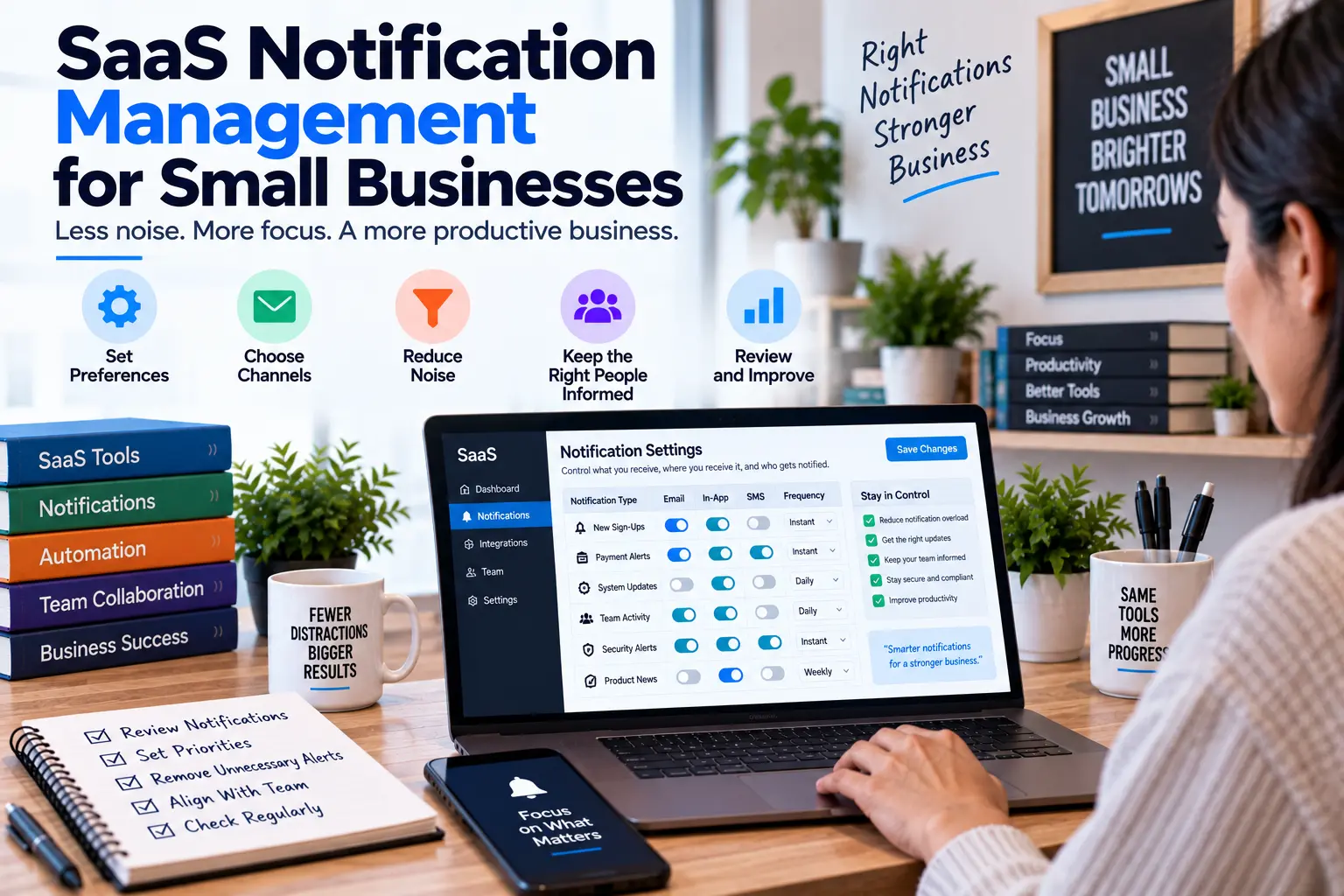
SaaS Notification Management for Small Businesses
- by Muhammad Raza
- 0 Comments
- 20 minutes read
- 44 Views
SaaS notification management helps small businesses reduce alert noise, prioritize important messages, assign clear ownership, and make sure critical notifications lead to the right action.
One SaaS application sends an email.
Another sends a push notification.
A third posts updates into a team channel.
A fourth creates tasks.
A fifth sends reminders.
Some messages require action.
Some merely provide information.
Some repeat what another system already reported.
Others arrive after the situation has already been resolved.
The result is a strange operational problem:
The business receives plenty of information but may still miss the message that matters.
This is not necessarily a problem with the applications themselves.
It is often a problem with how notifications are routed, interpreted, and handled.
A useful SaaS notification system should answer four questions:
- Does this message require action?
- Who should see it?
- How quickly does someone need to respond?
- What happens after the notification arrives?
If those questions are unclear, adding more alerts usually makes the problem worse.
That is why a small business can benefit from a SaaS Notification Triage System.
The goal is not to eliminate notifications.
The goal is to make important notifications easier to recognize and act on.
A Notification Is Not the Work
This distinction is easy to miss.
A notification is a signal.
The work comes afterward.
For example:
SaaS application → “Payment failed” notification
The actual work may be:
Review payment → identify customer → check account → contact customer → resolve issue → record outcome
The notification is only the beginning.
If nobody owns the next step, the alert has not created a useful process.
This is why notification management should focus on the action behind the message, not simply the message itself.
What Is SaaS Notification Management?
SaaS notification management is the process of deciding:
- Which notifications matter
- Who receives them
- Where they are delivered
- How urgently they should be handled
- What action they trigger
- Which notifications can be combined
- Which notifications should be reduced or removed
- How the business confirms that important alerts were handled
This is broader than turning application notifications on or off.
A useful notification system connects:
Signal → Recipient → Urgency → Action → Confirmation
If one part is missing, the message can become operationally weak.
Why Notification Noise Grows
Notification overload rarely arrives in one dramatic event.
It accumulates.
A new employee enables another alert.
A new SaaS application gets connected.
A manager asks for more updates.
A vendor adds another notification category.
A temporary campaign creates extra reminders.
A team creates a shared inbox.
Nobody removes the old rules.
Six months later, employees are receiving messages from several systems throughout the day.
The problem is not necessarily the number of notifications.
The problem is that their meaning has become unclear.
Start With the Actionability Test
For every recurring notification, ask:
“What should the recipient do after seeing this?”
There are four useful answers.
Act
Someone needs to perform a task.
Example:
A failed payment needs investigation.
Decide
Someone needs to make a judgment.
Example:
A new customer request needs approval.
Notice
The message is useful information but does not require immediate action.
Example:
A weekly report is ready.
Ignore
The message provides little practical value.
Example:
A low-value update that is duplicated elsewhere.
The first two categories deserve the strongest attention.
The last category should be reviewed.
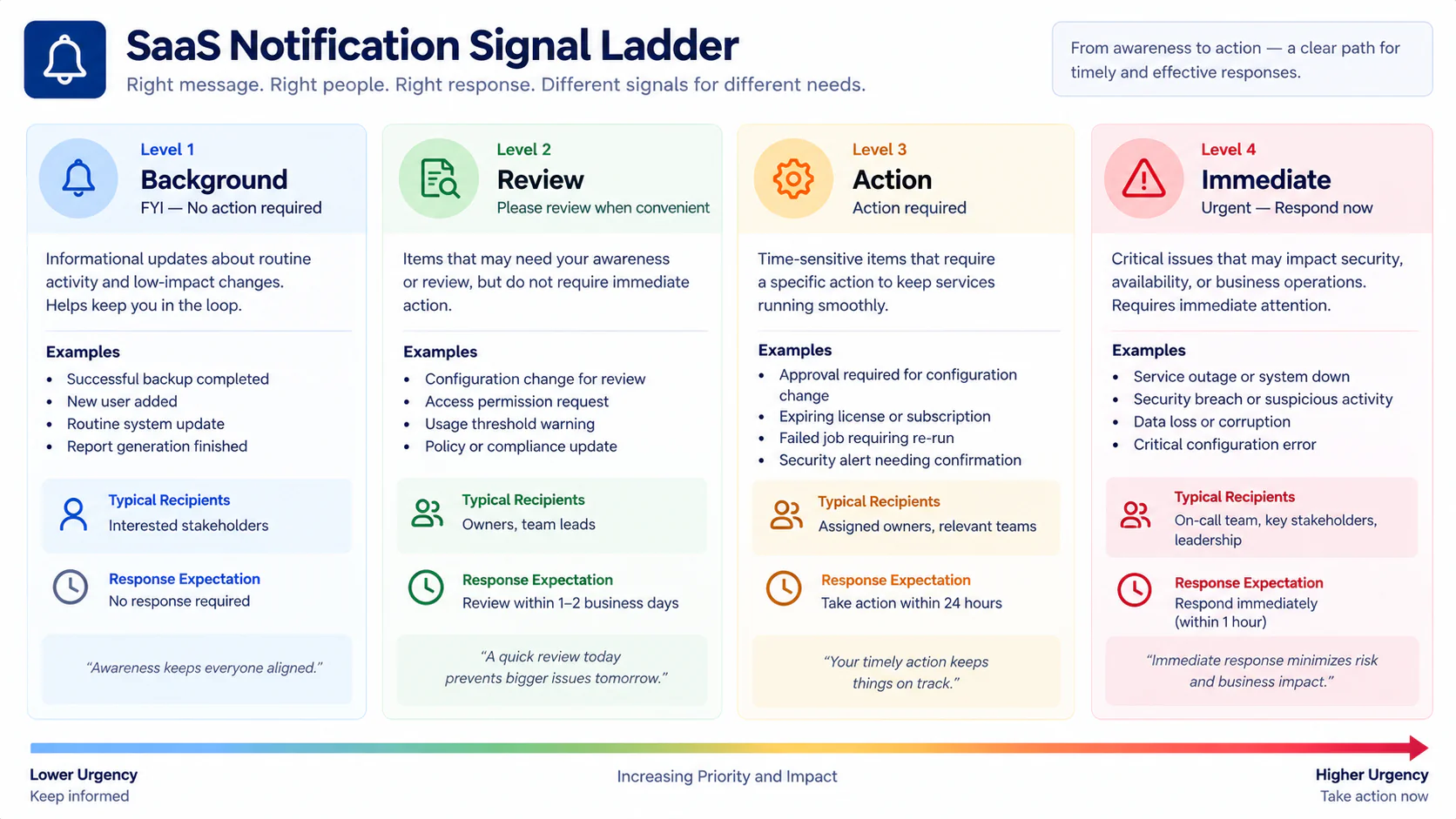
Build the Signal Ladder
Instead of treating every notification equally, classify them into four levels.
Level 1 — Background
Useful information with no immediate action.
Examples:
- Routine activity updates
- Completed system tasks
- Non-urgent summaries
- Low-priority status messages
These can usually be grouped into a digest.
Level 2 — Review
Someone should look at the information during normal working time.
Examples:
- Unusual activity
- Pending approvals
- New operational exceptions
- Weekly reports
These should reach the appropriate owner without creating unnecessary urgency.
Level 3 — Action
A person needs to respond within a defined period.
Examples:
- Failed customer transaction
- Important workflow failure
- Missed approval
- Operational exception
These should go to a specific person or team.
Level 4 — Immediate
A significant event requires prompt attention.
Examples:
- Critical service interruption
- High-impact business failure
- Important security event
- Customer-facing outage
These need a clear escalation route.
The exact classification will differ by business.
The important part is that urgency has a meaning.
Do Not Use Urgent Language for Everything
If every notification is described as urgent, employees eventually stop distinguishing urgency.
Compare:
URGENT: Weekly report available
with:
Weekly report ready for Monday review
The second message provides useful context.
Reserve urgent language for situations that genuinely require faster action.
A notification system becomes more trustworthy when its language matches the consequence.
Create a Notification Ownership Rule
Every important notification should have an owner.
Not:
“Someone on the team should see this.”
Instead:
“The operations lead reviews this.”
Or:
“The account owner handles this.”
Or:
“The finance queue owns this.”
Ownership can be assigned to:
- Individual
- Role
- Team
- Shared queue
For important alerts, a role-based owner is often more durable than naming one employee.
The Destination Test
For every important notification, ask:
“Where should this message land?”
Possible destinations include:
- Individual inbox
- Shared inbox
- Team channel
- Task queue
- Dashboard
- Mobile notification
- SMS
- Incident channel
Do not automatically choose the fastest channel.
Choose the channel that matches the work.
A message that requires a documented task may belong in a task system.
A message that requires immediate awareness may need a push notification.
A routine update may belong in a digest.
Separate Awareness From Action
One of the most useful distinctions is:
I need to know
versus
I need to do something
For example:
Awareness
“The weekly project report is available.”
Action
“Three client deliverables are overdue.”
The first can be summarized.
The second needs ownership.
When both are sent through the same channel with the same visual importance, the action-oriented message can become harder to notice.
Build a Notification Route Card
For important notification types, create a small Notification Route Card.
Notification Route Card
Notification: __________________
Source Application: __________________
Trigger: __________________
Signal Level: Background / Review / Action / Immediate
Primary Owner: __________________
Backup Owner: __________________
Destination: __________________
Expected Response: __________________
Response Window: __________________
Escalation: __________________
Confirmation: __________________
Last Reviewed: __________________
This takes only a few minutes to create.
It can prevent confusion later.
Use the “One Alert, One Next Step” Rule
For important notifications, the recipient should be able to answer:
“What do I do now?”
If the answer requires opening three applications, reading a long message, and asking another employee what happened, the notification is incomplete.
A stronger message might say:
Customer payment failed — review account 4821 and contact the account owner.
The notification does not need to contain the entire investigation.
It needs to make the next step obvious.
Avoid Notification Orphans
A Notification Orphan is a message that has no clearly defined next action or owner.
Examples:
“Workflow changed.”
Who cares?
“Integration updated.”
What should someone do?
“New activity detected.”
Is action required?
These messages may technically be accurate.
But accuracy is not the same as usefulness.
If a notification has no owner and no meaningful action, consider changing its destination, grouping it, or removing it.
Identify Duplicate Notifications
The same business event can sometimes produce several messages.
For example:
SaaS application
→ team-channel message
→ task
→ mobile alert
All four may describe the same event.
That is not automatically wrong.
But ask:
“Does each delivery channel add something useful?”
If all four simply repeat the same information, the business may be creating unnecessary noise.
Create a Duplicate Signal Check
When reviewing a notification, record:
Original event: __________________
Notification 1: __________________
Notification 2: __________________
Notification 3: __________________
Then ask:
- Which one creates action?
- Which one provides useful context?
- Which one is redundant?
- Which one should remain the source of truth?
This can reduce confusion without eliminating important information.
Watch for Notification Chains
A notification can create another notification.
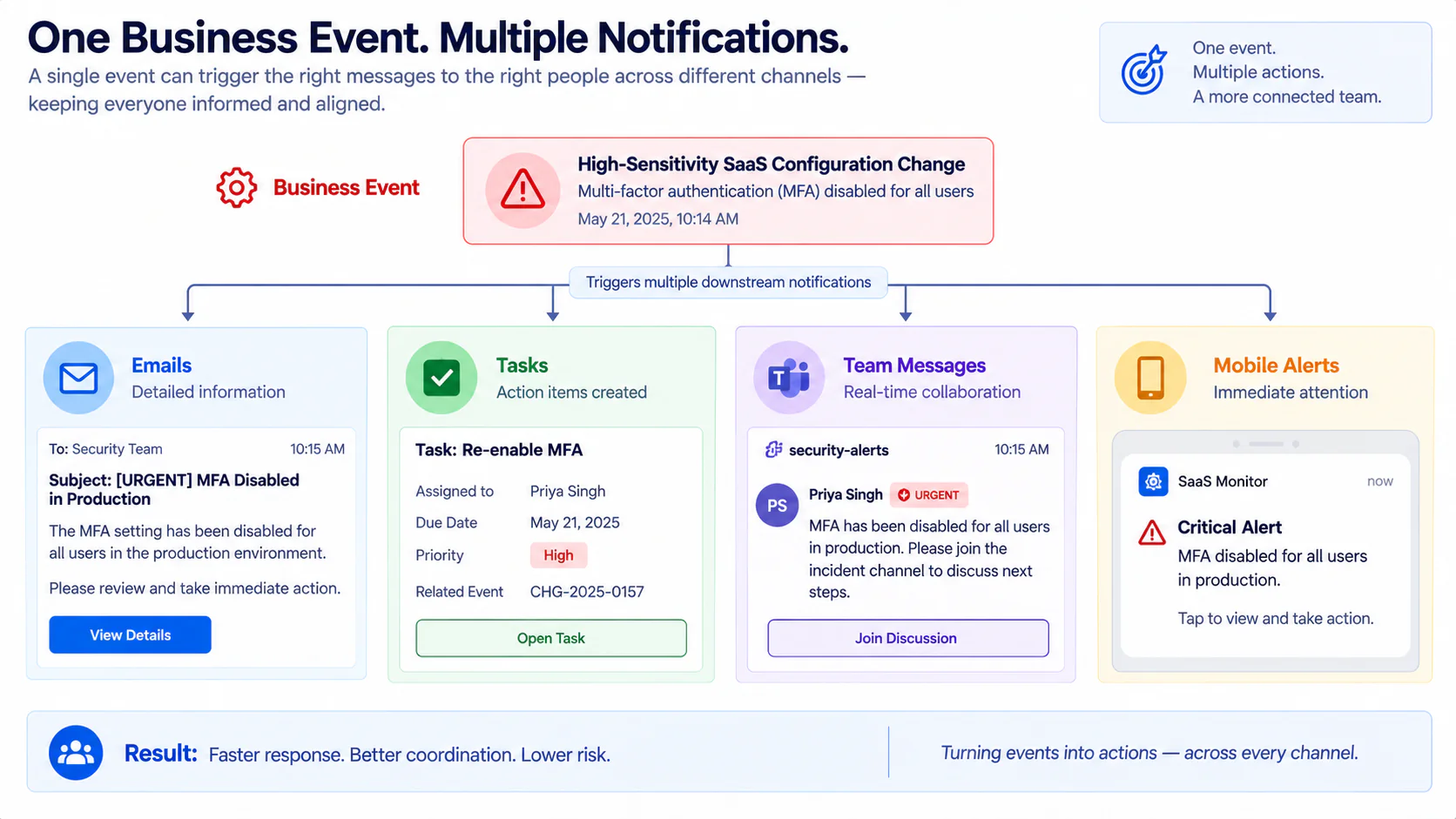
For example:
Customer request
↓
SaaS application creates task
↓
Task system sends email
↓
Email system sends mobile notification
↓
Team member replies
↓
Another application sends an update
The original event may generate five separate signals.
This is a Notification Chain.
Map the chain when messages seem excessive.
The solution may not be to disable the first notification.
The better solution may be to reduce unnecessary downstream duplication.
Create a Notification Budget
A useful concept for small teams is a Notification Budget.
This is not a strict numerical quota.
It is a decision rule.
For each notification category, ask:
“How much interruption is this business event worth?”
For example:
Routine information
Digest or dashboard.
Useful review item
Normal notification.
Action-required event
Direct notification.
High-impact event
Escalated notification.
The higher the operational consequence, the more interruption may be justified.
This prevents low-value information from competing with high-value signals.
Don’t Make Every Alert Real-Time
Real-time delivery sounds attractive.
But real-time does not automatically mean better.
A weekly summary does not become more useful because it arrives at 10:14 AM instead of 9:00 AM.
Ask:
“Does timing change the required decision?”
If not, consider:
- Daily digest
- Weekly digest
- Dashboard review
- Scheduled report
Reserve immediate delivery for information whose timing genuinely matters.
Create a Digest Rule
A notification can often be grouped when:
- Multiple messages describe the same category
- No immediate action is required
- Individual timing does not matter
- The recipient reviews the information periodically
For example:
Instead of ten separate routine activity emails:
Daily SaaS activity summary
This reduces interruption while preserving visibility.
Protect Action Notifications From Digests
Do not put everything into one summary.
An action-required notification should remain separate if delaying it could create a problem.
For example:
Digest:
Routine account activity.
Direct notification:
Customer payment failed.
Immediate notification:
Critical service interruption.
The digest is useful because it does not contain information that needs to compete with urgent work.
Create a Quiet-Time Rule Carefully
Some teams use quiet periods to reduce unnecessary interruptions.
That can be useful.
But do not automatically suppress important notifications during quiet hours.
Instead classify notifications first.
For example:
Background: Digest
Review: Next working period
Action: Defined response process
Immediate: Escalation route remains active
The point is not to make every alert silent overnight.
It is to decide deliberately which alerts can wait.
Define Escalation Before You Need It
An important notification should not depend entirely on one person’s memory.
For example:
Primary owner
↓
If not acknowledged
↓
Backup owner
↓
If still unresolved
↓
Escalation owner
This is an Alert Escalation Ladder.
The exact timing should depend on the business.
A small agency might use a simple same-day process.
A business handling time-sensitive transactions may need a faster response.
Build the Acknowledgement Rule
For high-priority notifications, define what “received” means.
Opening an email is not necessarily the same as acknowledging responsibility.
A useful acknowledgement might be:
“I have this.”
Or:
“I am investigating.”
Or:
“This has been assigned to the finance queue.”
The acknowledgement should create enough certainty that another person does not unknowingly duplicate the work.
Do Not Confuse Acknowledgement With Resolution
These are different.
Acknowledged:
Someone knows about the issue.
Resolved:
The underlying issue has been handled.
A notification system should not mark an important event as complete merely because someone opened it.
For important alerts, track:
Received → Assigned → Investigating → Resolved
This makes the notification part of an actual process.
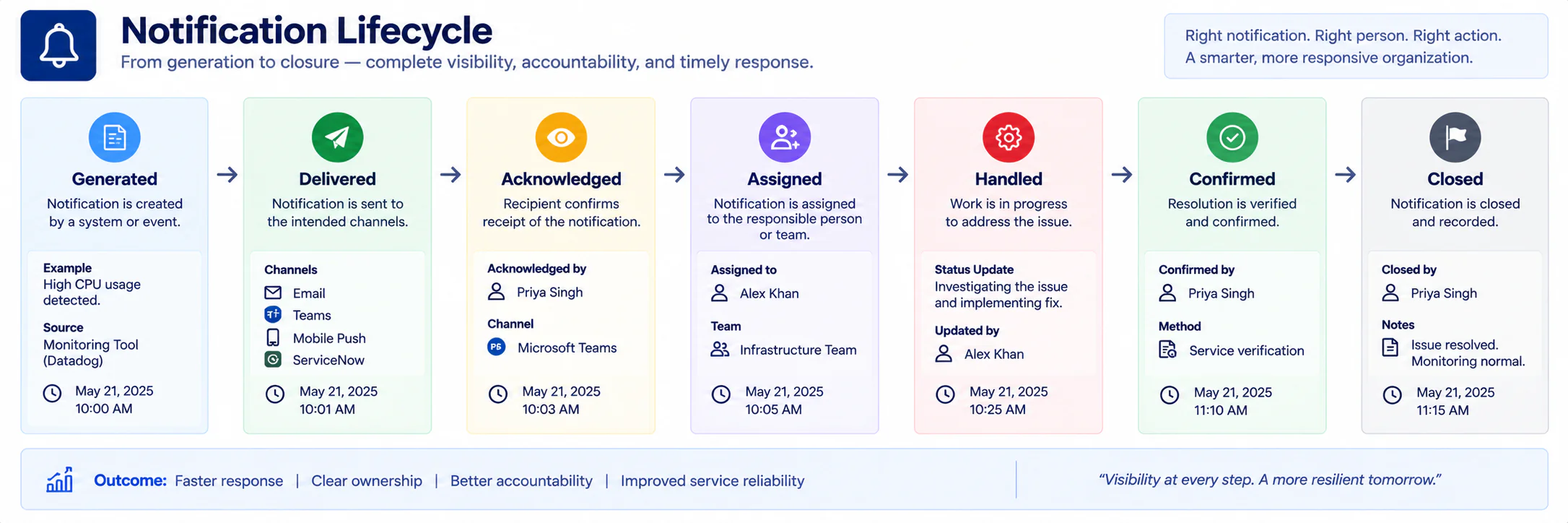
Create an Alert Lifecycle
A useful lifecycle is:
Generated
↓
Delivered
↓
Acknowledged
↓
Assigned
↓
Handled
↓
Confirmed
↓
Closed
Not every business needs every stage.
But the model helps identify where notifications disappear.
For example:
If alerts are generated but nobody confirms them, the problem is not notification delivery.
It is ownership.
Test the Destination, Not Just the Notification
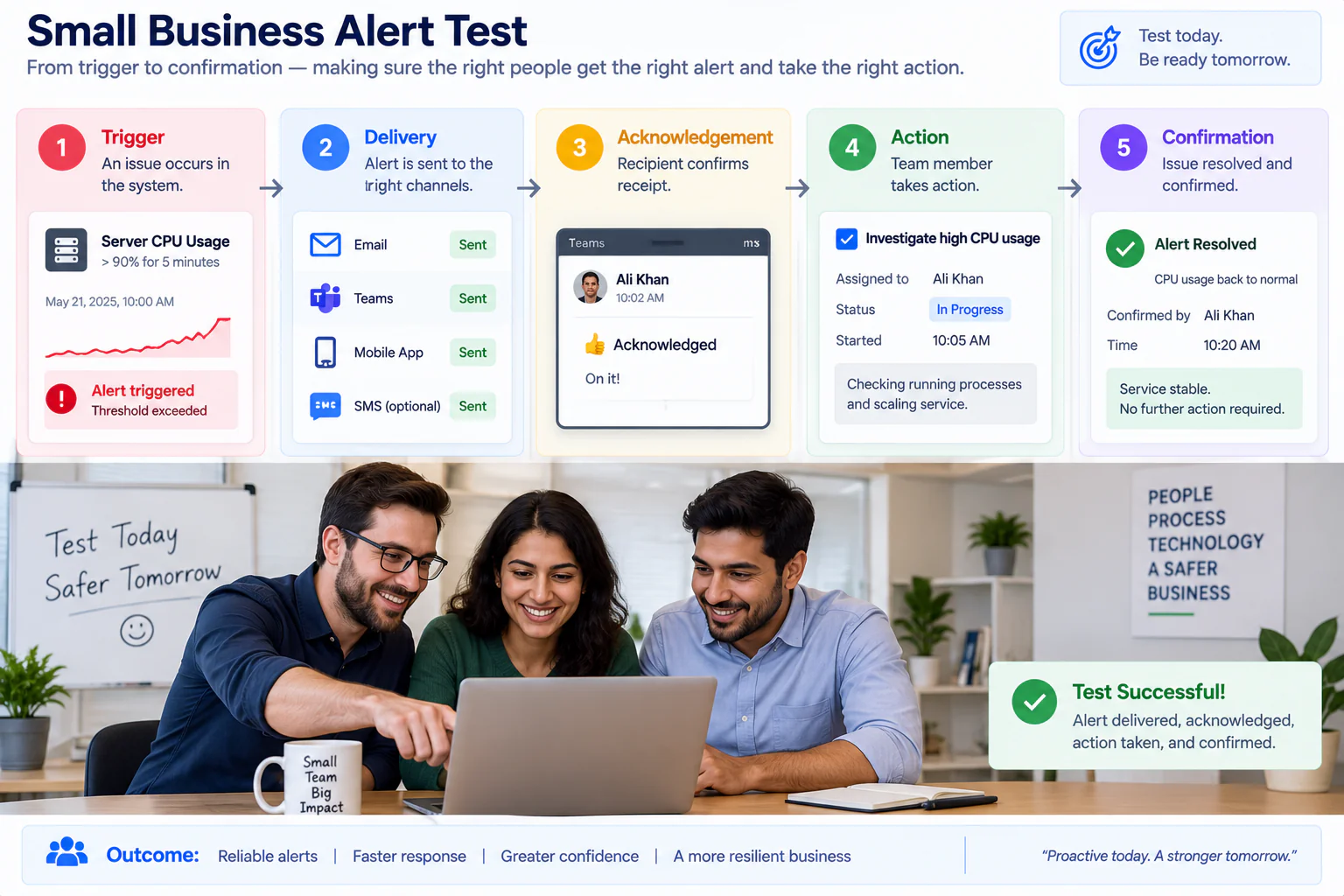
When setting up an important notification, perform a realistic test.
Do not stop at:
“The email arrived.”
Test the entire route.
Step 1
Trigger the event.
Step 2
Confirm the notification arrives.
Step 3
Confirm the intended person receives it.
Step 4
Confirm the message explains the next step.
Step 5
Confirm the recipient can perform the action.
Step 6
Confirm the action is recorded.
Step 7
Confirm another notification does not create unnecessary duplicate work.
This is a Notification Route Test.
Use the Notification Route Test
Record:
Event: __________________
Expected recipient: __________________
Expected channel: __________________
Expected response: __________________
Actual delivery: __________________
Action completed: Yes / No
Duplicate message: Yes / No
Escalation tested: Yes / No
Result: Pass / Needs Review
This creates evidence that the notification system actually works as intended.
Review Notification Failure Modes
Notifications can fail in several ways.
No Delivery
The intended recipient never receives the message.
Wrong Recipient
Someone receives information they should not be handling.
Wrong Channel
The notification arrives somewhere that is rarely checked.
Wrong Urgency
A critical event looks like a routine update.
Missing Context
The recipient does not know what to do.
Duplicate Delivery
Several messages create the same work.
Stale Recipient
The message still goes to someone who changed roles.
No Escalation
Nobody responds and no backup process activates.
False Completion
The notification is marked handled even though the underlying issue remains.
Each failure mode points to a different fix.
Create a Notification Ownership Review
People change roles.
Teams change.
Applications change.
Notification rules often do not.
Once a month or quarter, review important notification routes.
Ask:
- Does the owner still have this responsibility?
- Is the backup person still appropriate?
- Does the destination still get monitored?
- Is the notification still necessary?
- Has the business process changed?
- Does the response window still make sense?
- Is escalation still realistic?
This is a small review with potentially large operational value.
Watch Shared Inboxes Carefully
A shared inbox can solve one problem and create another.
It provides visibility.
But it can also create ambiguous ownership.
For example:
“Finance Alerts”
may be visible to five people.
Who actually handles the alert?
A shared destination should still have an ownership rule.
For example:
Finance inbox receives notification → Finance coordinator assigns owner → owner acknowledges
The inbox is the destination.
It is not automatically the owner.
Avoid the “Everyone Gets It” Strategy
Sending every important notification to everyone feels safe.
Usually, it creates uncertainty.
If ten people receive the same alert, each person may assume another person is handling it.
This creates shared responsibility without clear responsibility.
Instead use:
Primary owner
Backup owner
Escalation owner
Additional people can receive awareness notifications where appropriate.
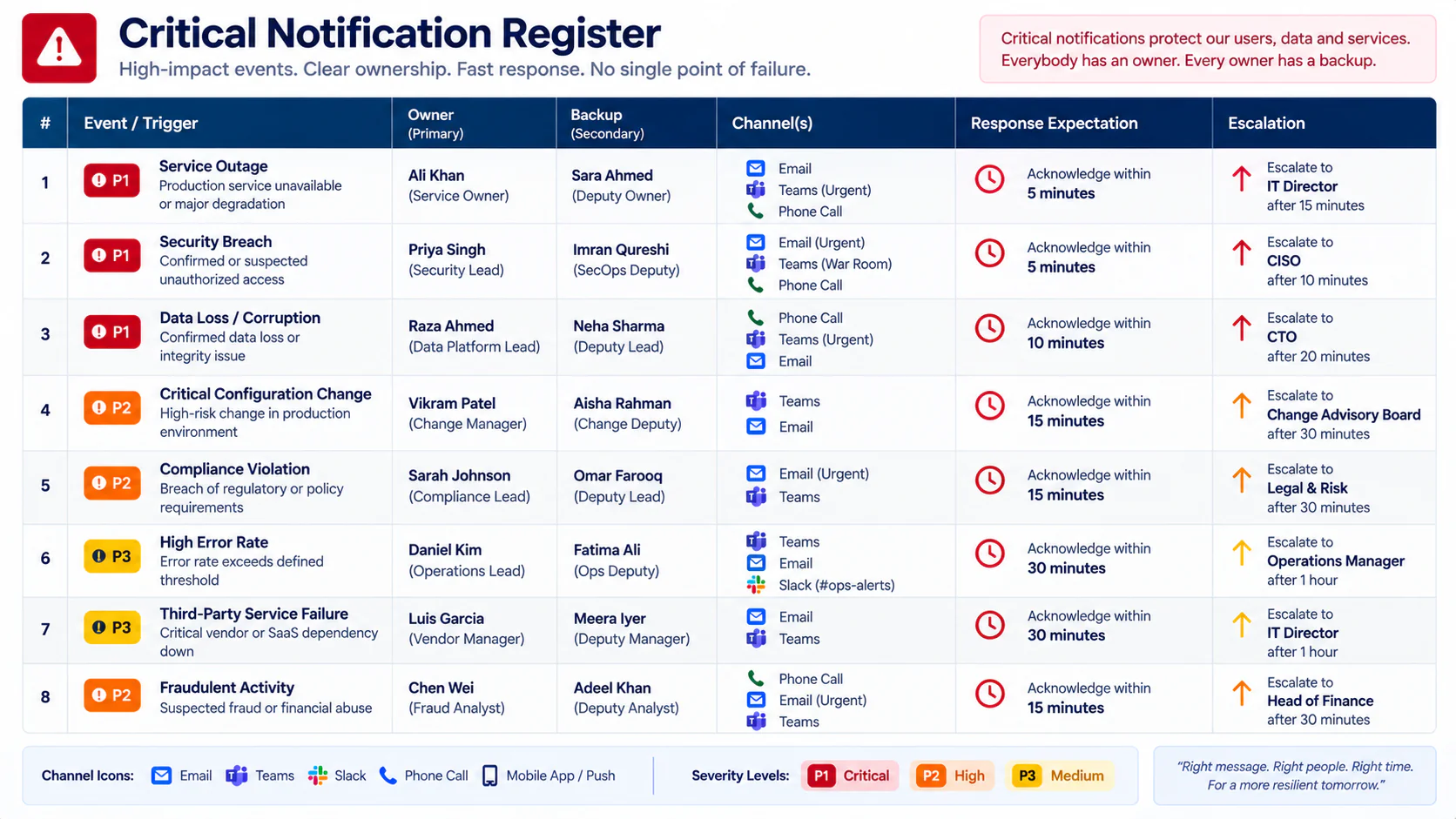
Create a Critical Notification Register
For the most important alerts, keep a small register.
| Notification | Owner | Backup | Channel | Response | Escalation |
|---|---|---|---|---|---|
| Payment failure | Finance | Owner | Task + email | Same business day | Owner |
| Service outage | Operations | Technical lead | Push + team channel | Immediate | Owner |
| New priority client request | Account lead | Operations | Task | Defined window | Account manager |
The exact entries will depend on the business.
The value comes from making ownership explicit.
Handle Vendor Notification Changes
SaaS applications evolve.
A vendor may:
- Add new notification types
- Change default delivery
- Introduce new channels
- Rename alert categories
- Modify workflows
- Add integrations
- Change how alerts are grouped
This can alter the business’s notification environment even when nobody internally changed anything.
After a meaningful application update, ask:
“Did the notification behavior change?”
If yes, review the affected route.
Do Not Build a Notification System Around Vendor Defaults
Default settings are a starting point.
They are not necessarily your business’s ideal operating model.
A vendor does not know:
- Who should respond
- Which events matter most to your business
- Which reports are already reviewed elsewhere
- Which alerts are duplicated by another application
- Which response windows are realistic
Use the application’s capabilities.
Design the notification process around your actual work.
Create a Notification Change Note
When changing an important notification, record:
Old route: __________________
New route: __________________
Reason: __________________
Owner: __________________
Expected improvement: __________________
Test date: __________________
Result: __________________
This helps future administrators understand why the notification exists.
Review Notification Rules After Team Changes
A new employee can change notification ownership without anyone noticing.
When someone:
- Changes role
- Leaves the company
- Joins a team
- Takes parental or extended leave
- Moves from operations to management
- Takes over a client account
review their important notification responsibilities.
This does not require reviewing every personal preference.
Focus on notifications tied to business-critical work.
Create a “No Silent Owner Change” Rule
For important notification routes:
If the owner changes, the notification route must be reviewed.
Do not simply forward messages from one person to another forever.
Update the actual ownership record.
That keeps the system understandable.
Test With a New Employee
One useful test is to give a new team member one notification route and ask:
“What would you do if this appeared right now?”
If they cannot answer, the route probably lacks context.
A good notification process should be understandable without relying entirely on tribal knowledge.
Notification Management for Freelancers
Freelancers can face the same problem with fewer applications.
A solo professional might receive notifications from:
- Client management software
- Project application
- Scheduling platform
- Invoicing system
- Email service
- Website forms
Instead of responding to everything immediately, classify the signals.
Immediate
A scheduled client meeting is starting.
Action
A client has approved work.
Review
A project deadline is approaching.
Background
A routine weekly report is ready.
This simple classification can prevent a freelancer’s inbox from becoming a substitute task-management system.
Notification Management for Small Teams
Small teams should avoid building a complicated alerting department.
Start with the notifications that affect:
- Customers
- Revenue
- Critical operations
- Important deadlines
- Security events
- Service availability
- Approvals
- Failed business processes
Map those first.
Then expand only when the business discovers a genuine need.
A Fictional Example: Brightpath Studio Reduces Notification Confusion
Consider a fictional design agency called Brightpath Studio.
The agency uses several SaaS applications.
The operations manager complains:
“We are getting too many notifications, but people still miss important updates.”
The team maps its notification flow.
They discover:
Client requests
Website form → project application → email → team channel
Invoice issues
Accounting application → email → finance inbox
Project deadlines
Project application → email → mobile notification
Weekly reporting
Project application → scheduled email → management inbox
The team then applies the Signal Ladder.
Background
Weekly reporting becomes a scheduled digest.
Review
Routine project activity goes into a normal team channel.
Action
Invoice failures are routed directly to the finance owner.
Immediate
A critical service issue goes through the escalation route.
They also discover that project deadlines were producing three notifications for the same event.
They keep one action-oriented notification and remove the unnecessary duplicates.
The result is not “fewer notifications” as the primary objective.
The improvement is that each important notification now has:
- A clear owner
- A meaningful destination
- A defined urgency
- A next action
This example is fictional and is included only to demonstrate the framework.
Build a Simple Weekly Notification Review
A weekly review can take only a few minutes.
Ask:
1. Which important notifications were missed?
Find the actual examples.
2. Why were they missed?
Possible reasons:
- Too much noise
- Wrong recipient
- Poor timing
- Weak subject line
- No ownership
- Duplicate messages
- Wrong channel
3. Which notifications created unnecessary work?
Look for duplicate or low-value messages.
4. Did any owner change?
Update important routes.
5. Did any notification remain unresolved?
Check escalation.
6. Did a temporary notification outlive its purpose?
Remove or review it.
This keeps notification management connected to real experience.
Use a Notification Friction Log
When someone says:
“I keep getting this message.”
or:
“I never saw that alert.”
record it.
A Notification Friction Log can contain:
Date
Notification
Problem
Affected person
Likely cause
Decision
Owner
This creates a practical improvement queue.
Turn Repeated Complaints Into Rules
If the same notification problem appears repeatedly, do not solve each incident manually.
For example:
Complaint: Too many routine activity emails.
Pattern: Same category every day.
Decision: Move to daily digest.
Another:
Complaint: Important alert goes to a former employee.
Pattern: Ownership was never updated.
Decision: Add notification ownership review to role changes.
The objective is to turn repeated friction into a better system.
Create a Notification Exception List
Some alerts may not fit normal rules.
Examples:
- Major product launch
- Large client event
- Financial deadline
- Temporary campaign
- System migration
- Unusual service disruption
Instead of permanently changing normal notification settings, create a temporary exception.
Record:
Reason
Start date
End date
Owner
Extra notification
Return state
This prevents temporary urgency from becoming permanent notification noise.
Don’t Leave Temporary Alerts Behind
Temporary alerts are especially dangerous because everyone expects them to disappear.
After the event, ask:
“Which notifications were created only for this situation?”
Then decide:
Remove
Keep
Modify
Return to previous route
This is a simple cleanup step with long-term value.
Create a Notification Baseline
At a useful point, record the normal notification environment.
For important applications, document:
- Critical notification types
- Owners
- Backup owners
- Destinations
- Escalation paths
- Digest schedules
- Temporary exceptions
- Last review date
This becomes the business’s Notification Baseline.
It complements a broader SaaS configuration record without replacing it.
The difference is focus:
Configuration baseline: How the application is set up.
Notification baseline: How important signals move through the business.
Keep the Notification Baseline Small
Do not document every personal notification preference.
Focus on shared operational notifications.
Good candidates include:
- Customer-facing events
- Revenue-related events
- Critical workflow failures
- Important approvals
- Service disruptions
- Security events
- Escalation alerts
Personal preferences can remain personal.
The One-Page SaaS Notification Triage Template
Use this template for an important notification route.
SAAS NOTIFICATION TRIAGE SHEET
Application: ______________________________
Notification: ______________________________
Trigger: ______________________________
Business Event: ______________________________
SIGNAL CLASS
☐ Background
☐ Review
☐ Action
☐ Immediate
OWNERSHIP
Primary Owner: ______________________________
Backup Owner: ______________________________
Escalation Owner: ______________________________
DELIVERY
Primary Channel: ______________________________
Backup Channel: ______________________________
Destination: ______________________________
RESPONSE
Expected Action: ______________________________
Response Window: ______________________________
Acknowledgement Method: ______________________________
Confirmation Method: ______________________________
DUPLICATION CHECK
Other Notifications for Same Event: ______________________________
Keep: ______________________________
Remove / Combine: ______________________________
TEST
Last Tested: ______________________________
Test Scenario: ______________________________
Expected Result: ______________________________
Actual Result: ______________________________
Status: Pass / Needs Review
EXCEPTIONS
Temporary Rule: ______________________________
Expiry Date: ______________________________
REVIEW
Last Reviewed: ______________________________
Next Review: ______________________________
Review Owner: ______________________________
Common SaaS Notification Management Mistakes
Sending Everything to Everyone
This creates visibility without clear ownership.
Treating Every Alert as Urgent
When urgency has no meaning, genuinely urgent events become harder to recognize.
Using Email as the Default for Everything
Email may be appropriate for some events but poor for time-sensitive operational work.
Ignoring the Action Behind the Notification
A message is not useful if nobody knows what happens next.
Keeping Duplicate Notifications
Multiple messages can create duplicate work.
Forgetting Former Employees
Notification ownership can survive role changes long after the person has moved on.
Treating Shared Inboxes as Owners
A shared inbox is a destination, not automatically a responsible person.
Suppressing Important Alerts During Quiet Periods
Not every notification should be delayed simply because it arrives outside normal working hours.
Confusing Acknowledgement With Resolution
Someone seeing an alert does not mean the underlying issue is fixed.
Never Testing the Route
A notification that worked six months ago may no longer reach the right person.
Allowing Temporary Alerts to Become Permanent
Temporary campaign or project notifications should have an expiry date.
Designing Around Vendor Defaults
The application’s default notification behavior may not match your business process.
Measuring Success Only by Notification Count
Fewer messages are not automatically better.
The better question is:
“Are the right people seeing the right signals at the right time?”
Frequently Asked Questions
What is SaaS notification management?
It is the process of organizing important SaaS notifications by urgency, ownership, destination, response expectations, escalation, and follow-up.
Why do small businesses need notification triage?
Because several SaaS applications can generate overlapping messages. Without clear rules, important alerts can compete with routine information.
Should every SaaS notification be enabled?
No. Enable or route notifications based on whether they provide meaningful information or trigger useful action.
What is a Notification Route Card?
It is a small record showing where an important notification originates, who owns it, where it goes, what action is expected, and how escalation works.
What is a Notification Orphan?
A Notification Orphan is a message that has no clear owner or meaningful next action.
Should important notifications go to multiple people?
Sometimes. A primary owner and backup owner can provide resilience. Sending every message to the entire company usually creates unnecessary noise.
Are email notifications bad for SaaS applications?
No. Email can be an appropriate channel for many notifications. The important question is whether the channel matches the urgency and work required.
What should I do with routine SaaS notifications?
Consider grouping them into a digest, dashboard, scheduled report, or normal team channel when individual messages do not require immediate action.
How often should notification rules be reviewed?
Review important routes periodically and whenever there is a significant change in team ownership, workflow, application behavior, or business requirements.
What is a notification baseline?
A notification baseline records the normal routing and handling of important SaaS signals so unexpected changes are easier to identify.
Should notification changes be documented?
Important notification changes should be documented with the old route, new route, reason, owner, test date, and result.
How can freelancers use SaaS notification management?
Freelancers can classify their most important signals as Background, Review, Action, or Immediate and route each type according to the work it triggers.
How do I know whether a notification should be removed?
Ask whether it provides unique useful information, triggers a meaningful action, or supports a decision. If it does none of these, it may be a candidate for removal or consolidation.
Final Thoughts
Notifications are supposed to reduce uncertainty.
Ironically, poorly managed notifications can create more of it.
A team may receive hundreds of messages and still ask:
“Did anyone see that?”
The solution is not necessarily another application.
It is often a clearer system for deciding what deserves attention.
Start with the event.
Ask what action follows.
Assign an owner.
Choose the right destination.
Define the urgency.
Separate awareness from action.
Remove unnecessary duplication.
Create escalation for important events.
Test the complete route.
Then review what actually happened.
The most valuable notification is not the one that arrives fastest.
It is the one that reaches the right person with enough context to produce the right next step.
That is the purpose of SaaS notification management.
A small business does not need a sophisticated notification command center.
It needs a handful of sensible rules.
Background information can wait.
Review items need a place.
Action items need an owner.
Immediate events need escalation.
Once those distinctions are clear, the notification environment becomes easier to trust.
And when the business trusts its important signals, employees spend less time sorting messages and more time responding to the work those messages represent.
Do not ask how many notifications your SaaS applications send. Ask how reliably the important ones become action.