Work Queue Management for Small Business: A Practical Guide
- by Muhammad Raza
- 0 Comments
- 14 minutes read
- 38 Views
A work queue management for small business system helps you see unfinished work before delays become operational problems.
Instead of measuring only how much the team completes, review what is waiting, how long it has been waiting, why it is waiting, and what should happen next.
This guide shows how to manage aging tasks, blockers, ownership, next actions, and weekly backlog reviews without turning your business into a bureaucracy.
- send client clarification
- request missing document
- approve quotation
- schedule production
- review draft
- call supplier
- assign developer
- close duplicate request
- convert request into a project
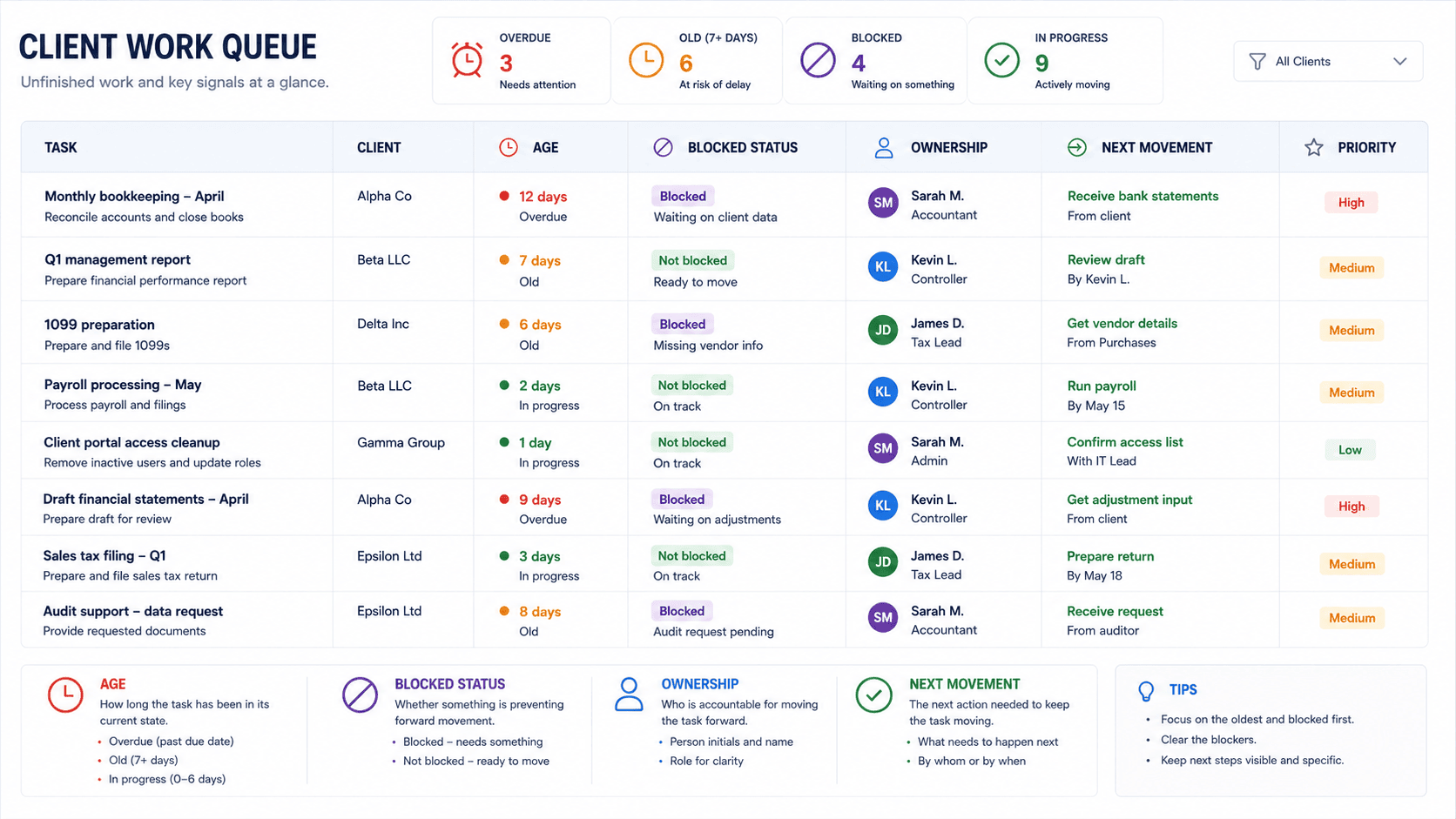
If the next movement cannot be described in one short sentence, the task may not actually be ready for execution.
Build a “Queue Health Strip” Instead of a Huge Dashboard
Small businesses often make the mistake of building reporting systems that require more maintenance than the problem itself.
You do not need 20 metrics.
Create a small Queue Health Strip with five numbers:
| Signal | What to record |
|---|---|
| Open | Total unfinished items |
| Aging | Items beyond their expected waiting time |
| Blocked | Items unable to move |
| Unowned | Items without clear responsibility |
| Next-Action Missing | Items where the next movement is unclear |
The exact numbers will differ from one business to another.
What matters is that you compare the same signals from week to week.
For example:
Monday Queue Health
- Open: 31
- Aging: 5
- Blocked: 4
- Unowned: 2
- Next-action missing: 3
The following Monday:
- Open: 34
- Aging: 9
- Blocked: 7
- Unowned: 3
- Next-action missing: 6
The queue has not merely grown by three items.
Its condition has deteriorated.
That is a much more useful operational warning.
Use the “Why Is This Waiting?” Test
When reviewing a queue, do not immediately ask:
“Why hasn’t this been completed?”
That question can turn into blame.
Ask:
“Why is this waiting?”
There is a major difference.
The first question focuses on the person.
The second focuses on the system.
For every aging item, assign one waiting reason.
A simple set might include:
Customer
The business needs something from the client.
Internal
Another team member must provide information or approval.
External
A supplier, platform, contractor, or third party is delaying progress.
Priority
The item was intentionally pushed behind more important work.
Unclear
Nobody knows what the correct next action is.
Capacity
The work is understood but there is currently no practical room to complete it.
Forgotten
The item should have moved but simply disappeared into the queue.
That last category is especially valuable.
If “forgotten” appears repeatedly, the business does not have a motivation problem.
It has a queue visibility problem.
Create a Waiting-Reason Review
Once per week, group the aging queue by waiting reason.
You might discover:
| Waiting reason | Items |
|---|---|
| Customer | 6 |
| Internal approval | 4 |
| Supplier | 2 |
| Capacity | 5 |
| Unclear | 3 |
| Forgotten | 4 |
Now the queue is telling you something about the business.
If most delays come from customers, improve the information-request process.
If most delays come from internal approval, clarify decision authority.
If capacity is responsible for many old tasks, the problem may be workload design rather than employee speed.
If “unclear” keeps growing, the business may be accepting work without defining what “ready” means.
This is where queue management becomes an operational tool rather than a task-counting exercise.
Introduce the “Ready to Start” Gate
One of the easiest ways to reduce future backlog is to stop incomplete work from entering the active queue.
Before moving an item into Ready, check whether it has the information needed to begin.
For example, a website change request might need:
- exact page
- requested change
- approved copy
- required images
- deadline
- responsible person
If half of those are missing, the task may not be ready.
Mark it Waiting for Information instead.
This small distinction prevents the active work queue from becoming a storage area for incomplete requests.

Separate “Waiting” From “Working”
This distinction can dramatically improve a small team’s understanding of its workload.
Imagine these 20 items:
- 8 are actively being worked on
- 5 are waiting for customers
- 3 are waiting for internal approval
- 2 are blocked by suppliers
- 2 are ready to start
Calling all 20 “open tasks” hides the real situation.
The team may actually have only 10 items it can directly move right now.
That changes the conversation.
Instead of:
“We have 20 things to finish.”
You can say:
“We have 10 items we can actively move, while 10 are waiting on something else.”
That is a much more useful management view.
Use the “Second Touch” Rule
Here is a simple rule that works particularly well for small businesses:
If a queue item requires a second follow-up because it has not moved, give it a reason and a next review date.
For example:
A client has not approved a proposal.
First follow-up:
“Just checking whether you had a chance to review the proposal.”
If there is no response, do not leave the item floating indefinitely.
Record:
- last contact
- next follow-up date
- expected action
- whether the opportunity remains active
The same idea works internally.
If an approval has been requested twice, the task should not simply remain “waiting for approval.”
It should become:
Waiting for approval — follow up Thursday
This creates movement without requiring constant chasing.
Build a Queue Escalation Line
Not every old task deserves escalation.
But certain queue conditions should trigger attention.
Create three simple levels.
Level 1 — Normal
The work is within its expected timeframe.
No intervention needed.
Level 2 — Aging
The item has passed the normal waiting period.
The owner checks the reason and next movement.
Level 3 — Stalled
The item has either:
- missed an important commitment
- remained blocked after follow-up
- lost clear ownership
- become dependent on an unresolved decision
- created a customer or operational risk
At Level 3, the question changes from:
“Can we remind someone?”
to:
“What needs to change for this item to move?”
That might mean reassignment, reprioritization, clarification, escalation, or cancellation.

Do Not Treat Every Old Task as a Priority
A common reaction to backlog is to attack the oldest tasks first.
That can work sometimes.
It can also create a new problem.
Suppose you have:
- an eight-day-old internal formatting request
- a two-day-old client issue affecting tomorrow’s delivery
- a ten-day-old low-priority research task
The oldest item is not automatically the most important.
Use two separate questions:
How old is it?
This measures waiting time.
What happens if it waits longer?
This measures consequence.
A useful queue review can classify items as:
Old + Low Consequence
Monitor or close.
Old + High Consequence
Escalate.
New + High Consequence
Prioritize immediately.
New + Low Consequence
Keep in normal flow.
This prevents the queue from becoming a race where whoever has waited longest automatically wins.
The “Close, Move, or Explain” Rule
Every aging item should eventually receive one of three outcomes:
Close
The work is no longer needed.
Maybe the customer solved the issue independently. Maybe the request was duplicated. Maybe the project changed.
Closing it is not failure.
An abandoned task that is formally closed is healthier than an abandoned task that remains open forever.
Move
The item still matters and needs a concrete next action.
Assign the movement.
Explain
The item must remain waiting because an external condition has not changed.
In that case, record why.
For example:
Waiting for client product specifications. Follow-up scheduled for September 12.
Now the queue contains an explanation rather than silent delay.
Add a “Queue Cleanup” Window
Do not let queue review become an all-day activity.
Set aside a short recurring period.
For a small business, 15–30 minutes once a week can be enough to review the most important queues.
During the review:
- Find aging items.
- Find blocked items.
- Find unowned items.
- Find tasks without next actions.
- Close obsolete work.
- Escalate stalled work.
- Check whether a repeated blocker needs a process change.
The goal is not to make every task perfect.
The goal is to prevent forgotten work from becoming normal.
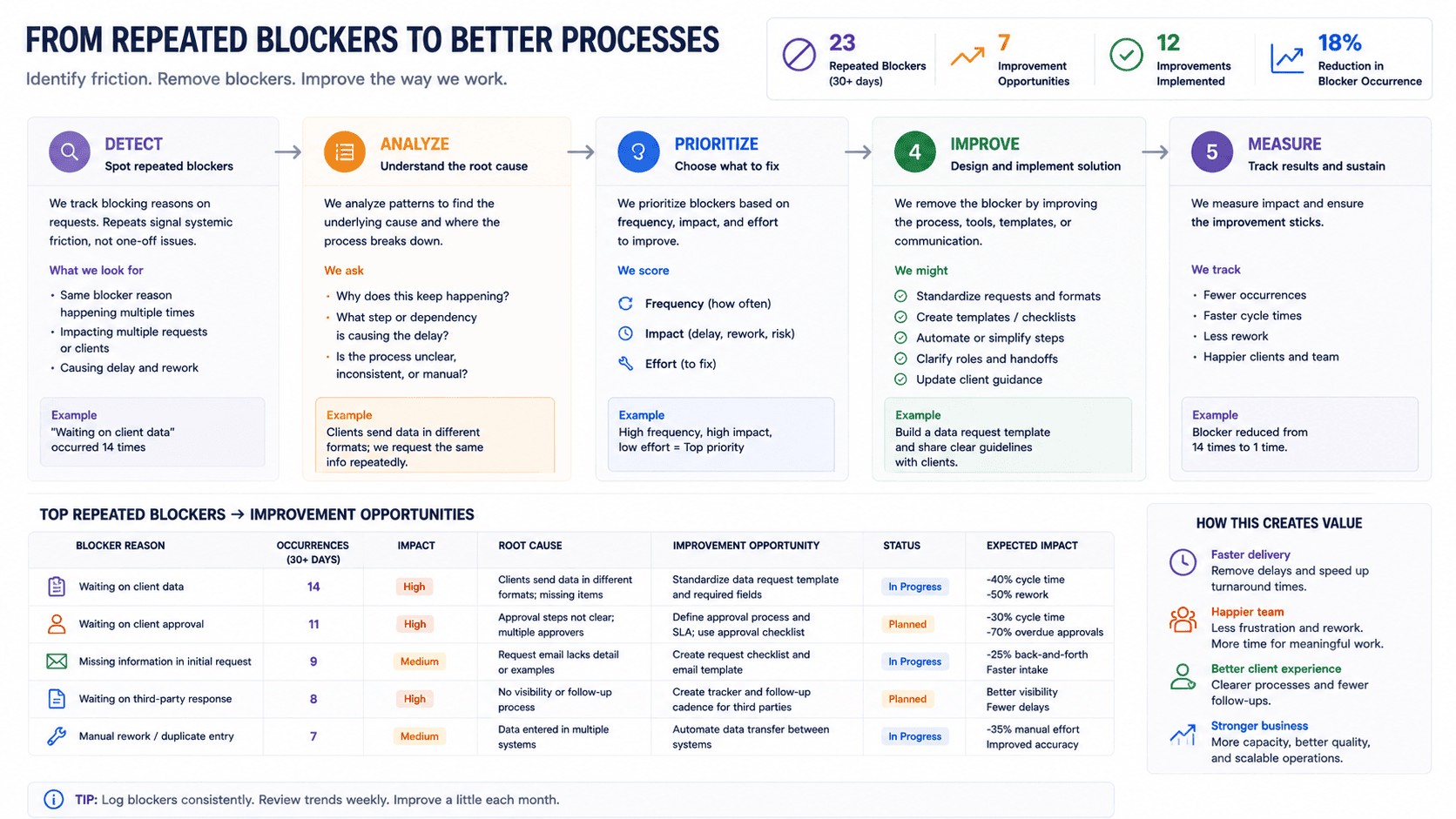
Build a “Queue Debt” List
Some backlog problems are caused by individual tasks.
Others are caused by the same obstacle appearing repeatedly.
That repeated obstacle is queue debt.
Examples:
- customers repeatedly submit incomplete briefs
- invoices repeatedly wait for one person’s approval
- product updates repeatedly require missing images
- developers repeatedly wait for copy
- staff repeatedly ask who can approve discounts
- suppliers repeatedly send information in inconsistent formats
Do not create a separate complicated improvement project for every problem.
Keep a small Queue Debt List.
Record:
- recurring blocker
- affected work
- likely cause
- owner
- possible fix
- review date
When the same problem appears again and again, it becomes a candidate for process improvement.
This is how a queue health check can improve the business instead of merely reporting that the queue is unhealthy.
A Practical Weekly Work Queue Health Check
Here is a simple routine a small business can actually maintain.
Step 1: Count the queues
Identify the places where unfinished work lives.
For example:
- customer requests
- projects
- finance
- operations
- supplier tasks
Do not try to combine everything immediately.
Step 2: Pull aging items
Find work that has exceeded its expected waiting period.
Step 3: Label the reason
For each aging item, record why it is waiting.
Step 4: Confirm ownership
If nobody knows who should move it, assign an owner.
Step 5: Define the next movement
Write the next action in plain language.
Step 6: Remove dead work
Close duplicates, cancelled requests, obsolete tasks, and work that no longer has a useful outcome.
Step 7: Identify repeated blockers
Add recurring problems to the Queue Debt List.
Step 8: Check the direction
Compare this week’s queue condition with last week’s.
You are not looking for a magically smaller number every time.
You are looking for signs that the queue is becoming more controlled.
Example: How a Small Design Studio Could Use This
Consider a fictional business called Northline Studio, a five-person design company.
On Monday, the team has 28 open work items.
At first glance, the number does not look alarming.
During the health check, they find:
- 6 tasks waiting for client feedback
- 4 waiting for internal review
- 3 without clear ownership
- 5 older than their normal working window
- 2 duplicate requests
- 4 genuinely ready for immediate work
- 4 scheduled for later in the month
The problem is not 28 tasks.
The problem is that several different conditions are mixed together.
Northline makes three changes.
First, it separates Ready, Working, Waiting, and Blocked.
Second, every waiting task receives a reason and next review date.
Third, repeated missing-information problems go onto the Queue Debt List.
After several weekly reviews, the team notices that client requests frequently arrive without final copy.
Instead of repeatedly chasing copy, Northline changes its project intake form so copy approval becomes a required step before production begins.
The queue review has now produced a process improvement.
That is the real value.
What Solo Business Owners Can Do
A solo operator may think queue management is unnecessary because there is only one person.
In reality, the opposite can be true.
When you are the owner, salesperson, service provider, administrator, and customer-support contact, unfinished work can spread across many locations.
You might have:
- three unanswered emails
- two proposals to follow up
- a tax document to upload
- one client revision
- a supplier issue
- four content ideas
- a website fix
- a payment to reconcile
Everything competes for attention.
A queue health check gives you a way to distinguish:
Work I can do now
from
Work waiting on someone else
and
Work that no longer deserves my attention.
For a solo business, that distinction can be more valuable than another productivity application.
What Freelancers Should Watch For
Freelancers often experience a special kind of queue problem: the client relationship makes it tempting to keep every request alive.
A client asks for an update.
Then another revision.
Then a new question.
Then a “small” extra task.
If every request enters the same active list, your queue can become a mixture of contracted work, waiting work, goodwill tasks, and potential new work.
That makes prioritization difficult.
A freelancer can use four labels:
- Committed — part of agreed work
- Waiting — needs client input
- Additional — outside current work
- Potential — not yet approved
This keeps a new request from silently becoming a delivery obligation.
That is particularly useful alongside a clear scope-management process.
What Not to Put in Your Queue Health System
A good operational system also needs boundaries.
Do not store sensitive credentials in a normal task queue.
Do not use the queue as a replacement for proper financial records.
Do not record unnecessary personal information about clients or employees.
Do not create complicated priority scores that nobody understands.
Do not require every tiny task to receive a five-minute documentation exercise.
And do not turn the weekly review into a meeting where everyone explains why they were busy.
The purpose is movement and visibility.
Not surveillance.
Common Mistakes in Work Queue Management
Mistake 1: Measuring only total open work
A queue of 50 scheduled future tasks can be healthier than a queue of 15 stalled tasks.
Look at condition, not just quantity.
Mistake 2: Treating “waiting” as “inactive”
Waiting work still needs review.
Otherwise, waiting becomes forgotten.
Mistake 3: Leaving ownership implied
If ownership is not visible, it is easy for work to disappear between roles.
Mistake 4: Keeping cancelled work open
An old task does not become more valuable because it has survived for months.
Close work that no longer matters.
Mistake 5: Fixing symptoms instead of repeated blockers
If ten tasks are waiting for the same missing input, chasing ten people is not the real solution.
Fix the input problem.
Mistake 6: Making every task urgent
If everything is urgent, the queue has no useful priority signal.
Mistake 7: Building a dashboard nobody maintains
A simple weekly health strip is better than a sophisticated reporting system that becomes outdated.
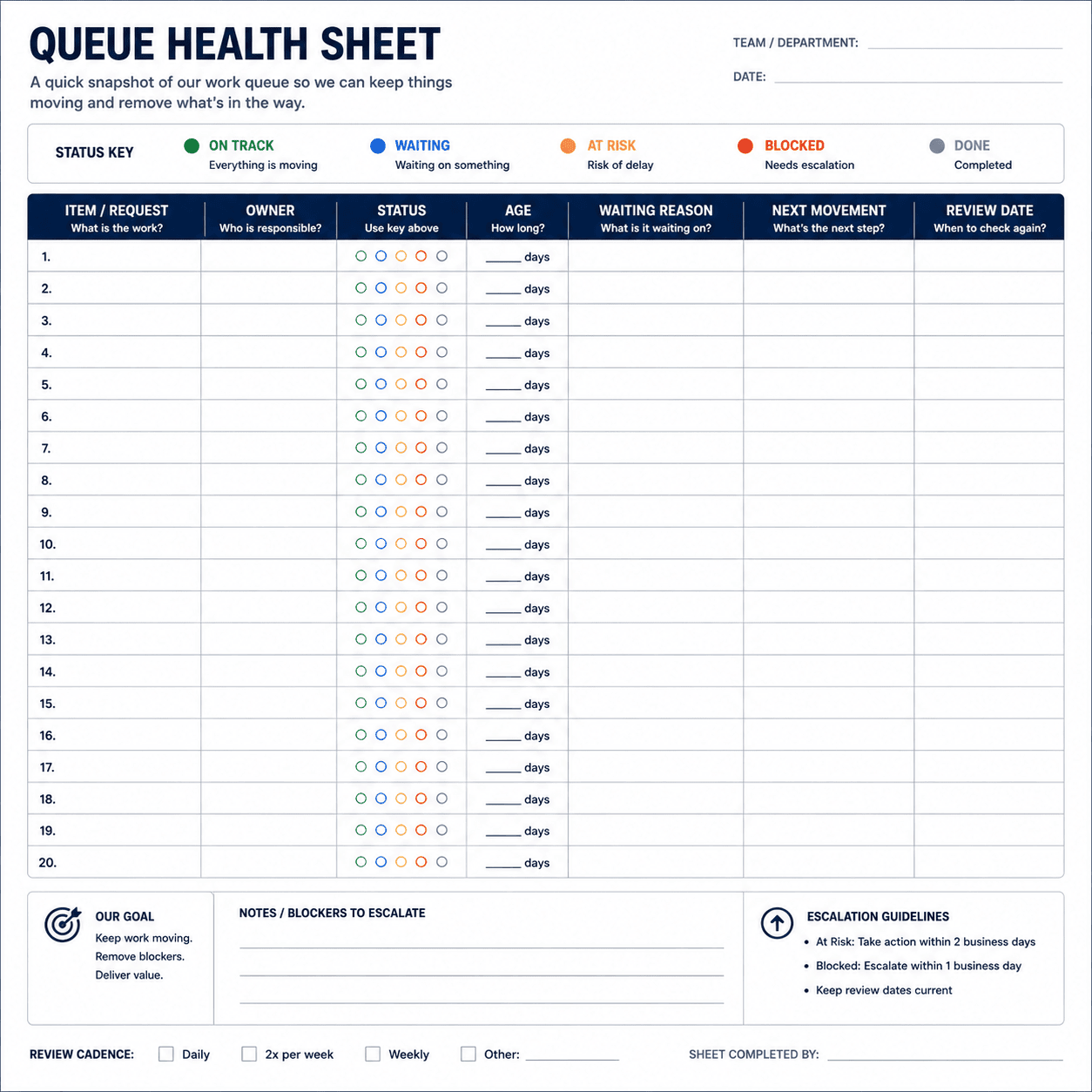
A One-Page Work Queue Health Template
You can start with a simple table:
| Field | What to record |
|---|---|
| Work Item | Short description |
| Owner | Person responsible for movement |
| Status | Ready / Working / Waiting / Blocked |
| Waiting Reason | Customer / Internal / External / Priority / Unclear / Capacity |
| Age | Days since entering current state |
| Next Movement | Immediate next action |
| Next Review | Date to check again |
| Consequence | What happens if it remains unresolved |
| Outcome | Close / Move / Explain |
Then keep a separate Queue Debt List:
| Repeated Blocker | Affected Work | Likely Cause | Owner | Next Review |
|---|---|---|---|---|
| Missing client copy | Website projects | Intake incomplete | Account lead | Friday |
| Approval delay | Quotes | No backup approver | Owner | Monday |
| Supplier response delay | Orders | Slow escalation route | Operations | Friday |
The two tables serve different purposes.
The first manages today’s work.
The second helps improve tomorrow’s work.
When Should You Run a Queue Health Check?
For most small businesses, weekly is a practical starting point.
Run it more frequently if the business handles:
- high-volume customer requests
- urgent service work
- short delivery cycles
- frequent operational changes
- time-sensitive orders
You can also trigger an additional review when something unusual happens.
For example:
- a major client arrives
- staff availability changes
- a large project starts
- an employee leaves
- a seasonal rush begins
- delivery dates begin slipping
The frequency should match the speed at which your queue changes.
The important thing is consistency.
A queue review done occasionally is an inspection.
A queue review done routinely becomes part of how the business operates.
The Bigger Lesson: Backlog Is Information
A backlog is not automatically a failure.
Sometimes it simply means demand has increased.
Sometimes it means the team is deliberately sequencing work.
Sometimes it means external dependencies are slowing progress.
And sometimes it exposes a broken process.
That is why the useful question is not:
“How do we eliminate our backlog?”
It is:
“What is our backlog trying to tell us?”
If customer requests keep waiting for missing information, improve intake.
If approvals keep stopping work, clarify authority.
If old tasks keep losing owners, redesign ownership.
If the same work keeps returning, examine the underlying process.
If the queue is growing because demand consistently exceeds available capacity, then the business has a different problem to solve.
The queue is simply where the evidence becomes visible.
Frequently Asked Questions
What is work queue management for a small business?
Work queue management is the practice of organizing unfinished work so the business can see what is waiting, who owns it, why it has not moved, and what should happen next.
How often should a small business review its work queue?
A weekly review is a practical starting point. Businesses with high-volume or fast-changing work may need more frequent checks.
What is the difference between backlog and queue?
A backlog usually refers to accumulated unfinished work. A queue is broader: it includes work waiting to start, work being processed, and work blocked by dependencies, depending on how the business defines its workflow.
Should every task have a deadline?
No. Some work is better managed with a next-review date or dependency rather than an artificial deadline. The important thing is that meaningful work has a visible next movement.
What should I do with tasks that have been waiting for weeks?
Find out why they are waiting. Then close them, move them forward, or document the reason they must remain open. Do not leave them indefinitely without explanation.
Can a spreadsheet be used for work queue management?
Yes. A spreadsheet can be enough for a small business if it is maintained consistently and clearly shows status, ownership, waiting reason, age, and next movement.
How can freelancers use a work queue health check?
Freelancers can separate committed work, client-dependent work, additional requests, and potential work. This prevents every incoming request from automatically becoming an active delivery commitment.
What is queue debt?
Queue debt is the repeated operational friction that causes unfinished work to accumulate, such as missing information, approval delays, unclear ownership, or recurring external dependencies.
Final Takeaway
You do not need a sophisticated operations department to manage unfinished work well.
You need to know when a queue is becoming unhealthy.
Start with five signals:
- open work
- aging work
- blocked work
- unowned work
- work without a clear next movement
Then add one weekly habit:
Ask why the oldest or most consequential work is still waiting.
That question can reveal much more than a task count.
It can show where customers get stuck, where approvals are slowing the team, where ownership is unclear, and where a recurring problem deserves a better process.
A healthy queue is not necessarily an empty queue.
It is a queue where the business knows what is waiting, why it is waiting, and what happens next.