Small Business Emergency Contact Tree: A Practical Guide
- by Muhammad Raza
- 0 Comments
- 15 minutes read
- 43 Views
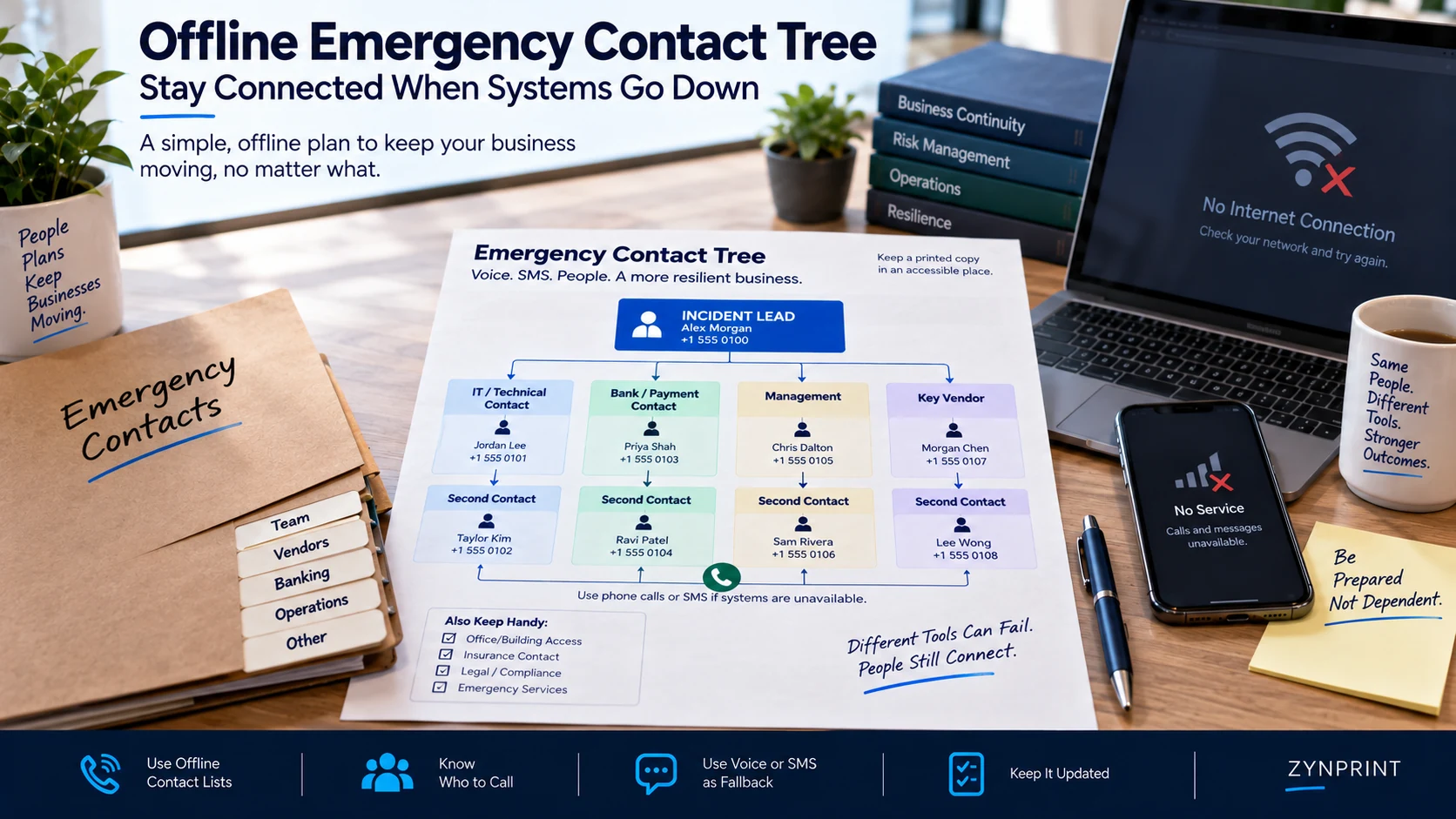
A small business emergency contact tree gives your team a clear offline route for contacting the right people when normal business systems are unavailable.
Instead of relying on email, chat, cloud documents, or one person’s memory, the tree identifies critical contacts, backup contacts, responsibilities, and alternative communication methods.
This guide shows how to build, test, and maintain a practical emergency contact tree for cyber incidents and other business disruptions without putting sensitive credentials into the document.
Separate Contact Information From Credentials
This distinction matters.
Your emergency packet may contain:
Bank:
Official support number
Relationship manager name
Fraud-reporting number
It should not contain:
Bank username:
Bank password:
MFA recovery code:
Likewise, your IT provider contact information can be printed.
Their administrator credentials should not be printed next to it.
The emergency document answers:
“Who can help?”
It should not answer:
“What secret lets me log in?”
Keep credentials in the appropriate secure system.
Create a “Who Calls the Bank?” Rule
Some incidents become complicated because everyone assumes somebody else will make the critical call.
Write down the responsibility.
For example:
Payment-related incident:
Owner or finance lead contacts the bank.
Email compromise:
Technical lead contacts IT provider.
Potential customer-data exposure:
Incident coordinator contacts legal or the designated privacy adviser.
Website compromise:
Technical lead contacts hosting provider and web administrator.
The exact assignments depend on your organization.
What matters is that responsibility is visible.
Add a “Do Not Call” Layer
Not every person should receive every incident.
Your contact tree should prevent unnecessary communication as well as enable necessary communication.
For example:
Technical issue
Call IT.
Financial issue
Call finance and bank.
Customer communication issue
Call the designated communications lead.
Legal question
Escalate to legal counsel or the appropriate adviser.
This prevents a chaotic situation where six people independently contact the same vendor with different explanations.
Decide Who Can Declare an Emergency
A small business should have a simple escalation rule.
For example:
“Any employee who believes company systems, customer information, financial accounts, or business operations may be compromised should immediately contact the incident coordinator or backup.”
Notice what this does not require.
It does not require the employee to prove that a cyberattack occurred.
They only need to recognize that something unusual may require escalation.
The person receiving the report can then decide whether the incident is serious enough to activate the wider response.
Give Employees Permission to Escalate Early
People sometimes hesitate because they fear being wrong.
An employee may notice:
- An unfamiliar login
- A suspicious password-reset message
- A strange payment request
- Unexpected files
- A locked account
- A security warning
- Unusual customer messages
- A device behaving unexpectedly
They may think:
“It is probably nothing.”
That assumption can delay investigation.
A better internal message is:
“You do not need to diagnose the incident. You only need to report something that looks unusual.”
This makes escalation easier.
It also separates detection from diagnosis.
Create an Emergency Communication Phrase
During an incident, vague messages create unnecessary confusion.
Give employees a standard phrase.
For example:
“Possible security incident. I cannot confirm the cause. Please activate the emergency contact process.”
That sentence is useful because it communicates urgency without pretending to know what happened.
A second version could be:
“Possible account compromise. Do not use the affected account for coordination until advised.”
Keep the wording short enough that employees can remember it.
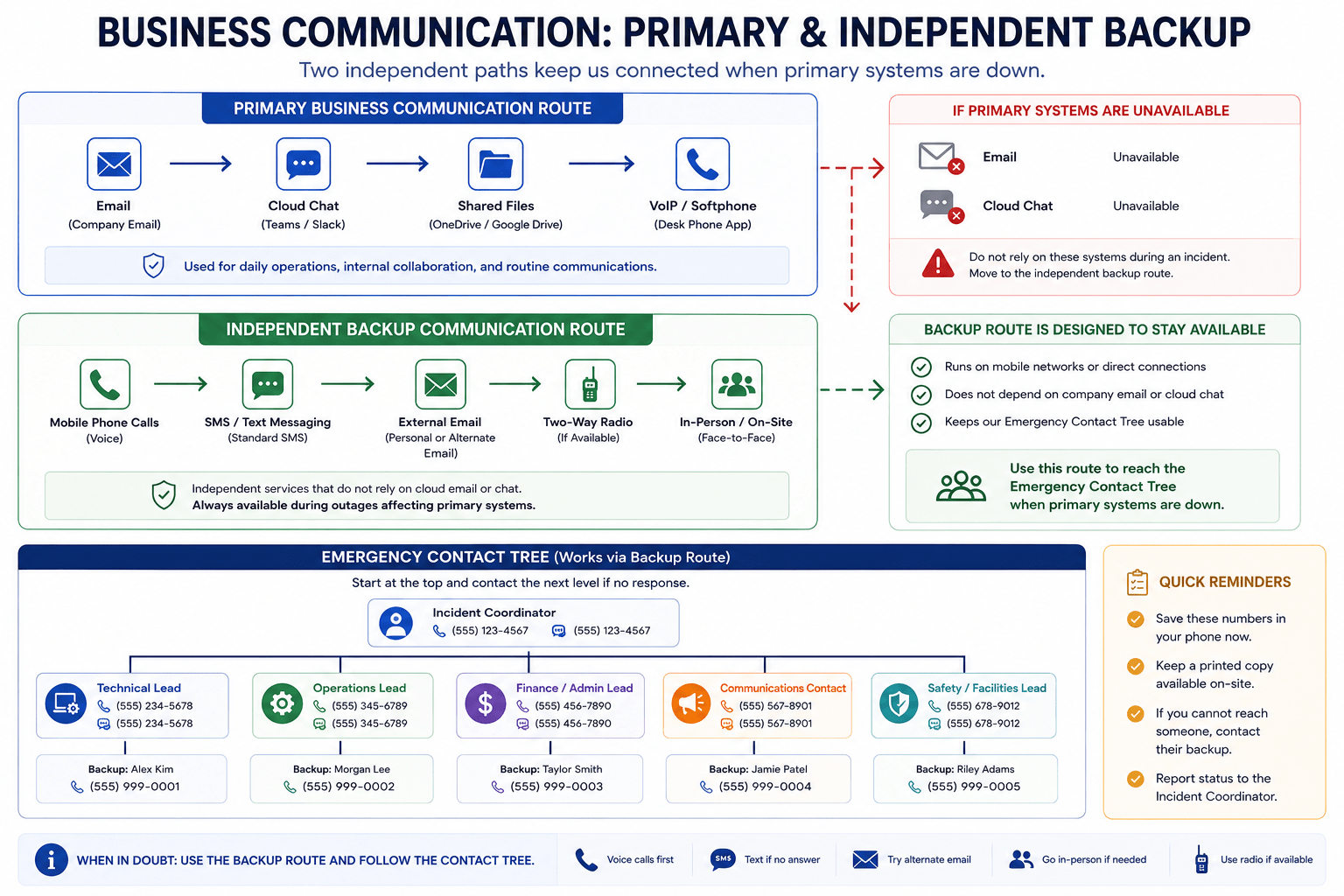
Keep an Alternate Communication Method Ready
If company email is compromised, do not assume email is still the safest coordination channel.
Your emergency plan might designate:
- Phone calls
- SMS
- A pre-approved personal contact method
- Separate emergency messaging account
- Physical meeting point
- External conference number
- Another communication system not dependent on the affected account
The appropriate choice depends on your business.
The principle is simple:
The backup communication method should not depend on the system you are currently trying to recover.
Put One Copy in a Physical Location
A digital emergency document is useful.
A physical copy provides another layer.
Possible locations include:
- Locked office cabinet
- Secure reception area
- Owner’s emergency folder
- Company vehicle emergency kit
- Secure off-site location
The exact location depends on the business.
Do not leave sensitive information in a place where anyone can casually photograph or remove it.
The goal is accessibility for authorized people, not public exposure.
Give the Owner a Personal Copy Carefully
A business owner may be away from the office when an incident happens.
A second controlled copy can help.
But the same security principle applies.
Do not keep the emergency packet:
- In an unlocked car
- In a public desk drawer
- Inside an ordinary shared folder
- Attached to an unprotected email
- With passwords written beside phone numbers
An offline copy is only useful if it is also handled responsibly.
Build a Vendor Contact Register
Your emergency list should not depend entirely on internal staff.
Regularly used vendors can become important during an incident.
Create a small register containing:
| Vendor Type | Primary Contact | Backup | Purpose |
|---|---|---|---|
| IT Provider | Named contact | Backup number | Technical response |
| Internet Provider | Support contact | Account contact | Connectivity |
| Hosting Provider | Support route | Account manager | Website/server |
| Bank | Fraud contact | Relationship manager | Payment issues |
| Insurance | Claims contact | Broker | Incident support |
| Legal | Adviser | Firm main line | Legal escalation |
| Accountant | Named contact | Office line | Financial records |
Do not copy this table blindly.
Use the vendors your business actually depends on.
Identify Single-Person Dependencies
This is one of the most valuable exercises you can perform.
Ask:
“If one person became unreachable today, which important process would become impossible?”
Maybe only one employee knows:
- Who manages the domain
- Where the hosting account is
- Which company handles IT
- Who controls the business phone system
- Which bank contact handles fraud
- How to reach the accountant
- Which vendor supplies a critical service
That person is an operational dependency.
The answer is not necessarily to remove that person’s responsibility.
The answer is to make the information transferable.
Create the “Second Person” Rule
For every critical external relationship, identify at least one internal person who understands:
- What the vendor does
- Why the business uses them
- How to contact them
- What situation requires escalation
The second person does not need to become an expert.
They need enough context to avoid a dead end.
This is especially important when the primary relationship owner takes leave, changes roles, or leaves the company.
Keep the Tree Small
A common mistake is trying to include everyone.
That creates noise.
If an employee sees 47 names during an emergency, they may still ask:
“Who do I call?”
The first page should answer that question immediately.
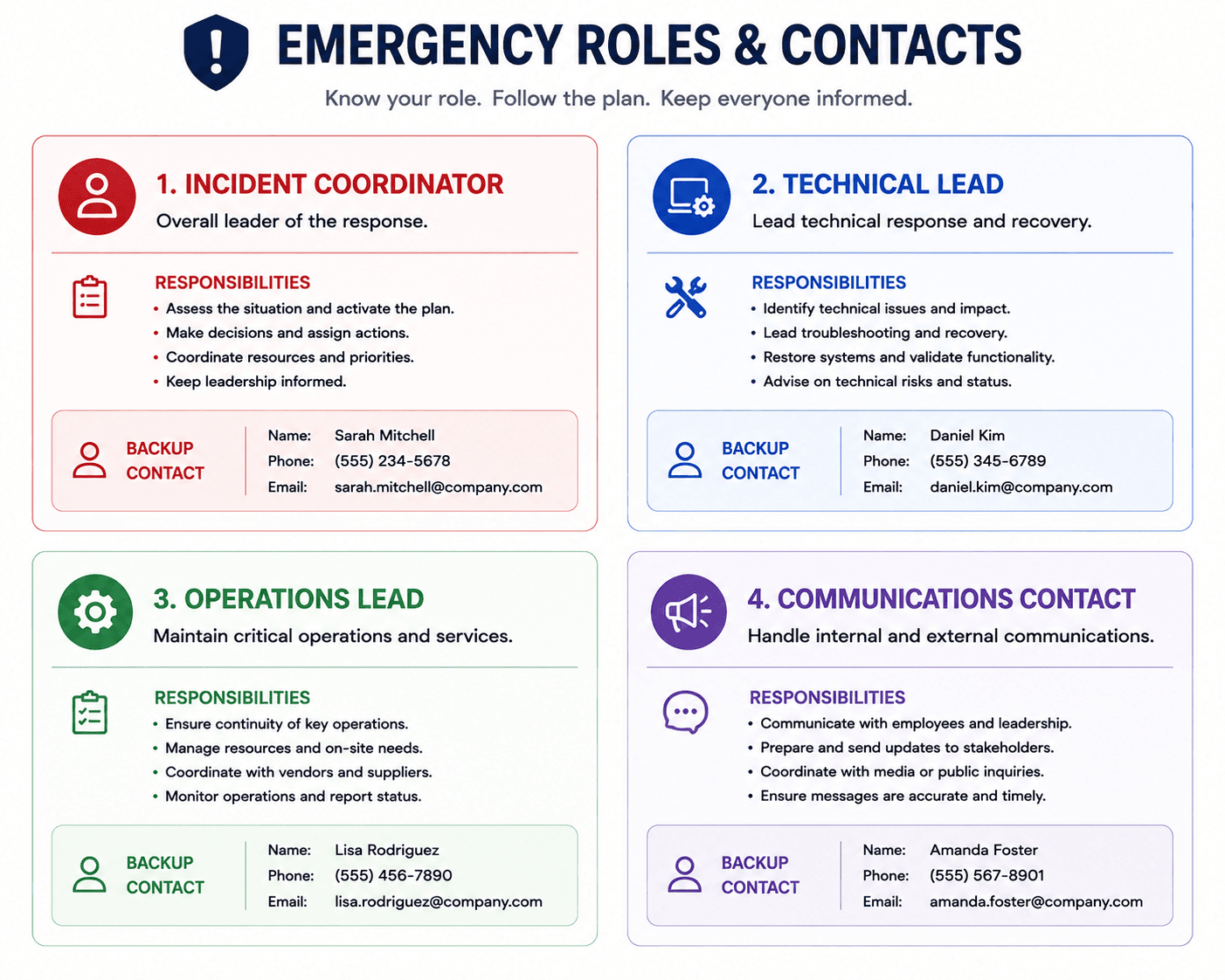
A practical first-level structure might be:
1. Incident Coordinator
2. Backup Coordinator
3. Technical Contact
4. Finance/Bank Contact
5. Legal/Insurance Contact
Everything else can sit underneath those roles.
The first page is for movement.
The deeper pages are for reference.
Build an “If This, Then That” Section
Employees should not have to interpret the entire contact tree.
Create a tiny decision map.
If company email appears compromised
Contact:
- Incident Coordinator
- IT Provider
Then wait for instructions before using the affected email account for incident coordination.
If suspicious payment activity appears
Contact:
- Finance lead
- Bank fraud contact
- Incident Coordinator
If a business device is lost
Contact:
- Incident Coordinator
- IT Provider
- Relevant account administrator
If customer information may be exposed
Contact:
- Incident Coordinator
- Legal/privacy adviser
- Technical contact
This is not a universal incident-response procedure.
It is a routing guide.
Test the Tree With a “Dead Number Drill”
You do not need a complicated cybersecurity exercise.
Pick one afternoon.
Choose a fictional scenario.
For example:
“The company email account is unavailable. The owner is travelling. A suspicious login alert has appeared.”
Now ask an employee:
“Without opening the company email, show me who you would contact first.”
Do not help them.
Watch what happens.
Can they find the contact?
Do they know which person to call?
Does the number work?
Does the backup contact understand the situation?
Does the employee know what information to provide?
This is a useful test because it checks the actual process rather than the quality of the document.
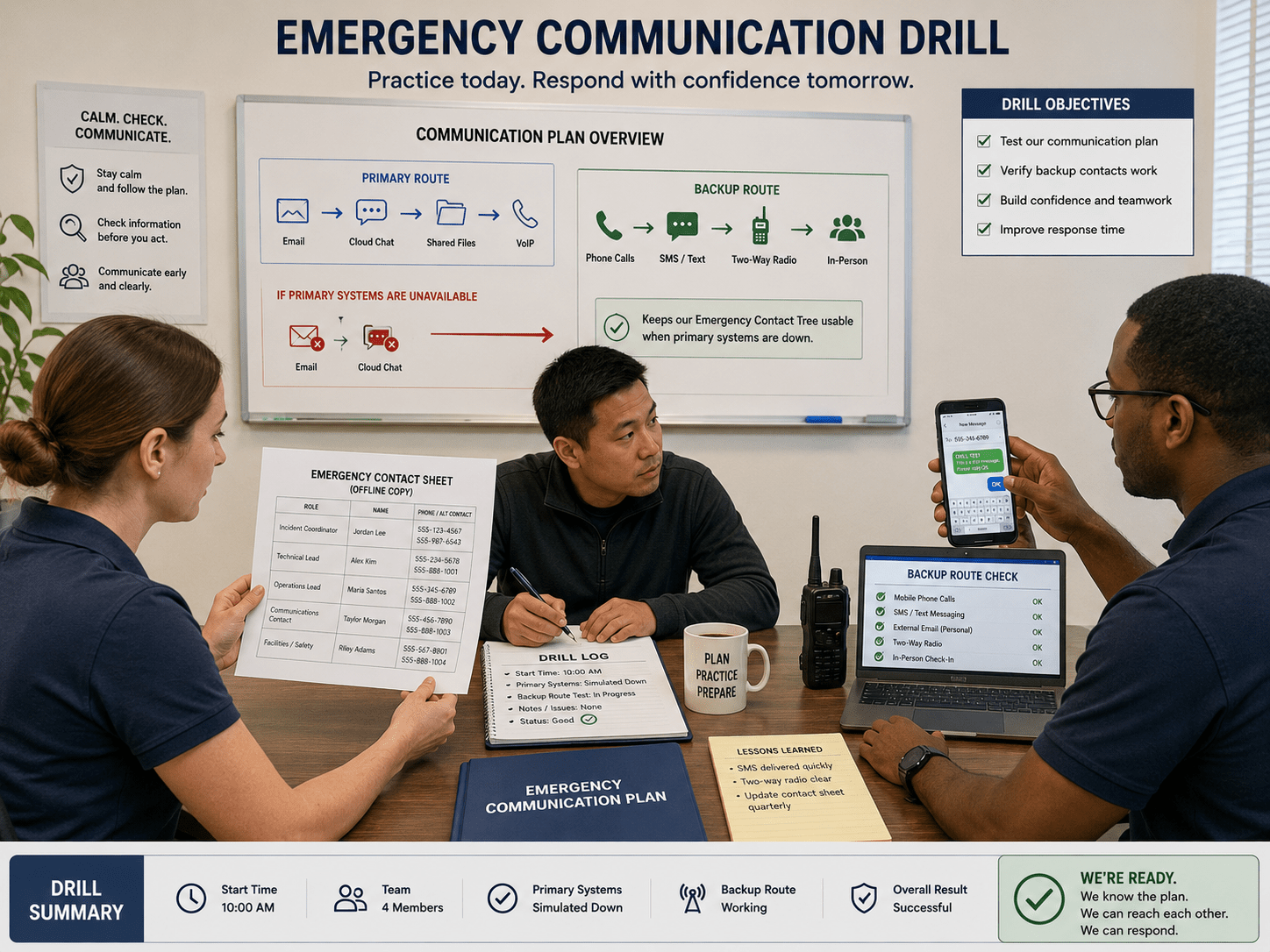
Test the Tree Without Creating a Real Incident
A drill should not involve:
- Disabling real accounts
- Calling emergency services unnecessarily
- Locking employees out of systems
- Sending false fraud reports
- Contacting customers with fake alerts
Keep the exercise clearly fictional.
You are testing communication.
You are not simulating an attack against production systems.
A discussion-based exercise is enough to expose many coordination problems.
Ask Five Questions During the Drill
After presenting the scenario, ask:
1. Who notices the problem first?
There should be a clear reporting route.
2. Who receives the first call?
The employee should not have to guess.
3. What happens if that person does not answer?
The backup should be obvious.
4. Which communication method do we use?
The team should know the alternative channel.
5. What information should be recorded?
Keep a basic incident note with time, observations, contacts, and next steps.
If people argue about these questions during the drill, that is valuable information.
You have found a gap before a real incident finds it for you.
Record the Outcome of Every Drill
After the exercise, write down:
What worked
- Contact numbers were current
- Staff knew the first contact
- Backup route worked
What failed
- IT contact had changed
- Backup person did not know the vendor
- Physical copy was outdated
What changes are needed
- Replace old number
- Add second technical contact
- Update printed packet
Then assign someone to make the changes.
A drill that produces observations but no corrections becomes another document nobody trusts.
Review Contact Information on a Schedule
People change jobs.
Companies change phone systems.
Vendors change support portals.
Insurance policies renew.
Banking contacts move.
Therefore, emergency contact information should not be treated as permanent.
A simple review schedule might be:
Monthly
Confirm the highest-priority contacts.
Quarterly
Review the full emergency contact tree.
After a major business change
Update immediately.
Examples:
- New IT provider
- New bank
- Office relocation
- New cloud platform
- New insurance provider
- Key employee departure
- Major organizational change
The exact schedule matters less than having an owner.
Give the Contact Tree an Owner
Someone should be responsible for maintaining it.
That could be:
- Owner
- Operations manager
- Office manager
- IT lead
- Security lead
Write the owner directly on the document.
For example:
Emergency Contact Tree Owner: Operations Manager
Review: First Monday of each quarter
Now the document has accountability.
Without an owner, everyone assumes someone else will update it.
Use Version Numbers
A simple version number prevents confusion.
For example:
Emergency Contact Tree — Version 2.3
Last reviewed: September 2026
Next review: December 2026
If multiple copies exist, versioning helps people determine which one is current.
This is particularly useful if one physical copy is stored at the office and another is kept by the owner.
A Fictional Example: The Locked-Out Studio
Consider a fictional company called Northbridge Studio.
It has seven employees.
Its daily operations depend heavily on:
- Business email
- Cloud storage
- Project management
- Online accounting
- Client communication
One Monday morning, the operations manager notices that several team members cannot access the company email system.
Nobody knows immediately whether this is:
- A service outage
- An account problem
- A configuration mistake
- A security incident
The company does not try to diagnose everything at once.
The employee checks the physical emergency packet.
The first page says:
1. Incident Coordinator — Owner
2. Backup Coordinator — Operations Manager
3. Technical Contact — Managed IT Provider
The operations manager calls the IT provider using the number printed on the sheet.
The provider confirms that the situation requires investigation.
The team switches to the designated backup communication channel.
No passwords were printed.
No secret recovery codes were stored in the packet.
The emergency document simply helped the company answer the first question:
“Who do we contact?”
That reduced the initial confusion.
This example is fictional and is included to demonstrate the process, not to claim a real incident or business outcome.
What Should Never Depend on One Person?
Review these areas:
Domain management
Who can contact the registrar?
Website hosting
Who knows the provider?
Business email
Who can escalate an outage or compromise?
Banking
Who knows the correct fraud contact?
Insurance
Who knows how to report an incident?
Legal support
Who knows which adviser to call?
IT
Who can authorize urgent technical action?
Customer communication
Who decides what customers are told?
If the answer to several questions is the same person, you may have a concentration risk.
Keep Customer Communication Separate
A cyber incident can create pressure to communicate quickly.
That does not mean everyone should start sending messages.
Designate one person or role for customer-facing communication.
The contact tree should identify:
Who drafts
Who reviews
Who approves
Who sends
This prevents contradictory messages.
It also protects employees from feeling that they personally need to explain an uncertain situation to customers.
The technical team can investigate.
The designated communication owner can coordinate approved messaging.
Create a Physical Meeting Point Only If Useful
Some businesses may need a physical fallback.
For example:
“If digital communication is unavailable for more than two hours, management meets at the secondary office location.”
That may be appropriate for a company where staff work nearby.
It may be useless for a fully distributed team.
Do not add a physical meeting point because emergency plans are supposed to contain one.
Add it only if it solves a real communication problem.
Keep the Emergency Packet Boring
This is a good sign.
The packet should not look impressive.
It should not contain:
- Huge diagrams
- Long security explanations
- Dozens of pages
- Technical jargon
- Passwords
- Unnecessary policy language
It should answer practical questions:
Who do I call?
Who is the backup?
What channel should I use?
What information should I record?
Who makes the decision?
What should I avoid doing?
Boring systems are often easier to use under pressure.
Common Mistakes When Building an Emergency Contact Tree
Keeping Everything in Email
If email is unavailable, the contact system disappears with it.
Printing Passwords Alongside Contacts
Contact information and credentials should be handled differently.
Listing Too Many People
A huge directory creates uncertainty instead of reducing it.
Having No Backup Contact
One unavailable person can stop the entire process.
Using Numbers Nobody Has Tested
A number that looks correct on paper may no longer work.
Failing to Define Responsibilities
Knowing whom to call is useful. Knowing why you are calling them is better.
Using the Same Communication Channel Twice
A backup route should not depend entirely on the primary system.
Never Running a Drill
A document can look excellent and still fail in practice.
Letting Employees Diagnose Incidents
Staff should report suspicious situations without needing to prove what happened.
Forgetting Vendors
Important external relationships are part of the emergency communication chain.
Leaving the Document Unowned
If nobody maintains it, the information will eventually become stale.
Making the Plan Too Complicated
The first page should be usable within seconds.
A One-Page Emergency Contact Template
Your small business can start with a simple structure like this.
EMERGENCY CONTACT TREE
Document Owner: __________________
Version: __________________
Last Reviewed: __________________
FIRST CONTACT
Incident Coordinator:
Name: __________________
Phone: __________________
Backup: __________________
TECHNICAL
IT Provider:
Name: __________________
Phone: __________________
Backup: __________________
FINANCE
Bank/Fraud Contact:
Name or department: __________________
Phone: __________________
Backup: __________________
LEGAL / INSURANCE
Legal Contact:
Name: __________________
Phone: __________________
Insurance Contact:
Name: __________________
Phone: __________________
BACKUP COMMUNICATION
Primary emergency channel: __________________
Secondary emergency channel: __________________
IF EMAIL IS UNAVAILABLE
- Contact Incident Coordinator.
- Use the designated backup communication method.
- Do not use the potentially affected account for sensitive coordination until advised.
- Record the time and major observations.
- Follow instructions from the designated response lead.
This is enough to start.
You can expand it later based on your business.
Build a “Minimum Information” Incident Note
When someone calls the emergency contact, they should be able to provide a few basic facts.
Use:
What happened?
When did you notice it?
Which system or account is affected?
Who noticed it?
What has already been done?
Is business activity currently stopped?
That is usually more useful than an employee trying to explain a technical theory.
For example:
“At 9:20 AM, three employees could not access company email. No passwords were changed by staff. We have not clicked the suspicious reset link. The owner has been notified.”
That gives the technical contact useful context.
Make the Emergency Tree Useful for More Than Cyber Incidents
The same contact structure can support other disruptions.
For example:
Internet outage
Contact ISP and internal coordinator.
Office access problem
Contact building management and operations lead.
Payment-system outage
Contact finance lead and payment provider.
Website outage
Contact technical provider and hosting provider.
Lost company device
Contact owner, IT provider, and relevant account administrator.
The tree does not have to be exclusively cybersecurity-focused.
Cybersecurity is simply one reason to build it.
The Monthly Five-Minute Review
Once the system exists, maintenance can be simple.
Ask five questions:
- Does every primary contact still work?
- Does every critical role have a backup?
- Is the backup communication method still available?
- Have any vendors or providers changed?
- Could an employee use the first page without asking for help?
If the answer is yes to all five, the contact tree is probably still usable.
If not, update it.
Frequently Asked Questions
What is a small business emergency contact tree?
It is a structured list of internal and external contacts arranged by responsibility and escalation order so a business can coordinate during an outage, cyber incident, or other disruption.
Why should emergency contacts be stored offline?
Because the systems normally used to access contact information may themselves become unavailable or unsafe during an incident.
Should the contact tree contain passwords?
No. The contact tree should identify people, roles, phone numbers, communication methods, and responsibilities. Sensitive credentials should remain in an appropriate secure credential-management system.
How many people should be on the first page?
Keep the first level small. The person responsible for coordination, their backup, technical support, finance support, and another critical escalation contact may be enough for a small business.
What if my business has no IT department?
List the external IT provider, cybersecurity specialist, hosting provider, or other person responsible for technical support. If nobody currently fills that role, identify who should be contacted when technical escalation is needed.
Should freelancers have an emergency contact tree?
Yes. A solo operator can create a smaller version containing their hosting provider, domain registrar, bank, insurance provider, accountant, legal contact, and one trusted backup person.
How often should I update the contact tree?
Review critical contacts regularly and update the document whenever a major vendor, employee, bank, insurer, or technical provider changes. A quarterly full review is a practical starting point.
What is the best backup communication method?
There is no universal answer. Choose a method that remains accessible if your primary business email, chat, or cloud tools become unavailable.
Should employees have physical copies?
Authorized employees who may need to coordinate an incident can have controlled access to a physical copy. Keep sensitive credentials out of the document and protect the physical copies from unauthorized access.
How do I know whether the contact tree actually works?
Run a small discussion-based drill. Give the team a fictional scenario and ask someone to find the first contact without using company email or cloud storage. Test the backup path as well.
Does an emergency contact tree replace an incident-response plan?
No. It is one supporting component. A broader incident-response plan may define detection, containment, recovery, communication, documentation, and other responsibilities.
Final Thoughts
A crisis can expose a strange weakness in otherwise organized businesses.
The company may have:
- Good software
- Cloud backups
- Security tools
- Password managers
- Email protection
- Written policies
And yet someone can still ask:
“Who are we supposed to call?”
That question should have an easy answer.
An emergency contact tree does not stop a cyber incident.
It does something more basic.
It keeps communication possible when normal communication becomes unreliable.
The strongest version is not complicated.
It has:
- A clear first contact
- A backup person
- A technical route
- A financial route
- An external support route
- Two communication methods
- A controlled offline copy
- Clear responsibilities
- No unnecessary credentials
- A tested process
The real test is not whether the document looks professional.
The real test is whether someone can use it when they are tired, uncertain, and unable to open the company’s normal systems.
If they can look at the first page and immediately know:
who to call, why to call them, what backup to use, and what information to provide,
then the contact tree is doing its job.
Do not wait for an incident to discover that your emergency communication plan lives inside the system that just stopped working.
Build the outside-the-inbox route first.
Then test it while everything is still normal.