Small Business Payment Verification: A Practical Guide
- by Muhammad Raza
- 0 Comments
- 15 minutes read
- 41 Views
A small business payment verification process gives your team a repeatable way to check invoices and payment changes before money is released.
Instead of deciding whether an email “looks legitimate,” the business identifies what changed, verifies the request through a trusted channel, records the confirmation, and applies the required approval.
This guide shows how to build a practical payment-verification rule that helps prevent invoice fraud, fake vendor changes, and rushed or unauthorized transfers.
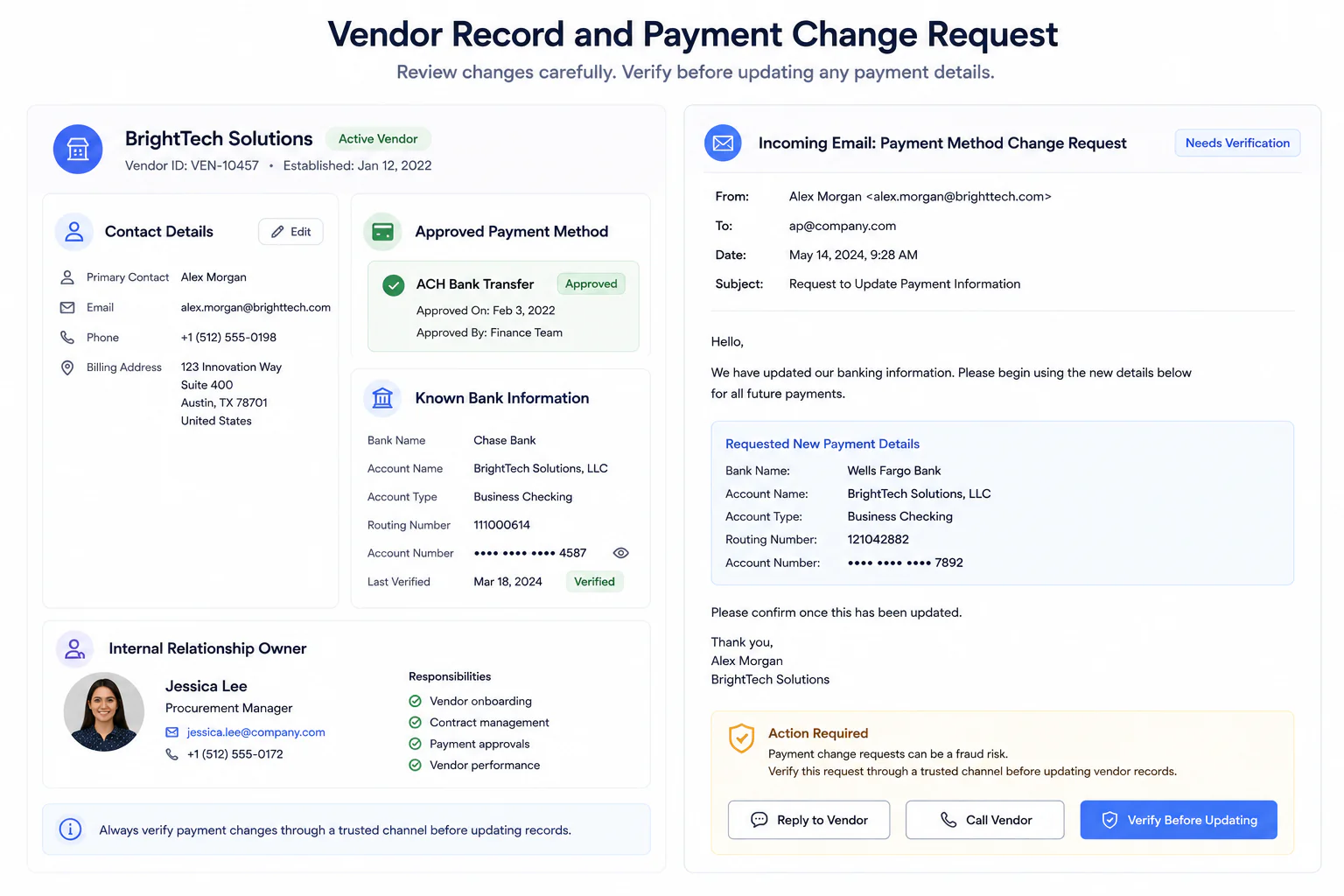
Use a Four-Question Payment Test
When a payment instruction changes, the employee handling it can work through four questions.
Question 1: What Exactly Changed?
Do not treat the entire email as one object.
Identify the material change.
Was it:
- Account number?
- Payee?
- Amount?
- Currency?
- Payment destination?
- Contact person?
- Payment method?
- Timing?
This matters because a long email can distract attention from one important alteration.
Write the change down clearly.
For example:
Existing supplier requested payment to a different beneficiary account.
Now the security decision is easier to see.
Question 2: Who Introduced the Change?
Identify the source.
Was the change requested by:
- Supplier contact?
- Senior manager?
- New employee?
- Accounts department?
- External accountant?
- Unknown sender?
Then compare that identity with the business’s existing records.
Do not assume that a familiar display name proves identity.
You are documenting who is claiming authority to make the change.
Question 3: Can We Verify It Outside This Message?
This is where the Payment Change Gate does its real work.
Contact the known supplier through an independent route.
A simple verification conversation might be:
“We received a request to update the payment destination for your invoices. Before changing our records, I need to confirm the request through our existing contact process.”
Then confirm the material change.
Do not ask a vague question such as:
“Did you send us an email?”
A person may say yes because they sent several emails that day.
Ask about the actual instruction.
Question 4: Who Approves the Change Internally?
One employee should not necessarily be responsible for:
- Receiving the change
- Editing payment information
- Releasing the money
For very small businesses, complete separation may not always be practical.
But even a lightweight second review can help.
For example:
- Employee verifies supplier
- Owner approves account change
Or:
- Operations person confirms details
- Bookkeeper releases payment
The second person should review the actual change, not merely click an approval button without context.
Create a “No Same-Thread Verification” Rule
This rule is easy to remember:
Do not verify a payment change by replying inside the conversation that introduced it.
Why?
Because if the mailbox or thread is compromised, the person answering may be the same attacker who requested the change.
A reply such as:
“Can you confirm these new bank details?”
may simply produce:
“Yes, confirmed.”
Nothing meaningful has been verified.
A separate contact path is what gives the check value.
Treat Urgency as a Reason to Slow Down
Payment fraud often benefits from speed.
A message may say:
- Payment must be sent today
- Account closes this afternoon
- Supplier will suspend service
- CEO needs the transfer immediately
- Invoice is already overdue
- Transaction must remain confidential
Some urgent requests are legitimate.
The problem is not urgency itself.
The problem is allowing urgency to remove verification.
A good internal rule is:
Urgency may change the order of work, but it does not remove the verification step.
If the request is genuine, the other party should generally understand why a business verifies unusual payment instructions.
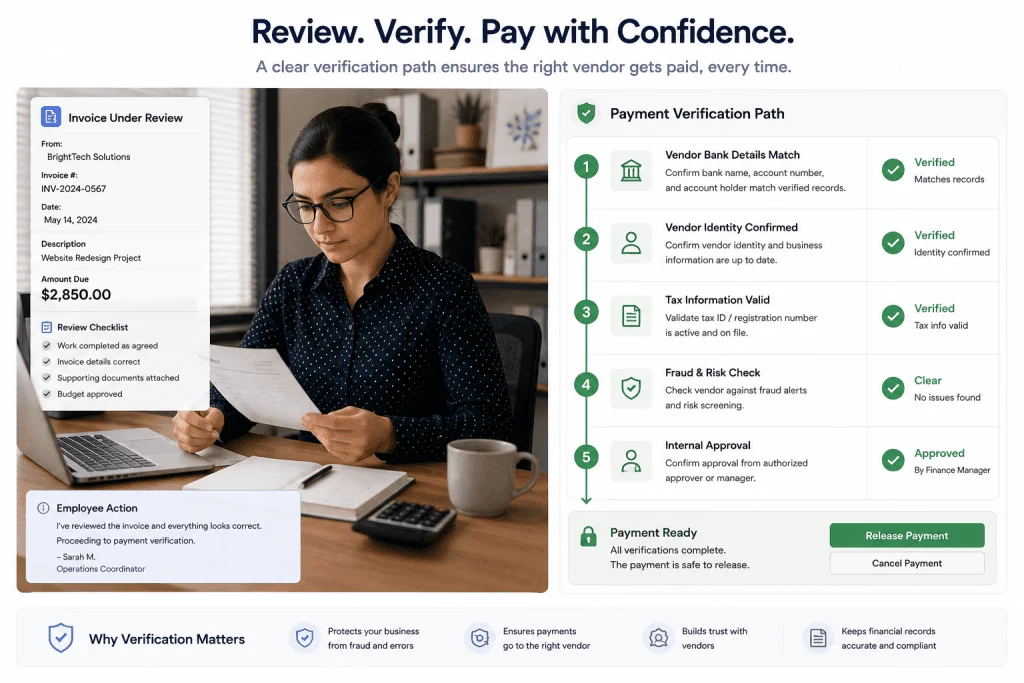
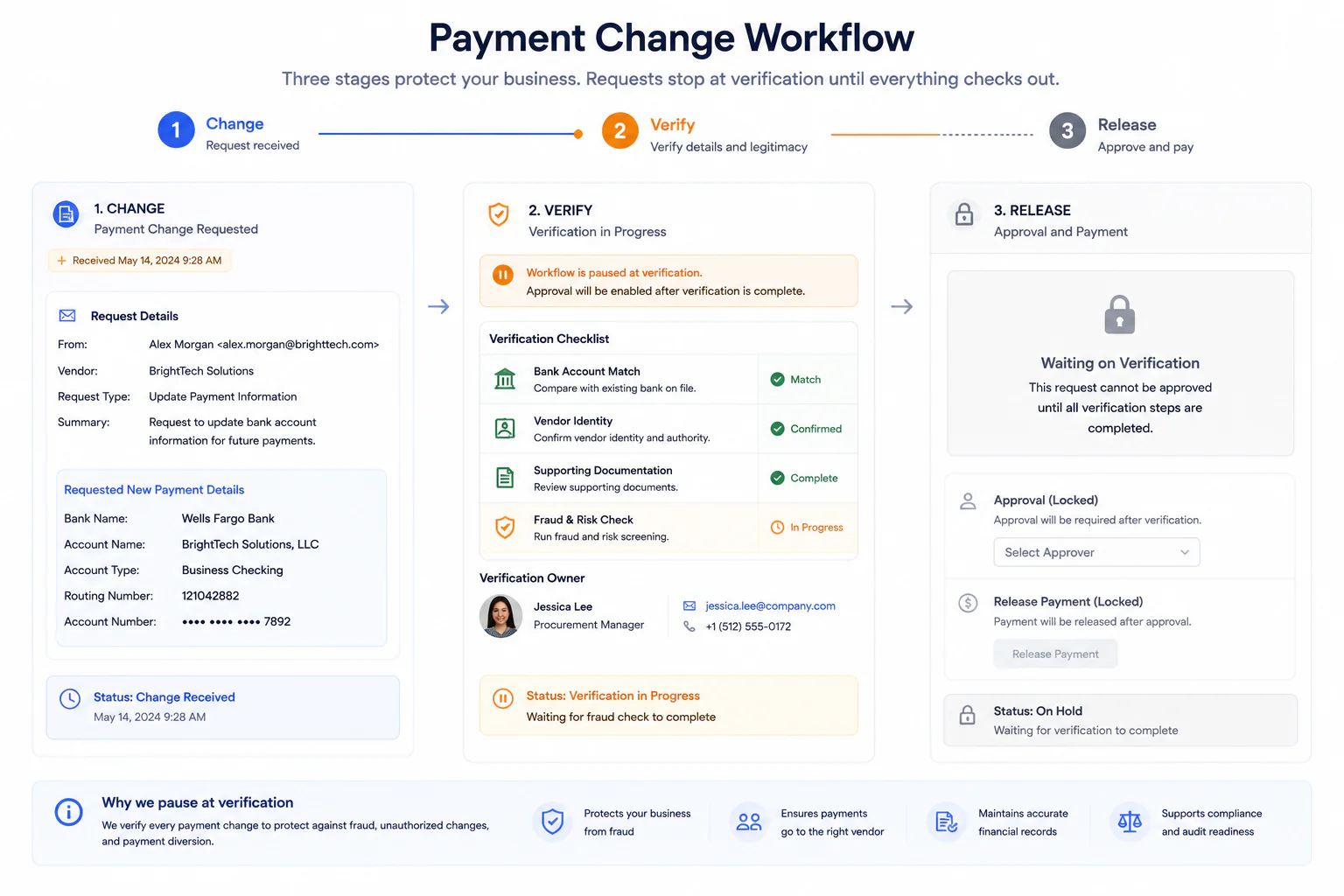
Use the “Change, Verify, Release” Sequence
The entire process can be reduced to three stages.
Stage 1: Change
A material payment detail changes.
The transaction pauses.
Stage 2: Verify
The business independently confirms the change using trusted information.
Stage 3: Release
Only after verification and any required approval does the payment continue.
This sequence is deliberately simple.
Security procedures often fail when employees cannot remember them during routine work.
“Change, Verify, Release” gives the team an easy mental model.
Document the Verification
A payment check should leave a small record.
You do not need to write a report.
Record enough information to show what happened.
For example:
Vendor: Northline Packaging
Requested change: New beneficiary account
Request received: September 8
Verified through: Existing supplier phone number
Verified with: Accounts manager
Verified by: Maria
Second approval: Daniel
Status: Approved
That record can help later if:
- Someone questions the payment
- The vendor reports a problem
- The company reviews its process
- Staff members change
- Auditors or accountants need context
It also encourages employees to actually complete the verification step rather than assuming somebody else handled it.
Avoid Using Security Questions That Are Easy to Guess
Some businesses try to verify vendors by asking questions such as:
“What is our company name?”
or:
“Who is your normal contact here?”
That information may already appear in emails, invoices, websites, or stolen correspondence.
The strongest verification is not a trivia test.
It is contact through a trusted channel combined with confirmation of the actual payment change.
The objective is to authenticate the instruction, not to see whether the caller knows public details.
Make New Vendors a Separate Workflow
A new vendor creates a different problem.
There may be no previous payment record to compare against.
In that case, create an onboarding process before the first payment.
Collect and verify:
- Business identity
- Primary contact
- Payment details
- Contract or purchase documentation
- Internal owner of the vendor relationship
The key is to establish a trusted baseline.
Once that baseline exists, later changes can be compared against it.
Without a baseline, every future verification becomes harder.
Don’t Let Email Rewrite Your Accounting Records Automatically
Convenience can create hidden risk.
Suppose an employee receives an email saying:
“Please update our bank account.”
They immediately replace the old details in the accounting system.
Even if the payment is not sent that day, the fraudulent information may now sit inside a trusted internal system.
Two weeks later, another employee processes the invoice and sees nothing unusual.
The dangerous instruction has become normalized.
A safer workflow is:
- Mark the change as pending.
- Verify it independently.
- Approve it internally.
- Update the official vendor record.
- Process future payments using the verified record.
Do not allow an unverified email to become your new source of truth.
Keep Old Payment Details During Verification
When a supplier requests a change, do not immediately erase the previous record.
Keep enough history to understand:
- What changed
- When it changed
- Who verified it
- Which details were replaced
This history can be extremely useful if confusion appears later.
It also prevents the business from losing the last known verified information before the new details have been confirmed.
Create a Rule for Unexpected Invoices
Not every fraudulent invoice changes bank details.
Some simply request payment for something the business never ordered.
Create a separate check for invoices that do not match an expected purchase, contract, subscription, or service.
Ask:
- Who ordered this?
- Which department owns the purchase?
- Is there an existing agreement?
- Does the vendor exist in our records?
- Is the amount expected?
- Has this service actually been delivered?
The purpose is not to turn every small invoice into an investigation.
It is to prevent the payment process from assuming that an invoice must be legitimate merely because it looks professionally formatted.
Separate Invoice Approval From Payment-Destination Approval
These are two different decisions.
Decision A
Do we actually owe this invoice?
Decision B
Are we sending the money to the correct destination?
A valid invoice can still contain manipulated payment instructions.
Likewise, correct bank details do not prove that an unexpected invoice is legitimate.
Treat both questions separately.
That small change in thinking can make the payment process much more disciplined.
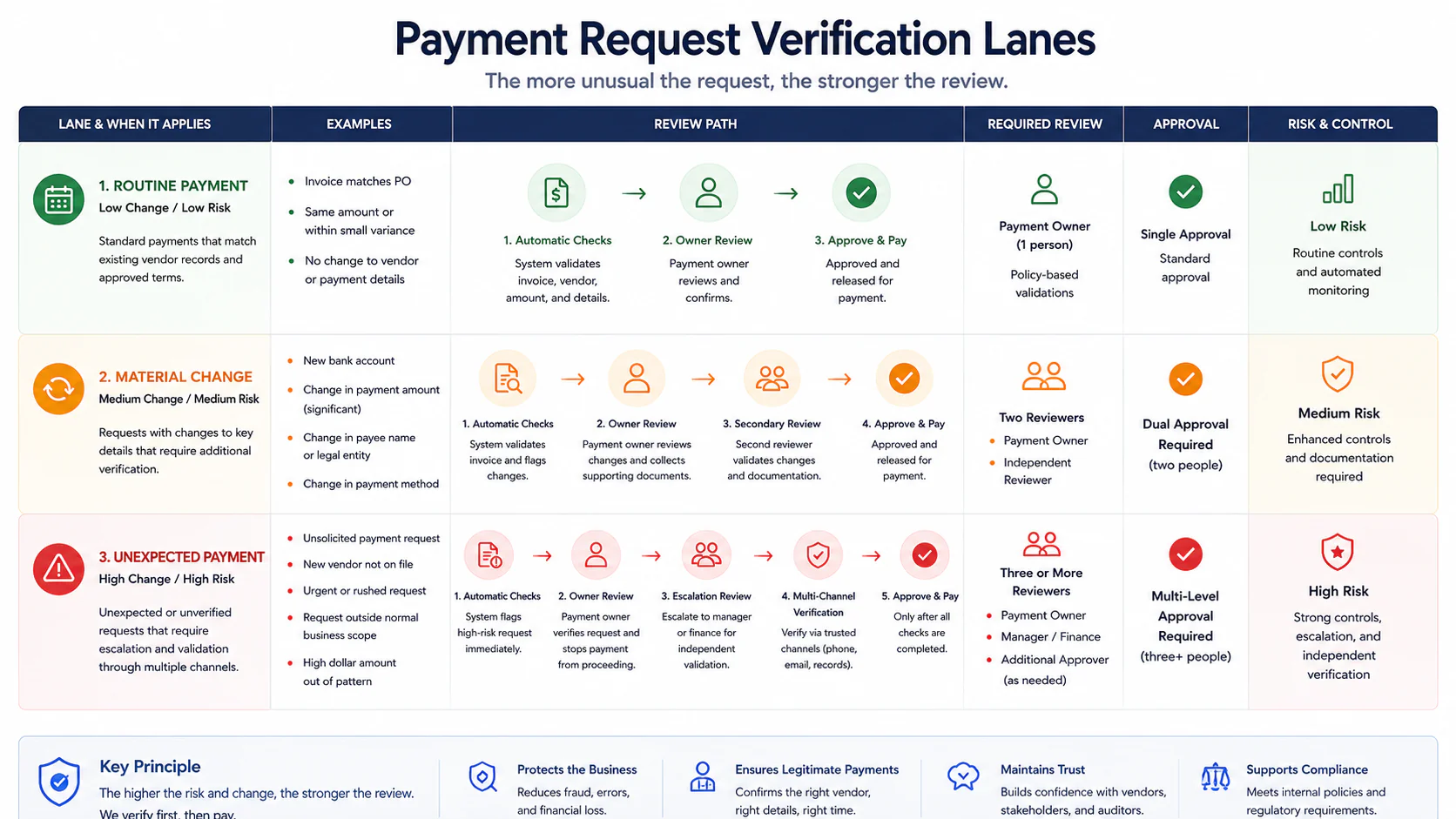
Use Different Rules for Different Levels of Change
A small business can make verification practical by categorizing events.
Routine Payment
Same vendor, expected invoice, unchanged verified destination.
Follow the normal payment workflow.
Material Change
Known vendor but bank details, beneficiary, payment method, or important contact information changes.
Activate independent verification.
Unexpected Payment
New vendor, unusual amount, unexpected invoice, unusual destination, or request outside normal operations.
Require verification plus additional internal review.
This prevents the business from treating every transaction as equally suspicious while still protecting high-risk changes.
Create an Internal Escalation Phrase
Employees sometimes process suspicious instructions because they do not want to appear difficult.
Give staff a standard phrase they can use:
“This request changes our stored payment instructions, so it needs our verification process before we can release the payment.”
That phrase does several things.
It removes personal confrontation.
The employee is not accusing the supplier of fraud.
They are following a company process.
It also makes the rule easier to enforce consistently.
Train People on the Process, Not Just on Warning Signs
Security awareness often focuses on red flags:
- Strange spelling
- Odd attachments
- Suspicious links
- Urgent language
- Unusual sender addresses
These signs can be useful.
But they are not a complete defence.
A polished email may contain none of them.
Train employees on what they should do when financial instructions change.
For example:
“Any new payment destination must be confirmed using the stored supplier contact before we edit the vendor record.”
That instruction is actionable.
Employees do not need to become email-forensics experts.
They need to know when the workflow changes.
Small Teams Should Decide Who Can Change Payment Details
In many small businesses, permissions grow informally.
Someone joins the company.
They need access to accounting.
Later, they begin managing vendors.
Eventually several people can edit payment details, but nobody has reviewed whether they still need that access.
Create a simple list:
- Who can add a vendor?
- Who can change vendor payment information?
- Who can approve those changes?
- Who can release payments?
The answer may involve the same person in a tiny company.
That is sometimes unavoidable.
But defining the responsibility is still better than leaving it unclear.
Use Multi-Factor Authentication on Business Email
Payment verification is a process control.
Account security still matters.
Business email accounts should use multi-factor authentication where available.
The FBI recommends two-factor or multi-factor authentication for accounts that support it.
MFA does not eliminate payment fraud.
It is one layer.
The payment-verification rule remains important because businesses may still receive convincing impersonation messages from outside their own systems.
Think in layers:
Account protection + payment process + human verification
not one magic defence.
Keep Business Email Domains Properly Configured
Companies using their own email domain should also pay attention to email authentication.
Technologies such as SPF, DKIM, and DMARC can help receiving systems evaluate whether messages claiming to come from a domain are authorized.
The FTC has specifically recommended email-authentication measures such as SPF and related controls for small businesses using their own domains.
These controls are useful, but they do not replace payment verification.
A genuine supplier mailbox itself could be compromised.
Again, the safest process does not depend on one signal.
What to Do When Verification Fails
Suppose the vendor says:
“We did not request any banking change.”
Stop the payment.
Do not continue arguing inside the suspicious email thread.
Preserve the message and relevant records.
Notify the appropriate people inside the business.
Contact the real vendor through the verified channel.
If credentials may have been exposed, secure the affected accounts.
If money has already been transferred, contact the financial institution as quickly as possible and follow the appropriate fraud-reporting process.
The important point is speed after the fraud is identified.
Before sending money, urgency should not bypass verification.
After discovering a fraudulent transfer, rapid escalation can matter.
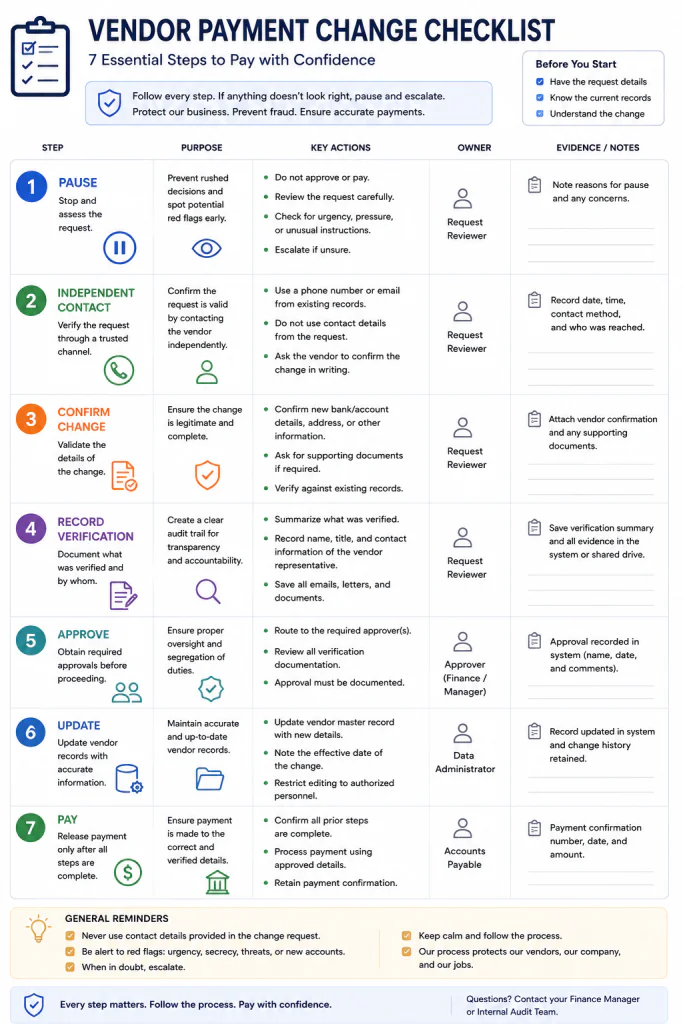
Create a One-Page Payment Rule
Your final procedure does not need to be long.
A small business could reduce it to something like this:
Payment Verification Rule
1. Routine payments
Use verified vendor information already stored in the system.
2. Any change to payment destination
Pause the transaction.
3. Verify independently
Contact the vendor using information that existed before the change request.
4. Record the confirmation
Note who confirmed the change, when, and how.
5. Obtain internal approval
Use the required second review for material changes.
6. Update the vendor record
Only after verification.
7. Release the payment
Use the newly verified details.
That is short enough for staff to follow.
Run a Simple Payment-Change Drill
A written procedure is useful.
A procedure people remember is better.
Create a fictional scenario.
For example:
A long-term supplier emails on Friday afternoon saying its bank account changed and asks for an overdue $8,400 payment before the end of the day.
Ask the person who normally processes invoices:
What would you do next?
Their answer will reveal whether the procedure actually makes sense.
You may discover that:
- The vendor phone number is not stored anywhere
- Nobody knows who can approve bank changes
- The accounting system overwrites old information
- The business has no escalation process
- Only one employee understands the vendor relationship
That is useful.
The drill exposes process gaps without requiring a real incident.
A Fictional Example: The Friday Invoice
Consider a fictional small furniture company called Cedar & Row.
The company buys packaging from the same supplier every month.
On Friday afternoon, its bookkeeper receives an invoice for an expected order.
The amount looks normal.
A note at the bottom says:
“Our bank details have changed. Please use the attached instructions for all future transfers.”
Without a verification policy, the request may look routine.
With the Payment Change Gate, the bookkeeper follows a different path.
First, she marks the payment as pending.
Second, she checks the existing vendor record rather than the attachment.
Third, she calls the supplier using the number already stored in the company’s records.
The supplier says no banking change was requested.
The company does not send the transfer.
Notice what protected the business in this example.
It was not superior ability to detect a fake invoice.
The bookkeeper did not need to identify the attack method.
She only needed to recognize that payment information changed.
The process did the rest.
This example is fictional and is included only to demonstrate the workflow.
What a Good Payment Process Should Make Difficult
Security procedures are often described by what employees should do.
Another way to evaluate them is to ask what the system makes difficult.
A good payment process should make it difficult for one email to:
- Introduce a new bank account
- Replace the trusted vendor record
- Approve its own change
- Create urgency
- Release the money
That is the design goal.
You are reducing the authority of any single message.
Payment Verification for Freelancers and Solo Businesses
This process is not only for companies with finance teams.
A freelancer can receive:
- Fake software invoices
- Changed subcontractor payment details
- Impersonated client refund requests
- Fake domain-renewal bills
- Suspicious service-renewal invoices
A solo operator may not have a second employee available for approval.
In that case, independent verification becomes even more important.
Create friction intentionally.
For material changes:
- Do not pay directly from the email.
- Open your existing records.
- Contact the person independently.
- Confirm the change.
- Record what you verified.
- Return to the payment only after the check is complete.
A five-minute interruption can be inconvenient.
Sending money to the wrong destination is worse.
Common Payment Verification Mistakes
Calling the Number in the Suspicious Email
The verification source should be independent of the request.
Asking Only “Did You Send This?”
Confirm the actual payment change.
Replacing Old Details Before Verification
Keep the existing trusted record until the new information is approved.
Letting Urgency Override the Rule
Urgency should not eliminate verification.
Treating a Familiar Email Thread as Proof
Existing conversations can still contain fraudulent instructions.
Giving Too Many Employees Editing Permissions
Only people who need to change vendor information should have that ability.
Approving the Invoice but Ignoring the Destination
Verify both whether money is owed and where it is being sent.
Building a Procedure Nobody Can Remember
Keep the rule short enough to use.
Assuming Software Removes the Need for Human Checks
Security tools can help, but unusual financial changes still deserve process controls.
Failing to Record Verification
A small verification note creates accountability and useful history.
Frequently Asked Questions
What is payment verification for small businesses?
Payment verification is the process of confirming that an invoice, payment instruction, or change to vendor payment details is legitimate before money is released.
Should every invoice require a phone call?
Not necessarily. A business can distinguish routine payments using previously verified information from material changes such as new bank details or unexpected payment destinations.
What should trigger additional verification?
Changes to bank accounts, beneficiaries, payment methods, unusual amounts, new vendors, unexpected invoices, and requests that bypass established procedures should receive additional review.
Is replying to the vendor’s email enough?
No. When the email itself introduces the payment change, verification should use an independent and previously trusted contact method.
What if the supplier says the payment is urgent?
Follow the same verification process. Urgency can affect how quickly you perform the check, but it should not remove the check.
Should a small business require two people for every payment?
That depends on the size and structure of the business. A second review is particularly useful for new vendors, unusual transfers, or changes to payment destinations.
Can multi-factor authentication prevent invoice fraud?
MFA can reduce the risk of unauthorized account access, but it does not prevent every form of impersonation or fraudulent payment request. It should be combined with payment-verification procedures.
Should old vendor bank details be deleted immediately?
Not before the new details have been independently verified. Keeping a record of previous verified information can also help with later review.
What should I do if a vendor denies requesting a payment change?
Stop the transaction, preserve the suspicious communication, notify the appropriate people, secure any affected accounts, and follow your organization’s incident and fraud-reporting procedures.
Can freelancers use the same process?
Yes. Freelancers and solo businesses can independently verify unusual payment changes using previously known contact information even if they do not have a finance department.
Final Thoughts
Invoice security becomes difficult when the business tries to answer one question:
“Does this email look trustworthy?”
That question puts too much weight on appearance.
A convincing message can still contain a dangerous instruction.
A simpler question is more useful:
“Did anything important about this payment change?”
If the answer is no, follow the normal process.
If the answer is yes, activate the Payment Change Gate.
Pause.
Identify the exact change.
Step outside the incoming message.
Use information that was trusted before the request arrived.
Confirm the change.
Record the verification.
Obtain the required internal approval.
Only then update the vendor record and release the money.
This does not require employees to become fraud investigators.
It gives them a process that remains useful even when a fraudulent request looks professional.
For a small business, that is the point of good security.
Not perfect detection.
Reliable decisions when something important changes.