How to Get Jobs on Upwork in 2026: A Complete Guide for Beginners
- by Muhammad Raza
- 0 Comments
- 18 minutes read
- 49 Views
Getting your first Upwork job can feel harder than doing the actual freelance work.
You create a profile, add your skills, browse dozens of projects, send proposals—and then wait. Some proposals may never be opened. Others might be viewed without producing a reply. Meanwhile, competing freelancers appear to have long work histories, strong reviews, and established client relationships.
That does not mean new freelancers cannot succeed.
The key is understanding that how to get jobs on Upwork in 2026 is less about sending the largest number of proposals and more about positioning yourself clearly, choosing suitable opportunities, proving your ability, and making it easy for the right client to understand why you fit the project.
Upwork itself has also changed. As of May 28, 2026, Specialized Profiles are no longer available. Freelancers now use one primary profile, while Upwork dynamically emphasizes the experience and skills it considers most relevant to a client or opportunity. Your proposals, portfolio, work history, skills, and overall positioning therefore matter more than maintaining multiple versions of your profile.
Connects also play a central role. Freelancers use Connects to submit many proposals and can optionally spend additional Connects on features such as proposal boosting or the Availability Badge. Upwork states that the number of Connects required for a proposal can vary depending on factors such as project size, scope, and marketplace demand.
So sending random applications is not only inefficient—it can cost you resources.
This guide explains a more deliberate approach.
You will learn how to optimize your Upwork profile, choose a profitable niche, build a portfolio without previous Upwork clients, identify better job posts, write proposals that sound like a professional rather than a template, use Connects more strategically, handle interviews, avoid common mistakes, and turn an early project into long-term momentum.
Is It Still Possible to Get Jobs on Upwork in 2026?
Yes, but simply creating an account does not create demand for your services.
Upwork is a marketplace. Clients compare multiple freelancers and decide which candidate appears most likely to solve their problem with the least risk.
As a new freelancer, you may lack Upwork-specific advantages such as:
- Client reviews
- Platform earnings
- Job Success Score
- Repeat contracts
- Talent badges
- Long work history
You therefore need to compete using other signals.
Those include:
- Clear specialization
- Relevant portfolio samples
- Strong communication
- Evidence of expertise outside Upwork
- Specific proposals
- Appropriate pricing
- Fast understanding of the client’s problem
- Professional profile presentation
Your first objective should not be to appear more experienced than you are.
It should be to make your existing ability easy to evaluate.
A client may be willing to hire someone with no Upwork history if the freelancer’s portfolio shows exactly the type of work required and the proposal demonstrates a clear understanding of the job.
Understand How Clients Evaluate Upwork Freelancers
Before improving your profile, think like a buyer.
Suppose a client needs someone to redesign a SaaS landing page.
They do not necessarily want the person with the longest biography.
They want evidence that someone can redesign a SaaS landing page successfully.
The client may look at:
- Your title
- Relevant skills
- Portfolio
- Rate
- Work history
- Reviews
- Proposal
- Availability
- Communication
- Similar past projects
Upwork’s current guidance says that your profile title, overview, and profile picture are among the first things clients see when opening a proposal. Upwork also says profile category, skills, Job Success Score, and client feedback are among the factors used when ranking freelancers.
This creates a simple principle:
Relevance beats generality.
“Experienced freelancer who can do many digital services” is usually less persuasive than:
WordPress Designer for SaaS and Service Businesses
or:
B2B SaaS Content Writer | SEO Blogs & Case Studies
Specificity reduces uncertainty.
Step 1: Choose a Clear Freelance Niche
A common beginner mistake is listing every skill the freelancer has ever learned.
For example:
Web design, graphic design, video editing, SEO, data entry, virtual assistance, WordPress, social media, logo design, AI and writing.
This may feel flexible.
To a client, however, it can feel unfocused.
Clients normally search for someone capable of solving a particular problem.
Start with a service
Ask:
What can I reliably deliver for a paying client?
Examples include:
- WordPress website design
- Shopify product-page design
- SEO article writing
- Short-form video editing
- Email copywriting
- LinkedIn lead generation
- Bookkeeping
- UI/UX design
- React development
- Virtual assistance
- Data analysis
Then narrow by customer or outcome when useful.
Instead of:
Graphic Designer
consider:
Social Media Designer for E-commerce Brands
Instead of:
Writer
consider:
B2B SaaS Content Writer
Instead of:
Web Developer
consider:
WordPress Developer for Small Business Websites
You do not need to remain in that niche forever.
The purpose is to make your first market position easy to understand.
Step 2: Build an Upwork Profile That Sells the Outcome
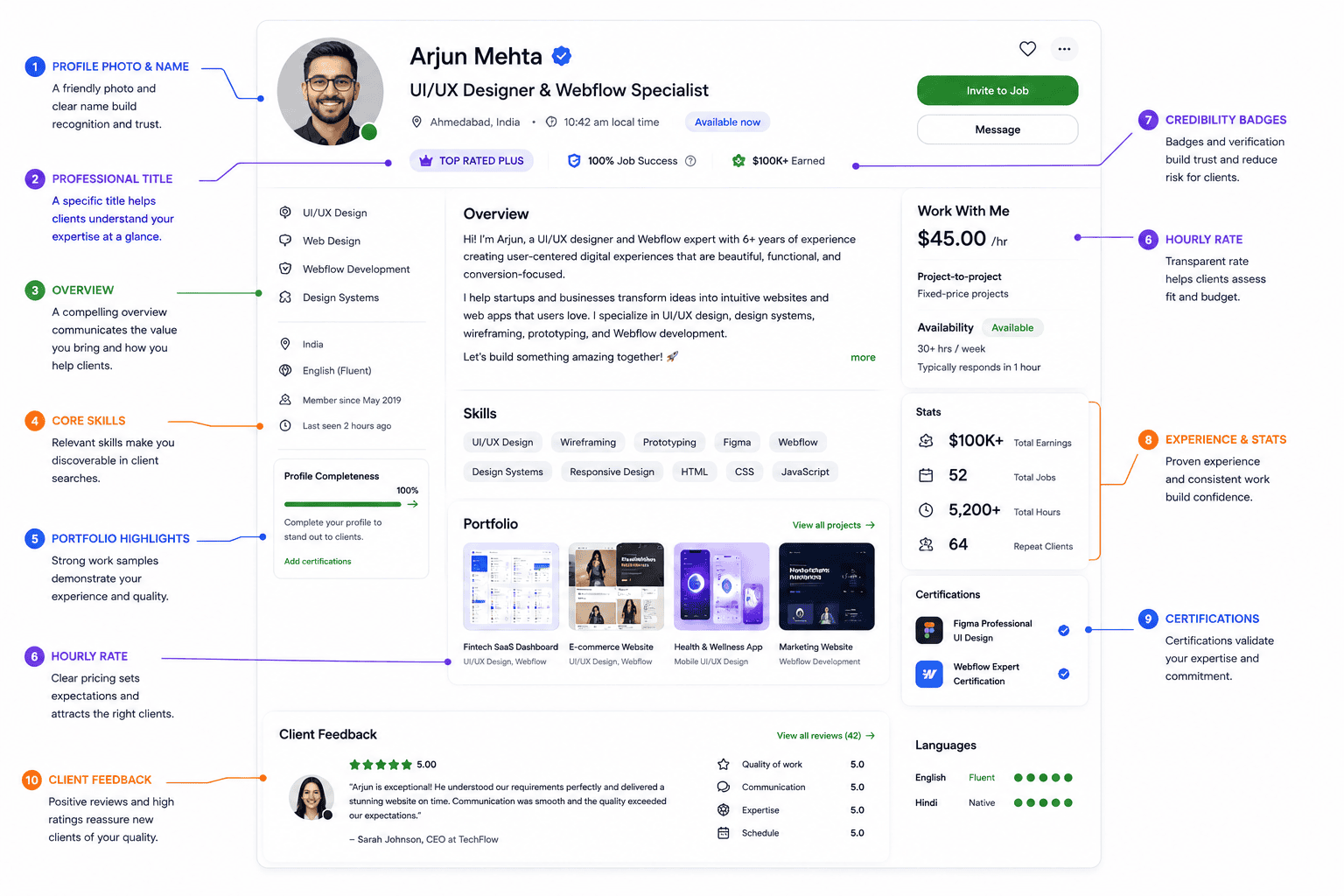
Your profile should not read like a traditional résumé.
A résumé often focuses on your history.
A freelance profile should focus heavily on the client’s future result.
Write a specific profile title
A weak title:
Freelancer | Hard Worker | Digital Expert
A stronger title:
WordPress Elementor Designer | Responsive Business Websites
Another:
SEO Content Writer for SaaS & Technology Brands
The title helps clients quickly determine whether they should continue reading.
Write your overview around the client
Do not begin with several paragraphs about how passionate you are.
Instead, communicate:
- What you do.
- Who you help.
- What type of result you produce.
- What evidence supports your claim.
- What the client should do next.
For example:
I design responsive WordPress websites for service businesses that need a clearer, faster, and more professional online presence. My work focuses on Elementor-based builds, mobile usability, conversion-focused layouts, and clean WordPress implementation.
Then add evidence.
That evidence could include:
- Number of years working in the field
- Relevant qualification
- Client results you can genuinely substantiate
- Previous employment
- Portfolio projects
- Specific technical expertise
Never invent achievements to compensate for a new Upwork account.
Add relevant skills
Use skill tags that accurately describe the service you want clients to hire you for.
Avoid filling your skill section with unrelated abilities merely because Upwork allows multiple tags.
Your profile, portfolio, and applications should reinforce one another.
Important 2026 Change: Specialized Profiles Are Gone
Many older Upwork tutorials recommend creating different Specialized Profiles for different services.
That guidance is outdated.
Upwork discontinued Specialized Profiles on May 28, 2026. According to Upwork, clients now see your primary profile while the platform automatically highlights relevant work and skills according to the client’s search or opportunity.
Upwork says portfolio items, work history, earnings, and reviews from former Specialized Profiles were incorporated into primary profiles. However, specialized titles, overviews, and skills did not automatically transfer.
For new freelancers, the implication is straightforward:
Build one strong, coherent main profile.
If you provide several closely related services, use your portfolio, skills, Project Catalog offerings, and proposals to demonstrate each capability without turning your profile into a random list.
Step 3: Create a Portfolio Before You Have Upwork Clients
One of the biggest misconceptions about freelancing is that you need clients before you can create a portfolio.
You need work samples.
They do not necessarily have to come from Upwork clients.
Suppose you are a web designer with no paid projects.
You could create:
- A concept landing page for a fictional SaaS product
- A redesign of an existing interface clearly labeled as a concept
- A WordPress demo website
- A restaurant homepage concept
- An e-commerce product page
A writer could create:
- An SEO article
- Landing-page copy
- Email sequence
- SaaS case-study sample
- Product description set
A data analyst could build:
- An interactive dashboard
- Sample business report
- Data-cleaning case study
- Visualization project using public data
Make every sample relevant
Do not upload ten unrelated projects just to make the portfolio look larger.
Three excellent projects aligned with the job you want can be more persuasive than fifteen generic pieces.
For each portfolio item, explain:
Problem: What was the objective?
Approach: What did you do?
Deliverable: What did you create?
Skills: Which relevant skills were involved?
If the project is fictional or self-initiated, make that clear.
Do not pretend a concept project was commissioned by a real client.
Step 4: Search for Jobs Strategically
Getting more Upwork jobs does not necessarily require sending more proposals.
It requires sending more appropriate proposals.
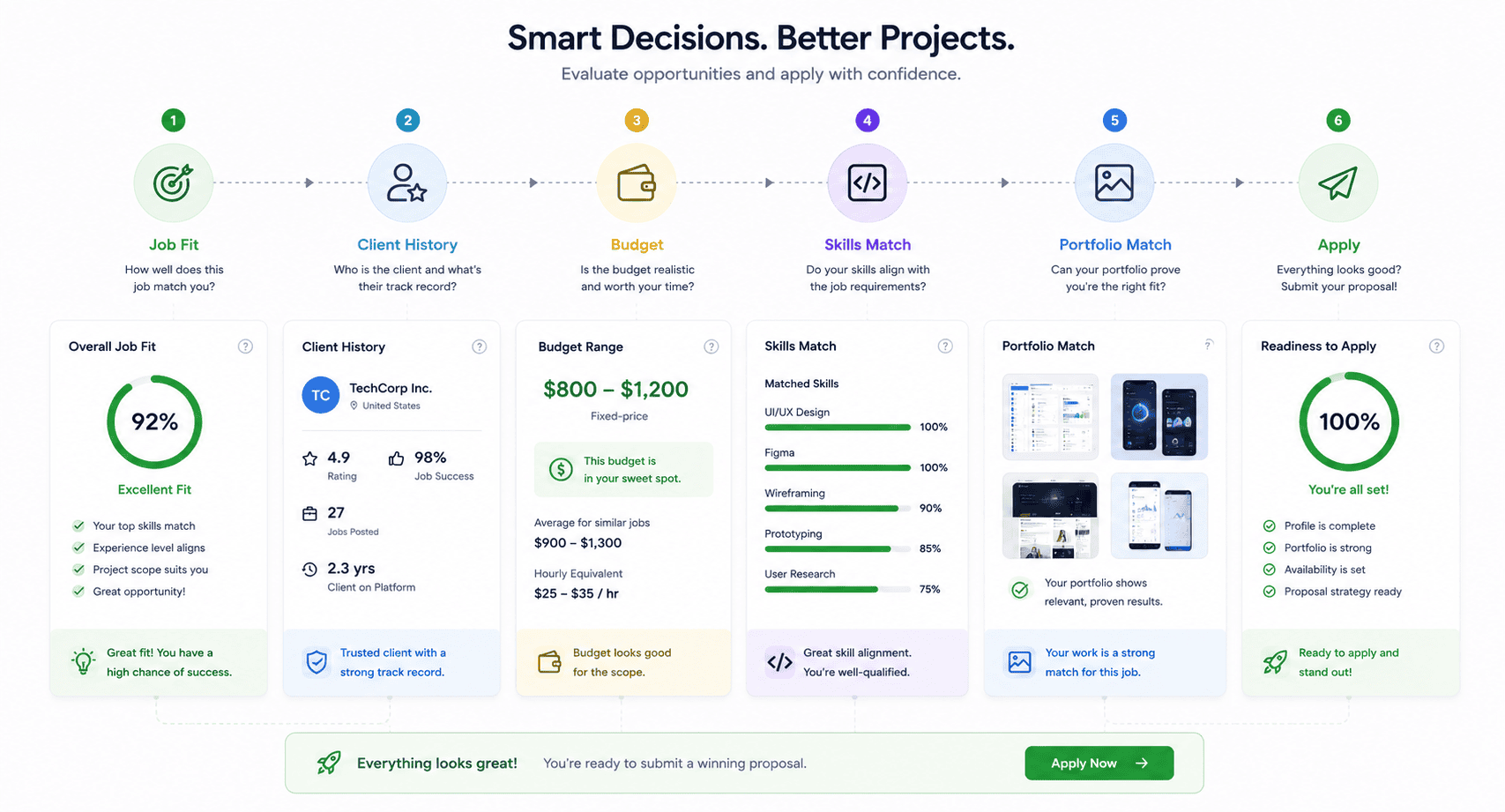
Upwork itself recommends being selective and reviewing factors such as the client’s hire rate, spending history, average hourly rate paid, recent feedback, rating, and other open jobs when evaluating an opportunity.
Before applying, ask:
Does this job match my strongest skill?
Do I have a relevant sample?
Is the client’s budget remotely compatible with my rate?
Is the job description clear enough to understand?
Does the client’s history look reasonable?
Can I explain specifically how I would solve the problem?
If most answers are no, save your Connects.
Look beyond the title
A job titled:
Need Web Designer
could mean almost anything.
Read the entire description.
A client may actually need:
- Figma design only
- Elementor development
- Webflow implementation
- Full branding and development
- Landing-page optimization
- Website maintenance
Apply only when the deliverable matches your capability.
Evaluate the client
Client history can help you make a more informed decision.
Look at:
- Previous freelancer reviews
- Hiring activity
- Amount spent
- Average rates previously paid
- Whether similar projects were completed
- Whether job descriptions are consistently clear
No single metric should automatically decide whether you apply.
A new legitimate client may have no Upwork history.
Use the information collectively.
Step 5: Understand Upwork Connects Before Spending Them
Connects are Upwork’s virtual tokens used for activities including submitting proposals and using certain promotional features.
The required number of Connects varies by job and can change while a posting remains open.
This makes proposal selection a business decision.
Imagine two opportunities.
Job A: Weak match, generic description, poor portfolio alignment.
Job B: Strong match, you have two relevant samples and clearly understand the requirement.
Spending Connects on Job B is generally more rational even if Job A appears easier.
Think in terms of expected value
You do not need to calculate complicated probabilities.
Simply ask:
If a client reads this proposal, do I have a believable chance of becoming one of the strongest candidates?
If not, reconsider the application.
Beginners often burn Connects by applying to every remotely relevant job because they believe quantity eventually guarantees success.
It does not.
A smaller set of carefully chosen applications can provide better information about whether your positioning and proposals work.
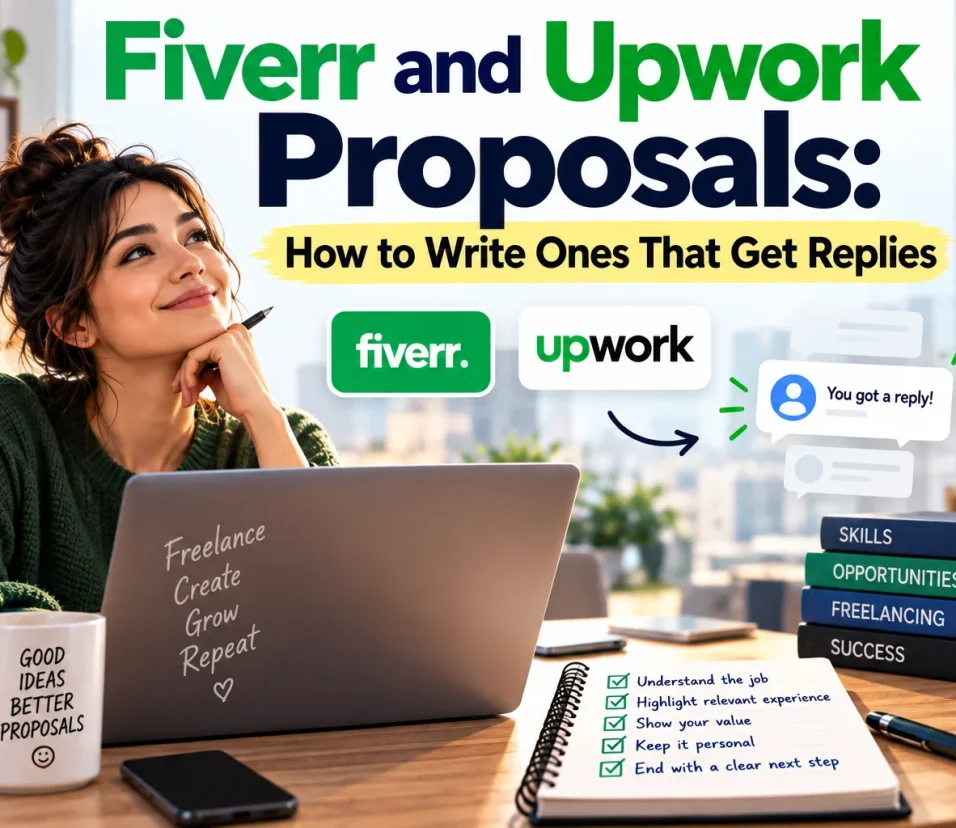
Step 6: Write an Upwork Proposal That Gets to the Point
A proposal is not an autobiography.
The client already has a problem.
Your job is to show that you understand it.
A weak introduction:
Dear Sir/Madam, I hope you are doing well. My name is John and I am a professional freelancer with extensive experience. I read your job post carefully and believe I am the best person for this job.
The client learns almost nothing.
A stronger opening:
Your main issue appears to be that the Elementor layout looks correct on desktop but breaks across tablet and mobile widths. I can rebuild the affected sections using a consistent responsive structure and test the final pages across common breakpoints.
The difference is relevance.
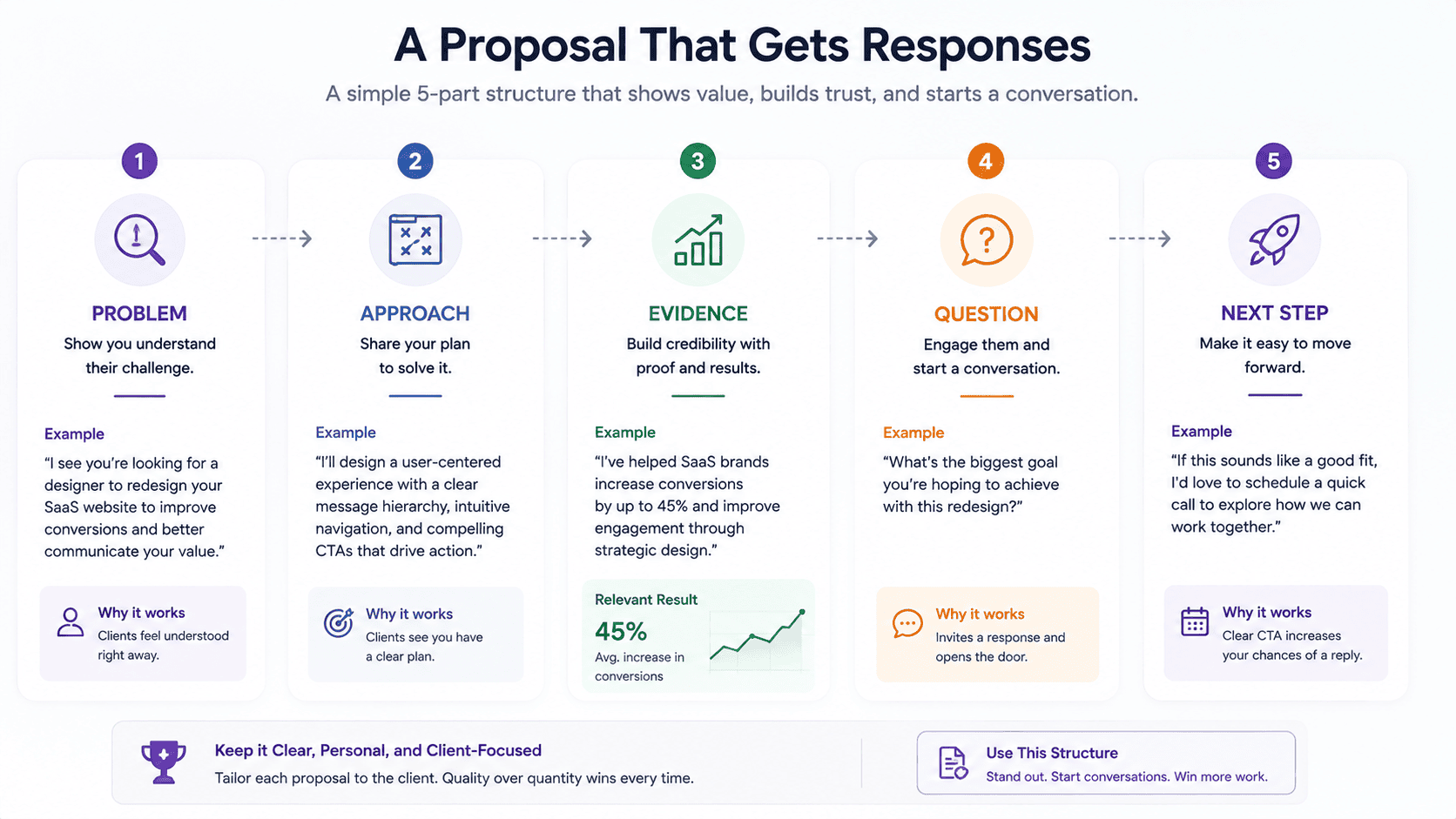
A practical proposal structure
Your proposal can generally follow this sequence:
1. Demonstrate understanding
Reference the actual requirement.
2. Explain your approach
Give the client a brief view of what you would do.
3. Provide evidence
Link or attach one or two relevant examples.
4. Address uncertainty
Ask an intelligent project-specific question.
5. Suggest the next step
Invite the client to message you or discuss the details.
You do not need a 700-word proposal for a simple project.
The goal is clarity, not length.
Personalize without wasting time
Personalization does not mean rewriting your entire professional history every time.
Keep reusable information about:
- Your services
- Work process
- Relevant experience
Customize the parts that relate to:
- Client problem
- Deliverable
- Technology
- Timeline
- Portfolio sample
- Questions
If you could paste the exact same proposal under twenty unrelated job posts, it is probably too generic.
Step 7: Use AI Carefully When Writing Upwork Proposals
Upwork currently offers Uma AI assistance in parts of the proposal workflow, and its proposal documentation says freelancers can use Uma to improve proposal content.
External AI assistants can also help.
The danger is allowing AI to create generic proposals that sound polished but prove nothing.
AI is better used to:
- Analyze the job description
- Identify missing requirements
- Improve clarity
- Shorten your draft
- Check tone
- Generate questions you might ask
- Organize your approach
Do not let AI fabricate:
- Experience
- Portfolio projects
- Results
- Qualifications
- Technologies you know
- Availability
- Client names
A client may ask detailed follow-up questions.
Anything written in your proposal should be something you can defend.
Step 8: Should You Boost an Upwork Proposal?
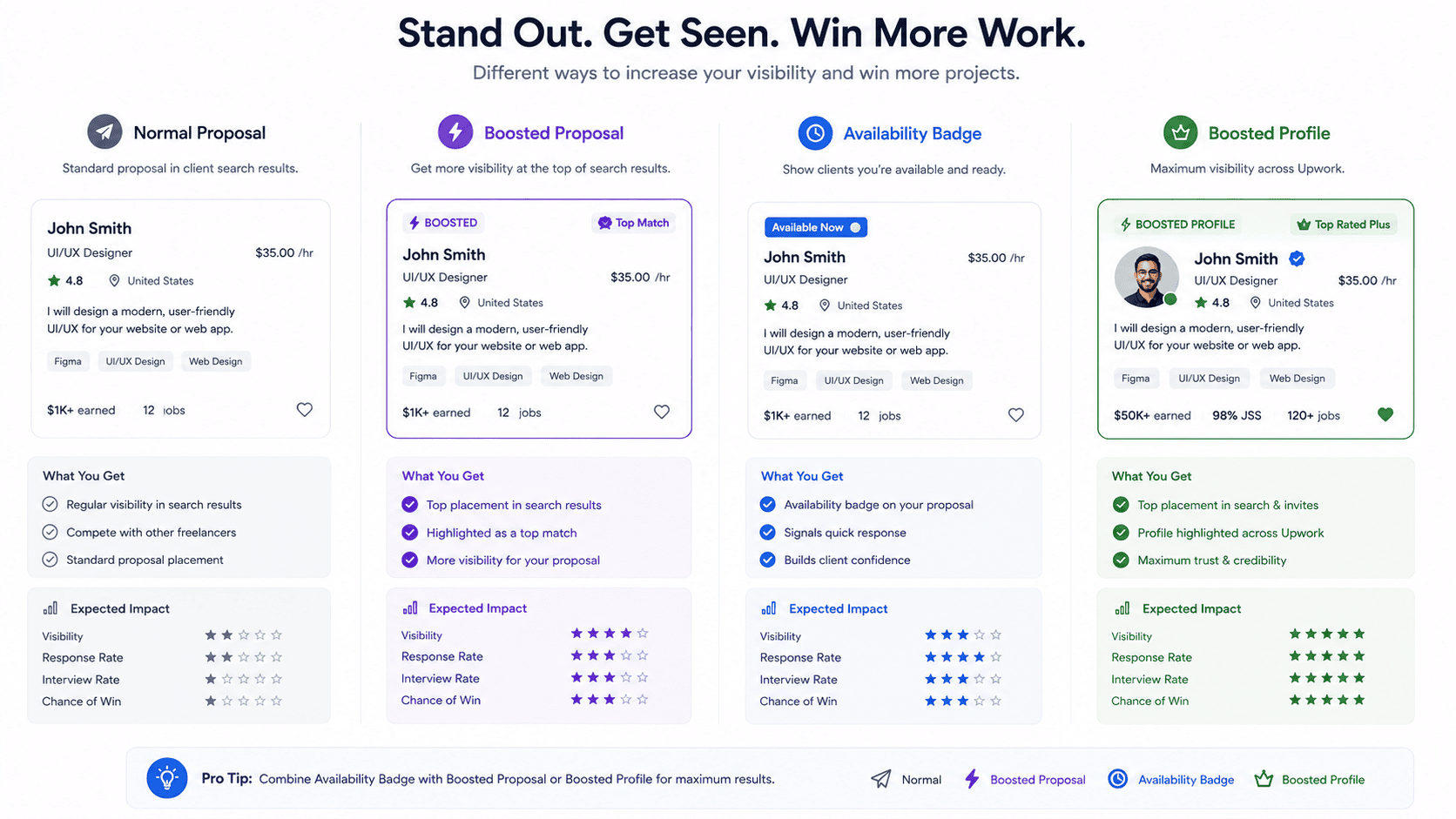
Upwork allows eligible freelancers to spend additional Connects to compete for boosted positions.
Boosting is optional.
Upwork currently places winning boosted proposals among the top four highlighted positions. Freelancers bid additional Connects, and the system determines the boosted slots through an auction.
Being boosted does not mean the client considers you the best freelancer.
It increases visibility.
That distinction matters.
When boosting may make sense
Consider it when:
- The job closely matches your profile.
- Your portfolio is highly relevant.
- The client appears credible.
- The potential contract justifies additional acquisition cost.
- You have enough Connects to experiment.
When not to boost
Avoid treating boosting as a solution for:
- Weak portfolio
- Generic proposals
- Poor job fit
- Unclear profile positioning
- Lack of relevant experience
Paying for visibility does not repair an irrelevant application.
Track results.
If boosted proposals receive more views but not more interviews, the issue may lie in your profile, positioning, rate, portfolio, or proposal itself.
Step 9: Consider the Availability Badge Selectively
Upwork’s Availability Badge displays an “Available now” indicator to clients and can appear in search results, recommendations, and profiles. It uses Connects, and the weekly cost can fluctuate according to demand.
It may make sense when you actively want additional work and have capacity to respond to invitations.
However, it is an advertising feature—not a substitute for a strong profile.
Before spending Connects on the badge, make sure your profile is worth discovering.
Evaluate whether it produces:
- More profile views
- More invitations
- Better-quality opportunities
Turn it off when you do not need additional work.
Step 10: Prepare for the Upwork Interview
Getting a response is not the finish line.
It means the client is considering you.
The interview stage is where you demonstrate communication, understanding, and professional reliability.
Read the job post again
Before responding, review:
- Original requirements
- Your proposal
- Client questions
- Timeline
- Budget
- Deliverables
Avoid asking questions that the client already answered clearly in the post.
Ask project-focused questions
Useful questions may include:
- What is the most important result you want from this project?
- Do you already have the required content/assets?
- What is the current technology stack?
- Who will approve the work?
- Is there an existing brand/design system?
- What is the desired launch date?
- Are there reference examples you like?
Do not interrogate the client.
Ask only what helps define the work.
Do not fake expertise
If a client asks whether you know a tool you have never used, do not answer yes simply to secure the contract.
A better response might be:
I haven’t used that specific plugin in production, but I have worked extensively with comparable WordPress plugins. I’d want to review its documentation before confirming that part of the scope.
Professional honesty can create more trust than pretending to know everything.
Step 11: Price Your First Upwork Jobs Carefully
New freelancers commonly make one of two pricing mistakes.
They charge far too much without evidence—or far too little because they believe the cheapest freelancer always wins.
Both approaches can create problems.
Pricing should reflect:
- Skill level
- Project complexity
- Market
- Scope
- Required communication
- Timeline
- Risk
- Revisions
- Value delivered
Do not automatically underbid the client’s budget.
If the project says “$500 fixed price,” bidding $100 does not necessarily make you more attractive.
It may signal that you misunderstood the work.
Do not work for free to get reviews
Avoid offers to complete substantial unpaid work merely to obtain an Upwork review.
If a client wants to assess you, a small paid test can sometimes be reasonable when clearly scoped.
Protect the value of your work.
Step 12: Deliver the First Project Exceptionally Well
Getting a contract is only half the strategy.
Your first successful project can create:
- A review
- Work history
- Portfolio evidence
- Repeat business
- Referral potential
- Greater confidence
That means delivery matters enormously.
Confirm scope before starting
Make sure both parties understand:
- Deliverables
- Deadline
- Price
- Revision expectations
- Required files
- Communication process
Ambiguity becomes expensive later.
Communicate before problems become emergencies
If a delay is likely, tell the client early.
If a requirement is unclear, ask.
If an assumption changes, explain it.
Silence creates uncertainty.
Deliver professionally
Do not send a final message such as:
Done.
Instead, summarize what was completed.
Mention relevant:
- Files
- URLs
- Changes
- Instructions
- Remaining considerations
Make it easy for the client to review your work.
Step 13: Turn One Client Into Repeat Work
The easiest freelance job to win can be the next project from someone who already trusts you.
After completing a project successfully, stay attentive to natural follow-up needs.
A web-design client may later need:
- Maintenance
- Landing pages
- Performance improvements
- Blog templates
- Conversion optimization
A writer may later provide:
- Additional articles
- Content updates
- Case studies
- Email copy
- Landing pages
Do not aggressively upsell immediately after delivery.
Instead, understand the client’s broader goals.
Reliable freelancers become valuable because clients do not want to repeated
Step 14: Use Upwork Metrics to Improve Your Strategy
Do not judge your Upwork performance only by contracts.
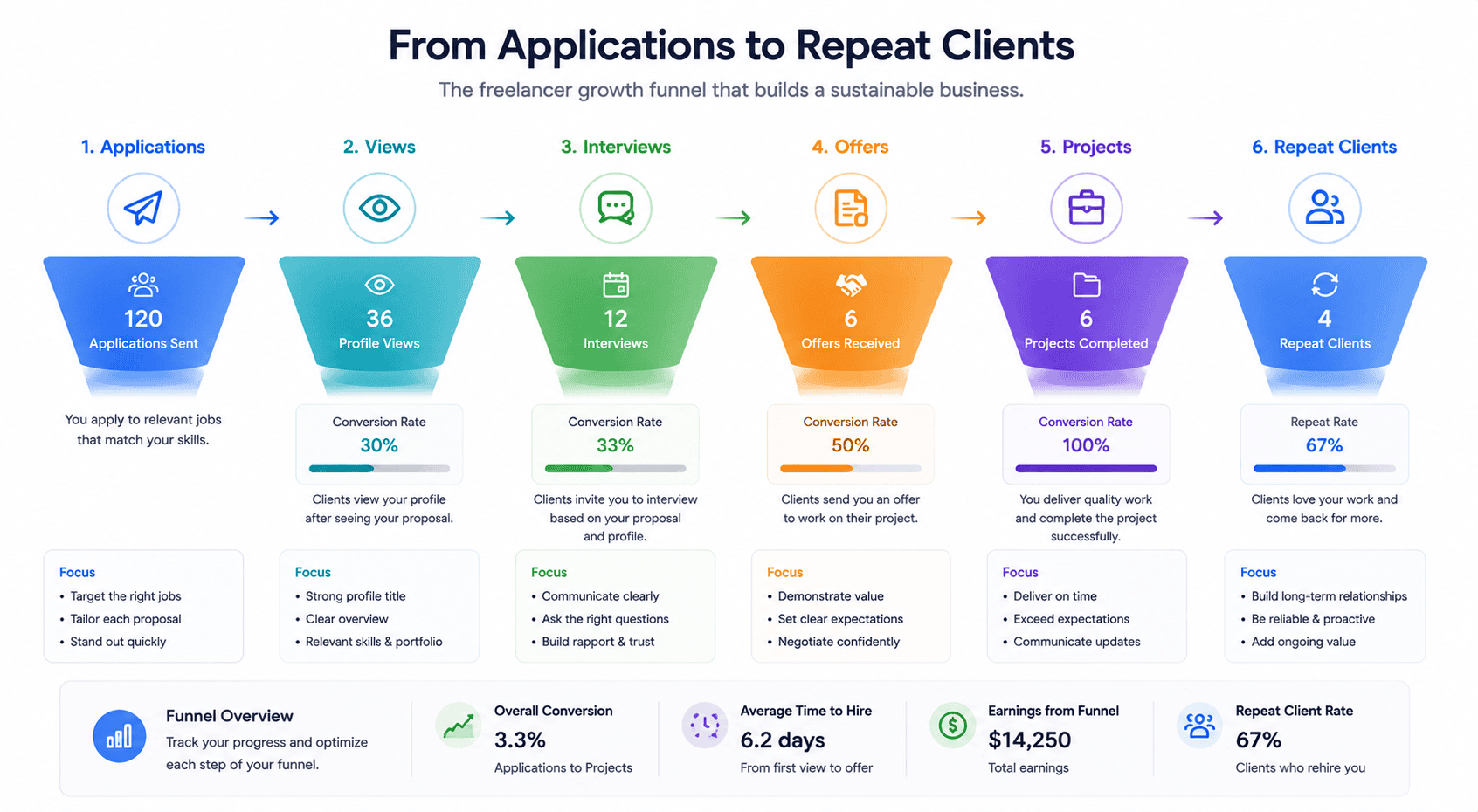
Look at the sequence.
Applications → Views → Interviews → Offers → Completed Projects → Repeat Clients
Each stage tells you something.
ly search for new people.
Few proposal views
Potential problems:
- Weak job matching
- Poor profile positioning
- Highly competitive applications
- Timing
- Insufficient relevance
Upwork’s own 2026 proposal-visibility guide recommends optimizing your profile and focusing applications on best-match jobs rather than applying indiscriminately.
Views but few interviews
Potential issues:
- Weak proposal
- Unclear value
- Poor portfolio relevance
- Pricing mismatch
Interviews but few contracts
Look at:
- Communication
- Pricing
- Discovery questions
- Confidence
- Scope clarity
- Client fit
Improve one bottleneck at a time.
Should You Boost Your Upwork Profile?
Upwork also offers Boosted Profiles, which are different from Boosted Proposals.
A Boosted Proposal promotes one specific application.
A Boosted Profile can place your freelancer profile more prominently in targeted search areas.
Upwork says freelancers can specify categories and specialties they want to target and bid Connects for engagement.
Again, promotion works best after the fundamentals are strong.
Before boosting your profile, make sure you already have:
- Clear title
- Strong opening overview
- Relevant portfolio
- Appropriate skills
- Professional photo
- Credible experience
Advertising an unclear profile simply gives more people an opportunity to ignore it.
Common Upwork Mistakes Beginners Should Avoid
Applying to everything
Your goal is not maximum proposal count.
It is high-quality opportunity selection.
Copying proposal templates word-for-word
Templates can provide structure.
They should not replace relevance.
Starting every proposal with your biography
Talk about the client’s need first.
No portfolio
Clients need evidence.
Create samples if necessary.
Offering unrelated services
An unclear profile makes positioning harder.
Spending too many Connects on boosting
Test promotional features strategically rather than assuming more Connects equal more contracts.
Ignoring client history
Review the available client information before committing significant time or Connects.
Taking a bad project just for a review
An unclear, unrealistic, or problematic client can create more damage than benefit.
Moving payments outside Upwork improperly
Upwork’s rules matter. Its own freelancer guidance warns that circumvention and feedback manipulation can result in serious account consequences.
Read current Upwork Terms of Service rather than relying on old YouTube advice.
A 30-Day Upwork Plan for New Freelancers
If you are starting from zero, avoid trying to overhaul everything every day.
Week 1: Build your foundation
Choose your main service.
Optimize:
- Profile title
- Overview
- Skills
- Photo
- Experience
Create at least three strong portfolio examples relevant to that service.
Week 2: Study the market
Search for jobs without immediately applying.
Study:
- Common requirements
- Client language
- Budgets
- Required tools
- Portfolio expectations
Adjust your positioning based on what real buyers request.
Week 3: Send selective proposals
Apply to projects where you can explain:
Why this project fits me.
Track:
- Jobs applied to
- Connects spent
- Proposal views
- Replies
- Interviews
Do not blindly increase proposal volume.
Week 4: Analyze results
If proposals are not being viewed, review job selection and profile relevance.
If proposals get views but no replies, improve proposal quality and portfolio alignment.
If you receive interviews without offers, evaluate discovery, communication, pricing, and fit.
Treat Upwork like a marketing channel.
Measure what happens.
Frequently Asked Questions
How do beginners get jobs on Upwork?
Beginners can improve their chances by choosing a clear niche, building a complete profile, creating relevant portfolio samples, applying selectively, and writing customized proposals focused on client needs. You do not need previous Upwork clients to create strong self-initiated portfolio examples.
Is Upwork worth it for beginners in 2026?
Upwork can be useful for beginners who already possess a marketable skill and are willing to learn client acquisition. It is not guaranteed income. Success depends on service quality, positioning, proposal strategy, competition, portfolio strength, and client demand.
How many proposals should I send on Upwork per day?
There is no universal number. Applying to five poor-fit jobs is not necessarily better than applying to one strong match. Since many proposals require Connects, prioritize relevance and track your proposal-to-view and interview rates rather than aiming for an arbitrary daily quantity.
Why are my Upwork proposals not being viewed?
Potential reasons include applying to poor-fit jobs, strong competition, a profile that does not closely match the project, weak positioning, or other marketplace factors. Upwork itself recommends optimizing your profile and targeting best-match jobs when proposals are not receiving views.
Should I boost every Upwork proposal?
No. Proposal boosting is optional. It can increase visibility by placing eligible winning bids in highlighted positions, but it does not make an unsuitable freelancer a better match. Consider boosting only strong-fit opportunities and track whether the additional Connects lead to useful results.
What are Connects on Upwork?
Connects are virtual tokens used for activities such as submitting proposals and certain advertising features. The number required to submit a proposal varies by job and can change according to factors such as scope, project size, and marketplace demand.
Does Upwork still have Specialized Profiles?
No. Upwork discontinued Specialized Profiles on May 28, 2026. Freelancers now use their main profile, with Upwork dynamically emphasizing relevant skills and experience for clients and opportunities.
Can I use AI to write Upwork proposals?
AI can help analyze job descriptions, improve grammar, shorten drafts, or organize ideas. However, proposals should remain truthful and specific to your real experience. Never use AI to invent qualifications, portfolio work, client results, or skills.
Conclusion
Learning how to get jobs on Upwork in 2026 is not primarily about discovering a secret proposal template.
It is about reducing risk for the client.
A strong freelancer profile tells the client what you do.
A focused portfolio proves you can do it.
Careful job selection ensures you apply where your experience is relevant.
A good proposal shows that you understand the specific problem.
Professional communication demonstrates that working with you will be straightforward.
Reliable delivery gives the client a reason to hire you again.
Upwork’s marketplace has also evolved. Specialized Profiles are gone. The primary profile now plays a broader role, Connects influence how freelancers apply and advertise availability, and features such as Boosted Proposals and Boosted Profiles create additional ways to purchase visibility.
None of those features replaces the fundamentals.
Do not spend your first month trying to game every marketplace feature.
Build one credible service.
Create evidence.
Apply to the jobs you can genuinely solve.
Write to the client rather than about yourself.
Track what happens.
Then improve the weakest stage in your process.
Your first Upwork job may take significantly more effort to acquire than later projects because you begin without platform-specific proof. But once you deliver well, each successful contract can strengthen your work history, credibility, portfolio, and understanding of what clients actually buy.
The goal is not to become good at sending proposals.
The goal is to become easy to hire.