How to Use LinkedIn to Get Clients in 2026: A Complete Freelancer Guide
- by Muhammad Raza
- 0 Comments
- 23 minutes read
- 58 Views
If you want to know how to use LinkedIn to get clients, start by building a clear offer, a credible profile, and a focused client-acquisition strategy.
Platforms such as Upwork and Fiverr can be useful, particularly when you are learning how to sell a service online. But marketplace competition is only one way to find work. Many freelancers eventually want another channel where they can build their own professional reputation, connect directly with decision-makers, demonstrate expertise, and create relationships before a formal project is advertised.
That is where LinkedIn can become valuable.
Learning how to get clients on LinkedIn is not about adding thousands of strangers, sending the same sales message to everyone, or turning every post into an advertisement. The strongest LinkedIn strategy is built around positioning, relevance, credibility, useful content, thoughtful networking, and direct conversations with people who may genuinely benefit from your service.
LinkedIn also has dedicated tools for service providers. Its current Service Pages are free landing pages that freelancers and small-business owners can use to showcase services. Potential clients can find providers through LinkedIn search, discover Service Pages through search engines such as Google depending on visibility settings, and contact service providers without necessarily being existing first-degree connections. LinkedIn operates the service-provider experience around requests and proposals, while the actual commercial agreement and payment take place outside LinkedIn.
That creates opportunities for freelancers who understand how to use the platform professionally.
This guide explains how to position your profile, create a clear freelance offer, build authority through content, find suitable prospects, send better connection requests and messages, use LinkedIn Service Pages, turn conversations into discovery calls, and avoid the spam tactics that damage both response rates and professional reputation.
Why LinkedIn Can Be Powerful for Freelancers
LinkedIn is fundamentally different from a traditional freelance marketplace.
On a freelance marketplace, a client usually publishes a requirement and freelancers compete for that opportunity.
LinkedIn allows you to enter the relationship much earlier.
A potential client might discover you because:
- Someone commented on your post.
- You appeared in search.
- You shared useful advice.
- A mutual connection interacted with you.
- You commented intelligently on their post.
- They discovered your Service Page.
- Someone recommended your work.
- You sent a relevant message.
- They encountered your website or profile through Google.
This means client acquisition does not always begin with:
“We need a freelancer right now.”
It may begin with:
“This person seems to understand the problem our company has.”
That difference is important.
Professional-service sales often depend on trust.
A client buying a logo, WordPress website, consulting engagement, SEO strategy, software project, or monthly marketing service is taking a risk. They want evidence that the freelancer understands the work, communicates professionally, and can be trusted with the project.
Your LinkedIn presence can gradually provide that evidence.
LinkedIn vs Upwork for Finding Freelance Clients
Neither platform is automatically better.
They solve different client-acquisition problems.
| Upwork | |
|---|---|
| Relationship-driven | Marketplace-driven |
| Clients may not have posted a job | Clients usually have a defined requirement |
| Strong personal-brand opportunity | Strong freelancer marketplace profile |
| Direct networking | Proposal-based competition |
| Content can create inbound leads | Job feed creates active opportunities |
| Longer relationship cycle possible | Often shorter hiring cycle |
| Contracts/payment usually handled externally | Contracts/payment handled through Upwork |
| Useful for ongoing reputation building | Useful for project marketplace access |
A freelancer does not necessarily need to choose one.
You might use Upwork to pursue active projects while using LinkedIn to build a long-term professional network.
The two channels can support each other.
A freelancer who completes several successful Upwork projects gains experience and portfolio material that can strengthen their LinkedIn presence.
A professional network developed on LinkedIn can eventually reduce dependence on bidding platforms.
Step 1: Choose Who You Want as a Client
Before changing your LinkedIn headline, decide who you want to attract.
A vague target produces a vague profile.
Consider these two freelancers.
Freelancer A:
I provide web design, graphic design, digital marketing, video editing, virtual assistance and SEO.
Freelancer B:
I build conversion-focused WordPress websites for consultants and B2B service businesses.
Freelancer A offers more services.
Freelancer B is easier to understand.
The second profile tells a prospective client:
- What the freelancer does
- What platform they work with
- Who they serve
- What type of outcome they care about
That clarity makes marketing easier.
Define three things
Before optimizing your profile, write down:
Service: What exactly do you sell?
Client: Who is most likely to buy it?
Problem: What business problem does the service solve?
For example:
Service: LinkedIn content writing
Client: B2B SaaS founders
Problem: They need consistent thought-leadership content but do not have time to write it.
Another:
Service: WordPress development
Client: Marketing agencies
Problem: They need a reliable developer to build client sites after design approval.
Another:
Service: Short-form video editing
Client: Coaches and educators
Problem: They have long-form video but need reusable clips for social channels.
This becomes the foundation for the entire LinkedIn strategy.
Step 2: Optimize Your LinkedIn Profile for Clients
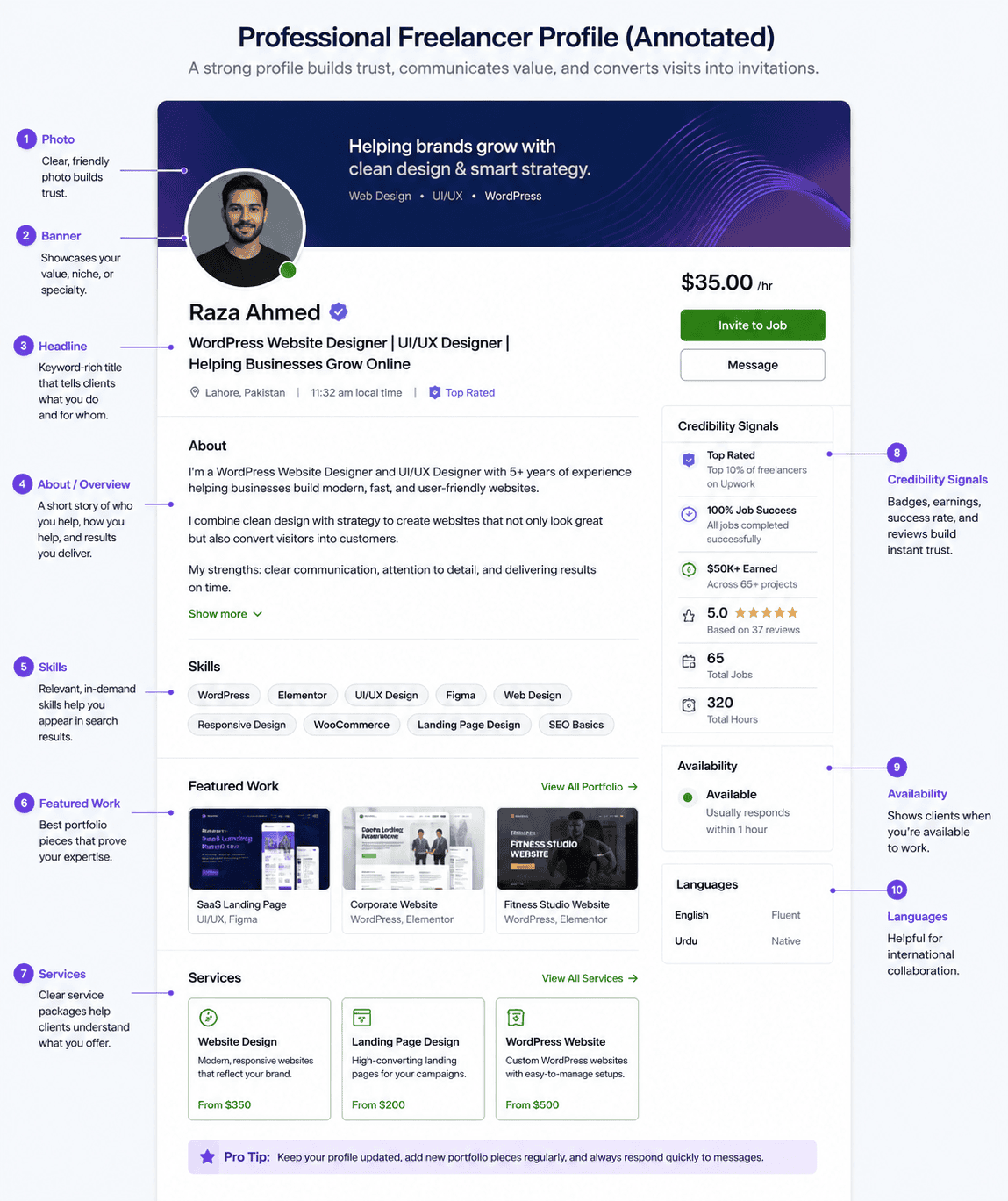
A freelance LinkedIn profile should answer a visitor’s questions quickly.
Those questions are usually:
What does this person do?
Is it relevant to me?
Can they actually do it?
How do I contact them?
Your profile should reduce the effort required to answer those questions.
A strong profile makes your service, target client, proof of expertise, and next step easy to understand. For a deeper profile checklist, see our guide to optimizing your LinkedIn profile in 2026.
Use a Professional Profile Photo
Your photo does not need to look like a corporate executive portrait.
It should simply be:
- Clear
- Recent
- Professional
- Easily recognizable
Avoid heavily filtered or low-resolution images.
Trust begins with small signals.
Use the Banner as Marketing Space
Many freelancers ignore the LinkedIn banner.
It is valuable visual space.
You could use it to communicate:
- Your service
- Your niche
- A simple value proposition
- Your website
- A recognizable visual identity
For example:
WordPress Websites for B2B Service Businesses
or:
Helping SaaS Teams Turn Expertise Into SEO Content
Keep the banner simple enough to remain readable on different screen sizes.
Write a Clear LinkedIn Headline
Your headline should not simply say:
Freelancer
or:
Open to Work
That provides almost no useful context.
A stronger headline communicates your service and audience.
Examples:
WordPress Designer for Consultants & B2B Service Businesses
B2B SaaS Content Writer | SEO Articles, Case Studies & Thought Leadership
Video Editor for Coaches & Personal Brands | Reels, Shorts & YouTube
AI Automation Specialist | Helping Small Businesses Eliminate Repetitive Work
Do not stuff every possible keyword into the headline.
It still needs to read naturally.
LinkedIn currently provides an AI-powered headline-writing assistant for selected Premium users, but any generated suggestion should still be reviewed and rewritten to accurately represent your real service and experience.
Write the About Section for a Potential Client
Your About section should not read like a personal autobiography.
A client cares about your background, but only as it relates to their problem.
A useful structure is:
Opening
Explain who you help and what you do.
Problem
Show that you understand the client’s challenge.
Solution
Describe how your service helps.
Evidence
Include real experience, relevant work, results, or qualifications.
Services
List core deliverables.
Call to action
Explain how someone can contact you.
For example:
I design WordPress websites for consultants and professional-service businesses that need more than an attractive homepage. My work focuses on clear positioning, responsive layouts, fast page structures, and conversion-focused user journeys.
Then explain the types of projects you handle.
Avoid unsupported claims such as:
I guarantee 10x your sales.
Professional marketing does not require exaggeration.
Step 3: Use the Featured Section to Prove Your Skills
People are more likely to believe evidence than claims.
If you say:
I am an excellent web designer.
that is a claim.
If the visitor can immediately open three polished projects, that is evidence.
Use the Featured section to showcase assets such as:
- Portfolio
- Website
- Case study
- Best LinkedIn post
- PDF guide
- Client project
- YouTube video
- Newsletter
- Lead magnet
- Project breakdown
Choose examples that reinforce the type of work you want.
If you want SaaS clients but feature only restaurant branding projects, your profile communicates a different specialization.
Build evidence if you are new
You do not need to wait for ten clients.
Create relevant demonstration projects.
For example, a beginner WordPress designer can create a complete concept website for a fictional consulting firm and explain:
- Target audience
- Site architecture
- Design decisions
- Mobile layout
- Conversion strategy
Clearly label it as a concept project.
Do not invent a customer.
The objective is to prove capability honestly.
Why a Service Page matters
LinkedIn says a Service Page can:
- Showcase what you provide
- Increase discoverability through LinkedIn
- Potentially appear through search engines such as Google
- Allow LinkedIn members to contact you about services
- Receive project requests
- Collect client reviews
The service-provider process generally works like this:
- A potential client searches for a provider.
- The client sends a project request.
- The provider responds with a proposal.
- Both parties discuss the project.
- The agreement and payment happen outside LinkedIn.
- The provider can later request a review.
This is particularly useful for freelancers because the platform itself creates a service-discovery layer.
How to create your Service Page
LinkedIn’s current profile-based process involves:
- Open your profile.
- Select Add profile section.
- Choose Add services.
- Select the services you provide.
- Write your service description.
- Choose your location and remote-work availability.
- Optionally provide a starting hourly rate or choose contact-for-pricing.
- Configure buyer messaging.
- Publish the page.
Some advanced Service Page features, including richer Services Showcase functionality and certain media/lead features, are linked to Premium Business, Sales Navigator, or Recruiter Lite.
The free Service Page remains useful even without those paid additions.
Step 5: Build a Network of Potential Buyers and Referrers
One of the worst LinkedIn strategies is trying to collect connections simply to make the number larger.
A network becomes useful when it contains relevant relationships.
For a freelance WordPress developer, useful connections might include:
- Agency owners
- Marketing managers
- Designers
- SEO consultants
- SaaS founders
- Small-business owners
- Other WordPress professionals
Some may become clients.
Others may refer clients.
Others may collaborate with you.
Search for specific people
Instead of browsing randomly, define the type of person who regularly experiences the problem you solve.
For example:
If you write B2B SaaS content, look for:
- Heads of content
- Content marketing managers
- SaaS founders
- SEO managers
- Marketing directors
If you build websites:
- Agency founders
- Marketing consultants
- Business owners
- Brand strategists
- Designers without development capabilities
If you edit videos:
- YouTubers
- Coaches
- Course creators
- Podcasters
- Personal brands
The objective is relevance.
Do not mass-send connection requests
LinkedIn explicitly warns that accounts may be temporarily restricted from sending invitations when invitations are reported as unwanted or spam.
LinkedIn also has a maximum of 30,000 first-degree connections.
Neither fact should become a target.
You do not need 30,000 connections to build a freelance business.
You need an appropriate professional network.
Step 6: Warm Up Relationships Before Selling
Imagine receiving this message five seconds after accepting a connection:
Hi. Thanks for connecting. We are a leading agency offering websites, SEO, app development and social media marketing. Would you like to book a meeting?
Most people recognize exactly what happened.
The connection was never intended as networking.
It was simply permission to send a sales message.
A better approach is to create context first.
You can:
- Read their profile
- Understand their business
- Follow their content
- Leave thoughtful comments
- Respond to something relevant
- Share a useful resource
- Ask a legitimate question
This does not mean pretending to be someone’s friend for three months before making an offer.
It means communicating like a professional rather than an automated sales sequence.
Step 7: Write Better LinkedIn Connection Requests
A connection request does not need a miniature sales pitch.
The goal is simply to establish a relevant professional connection.
A useful request may reference:
- Shared industry
- Their content
- Mutual professional interest
- Event
- Community
- Specific business context
Example:
Hi Sarah, I work with B2B SaaS teams on content strategy and noticed your posts about scaling organic acquisition. Thought it would be useful to connect.
Short.
Relevant.
No fake compliment.
No immediate pitch.
Sometimes follow instead
Not every interesting person needs to become a first-degree connection immediately.
LinkedIn provides both Follow and Connect options depending on member settings.
Following can be useful when you want to learn from or interact with someone before making a direct connection.
This produces more natural relationship development.
Step 8: Use Comments as a Client-Acquisition Channel
Comments are one of the most underrated LinkedIn marketing tools.
When you comment on another person’s post, your contribution can be visible not only to the author but also to people participating in the discussion.
Good comments demonstrate how you think.
A weak comment:
Great post! Very insightful.
A stronger comment:
The point about homepage clarity is especially important for service businesses. I often see companies spend heavily on visual redesign while keeping a vague headline, so visitors still cannot tell who the service is for. Fixing the message before the visual layer usually makes the redesign more effective.
That comment demonstrates expertise without saying:
Hire me.
Do not hijack someone’s post
Avoid turning comments into advertisements.
For example:
Excellent tips! My agency provides this service for only $500. DM me.
This reduces credibility.
The goal is to add something useful to the conversation.
Step 9: Publish Content That Demonstrates Expertise
LinkedIn content can create inbound client opportunities because it allows prospective buyers to observe your expertise before contacting you.
You do not have to become a full-time creator.
You need to share useful ideas consistently enough that people understand what you know.
What should freelancers post?
Strong freelance content generally comes from your work.
Examples include:
Educational posts
Teach a small concept.
3 mistakes that make WordPress landing pages feel slow
Project breakdowns
Explain your decisions.
How I reorganized a service website homepage to make the value proposition clearer
Before-and-after analysis
Show what changed and why.
Opinion posts
Share a thoughtful professional perspective.
Why most small businesses do not need a custom-coded website
Lessons
Explain something you learned from a real project without revealing confidential information.
Industry commentary
Interpret a relevant change.
For example:
What WordPress 7.0’s AI Client API could eventually mean for plugin developers
Checklists
Provide immediately usable information.
7 things I check before launching a WordPress site
Write for the buyer, not other freelancers only
This is a subtle problem.
A web designer may publish:
10 Figma shortcuts designers should learn.
That may attract other designers.
But if the target client is a business owner, content such as:
5 signs your company website is costing you enquiries
may be more aligned with buyers.
Both content types have value.
Make sure at least some of your content speaks directly to the people who might pay for your service.
Step 10: Do Not Obsess Over “The LinkedIn Algorithm”
Freelancers frequently become distracted by algorithm tricks.
Questions such as:
- What time should I post?
- Should I put the link in the comments?
- How many lines should the hook contain?
- Does LinkedIn punish hashtags?
- Should I post every day?
These details can matter less than the quality and relevance of the content.
A freelancer does not need maximum impressions.
You need the right people to understand your expertise.
A post seen by 500 relevant decision-makers can be more commercially useful than one seen by 100,000 people who will never need your service.
Focus on:
- Relevance
- Credibility
- Clarity
- Useful insights
- Consistency
- Genuine discussion
Do not design your entire content strategy around temporary engagement tactics.
Step 11: Turn Engagement Into Conversations
Suppose someone repeatedly comments on your posts.
Or a potential client views your profile after reading your content.
Or someone connects after you participate in a discussion.
This may be a good moment to begin a conversation.
You do not need to pitch immediately.
Example:
Thanks for connecting, Mark. I noticed you’re expanding the consulting side of the business. Is the website being updated as part of that expansion too?
This is specific.
It opens a conversation.
If the person explains that the website is a current problem, you now have genuine context for discussing your service.
Use questions intelligently
Good sales conversations are not interrogations.
Ask only enough to understand:
- Current situation
- Problem
- Priority
- Timing
- Existing solution
If no meaningful need exists, do not force the pitch.
Professional restraint creates long-term credibility.
Step 12: Write LinkedIn Outreach That Does Not Feel Like Spam
Cold outreach can work, but mass generic messages damage trust.
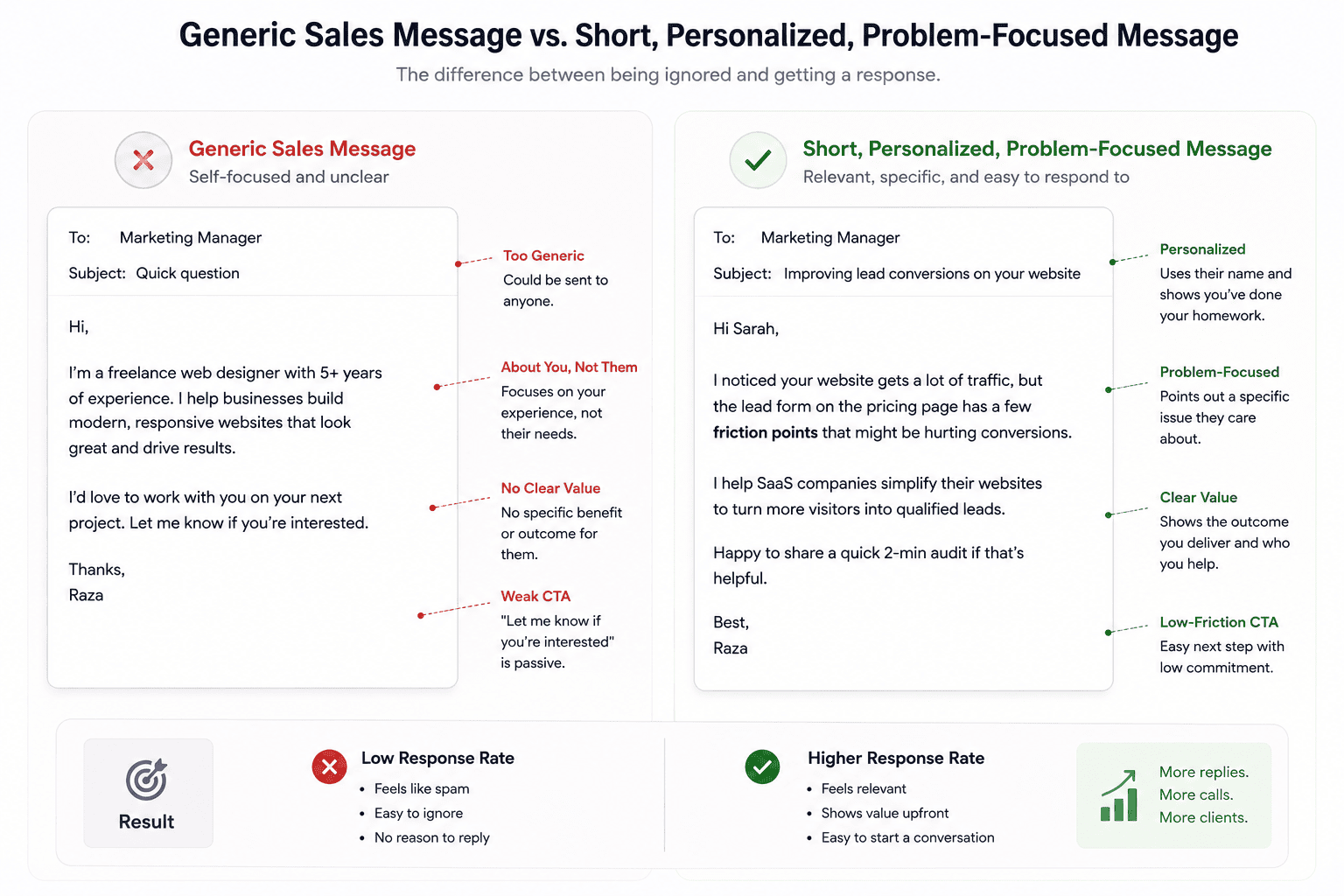
A common spam message looks like:
Hi [Name], I came across your impressive profile. We help businesses increase revenue with web design and digital marketing. Can we schedule 15 minutes?
This is easy to ignore because it could be sent to anyone.
A stronger message is based on a genuine observation.
For example:
Hi Adam, I was looking at your agency site after seeing your post about expanding into B2B SaaS. I noticed the case-study pages are still structured around the older general-service positioning. If you’re repositioning toward SaaS, those pages could probably do more of the sales work. Happy to send two quick suggestions if useful.
This works better because:
- It shows research.
- It identifies a specific issue.
- It does not demand a meeting immediately.
- It offers a small amount of value.
- The service is relevant to the observation.
Do not pretend you performed research if you did not.
Step 13: Use a Value-First Outreach Approach
“Value first” does not mean completing an entire project for free.
It means making the first interaction useful.
Examples:
A designer could identify one obvious UX problem.
An SEO consultant could point out a technical indexing issue.
A writer could suggest a clearer content angle.
An automation specialist could identify a repetitive process worth automating.
A developer could flag a visible performance issue.
The value should demonstrate your thinking without replacing paid work.
Avoid unsolicited large free projects
Do not redesign someone’s entire homepage and send it without permission expecting them to pay.
Do not write a complete unpaid article.
Do not perform a full audit that takes six hours.
Provide enough insight to establish credibility.
Keep the substantial implementation inside the paid engagement.
Step 14: Move the Conversation Toward a Discovery Call
Not every service requires a call.
Small defined projects may be handled through messages.
For larger or less-defined work, a short discovery call can help.
A useful transition might be:
It sounds like the main issue is the website positioning rather than just visual design. There are a few possible ways to approach it. If useful, we could spend 20 minutes going through the current setup and I can explain what I would prioritize.
The goal of the call should be understanding the project, not forcing a sale.
Prepare before the call
Review:
- Prospect’s profile
- Company
- Website
- Existing content
- Original conversation
Prepare relevant questions.
Do not ask:
So, what does your company do?
when the answer is clearly available on their homepage.
Step 15: Qualify LinkedIn Leads Before Sending Proposals
Not every interested person is a suitable client.
Before writing a detailed proposal, understand:
- Problem
- Deliverables
- Timeline
- Budget expectations
- Decision-maker
- Existing resources
- Definition of success
Some projects should be declined.
Warning signs may include:
- Undefined unlimited work
- Extremely unrealistic deadlines
- Refusal to discuss scope
- Pressure to begin before agreement
- Requests for substantial unpaid tests
- Misalignment with your expertise
- Poor communication
Winning the wrong client can cost more than losing the opportunity.
Step 16: Create a Simple LinkedIn Sales Funnel
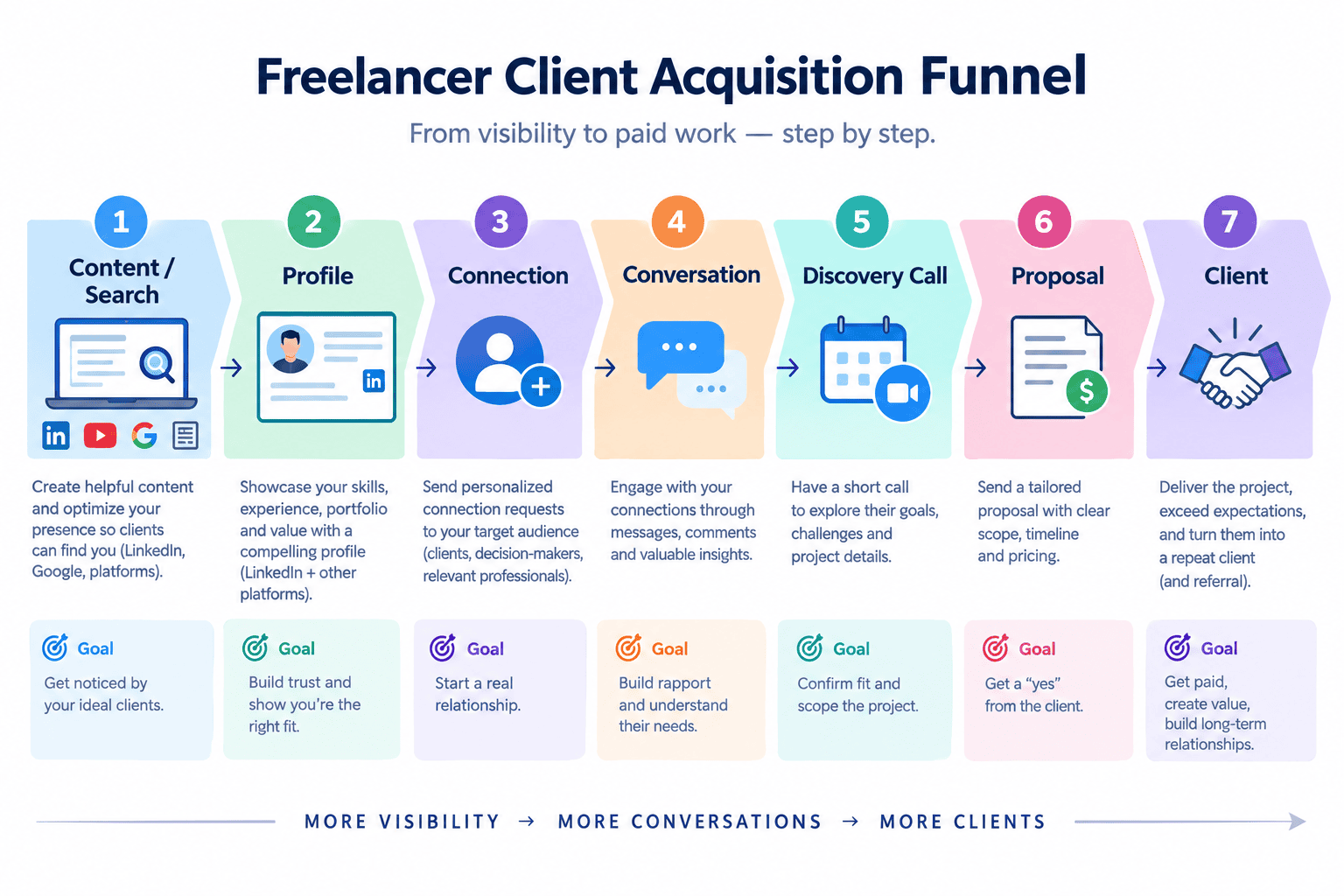
Your LinkedIn process does not need complicated software.
A simple funnel might be:
Target audience → Profile/content → Interaction → Connection → Conversation → Discovery → Proposal → Client
Each stage has a different objective.
Visibility
Become discoverable to relevant people.
Credibility
Demonstrate expertise through your profile, content, and work.
Conversation
Understand whether a real problem exists.
Conversion
Offer a clearly scoped paid solution.
Do not jump straight from:
Stranger → Buy my service.
That shortcut is why much LinkedIn outreach feels unpleasant.
Step 17: Ask Clients for LinkedIn Reviews and Recommendations
Social proof can significantly strengthen a professional profile.
After successfully completing a project, ask the client whether they would be comfortable providing a recommendation or Service Page review where appropriate.
LinkedIn Service Pages allow providers to invite clients to write reviews.
A good request should be simple.
For example:
I’m glad the launch went well. If you’re comfortable doing so, would you be willing to leave a short LinkedIn review describing what it was like working together? It would help future clients understand the type of projects I handle.
Never tell clients what positive opinion they must express.
Do not manufacture reviews.
Trust signals are valuable precisely because they are genuine.
Step 18: Use LinkedIn Search More Intentionally
Prospecting becomes much easier when you know exactly what you are looking for.
Search based on:
- Job title
- Industry
- Company
- Geography
- Keywords
- Mutual connections
For example, a freelance content writer might search for:
Head of Content SaaS
A designer:
Founder consulting agency
An automation specialist:
Operations Manager ecommerce
Then inspect whether the person’s situation actually fits the service.
LinkedIn Premium products such as Sales Navigator provide more advanced sales-prospecting functionality, but freelancers should not assume a paid subscription is required to start.
A clear strategy with ordinary LinkedIn search can be enough to validate your approach.
Step 19: Should Freelancers Buy LinkedIn Premium?
Premium can be useful, but it is not automatically necessary.
Depending on the specific LinkedIn product and current eligibility, paid features may include:
- Expanded profile insights
- InMail
- AI-assisted writing functionality
- Additional Service Page presentation/features
- Prospecting functionality in products such as Sales Navigator
However, a weak freelance offer does not become strong because you purchase Premium.
Before paying, ask:
- Am I already using LinkedIn consistently?
- Do I know exactly who my ideal client is?
- Is the limitation actually a missing paid feature?
- Will the subscription help generate enough value to justify its cost?
Start with strategy.
Add tools when they solve a real constraint.
Step 20: Track the Right LinkedIn Metrics
Do not evaluate your freelance marketing only by likes.
Track business-relevant indicators.
Examples include:
- Relevant profile views
- Service enquiries
- Connection acceptance
- Message replies
- Discovery calls
- Proposals sent
- Clients won
- Referral introductions
- Repeat work
For content, also observe:
- Who is engaging?
- Are they potential buyers?
- Are people visiting your profile?
- Are conversations starting?
A post receiving 20 likes from relevant business owners may matter more than one receiving 2,000 likes from unrelated creators.
Common LinkedIn Mistakes Freelancers Should Avoid
Sending a sales pitch immediately after connection
Establish context first.
Generic profile headline
“Freelancer” does not communicate a useful service.
Posting motivational content unrelated to your expertise
Occasional personal posts are fine, but your professional audience should still understand what you do.
Copying viral posts
Content that gains engagement for someone else may not build your positioning.
Fake personalization
“I was impressed by your profile.”
is not personalized if you send it to 500 people.
Overusing AI-generated messages
AI can help edit communication, but obvious mass-generated outreach usually feels generic.
Connecting indiscriminately
A relevant network is more useful than a large random network.
Buying tools before building a strategy
Sales Navigator, automation tools, Premium, and AI assistants cannot define your market for you.
Expecting instant results
LinkedIn can produce direct opportunities, but relationship-based acquisition often compounds over time.
Ignoring your profile after posting
Content may lead people to your profile.
If the profile does not clearly explain your service, the attention is wasted.
Should You Automate LinkedIn Outreach?
Automation deserves caution.
LinkedIn explicitly discourages spam and unwanted invitation behavior. Accounts can face invitation restrictions if recipients report requests as unwanted.
Automation can also create another problem: it removes context.
A bot may send a cheerful pitch to:
- Someone who just lost their job
- A competitor
- Someone who already said no
- Someone whose company does not need the service
- A student
- A person outside the target market
This is why fully automated cold outreach often produces poor experiences.
If you use tools to support prospect research or organization, maintain human review before messaging people.
Do not sacrifice professional judgment simply to increase volume.
How AI Can Help With LinkedIn Client Acquisition
AI can still be useful when used as an assistant rather than a spam engine.
For example, AI can help:
- Review your profile positioning
- Generate alternative headline ideas
- Improve the clarity of your About section
- Analyze a prospect’s public business information
- Brainstorm content ideas
- Edit a draft post
- Shorten a message
- Create a discovery-call agenda
- Organize CRM notes
- Summarize conversations
LinkedIn itself currently offers AI-powered writing assistance for selected Premium users in certain profile and messaging areas.
The critical rule is accuracy.
Do not let AI invent:
- Client results
- Skills
- Experience
- Personal connections
- Reasons you are contacting someone
- Compliments
- Case-study outcomes
AI can improve communication.
It should not manufacture authenticity.
A Practical 30-Day LinkedIn Client Acquisition Plan
If you are beginning from zero, use the first month to establish a system rather than trying to close everyone immediately.
Week 1: Positioning
Define:
- Main service
- Target client
- Core business problem
Then improve:
- Profile photo
- Banner
- Headline
- About section
- Experience
- Featured section
Create or improve your Service Page.
Week 2: Network
Identify approximately 30–50 relevant people—not hundreds of random profiles.
Study:
- What they post
- What businesses they run
- What problems they discuss
- Who interacts with them
Start commenting thoughtfully.
Send relevant connection requests where appropriate.
Week 3: Publish Expertise
Publish several genuinely useful posts.
For example:
Post 1: Explain a common client mistake.
Post 2: Break down a project or concept.
Post 3: Share a practical checklist.
Continue participating in other people’s discussions.
Week 4: Start Targeted Conversations
Review:
- People interacting with your content
- New connections
- Suitable prospects
- Profile visitors where available
Start relevant conversations.
Do not send the same pitch to everyone.
Track:
- Connections
- Replies
- Calls
- Proposals
- Clients
Then adjust your strategy.

Frequently Asked Questions
How do I get freelance clients on LinkedIn?
Start by clearly positioning your service and target market on your profile. Build a relevant network, share useful expertise, participate in industry discussions, create a LinkedIn Service Page, and begin personalized conversations with prospects who genuinely fit your service. Avoid mass outreach.
Is LinkedIn good for freelancers?
Yes. LinkedIn can be useful for freelancers offering professional services because it combines professional profiles, search, networking, content, messaging, recommendations, and dedicated Service Pages. Results still depend on your skills, positioning, target audience, and consistency.
Can I find clients on LinkedIn for free?
Yes. LinkedIn currently allows eligible freelancers and small-business owners to create a Service Page without charge, and many core networking, posting, profile, and search functions can be used without Premium. Paid subscriptions provide additional features but are not mandatory for starting.
What is a LinkedIn Service Page?
A LinkedIn Service Page is a dedicated page where freelancers and businesses can showcase the services they provide. Potential clients can discover providers, send project requests, communicate with them, and later provide reviews. LinkedIn states that Service Pages can also increase discoverability through LinkedIn and external search engines depending on visibility settings.
Should I send cold messages to potential clients on LinkedIn?
Targeted cold outreach can be appropriate when the message is relevant and respectful. Research the prospect, identify a genuine reason for contacting them, keep the message concise, and avoid repeated unsolicited pitches. Do not mass-message people with generic templates.
How often should a freelancer post on LinkedIn?
There is no universally correct frequency. Choose a schedule you can maintain while producing useful material. Quality and relevance matter more than publishing every day. A freelancer posting one or two valuable pieces consistently can outperform someone posting daily content that does not support their expertise.
Do I need LinkedIn Premium to get clients?
No. Core profile, networking, posting, and Service Page features can provide a strong starting point. Premium products may offer useful functionality such as InMail, additional profile/service features, AI assistance, or advanced prospecting, but they do not replace a strong offer and relevant outreach strategy.
Can AI help me find clients on LinkedIn?
AI can help analyze positioning, brainstorm content, improve messages, summarize information, and support prospect research. It should not be used to mass-generate fake personalized messages or fabricate experience. Human review remains important.
Conclusion
Learning how to get clients on LinkedIn is less about discovering a secret outreach script and more about building a professional system.
First, define exactly what you sell and who needs it.
Then make your profile communicate that offer clearly.
Use your Featured section and portfolio to provide evidence.
Create a LinkedIn Service Page so people searching for professional services have another way to discover and contact you.
Build a network around your actual market rather than collecting random connections.
Publish useful content that demonstrates the way you think.
Participate in relevant conversations.
When you identify a potential client, research their situation before messaging them.
And when a real business problem appears, move naturally toward a discovery conversation and a properly scoped proposal.
LinkedIn works differently from Upwork because you do not always wait for clients to announce that they need a freelancer.
You build visibility and relationships around the problems you already know how to solve.
That process may feel slower initially, but it can create something valuable over time: a professional reputation that belongs to you rather than to a single freelance marketplace.
Do not measure success by connection count.
Do not measure it only by impressions.
Measure whether the right people understand what you do, trust your expertise, and feel comfortable starting a conversation.
That is the foundation of sustainable LinkedIn client acquisition.